
Last updated on
Oct 22, 2026

Get the free Massachusetts No Trespass Notice
We are not affiliated with any brand or entity on this form

Fill out
Complete the form online in a simple drag-and-drop editor.

eSign
Add your legally binding signature or send the form for signing.

Share
Share the form via a link, letting anyone fill it out from any device.

Export
Download, print, email, or move the form to your cloud storage.
Why pdfFiller is the best tool for your documents and forms


End-to-end document management
From editing and signing to collaboration and tracking, pdfFiller has everything you need to get your documents done quickly and efficiently.
Accessible from anywhere
pdfFiller is fully cloud-based. This means you can edit, sign, and share documents from anywhere using your computer, smartphone, or tablet.
Secure and compliant
pdfFiller lets you securely manage documents following global laws like ESIGN, CCPA, and GDPR. It's also HIPAA and SOC 2 compliant.
What is No Trespass Notice
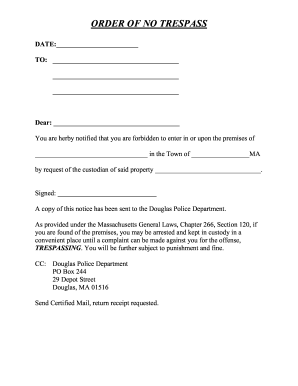
The Massachusetts No Trespass Notice is a legal document used by property owners to prohibit individuals from entering or remaining on their property.
pdfFiller scores top ratings on review platforms




Who needs No Trespass Notice?
Explore how professionals across industries use pdfFiller.

No Trespass Notice is needed by:
-
Property owners wanting to enforce no trespassing rules
-
Property managers overseeing rental or commercial properties
-
Real estate agents assisting clients with property management
-
Law enforcement personnel involved in property disputes
-
Legal professionals advising clients on property rights
Comprehensive Guide to No Trespass Notice
What is the Massachusetts No Trespass Notice?
The Massachusetts No Trespass Notice serves as a legal document intended to prohibit specific individuals from entering or remaining on a property managed or owned by the issuer. Defined under MGL Chapter 266 Section 120, this notice provides property owners and managers with a structured approach to assert their rights against unauthorized access. It is critical for maintaining control over one’s property and offers an important layer of legal protection.
This notice is not merely a formality; it holds significant implications for those who violate its terms. Property owners and managers wield this document as a proactive tool to prevent unauthorized entry, establishing clear boundaries for potential trespassers.
Purpose and Benefits of the Massachusetts No Trespass Notice
The Massachusetts No Trespass Notice is essential for effective property management, as it allows property owners and managers to control who accesses their premises. By issuing this notice, property owners can enjoy several benefits:
-
Legal protection against unauthorized access.
-
Streamlined management of trespassers and unauthorized individuals.
-
A clear framework for potential legal actions against violators.
Understanding the potential legal consequences faced by trespassers who disregard the notice can further enforce compliance and deter unauthorized entry.
Key Features of the Massachusetts No Trespass Notice
This important legal notice includes several key features, ensuring its effectiveness:
-
Required fields such as the owner's information, property address, and details of the trespasser.
-
A signature line to validate the notice by the property owner or manager.
-
Specific instructions for serving the notice to the trespasser.
The form is designed with fillable fields that facilitate the process of completing this important legal document, catering to modern document management needs.
Who Should Use the Massachusetts No Trespass Notice?
The Massachusetts No Trespass Notice is primarily aimed at property owners and managers who find themselves in situations requiring control over their premises. These individuals can include:
-
Homeowners frustrated with repeat trespassers.
-
Landlords seeking to maintain tenant privacy and property integrity.
-
Business owners needing to restrict access to their commercial spaces.
Understanding the eligibility criteria specified under Massachusetts law is essential for anyone wishing to utilize this legal notice effectively.
How to Fill Out the Massachusetts No Trespass Notice Online
Completing the Massachusetts No Trespass Notice can easily be done online through platforms like pdfFiller. Here’s a step-by-step guide to help you fill out the form accurately:
-
Access the online form on pdfFiller.
-
Fill in the required fields, including your name, property address, and details about the trespasser.
-
Ensure you sign the document to validate it as the property owner or manager.
Be mindful of common mistakes, such as omitting essential details or inaccuracies in the property address, to ensure the notice’s effectiveness.
Required Documents and Supporting Materials
Before submitting the Massachusetts No Trespass Notice, gather the necessary supporting documents to ensure accuracy and compliance. Important materials include:
-
Proof of property ownership or management.
-
Identification verification.
Having accurate documentation is crucial, especially if police or judicial involvement becomes necessary following submission.
Submission Process for the Massachusetts No Trespass Notice
Once you have completed the Massachusetts No Trespass Notice, you can submit it through various methods:
-
Mailing the document to the specified address.
-
Delivering the notice in person to the trespasser, if feasible.
-
Utilizing law enforcement to serve the notice directly.
Be aware of the timeline associated with submissions and any required follow-up actions after the document is issued.
What Happens After You Submit the Massachusetts No Trespass Notice?
After submitting the Massachusetts No Trespass Notice, property owners should be prepared for several outcomes. For instance, they can expect:
-
Potential legal follow-ups in cases where trespassers ignore the notice.
-
The possibility of arrest and subsequent penalties for violators.
-
A recommendation to maintain a record of the submission for future reference.
This documentation may be critical for any ensuing legal actions or disputes surrounding property access.
Security and Compliance with the Massachusetts No Trespass Notice
When filling out and handling the Massachusetts No Trespass Notice, security is paramount. pdfFiller offers assurances regarding:
-
Data privacy and the security of all filled forms.
-
Compliance with legal standards, including HIPAA and GDPR.
Ensuring secure document handling is vital, especially when dealing with sensitive information that accompanies legal notices.
Get Started with Your Massachusetts No Trespass Notice Today
Utilizing pdfFiller simplifies the process of completing your Massachusetts No Trespass Notice. The platform’s user-friendly interface and comprehensive support options make it easy to fill out your form online. Start your process today to ensure your property is protected effectively and efficiently.
How to fill out the No Trespass Notice
-
1.To access the Massachusetts No Trespass Notice on pdfFiller, visit their website and use the search feature to locate the form. Click on the form to open it for editing.
-
2.Once the form is open, navigate through the fillable fields using your mouse or keyboard. Fill in the required information, such as the property owner's name, company or agency, and street mailing address.
-
3.Before completing the form, gather essential information like the property address and details regarding any individuals who may be trespassing. Ensure you have the owner's signature ready for the form.
-
4.Review each field to ensure accuracy and completeness. This is important as errors can lead to issues in the enforcement of the notice.
-
5.After completing the form, use pdfFiller's review tools to double-check entries. Make any necessary edits to ensure the document is legally compliant.
-
6.When satisfied with the completed form, save your changes. You can download the document in PDF format or submit it directly through pdfFiller, depending on your preferred process.

Who is eligible to use the Massachusetts No Trespass Notice?
Property owners or managers are eligible to use the Massachusetts No Trespass Notice. They must own or control the property in question and have a legitimate reason to prohibit individuals from entering.
Are there any deadlines for serving a No Trespass Notice?
The Massachusetts No Trespass Notice should be served promptly when trespassing occurs. Delaying service may weaken the enforcement of the notice if issues arise later.
How do I submit the completed No Trespass Notice?
Once the No Trespass Notice is completed, it must be served to the individual either by police officer, sheriff, constable, or via certified mail to ensure legal validity.
What information is required on the No Trespass Notice?
The form requires pertinent information such as the property owner's name, street mailing address, property address, details of the trespasser, and the owner's signature.
What are common mistakes to avoid when filling the form?
Common mistakes include failing to provide accurate property details, missing the owner's signature, or serving the notice improperly. Always review the form for completeness before submission.
How long does it take for the No Trespass Notice to be processed?
Processing time can vary depending on how the notice is served. For notices served through law enforcement, it can take immediate effect, while certified mail may take longer depending on delivery times.
Do I need to notarize the No Trespass Notice?
No, notarization is not required for the Massachusetts No Trespass Notice. However, the owner's signature is essential for the validity of the document.
Related Forms



Get the latest insights from our blog


If you believe that this page should be taken down, please follow our DMCA take down process
here
.
This form may include fields for payment information. Data entered in these fields is not covered by PCI DSS compliance.