
Last updated on
Oct 23, 2026

Get the free North Thurston Public Schools Transportation Registration Form
We are not affiliated with any brand or entity on this form

Fill out
Complete the form online in a simple drag-and-drop editor.

eSign
Add your legally binding signature or send the form for signing.

Share
Share the form via a link, letting anyone fill it out from any device.

Export
Download, print, email, or move the form to your cloud storage.
Why pdfFiller is the best tool for your documents and forms


End-to-end document management
From editing and signing to collaboration and tracking, pdfFiller has everything you need to get your documents done quickly and efficiently.
Accessible from anywhere
pdfFiller is fully cloud-based. This means you can edit, sign, and share documents from anywhere using your computer, smartphone, or tablet.
Secure and compliant
pdfFiller lets you securely manage documents following global laws like ESIGN, CCPA, and GDPR. It's also HIPAA and SOC 2 compliant.
What is Transportation Registration
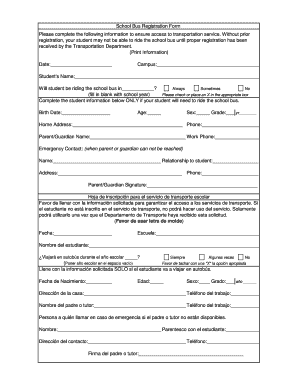
The North Thurston Public Schools Transportation Registration Form is an educational document used by parents or guardians to register their students for transportation services.
pdfFiller scores top ratings on review platforms




Who needs Transportation Registration?
Explore how professionals across industries use pdfFiller.

Transportation Registration is needed by:
-
Parents or guardians of students requiring school transportation
-
Students transferring between schools in Washington
-
Parents of children in special programs or special education services
-
Administrative staff managing school transportation services
-
Counselors assisting with student enrollment and registration
Comprehensive Guide to Transportation Registration
What is the North Thurston Public Schools Transportation Registration Form?
The North Thurston Public Schools Transportation Registration Form is essential for parents or guardians to register their students for transportation services. This form specifically caters to various transportation needs, including those for transfer students and participants in special programs. It serves to ensure that all students receive the appropriate transportation support required for their educational journey.
Purpose and Benefits of the Transportation Registration Form
Completing the Transportation Registration Form is crucial for ensuring safe and reliable student transportation. It enables streamlined communication between parents or guardians and the transportation department, allowing for personalized route information tailored to each student's unique requirements. By submitting this form, families can avoid potential inconveniences related to transportation changes.
Who Needs the North Thurston Public Schools Transportation Registration Form?
This form is required for parents or guardians who wish to register their children for school transportation. It outlines their eligibility and responsibilities. The registration form should be filled out in specific circumstances, such as when students require transportation for the first time or when there are changes to their existing transportation needs.
Key Features of the North Thurston Public Schools Transportation Registration Form
-
Required fields include 'Last Name', 'First Name', 'Birthdate', and 'Grade'.
-
A parental signature is necessary to verify the information provided.
-
Instructions for completing the form ensure clarity for parents or guardians.
How to Fill Out the North Thurston Public Schools Transportation Registration Form Online
To complete the Transportation Registration Form online, parents or guardians should gather specific information beforehand. The following steps outline how to fill out the form:
-
Visit the online form portal.
-
Enter the required personal details such as your child’s Last Name and First Name.
-
Provide student information including Birthdate and Grade.
-
Review the details for accuracy and submit the form.
Common Errors and How to Avoid Them
When filling out the Transportation Registration Form, users may encounter common errors. Frequent mistakes include:
-
Missing crucial information, such as the child's grade or school.
-
Incorrect personal details, which can lead to delays in processing.
To ensure accuracy, carefully review all entries before submission and double-check for required fields.
What to Do After Submitting the Transportation Registration Form
After submitting the Transportation Registration Form, parents or guardians should confirm their submission. Tracking the status of the application can be done through the transportation department. It’s also advisable to maintain open lines of communication with the department for any follow-up actions or additional information required.
Security and Privacy for Sensitive Documents
The submission of the Transportation Registration Form involves handling sensitive personal data. pdfFiller implements strict security measures, including encryption and compliance with relevant regulations. It is crucial for parents and guardians to be confident that their personal information is well-protected throughout the registration process.
How pdfFiller Can Help with the Transportation Registration Process
Using pdfFiller significantly enhances the efficiency of completing the Transportation Registration Form. Users can create and edit the form seamlessly, ensuring compliance with required information. Moreover, the cloud-based solution offers easy access and streamlined document management, making it simple to handle school-related documents.
Engage with pdfFiller for Your Transportation Registration Needs
Parents or guardians are encouraged to try pdfFiller to simplify their form completion process. Experience the convenience of managing school-related documents effortlessly, ensuring that all forms, including the Transportation Registration Form, are handled efficiently.
How to fill out the Transportation Registration
-
1.To access the North Thurston Public Schools Transportation Registration Form, visit pdfFiller's website and use the search functionality to find the form by its name.
-
2.Once you find the form, click on it to open it in the pdfFiller interface, enabling you to start filling it out directly online.
-
3.Before starting to fill out the form, gather all necessary information such as your child's last name, first name, birthdate, grade, and the school they will attend. Ensure you have details regarding transportation needs if applicable.
-
4.Navigate through the form by clicking on each fillable field within pdfFiller. Fill in each section methodically, including your name as the parent/guardian and adding your signature at the designated area.
-
5.Review all entered information carefully for accuracy. Make sure that all required fields are completed before moving on.
-
6.Once you are satisfied, look for the 'Save' option in pdfFiller to keep a record of your completed form.
-
7.You can also use the 'Download' option to save the form as a PDF file or select 'Submit' if there is an option available for direct submission to the school’s transportation department.

Who is eligible to use the North Thurston Public Schools Transportation Registration Form?
The form is intended for parents or guardians of students who require transportation services in North Thurston Public Schools, including those attending special programs or those who are transfer students.
What information is required to complete the transportation registration form?
You will need to provide your child's last name, first name, birthdate, grade, school, and details about their transportation needs before completing the form.
How can I submit the transportation registration form?
You can submit the form through pdfFiller by following the steps to save, download, or send it directly to the North Thurston Public Schools transportation department as instructed within the form platform.
Are there any deadlines for submitting the form?
While specific deadlines may vary, it is generally advisable to submit the transportation registration form as early as possible before the school year begins to ensure your child is included in transportation planning.
What common mistakes should I avoid when filling out the form?
Ensure that all fields are filled out completely and accurately, double-check for spelling errors in names and addresses, and confirm that you have signed the document where required.
How long does it take to process the transportation registration?
Processing times can vary, but typically, it may take several days to weeks for the transportation department to review and confirm registration. It's best to follow up if you haven’t heard back within that timeframe.
Is notarization required for this registration form?
No, notarization is not necessary for the North Thurston Public Schools Transportation Registration Form, streamlining the registration process for parents and guardians.
Related Forms





Get the latest insights from our blog


If you believe that this page should be taken down, please follow our DMCA take down process
here
.
This form may include fields for payment information. Data entered in these fields is not covered by PCI DSS compliance.