
Last updated on
Oct 31, 2026

Get the free Common Data Set 2025-2026
We are not affiliated with any brand or entity on this form

Fill out
Complete the form online in a simple drag-and-drop editor.

eSign
Add your legally binding signature or send the form for signing.

Share
Share the form via a link, letting anyone fill it out from any device.

Export
Download, print, email, or move the form to your cloud storage.
Why pdfFiller is the best tool for your documents and forms


End-to-end document management
From editing and signing to collaboration and tracking, pdfFiller has everything you need to get your documents done quickly and efficiently.
Accessible from anywhere
pdfFiller is fully cloud-based. This means you can edit, sign, and share documents from anywhere using your computer, smartphone, or tablet.
Secure and compliant
pdfFiller lets you securely manage documents following global laws like ESIGN, CCPA, and GDPR. It's also HIPAA and SOC 2 compliant.
What is CDS 2025-2026
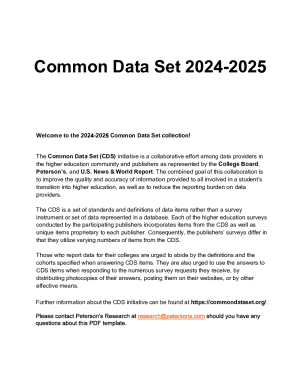
The Common Data Set 2025-2026 is a standardized form used by higher education institutions in the U.S. to collect and report vital enrollment data.
pdfFiller scores top ratings on review platforms




Who needs CDS 2025-2026?
Explore how professionals across industries use pdfFiller.

CDS 2025-2026 is needed by:
-
Higher education administrators
-
Admissions offices at colleges and universities
-
Data analysts in educational institutions
-
Policy makers in education
-
Educational researchers
-
Students seeking enrollment statistics
Comprehensive Guide to CDS 2025-2026
What is the Common Data Set 2?
The Common Data Set 2 (CDS 2) is a standardized format utilized by higher education institutions to collect critical data regarding enrollment, persistence, and other institutional demographics. This framework not only aids in consistent data reporting but also helps institutions articulate their contexts and offerings effectively. The importance of CDS 2 in higher education lies in its ability to provide a reliable and accurate dataset that stakeholders can trust.
Key data types collected through this form include enrollment statistics, graduation rates, and retention figures, which are essential for prospective students and educational governance bodies. By adhering to the structure of the CDS, institutions contribute to a national database that facilitates insights into higher education trends and patterns.
Purpose and Benefits of the Common Data Set 2
The primary purpose of the Common Data Set 2 is to streamline education data collection for higher education institutions. By using this standardized approach, institutions can significantly reduce the reporting burden typically associated with compiling various metrics.
Among the benefits are improved data quality and accuracy, which foster confidence among stakeholders relying on this information for decision-making. Furthermore, CDS 2 enhances transparency and comparability across institutions, promoting informed choices for students and enabling educational institutions to benchmark effectively.
Key Features of the Common Data Set 2
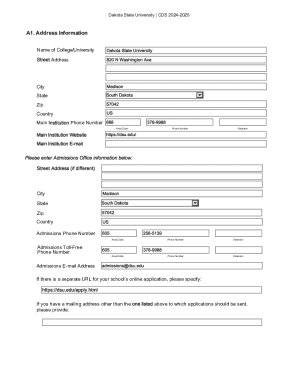
The CDS 2 is organized into several main sections, each designed for clarity and ease of use. The form features fillable fields that include essential information about degrees offered and enrollment data, catering to the needs of various stakeholders.
Some significant fields and features include:
-
Fillable sections for institutional information.
-
Detailed enrollment data fields.
-
User-friendly layout that enhances completion efficiency.
These features make the CDS 2 template a practical tool for any institution involved in data reporting.
Who Needs the Common Data Set 2?
The Common Data Set 2 serves a diverse group of stakeholders within the higher education community. Primarily, institutions of higher education are required to submit the CDS, ensuring that they provide standardized and comparable data.
Students, prospective applicants, and various stakeholders benefit from the insights provided by the CDS. Educational governance bodies also rely on this data for policy-making and oversight functions, making the CDS an essential resource across the educational landscape.
How to Fill Out the Common Data Set 2 Online (Step-by-Step)
Filling out the Common Data Set 2 online is a straightforward process. Follow these steps to ensure successful completion:
-
Access the form through your institution's designated platform.
-
Complete the respondent information fields, including names and contact details.
-
Fill out key sections addressing enrollment figures and institutional data.
-
Review for any missing or inaccurate fields before final submission.
-
Utilize digital capabilities for editing, saving, and eSigning as needed.
By adhering to these steps, users can efficiently navigate the submission process of the CDS 2.
Common Errors and How to Avoid Them
When filling out the Common Data Set 2, users often encounter typical errors that can lead to inaccuracies. Common mistakes include leaving fields incomplete or entering incorrect figures.
To enhance accuracy when completing the form, consider these tips:
-
Double-check all entries for correctness.
-
Use resources available for troubleshooting and support.
-
Seek peer reviews to verify data before submission.
By being vigilant and thorough, users can avoid these pitfalls and ensure high-quality submissions.
How to Submit the Common Data Set 2
The submission process for the Common Data Set 2 can be accomplished through multiple methods. Institutions may choose to submit the CDS online or offline, depending on their operational preferences.
Keep in mind the following important aspects regarding submission:
-
Identify and adhere to submission deadlines.
-
Track the submission status and confirmation after sending the form.
By following these guidelines, institutions can ensure that their data submissions are timely and effective.
Keeping Your Data Secure with pdfFiller
Data security is a paramount concern when using tools like pdfFiller to complete the Common Data Set 2. pdfFiller adheres to strict compliance with security standards such as HIPAA and GDPR, providing users peace of mind.
The platform employs advanced encryption practices and mechanisms designed to protect sensitive data throughout the completion and submission processes. Users can rest assured that their information is handled securely and responsibly.
Using pdfFiller to Fill Out the Common Data Set 2
pdfFiller offers a range of capabilities that enhance the experience of filling out the Common Data Set 2. The platform is designed for optimal user experience, providing tools that simplify the editing and management of the form.
Highlighted features include:
-
Easy editing and annotation tools.
-
Functionality for eSigning and secure saving options.
-
Positive feedback from institutions that have streamlined their processes using pdfFiller.
By utilizing pdfFiller, users can maximize efficiency and effectiveness in completing the Common Data Set 2.
How to fill out the CDS 2025-2026
-
1.To begin, visit pdfFiller's website and log in to your account. If you do not have an account, create one for free to access the form.
-
2.Use the search bar to find 'Common Data Set 2025-2026' and select the form from the results.
-
3.Once the form opens, familiarize yourself with the various sections including respondent information, address, and enrollment data fields.
-
4.Before you start filling out the form, gather all necessary information such as your institution's enrollment statistics, calendar dates, and degrees offered.
-
5.Click on each fillable field marked with a cursor. Enter your responses for required fields like 'First Name,' 'Last Name,' and other institutional data.
-
6.Utilize pdfFiller's tools to easily navigate between sections. If needed, you can use the 'Zoom' feature to enhance visibility.
-
7.Double-check entered information for accuracy as you complete each section, ensuring compliance with data reporting standards.
-
8.Once all fields are completed, review the entire form to ensure all necessary information is correct and complete.
-
9.To save your progress, use the 'Save' option. You can also download a copy for offline storage or print it directly.
-
10.After finalizing, you can submit the form online via pdfFiller's submission features or download it for manual submission, based on your institution's submission process.

Who is eligible to fill out the Common Data Set 2025-2026?
Typically, universities and colleges are eligible to fill out this form. It is designed for higher education administrators who manage enrollment data.
What is the deadline for submitting this form?
Deadlines may vary by institution, but most educational institutions should align submissions with their annual reporting timelines. It is advisable to check specific deadlines with your institution.
How can I submit the Common Data Set form?
You can submit the form online through pdfFiller by using their submission options or download the completed form for manual submission according to your institution's requirements.
What kind of supporting documents may be required?
While the Common Data Set itself may not require attachments, ensure you have access to relevant institution data or reports that corroborate the information provided within the form.
What are common mistakes to avoid when filling out this form?
Common mistakes include missing required fields, entering inaccurate enrollment figures, or neglecting to review the entire document before submission. Double-checking data entry is crucial.
How long does it take to process the submitted Common Data Set?
Processing times can vary by institution. Check with your institution for specific processing timelines regarding data verification and reporting.
Are there any fees associated with completing this form?
Generally, there are no fees associated with filling out the Common Data Set. However, verify with your institution if they impose any administrative costs for data collection.
Related Forms




Get the latest insights from our blog


If you believe that this page should be taken down, please follow our DMCA take down process
here
.
This form may include fields for payment information. Data entered in these fields is not covered by PCI DSS compliance.