
Last updated on
Nov 7, 2026

Get the free Eviction Instruction Sheet
pdfFiller is not affiliated with any government organization

Fill out
Complete the form online in a simple drag-and-drop editor.

eSign
Add your legally binding signature or send the form for signing.

Share
Share the form via a link, letting anyone fill it out from any device.

Export
Download, print, email, or move the form to your cloud storage.
Why pdfFiller is the best tool for your documents and forms


End-to-end document management
From editing and signing to collaboration and tracking, pdfFiller has everything you need to get your documents done quickly and efficiently.
Accessible from anywhere
pdfFiller is fully cloud-based. This means you can edit, sign, and share documents from anywhere using your computer, smartphone, or tablet.
Secure and compliant
pdfFiller lets you securely manage documents following global laws like ESIGN, CCPA, and GDPR. It's also HIPAA and SOC 2 compliant.
What is Eviction Instructions
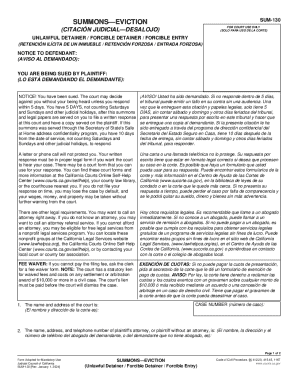
The Eviction Instruction Sheet is a legal document used by plaintiffs in California to provide instructions for executing an eviction notice.
pdfFiller scores top ratings on review platforms




Who needs Eviction Instructions?
Explore how professionals across industries use pdfFiller.

Eviction Instructions is needed by:
-
Landlords seeking to evict tenants.
-
Property managers handling eviction processes.
-
Attorneys representing landlords in eviction cases.
-
Agents assisting landlords with legal evictions.
-
Court officials dealing with eviction notices.
Comprehensive Guide to Eviction Instructions
What is the Eviction Instruction Sheet?
The Eviction Instruction Sheet is a critical form within the California eviction legal process, serving as a guide for landlords and agents during eviction proceedings. This document outlines specific instructions necessary for the sheriff's office to carry out an eviction effectively. By utilizing the eviction instruction sheet, landlords can ensure compliance with legal requirements, enhancing the efficiency of the eviction process.
Purpose and Benefits of the Eviction Instruction Sheet
The primary role of the Eviction Instruction Sheet is to facilitate efficient eviction proceedings. This document plays a vital part in preventing delays, as it ensures that all necessary information is accurately provided, adhering to the legal eviction process. By utilizing the appropriate tenant eviction form, users can streamline the eviction procedure, minimizing potential complications.
Key Features of the Eviction Instruction Sheet
The Eviction Instruction Sheet contains several key components essential for accurate completion. Notable features include:
-
Fillable fields such as CASE NAME
-
COURT CASE#
-
DEFENDANT INFORMATION
-
Instructions for proper completion
-
Applicable checkboxes for various scenarios
These elements enable users to prepare the form efficiently, ensuring compliance with the legal eviction process.
Who Needs the Eviction Instruction Sheet?
Various stakeholders within the eviction process require the Eviction Instruction Sheet. These include:
-
Landlords who need a structured approach for evicting tenants
-
Property managers responsible for managing tenant transitions
-
Attorneys representing landlords or property management companies
Each group's need for this particular tenant eviction form arises in different contexts, emphasizing its importance in the eviction procedure.
How to Fill Out the Eviction Instruction Sheet Online (Step-by-Step)
Filling out the Eviction Instruction Sheet online can be easily accomplished using pdfFiller. Follow these steps:
-
Access the Eviction Instruction Sheet within pdfFiller.
-
Complete the required fields, including CASE NAME and COURT CASE#.
-
Provide DEFENDANT INFORMATION accurately to avoid processing delays.
-
Review all entries for accuracy to minimize common pitfalls.
-
Submit the completed form for processing following the provided guidelines.
Digital Signature vs. Wet Signature Requirements
Understanding the signing requirements for the Eviction Instruction Sheet is essential. Users can opt for digital signatures using pdfFiller, which offer several advantages over traditional wet signatures. Digital signatures enhance security and streamline the signing process, ensuring a quick submission of the eviction instruction sheet.
Where to Submit the Eviction Instruction Sheet
After completing the Eviction Instruction Sheet, it must be submitted to the sheriff's office or relevant authorities in California. It is important to be aware of any deadlines for submission and processing times to avoid unnecessary delays in the eviction process.
What Happens After You Submit the Eviction Instruction Sheet?
Following submission, several outcomes can occur. Users should be prepared for various scenarios, including:
-
Receiving an eviction notice from the sheriff
-
Potential rejections that may require corrections
-
Timelines associated with each step of the legal eviction process
Handling rejections efficiently is crucial to maintaining progress in eviction proceedings.
Security and Compliance for the Eviction Instruction Sheet
When using pdfFiller to manage the Eviction Instruction Sheet, users can have confidence in their security. pdfFiller implements 256-bit encryption and adheres to SOC 2 Type II standards, ensuring compliance with legal regulations. This commitment to security protects sensitive information and assures users of data protection throughout the process.
Experience a Seamless Document Management with pdfFiller
pdfFiller offers robust capabilities for creating, editing, and securely managing eviction-related documents. The platform simplifies the handling of legal forms online, enhancing user experience while ensuring compliance with necessary protocols and security measures. Users can trust pdfFiller for efficient management of their eviction instruction sheet and other legal documents.
How to fill out the Eviction Instructions
-
1.Access the Eviction Instruction Sheet on pdfFiller by searching for the form name in the platform's search bar.
-
2.Once opened, navigate through the form using your cursor to click on each fillable field. Each section will prompt you for specific information.
-
3.Prepare the necessary details before starting. Gather case information, details about the defendant, and any specific instructions you want to include.
-
4.Fill in the ‘CASE NAME’, ‘COURT CASE#’, and ‘DEFENDANT INFORMATION’ accurately, as this information is crucial for processing the eviction.
-
5.Complete the ‘SIGNATURE OF PLAINTIFF/AGENT/ATTORNEY’ field by signing digitally or printing, signing, and re-uploading if required.
-
6.After entering all details, review the document for accuracy. Ensure that all required sections are completed and double-check spelling.
-
7.Utilize pdfFiller’s review features to confirm that correct information is captured and that there are no missed fields or checkboxes.
-
8.Once finalized, save your document by selecting the ‘Save’ option. You can also download or print it directly from pdfFiller for submission.
-
9.Finally, submit the signed form according to local regulations, either by delivering it to the sheriff’s office or following any specific submission channels listed.

Who is eligible to use the Eviction Instruction Sheet?
The Eviction Instruction Sheet is intended for landlords, property managers, or attorneys representing a plaintiff in a legal eviction case in California.
Is there a deadline for submitting this form?
Yes, it is essential to submit the Eviction Instruction Sheet promptly after obtaining a court judgment for eviction. Check local requirements for specific deadlines.
How can I submit the Eviction Instruction Sheet?
You can submit the Eviction Instruction Sheet by delivering it to the sheriff's office either in person or by mail, depending on your local regulations and processes.
What supporting documents do I need when submitting the form?
When submitting the Eviction Instruction Sheet, you may need to include a copy of the court judgment and any prior notices served to the tenant regarding the eviction.
What are common mistakes to avoid when filling out this form?
Avoid incorrect or incomplete information, especially in key fields like the case number and defendant's details. Double-check your signatures and date fields to prevent delays.
How long does it take for the eviction process to be processed after submitting this form?
Processing times can vary based on the sheriff’s office workload. Typically, you can expect the process to take a few days to a week for an official execution.
Can I fill this form in another language?
The Eviction Instruction Sheet is available in English. If you require assistance in another language, consider using translation services or seeking help from legal advisors.
Related Forms





Get the latest insights from our blog


If you believe that this page should be taken down, please follow our DMCA take down process
here
.
This form may include fields for payment information. Data entered in these fields is not covered by PCI DSS compliance.