
Last updated on
Nov 6, 2026
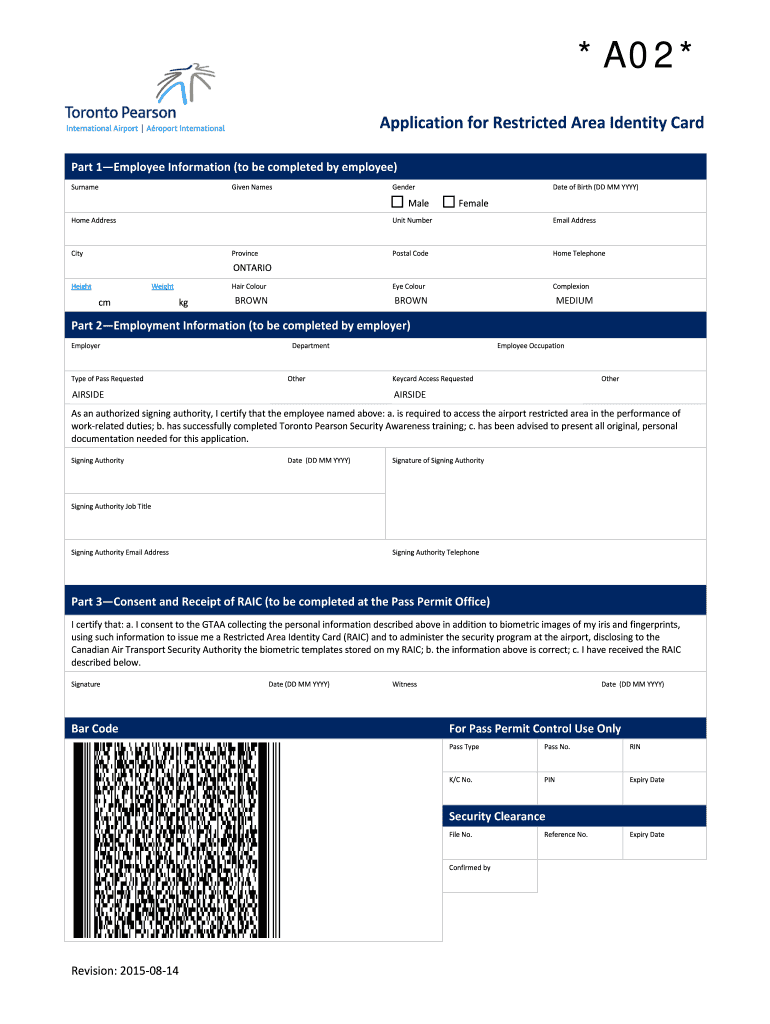
Canada Toronto Pearson A02 2015 free printable template
We are not affiliated with any brand or entity on this form

Fill out
Complete the form online in a simple drag-and-drop editor.

eSign
Add your legally binding signature or send the form for signing.

Share
Share the form via a link, letting anyone fill it out from any device.

Export
Download, print, email, or move the form to your cloud storage.
Why pdfFiller is the best tool for your documents and forms


End-to-end document management
From editing and signing to collaboration and tracking, pdfFiller has everything you need to get your documents done quickly and efficiently.
Accessible from anywhere
pdfFiller is fully cloud-based. This means you can edit, sign, and share documents from anywhere using your computer, smartphone, or tablet.
Secure and compliant
pdfFiller lets you securely manage documents following global laws like ESIGN, CCPA, and GDPR. It's also HIPAA and SOC 2 compliant.
What is Canada Toronto Pearson A02
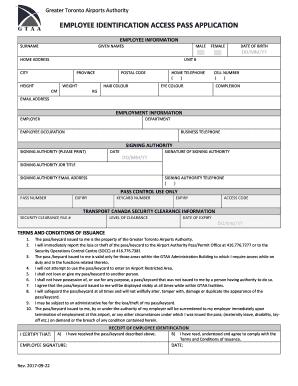
The Application for Restricted Area Identity Card is a form used by employees at Toronto Pearson Airport to request access to secured areas, essential for their job functions.
pdfFiller scores top ratings on review platforms




I really like it so far. The snap to grid text editing is fantastic. The cloud options and email sync are perfect. Nice job. The UI is almost exactly like my Neat scanner software so it's very intuitive.
This product is excelent. Este producto es excelent
Who needs Canada Toronto Pearson A02?
Explore how professionals across industries use pdfFiller.

Canada Toronto Pearson A02 is needed by:
-
Airport employees requiring access to restricted zones.
-
Signing authorities verifying employee identity and training.
-
Witnesses affirming the applicant’s credentials.
-
Human resources personnel managing employee access privileges.
-
Security personnel processing access requests.
-
Employers needing compliance with GTAA regulations.
Comprehensive Guide to Canada Toronto Pearson A02
What is the Application for Restricted Area Identity Card?
The Application for Restricted Area Identity Card serves as a critical tool for employees at Toronto Pearson Airport, allowing individuals to access areas that require enhanced security clearances. This document is essential because it facilitates the collection of biometric data, which significantly contributes to maintaining airport security standards. Understanding the purpose and definition of this application is paramount, as it directly impacts compliance with the regulations established by the Greater Toronto Airports Authority (GTAA).
Purpose and Benefits of the Application for Restricted Area Identity Card
The primary purpose of the restricted area identity card is to streamline access for employees to secure zones within the airport. This card not only benefits the employees by granting them necessary access but also enhances employer operational efficiency. Additionally, adherence to security and compliance protocols ensures that both individuals and organizations maintain high safety standards within the airport environment.
-
Facilitates employee access to restricted areas.
-
Improves workplace safety and compliance.
-
Boosts operational efficiency for employers.
Who Needs the Application for Restricted Area Identity Card?
Understanding who requires the Application for Restricted Area Identity Card is vital for efficient airport operations. This application is necessary for various roles including employees, signing authorities, and witnesses, and it is particularly critical depending on the individual’s employment type. For the Greater Toronto Airports Authority (GTAA), ensuring that the right personnel are eligible for this credential is key to maintaining security protocols.
-
Employees requiring access to secure areas.
-
Signing authorities for verification.
-
Witnesses to validate signatures.
Eligibility Criteria for the Application for Restricted Area Identity Card
Not everyone can apply for the restricted area identity card; certain eligibility criteria must be met. Applicants must fulfill specific security training requirements and provide documentation that demonstrates their capability and need for access to restricted zones. By laying out these conditions, the GTAA ensures that all applicants are vetted thoroughly to uphold safety at Toronto Pearson Airport.
-
Completion of necessary security training.
-
Provision of valid documentation.
-
Employment type relevant to restricted area access.
How to Fill Out the Application for Restricted Area Identity Card Online (Step-by-Step)
Filling out the Application for Restricted Area Identity Card online involves several critical steps to ensure accuracy and completeness. Begin by navigating to the application form and inputting your personal information, followed by your employment details. Each field must be filled out precisely to avoid delays in processing.
-
Visit the application webpage.
-
Fill in personal information accurately.
-
Complete employment information as required.
-
Review all details for completeness.
Field-by-Field Instructions for Completing the Application
Understanding the specific fields within the Application for Restricted Area Identity Card is essential for successful completion. Take extra care with fields such as 'Surname Given Names', 'Date of Birth', and required signatures. Common pitfalls can be easily avoided by following the detailed instructions provided for each section.
-
Ensure surname and given names are entered correctly.
-
Double-check the date format.
-
Follow signature instructions carefully.
How to Sign the Application for Restricted Area Identity Card
Signing the application correctly is crucial for its acceptance. Applicants must adhere to specific signing authority and witness requirements, with clarity on whether a digital or wet signature is necessary. Valid signatures play a significant role in the processing of the application, ensuring that it meets all necessary benchmarks for approval.
-
Understand the signing authority required.
-
Confirm whether a witness is needed.
-
Decide between digital and wet signatures.
Submission Methods and What Happens After Submission
Once the application is completed, various submission methods are available to ensure it reaches the relevant authorities. Applicants can expect to see processing times communicated clearly, with options to track the application status post-submission. Various outcomes, such as approval or rejection, will follow based on the assessment of the application.
-
Choose an appropriate submission method.
-
Be aware of estimated processing times.
-
Know how to track your application status.
How pdfFiller Can Help You with the Application for Restricted Area Identity Card
pdfFiller offers a range of features that simplify the application process for the Restricted Area Identity Card. Security measures are in place to protect sensitive information, ensuring compliance with industry standards. Users can benefit from testimonials and success stories that highlight the platform's effectiveness in document management and form filling.
-
Edit and fill PDFs seamlessly.
-
Utilize strong security features like 256-bit encryption.
-
Access user testimonials for added confidence.
Next Steps After Submitting Your Application
After submitting the application, it is crucial to know the next steps in case corrections or amendments are necessary. Additionally, understanding the renewal processes for expired cards ensures ongoing compliance with GTAA regulations. Record retention remains essential for verification and security assessments in the future.
-
Learn how to amend your application if needed.
-
Stay updated on renewal processes.
-
Maintain records for compliance purposes.
How to fill out the Canada Toronto Pearson A02
-
1.To access the Application for Restricted Area Identity Card on pdfFiller, begin by navigating to the pdfFiller website and logging in or creating an account if you don't have one.
-
2.Once logged in, use the search bar to locate the form by typing 'Application for Restricted Area Identity Card'. You can also browse through categories until you find it.
-
3.Once you open the form, familiarize yourself with the layout. The document will present multiple fields and checkboxes requiring your input.
-
4.Before starting, gather the necessary personal and employment information, including your surname, given names, date of birth, and details related to your job role and security training certification.
-
5.Begin entering your information in the designated fields. Ensure that you fill in all required sections to prevent delays in processing.
-
6.As you progress, use the checkboxes to confirm any training completions or declarations. Follow all explicit field instructions noted within the form.
-
7.After completing all fields, review the document for accuracy. Ensure spelling is correct and every required field is filled out properly.
-
8.Finalize the form by signing where required. You will need the signatures of a signing authority and a witness as per the requirements of the application.
-
9.Once confirmed, save your progress. Use the options to download your form as a PDF or submit it directly through pdfFiller, if available. Make sure to keep a copy for your records.

Who is eligible to apply for the Restricted Area Identity Card?
Employees of organizations operating at Toronto Pearson Airport that require access to restricted areas are eligible to apply for the Restricted Area Identity Card, assuming they meet security training requirements.
What documents are required to complete the application?
To complete the application, you will need personal identification details, employment verification, and proof of completed security training. Ensure all information accurately reflects your current status.
How do I submit the completed form?
You can submit the completed form through pdfFiller directly if the option is available, or download the form and submit it via email or in person to your employer or the GTAA.
What common mistakes should I avoid when filling out the form?
Ensure all personal information is accurate, all checkboxes are checked as required, and signatures from all parties are obtained. Double-check for completeness before submission to avoid delays.
How long does it take to process the application?
Processing times for the application can vary based on the volume of requests. Generally, you should allow several weeks for processing, so plan accordingly.
What should I do if I encounter issues accessing pdfFiller?
If you experience issues accessing pdfFiller, ensure your internet connection is stable, clear your browser cache, or try accessing the site through a different web browser or device.
Is notarization required for this application?
No, notarization is not required for the Application for Restricted Area Identity Card; however, you must ensure all required signatures are duly provided.
Canada Toronto Pearson A02 Form Versions
Related Forms



Related Catalogs
Get the latest insights from our blog


If you believe that this page should be taken down, please follow our DMCA take down process
here
.
This form may include fields for payment information. Data entered in these fields is not covered by PCI DSS compliance.