Save NDA via DOC For Free

Drop document here to upload
Select from device
Up to 100 MB for PDF and up to 25 MB for DOC, DOCX, RTF, PPT, PPTX, JPEG, PNG, JFIF, XLS, XLSX or TXT

Last updated on Sep 10, 2026

Save NDA via DOC

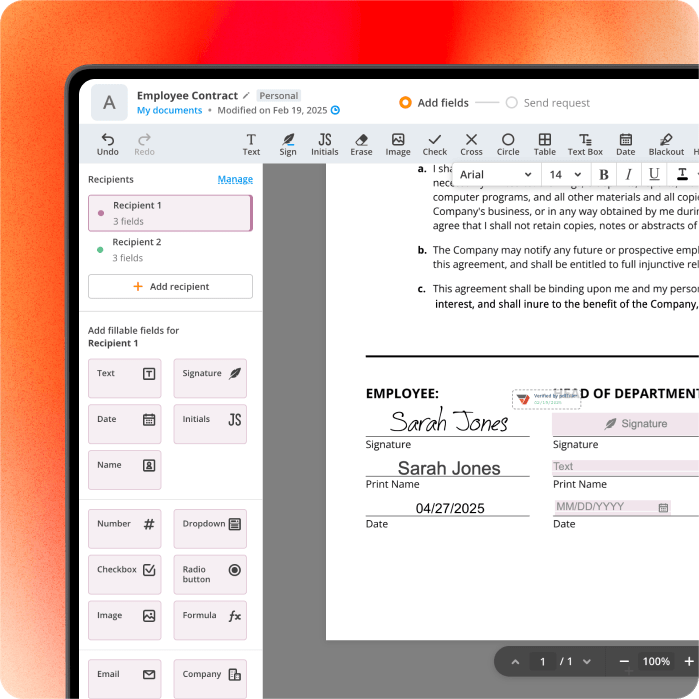
Save your NDA documents quickly and securely using pdfFiller.

What is My Documents in pdfFiller?

The My Documents feature in pdfFiller serves as a central repository for all your documents, allowing you to save NDA documents efficiently. This document storage capability enables you to organize files with folders and tags, making it easy to access them from any device. You can store various document types, ensuring that all your NDAs are in one place. This feature enhances your document management process, eliminating the need for fragmented solutions.

How to Save Your NDA Document

  • Log in to your pdfFiller account and navigate to the My Documents section.
  • Click on the "Upload" button to upload your NDA document from your device.
  • Once uploaded, make any necessary edits to your NDA document using the editing tools.
  • Utilize the auto-save feature to ensure your changes are saved automatically during editing.
  • After editing, choose your preferred download option to save the document to your device.
  • Select the saving format that best suits your needs, such as PDF or DOCX.
  • Confirm the save action to ensure your NDA is securely stored in your account.
  • Check the My Documents section to verify that your NDA document has been saved successfully.

Organizing Your NDA Documents

To keep your NDAs organized, create custom folders specifically for NDAs within pdfFiller. This allows you to categorize documents effectively. Use tags for easy retrieval, helping you find specific NDAs quickly. Setting up Smart folders can automate the organization process, ensuring that new NDAs are sorted correctly. Additionally, you can move and rename documents easily to maintain a clear structure, preventing confusion in your document management system.

Finding Your Saved NDA Documents

To quickly locate your saved NDAs, utilize the search bar effectively by entering relevant keywords. You can also apply filters available in pdfFiller for quick access to specific documents. The Audit Trail feature allows you to track changes made to your NDAs, providing a clear history of edits. Accessing documents across devices ensures you can retrieve your NDAs whenever needed, enhancing your workflow efficiency.

Tracking Versions of Your NDA

Understanding the difference between the Audit Trail and version tracking is essential for managing your NDAs effectively. You can access version history to see previous iterations of your document, which is crucial for compliance purposes. Exporting audit logs as PDF provides a record of changes made, ensuring accountability. This tracking capability is vital for legal professionals managing NDAs, as it helps maintain accurate documentation.

Secure Storage for Your NDA

To securely store your NDA documents, utilize the Confidential folder feature in pdfFiller. This adds an extra layer of security to sensitive documents. Implement phone verification for access to ensure that only authorized users can view your NDAs. Data encryption during upload protects your documents from unauthorized access. Additionally, retention policies for documents help manage how long your NDAs are stored, ensuring compliance with data protection regulations.

Role-Specific Scenarios for NDAs

Different roles utilize NDAs in various ways within pdfFiller. An HR manager may organize employee NDAs to ensure confidentiality. A legal professional can track contract versions to maintain compliance and accuracy. Small business owners often secure client agreements using NDAs, ensuring their interests are protected. Utilizing NDA templates can enhance efficiency, allowing these professionals to focus on their core tasks while managing documents effectively.

Browser Compatibility for Saving NDAs

When using pdfFiller, it’s important to know the supported browsers for optimal performance. The platform is accessible on mobile devices, allowing you to manage your NDAs on the go. No installation is required for access, making it easy to use from any device. Cross-device functionality ensures that you can save NDAs regardless of the device you are using, enhancing your flexibility.

Limitations of Saving NDAs

Be aware of the constraints when saving NDAs in pdfFiller. Storage limits may vary based on your plan tier, affecting how many documents you can store. There is a maximum file size for uploads, which can impact larger documents. Additionally, there may be document count limits per account, restricting the total number of NDAs you can save. Retention windows for version history may also apply, affecting how long you can access previous versions.

Security Measures for NDA Documents

pdfFiller implements several security measures to protect your NDA documents. TLS encryption during document upload ensures that your files are secure from interception. Automatic deletion timelines for files help manage data retention effectively. Compliance with data protection regulations is maintained throughout the document handling process. Audit considerations for document handling further ensure that your NDAs are managed securely.

Comparison with Other Document Management Tools

How does pdfFiller compare with other document management tools? pdfFiller offers over 1 million templates for NDAs, making it a versatile choice for document creation. It is trusted by over 68 million users, highlighting its reliability. The platform provides affordable pricing compared to competitors, making it accessible for small businesses. Additionally, pdfFiller is easy to use without requiring IT setup, which is a significant advantage over other tools.

Next Steps for Managing Your NDA

To effectively manage your NDA documents, start by uploading your NDA to pdfFiller. After uploading, edit and fill out the document as needed. Organize and track your NDAs to maintain an efficient workflow. Finally, share your NDAs securely with stakeholders to ensure that all parties have access to the necessary documents.

Try most popular PDF tools

Discover a full set of tools to handle any document task.

Edit PDFs

Make quick PDF edits online.

Sign

Add legally binding signatures.

Merge

Combine multiple PDFs.

Request signatures

Send a document for signing.

Convert

Transform PDFs into other formats.

Rearrange

Change the order of pages.

Share

Send PDFs for review or editing.

Compress

Reduce PDF file sizes.

Use pdfFiller where you already work

1. Connect your tools

pdfFiller, built into your existing workflow

  • Sign and fill PDFs directly in your browser Install the pdfFiller Chrome extension and open any PDF you find online directly in the editor — without downloading it first. Fill in fields, add your signature, and save or send the completed document. The tools you need are one click away, wherever you are on the web.
  • Work with Google Drive files without leaving Drive Connect pdfFiller to your Google Drive and open any document directly in the editor. Fill it, sign it, use AI to summarize or extract key information, and save the updated file back to the same Drive folder. No downloading, no re-uploading, no version confusion.
  • Embed a fillable form on your website Turn any pdfFiller form into an embeddable widget and add it to your website without a single line of code. Visitors fill it out directly on your page — no redirects, no external links, no broken experience on mobile. Submissions come into your pdfFiller account, structured and ready to act on.
  • Let AI do the repetitive work Whether you’re working from Drive, the browser, or an embedded form — AI features are available wherever pdfFiller is. Generate a form from a description, summarize a lengthy document, extract key fields, or get a draft ready in seconds. The same AI tools, across every integration.
  • Keep everything in one account, wherever it started Documents filled through the browser extension, edited from Google Drive, or submitted through an embedded form — everything lands in your pdfFiller account. Searchable, organized, and accessible from any device. One place for every document, no matter where it came from.

Who needs this?

Explore how professionals across industries use pdfFiller to edit PDFs.

Healthcare

Patient intake forms, consent documents, and referral authorizations need to reach patients before appointments, collect signatures, and land in a HIPAA-compliant system. Send forms via link, let patients fill and sign them from any device, and store everything encrypted — without a fax machine or a paper trail.

  • Patient intake and consent forms
  • Authorization and release forms (HIPAA)
  • Referral and prior authorization forms
  • Medical history and registration forms
Healthcare
  • G2 — Users Most Likely To Recommend
  • G2 — Grid Leader in Small-Business
  • G2 — High Performer
  • G2 — Regional Leader
  • G2 — Easiest To Do Business With
  • G2 — Best Meets Requirements
  • G2 — Best Support

pdfFiller scores top ratings on review platforms

pdfFiller is rated 4.6 out of 5 stars across 1,000+ G2 reviews.

I've only used this service once, and I'm pleased with the outcome. My document looked more professional and I will use this service again. I think it's a bit pricey, so I suggest the company use a "one-time-purchase" option or free trial before buying.
Ruth
Its been great. I use it for my real estate contracts
Stacey A
This system makes it so easy to fill out and submit claim forms. It saves me so much time!!!
VICKY
Well laid out, easy to use fillable pdf program Just downloaded this program and am impressed already. It's well laid out, easy to use, and overall a great experience. It's nice to be able to turn non-fillable pdf's into fillable ones.
Sam
Very satisfied with the pdfFiller… Very satisfied with the pdfFiller experience! This was easy to use!Thanks for the help!
Judy Hough
Great product and even better customer service. Very responsive and willing to help!
PC

The document tool your small business needs to edit, share, sign, and stay compliant

pdfFiller workspace for creating, filling and managing PDF forms

PDF editing is just the beginning

Turn any document into a reusable template

How to Edit PDFs Across Devices with pdfFiller

Need to update a resume, contract, or HR form while on the go? In this tutorial, we’ll show you step-by-step how to edit PDFs across devices—from iPhone and Android to Mac and Windows. With pdfFiller, it’s simple to edit PDF files on mobile or desktop, add signatures, insert images, and share documents securely—all without extra software.

FAQs

If you can't find what you're looking for, please contact us anytime!

To save an NDA via DOC format in pdfFiller, first, upload your NDA document to the platform. Once uploaded, select the 'Edit' option to make any necessary changes. After finalizing your edits, click on 'Save As' and choose the DOC format from the dropdown menu. This process ensures that your document retains formatting and is easily editable across different platforms. For best results, check the document for compatibility with word processors like Microsoft Word or Google Docs after saving.

When saving an NDA via DOC in pdfFiller, your document is protected by advanced security protocols including encryption and secure cloud storage. This means that your sensitive information remains confidential and is accessible only to authorized users. Additionally, pdfFiller complies with industry standards for data protection, ensuring your NDAs are safe from unauthorized access. Always ensure that you enable two-factor authentication for an added layer of security when managing sensitive documents.

Yes, pdfFiller offers document automation features that allow you to streamline the process of saving NDAs via DOC. By setting up templates, you can pre-fill common fields and save time on repetitive tasks. Once your template is ready, simply upload the NDA, fill in the necessary details, and save it as a DOC file with a single click. This automation not only increases efficiency but also reduces the risk of errors in document preparation.

Absolutely! pdfFiller allows multiple users to collaborate on NDAs in real-time before saving them as DOC files. You can invite team members or legal advisors to review and edit the document simultaneously. This collaborative feature enhances communication and ensures that all necessary changes are made before finalizing the document. Once everyone has contributed, simply save the updated NDA as a DOC file to maintain a record of all changes.

Saving NDAs via DOC format offers several advantages over PDF, particularly in terms of editing capabilities. DOC files are easily editable, allowing users to make changes without needing specialized software. This is particularly useful for legal teams who may need to adjust terms or clauses frequently. Additionally, DOC files can be integrated with various document automation tools, enhancing workflow efficiency. However, for final versions, consider saving a PDF copy for secure sharing and archiving.

To ensure compatibility when saving NDAs via DOC in pdfFiller, always use standard fonts and formatting options that are widely supported by word processors. After saving your document, test it by opening it in different applications like Microsoft Word or Google Docs. This practice helps identify any formatting issues that may arise and allows you to make necessary adjustments before sharing the document with others. Keeping your document simple and avoiding complex layouts can also improve compatibility.

If you encounter issues saving your NDA as a DOC file in pdfFiller, first check your internet connection and ensure that your browser is up to date. If the problem persists, try clearing your browser cache or switching to a different browser. Additionally, consult the pdfFiller support resources or contact customer service for assistance. They can provide specific troubleshooting steps tailored to your situation, ensuring that you can save your NDA efficiently.

What businesses achieve with pdfFiller

Discover how you can benefit too.

I tell my employees that if you need to have stuff filled out, hey, check out pdfFiller, that's what I use. Yes, I would and I do recommend it.

Hope Discovery ABA Services

One tool. Every document task.

One workflow shouldn’t take five tools

Start free trial