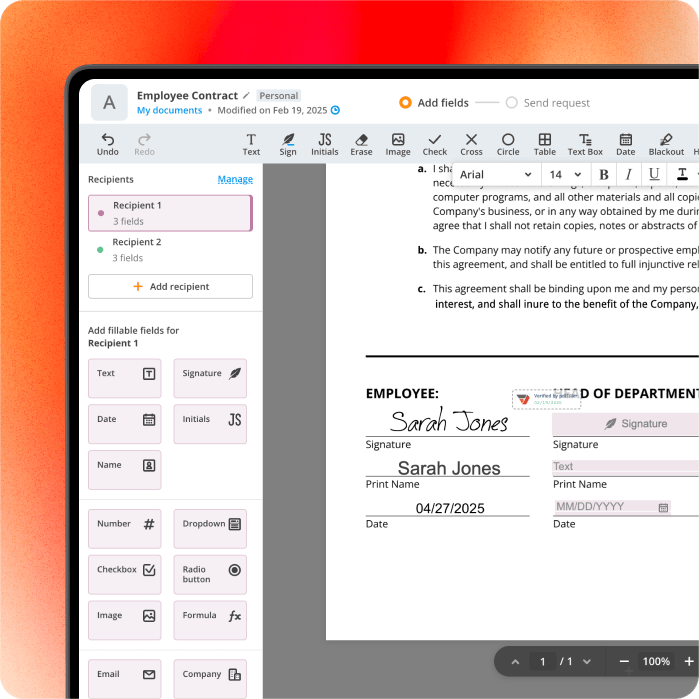
Send NDA via Email For Free

Drop document here to upload
Select from device
Up to 100 MB for PDF and up to 25 MB for DOC, DOCX, RTF, PPT, PPTX, JPEG, PNG, JFIF, XLS, XLSX or TXT

Last updated on Sep 10, 2026

Send NDA via Email

Send your NDA via email quickly and securely with pdfFiller.

What Are Sharing and Delivery Tools in pdfFiller?

pdfFiller offers a variety of delivery channels to ensure that you can send your NDA via email efficiently. These channels include email delivery, SMS, fax, and physical mail, allowing for multi-channel delivery that suits different needs. The user-friendly interface makes it easy for small businesses to navigate and utilize these tools without any complex jargon. You can track sent documents to confirm delivery and ensure that your NDAs reach the intended recipients. This streamlined process is particularly beneficial for small businesses that require quick and effective document distribution.

How to Send an NDA via Email

  • Log in to your pdfFiller account and open the NDA document you wish to send.
  • Click on the "Send" button to initiate the email process.
  • Enter the recipient's email address in the designated field.
  • Add a subject line and a message if desired, to provide context for the recipient.
  • Review the email details to ensure accuracy before sending.
  • Click "Send" to deliver the NDA via email.
  • Access the "Sent" folder in your pdfFiller account to view sent documents.
  • Track the email status to confirm that the NDA has been received by the recipient.

Sending an NDA via SMS

To send an NDA via SMS, follow these steps: First, select the NDA document you want to share. Next, enter the recipient's phone number in the SMS delivery option. After sending, you can track the SMS status to confirm delivery. This method is ideal for urgent requests, ensuring that your NDA reaches the recipient quickly and efficiently.

Sending an NDA via Fax

To fax an NDA, start by opening the document in pdfFiller. Enter the recipient's fax number in the appropriate field. Once you send the fax, monitor the fax status to ensure successful transmission. This method is suitable for formal communications that require a physical document to be sent securely.

Sending an NDA via USPS Mail

To send an NDA through USPS, first prepare the document in pdfFiller. Enter the recipient's postal address accurately. After sending the document, you can track the mail status to confirm delivery. This method is ideal for sending hard copies that may require signatures or physical documentation.

Sharing an NDA Online via Link

To share an NDA online, generate a shareable link from pdfFiller. Set access controls for recipients to manage who can view or edit the document. Online sharing offers the benefit of quick access without the need for email attachments. You can also track link access to see who has viewed the NDA.

Collaborating on an NDA

To invite others to collaborate on an NDA, use the collaboration feature in pdfFiller. Send invitations to potential collaborators, allowing them to access shared documents. Collaboration enhances the editing process, enabling multiple users to contribute. You can track changes made by collaborators to maintain document integrity.

Tracking Sent NDAs

To track sent NDAs, access the "Sent" folder in your pdfFiller account. Here, you can view delivery status indicators for each document. Understanding these indicators is crucial for managing sent documents effectively. Tracking helps ensure that your NDAs have been delivered and received by the intended parties.

Limitations of Sending NDAs

When sending NDAs, be aware of certain limitations. There may be a maximum number of recipients allowed for bulk sending. Additionally, file size limits for email attachments can restrict larger documents. USPS delivery timelines can vary, and SMS delivery may have country restrictions that affect sending.

Security of Sent NDAs

pdfFiller implements several security measures for sent NDAs. Emails are protected with TLS encryption, ensuring that your documents remain confidential. Access controls for shared links help manage who can view the NDA. An audit trail for sent documents provides accountability, while retention policies ensure documents are managed after delivery.

How Does pdfFiller Compare?

pdfFiller offers unique advantages over its competitors. Adobe Acrobat provides extensive features but can be complex and costly for small and medium businesses. DocuSign focuses primarily on e-signatures and may require additional tools for comprehensive document management. Smallpdf offers basic PDF tools but lacks the depth of features available in pdfFiller, potentially limiting user capabilities.

Next Steps for Sending NDAs

In summary, pdfFiller provides multiple delivery methods for sending NDAs, including email, SMS, fax, USPS, and online sharing. We encourage you to try pdfFiller for your document needs. Explore related resources to enhance your document management experience and consider signing up to access over 1 million ready-to-use templates.

Try most popular PDF tools

Discover a full set of tools to handle any document task.

Edit PDFs

Make quick PDF edits online.

Sign

Add legally binding signatures.

Merge

Combine multiple PDFs.

Request signatures

Send a document for signing.

Convert

Transform PDFs into other formats.

Rearrange

Change the order of pages.

Share

Send PDFs for review or editing.

Compress

Reduce PDF file sizes.

How to sign a document online?

Upload

Signing and editing documents has never been easier

  • Edit and sign in one place Quickly eSign documents after reviewing or editing — no need to juggle tools and move files back and forth. Get your PDFs done fast with all the tools you need at your fingertips.
  • Easy sharing & collaboration After signing a document, share it instantly with clients and stakeholders for review, editing, or comments. To request signatures from other parties, add fillable fields and send the document for signing.
  • Mobile-ready solution Easily edit, sign, and send your documents from anywhere, even on the go. pdfFiller is entirely cloud-based, so you can manage documents effectively from your computer, smartphone, or tablet.
  • Legally binding & secure Sign contracts and agreements following global eSignature laws, including ESIGN, UETA, eIDAS, and GDPR. With HIPAA, PCI DSS, SOC 2 Type II, and other compliance standards, pdfFiller works for any industry.

Who needs this?

Explore how professionals use pdfFiller to sign documents.

Healthcare

Healthcare professionals use pdfFiller to simplify document signing, from patient consent forms to medical record requests. They can easily request, approve, and share signed documents with patients, staff, or suppliers, saving time and improving communication.

  • Patient consent forms
  • Prescription forms
  • Lab test requisition forms
  • Referral and consultation forms
Healthcare
  • G2 — Users Most Likely To Recommend
  • G2 — Grid Leader in Small-Business
  • G2 — High Performer
  • G2 — Regional Leader
  • G2 — Easiest To Do Business With
  • G2 — Best Meets Requirements
  • G2 — Best Support

pdfFiller scores top ratings on review platforms

pdfFiller is rated 4.6 out of 5 stars across 1,000+ G2 reviews.

I was a bit confused & frustrated about how it works at first, but the support staff has been GREAT!
Rochelle
It has worked perfectly for me. My team and myself love it.
Alverna M
PDFFiller is a great tool! I have been very happy being able to fill in documents without having to print the document, then handwrite the answers on the document, so I could then scan it back in to my computer to send it off via email.
Michelle N
Very user friendly and convenient. Beats printing, scanning, and faxing
Anonymous Customer
Good application. Sometimes not as user friendly as I would like, but overall, the best PDF application I have available right now.
Melodie A
Hasta ahora ha cubierto mis necesidades. Muy Buena aplicación.
Anonymous Customer

eSign documents with a trusted, all‑in‑one solution

Try easy-to-use tools for all your document management needs.

pdfFiller workspace for creating, filling and managing PDF forms

Why sign documents with pdfFiller?

Ease of use

Watch pdfFiller eSignatures in action

Check out a quick video tutorial that shows how to create and place your signature or send a document for signing.

FAQs

If you can't find what you're looking for, please contact us anytime!

To send an NDA via email securely, use a trusted document management platform like pdfFiller that offers encryption and secure sharing options. Start by uploading your NDA to the platform, where you can edit and eSign the document. Once finalized, you can share the NDA via a secure link or directly through email, ensuring that only the intended recipients have access. Additionally, consider using password protection for added security. This method not only protects sensitive information but also streamlines document management for remote professionals and legal teams.

To ensure your NDA is legally binding when sent via email, use a platform like pdfFiller that complies with electronic signature laws such as ESIGN and UETA. Start by drafting your NDA with clear terms and conditions. When sending it via email, include a request for eSignature from the recipient. This can be done directly within pdfFiller, which provides a secure and legally recognized way to sign documents electronically. Always confirm that both parties have signed before considering the NDA enforceable.

Common mistakes to avoid when sending an NDA via email include failing to use secure methods for sharing, not confirming the recipient's identity, and neglecting to include all necessary signatures. To prevent these issues, utilize pdfFiller’s document automation features to ensure that all required fields are completed before sending. Additionally, always double-check the email addresses and consider using a secure link for sharing the NDA instead of attaching it directly to the email. This minimizes the risk of unauthorized access.

Yes, you can send an NDA via email to multiple recipients at once using pdfFiller. The platform allows you to add multiple email addresses when sharing the document. Simply upload your NDA, fill in the necessary fields, and select the option to send to multiple recipients. Each recipient will receive their own link to review and eSign the document securely. This feature is particularly useful for legal teams and SMEs that need to streamline document management and collaboration.

When choosing a platform to send an NDA via email, look for features such as secure eSigning, document tracking, and user authentication. pdfFiller offers these capabilities, ensuring that your NDA is sent securely and that you can track who has viewed and signed the document. Additionally, consider platforms that provide templates for NDAs, allowing for quick customization and sending. These features enhance document automation and ensure compliance with security protocols, making them ideal for remote professionals.

To track the status of your NDA after sending it via email, use pdfFiller’s document tracking feature. Once you send the NDA, you can monitor who has opened the document, signed it, or if it is still pending. This real-time tracking allows you to follow up with recipients efficiently and ensures that your NDA process remains organized. Keeping tabs on your document status is crucial for legal teams and SMEs to maintain compliance and manage timelines effectively.

If your recipient does not receive the NDA sent via email, first check the email address for accuracy and confirm that it was sent successfully from pdfFiller. If the email is correct, advise the recipient to check their spam or junk folder, as automated emails can sometimes be filtered. If necessary, resend the NDA using a secure link from pdfFiller, which can help ensure that the document is received. Additionally, consider following up with a phone call or alternative communication method to confirm receipt.

What businesses achieve with pdfFiller

Discover how you can benefit too.

pdfFiller allows us to tap into additional markets and sell business we might not otherwise have sold because of the speed and ease with which we can produce the forms.

Scaturro Insurance Agency LLC

One tool. Every document task.

One workflow shouldn’t take five tools

Start free trial