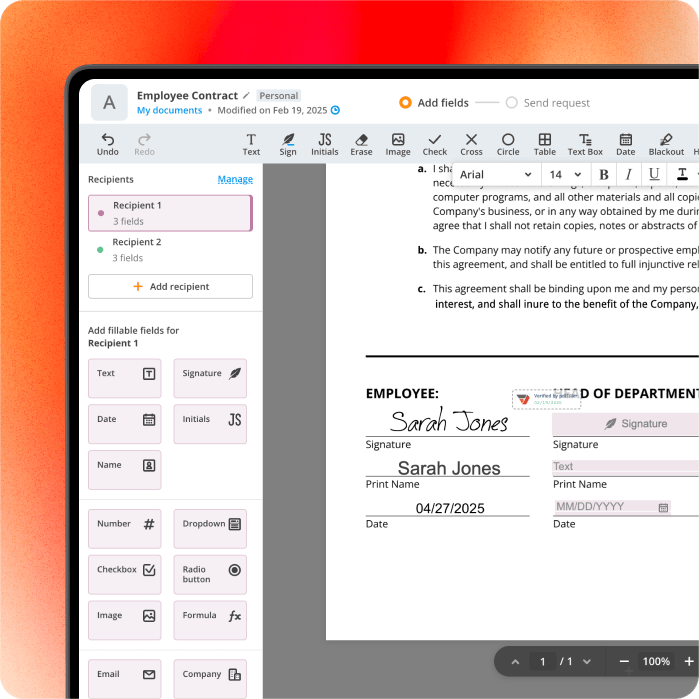
eSignature for Sales For Free

Focus on delivering better services and boosting revenue instead of chasing signatures. eSign documents and collect signatures online without tedious paper hassles.

Drop document here to upload
Select from device
Up to 100 MB for PDF and up to 25 MB for DOC, DOCX, RTF, PPT, PPTX, JPEG, PNG, JFIF, XLS, XLSX or TXT

Last updated on Oct 22, 2026

eSignature for Sales

Sign sales documents quickly and securely with pdfFiller's eSignature tool.

What is the eSignature Tool?

The eSignature tool is a digital solution that allows you to sign documents electronically, making the signing process for sales documents efficient and straightforward. With the self-signing feature, you can quickly sign your own documents without needing to send them to someone else for approval. This differs from sending for signature, where you would wait for another party to sign the document. The eSignature tool supports various document types, including PDFs and Word files, ensuring versatility in your signing needs. Setting up the tool is quick and requires no IT assistance, making it accessible for anyone in sales.

How Does eSignature Improve Document Workflows?

Implementing eSignature for sales significantly enhances document workflows by eliminating the need for printing and scanning. This digital approach speeds up contract finalization, allowing you to close deals faster. The tool supports remote signing, which is particularly beneficial for sales professionals who work with clients in different locations. Additionally, eSignature integrates seamlessly with existing workflows, ensuring that you can incorporate it into your daily operations without disruption.

Three Ways to Create Your Signature

  • Draw your signature using a mouse or touchscreen, providing a personal touch to your documents.
  • Type your name and select a font style that resembles a handwritten signature, ensuring legibility.
  • Upload an image of your handwritten signature, allowing for a quick and authentic signing experience.
  • Each method produces legally binding signatures, ensuring your agreements are valid and enforceable.
  • Customization options are available, enabling you to adjust the size and style of your signature to fit your documents.

Step-by-Step Guide to Signing

  • Log in to your pdfFiller account to access the eSignature tool.
  • Select the document you wish to sign from your files.
  • Choose your preferred method for creating your signature: draw, type, or upload.
  • Place your signature in the appropriate location on the document.
  • Review the document to ensure all information is correct before finalizing.
  • Click the 'Sign' button to apply your signature digitally.
  • Save the signed document to your account or download it for your records.
  • If needed, share the signed document with relevant parties via email or other platforms.

Legal Validity of Your Signatures

eSignatures created with pdfFiller comply with the ESIGN Act and UETA, ensuring their legal standing in the United States. Each signature comes with a timestamped audit trail, providing proof of when the document was signed. Additionally, signatures are verified by a pdfFiller badge, adding an extra layer of authenticity. The tool also adheres to international compliance standards, including GDPR, ensuring your data is handled securely.

Scenarios for Using eSignature in Sales

eSignature for sales can be utilized in various scenarios, enhancing efficiency and convenience. For instance, you can sign a lease agreement quickly without the need for physical meetings. Authorizing a sales contract becomes a straightforward process, allowing you to finalize deals faster. Completing a sales form can also be done digitally, saving time and resources. Remote signing scenarios are particularly useful for sales professionals who need to engage with clients across different locations.

Browser Compatibility for eSignature

The eSignature tool is compatible with all major web browsers, including Chrome, Firefox, and Safari, ensuring accessibility for all users. It also supports mobile signing capabilities, allowing you to sign documents on the go from your smartphone or tablet. Cross-device functionality ensures that you can access your documents and sign them from any device, whether at the office or working remotely. Performance remains consistent across different platforms, providing a reliable signing experience.

Limitations of the eSignature Tool

While the eSignature tool offers many benefits, it does have some limitations. There is no option to request signatures from others, which means you can only self-sign documents. Additionally, saved signatures are not auto-applied, requiring you to select your signature each time you sign a document. There are also limitations on the types of documents that can be signed, as some formats may not be supported. Lastly, the eSignature tool is not a substitute for full document management solutions, focusing instead on the signing aspect.

Security Measures for eSignatures

Security is a top priority for pdfFiller's eSignature tool. All signed documents are protected with encryption standards, ensuring that your information remains confidential. The company follows strict data handling policies to safeguard your data against unauthorized access. Compliance with industry regulations further reinforces the security of your signatures, providing peace of mind when signing sensitive documents.

Next Steps After Signing

After signing your documents with eSignature for sales, you can easily share them with others via email or through integrated platforms. pdfFiller allows you to track the status of your signed documents, ensuring you stay updated on any necessary follow-ups. Integration with other pdfFiller features enhances your document management capabilities, making it easier to organize and access your files. Following best practices for document management will help you maintain an efficient workflow.

How Does pdfFiller Compare?

pdfFiller stands out against competitors like DocuSign, which offers extensive integrations and a wide user base but can be complex for small businesses to navigate. Adobe Acrobat Sign is known for its strong brand recognition and comprehensive PDF tools, though its higher costs may deter small businesses. On the other hand, signNow focuses on affordability for small businesses but is less feature-rich compared to pdfFiller.

Try most popular PDF tools

Discover a full set of tools to handle any document task.

Edit PDFs

Make quick PDF edits online.

Sign

Add legally binding signatures.

Merge

Combine multiple PDFs.

Request signatures

Send a document for signing.

Convert

Transform PDFs into other formats.

Rearrange

Change the order of pages.

Share

Send PDFs for review or editing.

Compress

Reduce PDF file sizes.

How to sign a document online?

Upload

Signing and editing documents has never been easier

  • Edit and sign in one place Quickly eSign documents after reviewing or editing — no need to juggle tools and move files back and forth. Get your PDFs done fast with all the tools you need at your fingertips.
  • Easy sharing & collaboration After signing a document, share it instantly with clients and stakeholders for review, editing, or comments. To request signatures from other parties, add fillable fields and send the document for signing.
  • Mobile-ready solution Easily edit, sign, and send your documents from anywhere, even on the go. pdfFiller is entirely cloud-based, so you can manage documents effectively from your computer, smartphone, or tablet.
  • Legally binding & secure Sign contracts and agreements following global eSignature laws, including ESIGN, UETA, eIDAS, and GDPR. With HIPAA, PCI DSS, SOC 2 Type II, and other compliance standards, pdfFiller works for any industry.

Who needs this?

Explore how professionals use pdfFiller to sign documents.

Healthcare

Healthcare professionals use pdfFiller to simplify document signing, from patient consent forms to medical record requests. They can easily request, approve, and share signed documents with patients, staff, or suppliers, saving time and improving communication.

  • Patient consent forms
  • Prescription forms
  • Lab test requisition forms
  • Referral and consultation forms
Healthcare
  • G2 — Users Most Likely To Recommend
  • G2 — Grid Leader in Small-Business
  • G2 — High Performer
  • G2 — Regional Leader
  • G2 — Easiest To Do Business With
  • G2 — Best Meets Requirements
  • G2 — Best Support

pdfFiller scores top ratings on review platforms

pdfFiller is rated 4.6 out of 5 stars across 1,000+ G2 reviews.

this has been good for the money you pay for i. Excellent set up
Anonymous Customer
I've always used Adobe Acrobat but looking for something less expensive.
anne p
Simple and intuitive, seems to do a nice job.
Matt S
love this app love this app! really is heaven sent
lea
thank you ! thank you for the service !
Kasey Cochran
I have found it to be intuitive. With some training, I am sure there are a lot more functions I could utilize.
Marsha R

eSign documents with a trusted, all‑in‑one solution

Try easy-to-use tools for all your document management needs.

pdfFiller workspace for creating, filling and managing PDF forms

Why sign documents with pdfFiller?

Ease of use

Watch pdfFiller eSignatures in action

Check out a quick video tutorial that shows how to create and place your signature or send a document for signing.

FAQs

If you can't find what you're looking for, please contact us anytime!

Using eSignature for Sales streamlines the signing process, reducing turnaround time significantly. This digital solution allows sales teams to send, sign, and manage documents from anywhere, enhancing efficiency and customer satisfaction. Additionally, eSignatures are legally binding and secure, ensuring compliance with regulations like ESIGN and UETA. For remote professionals and legal teams, integrating eSignature into your sales workflow can lead to faster deal closures and improved tracking of document statuses. Consider utilizing a platform like pdfFiller, which offers comprehensive document automation features to enhance your sales process.

pdfFiller prioritizes security in eSignature for Sales by employing advanced encryption protocols and secure cloud storage. Each signed document is protected with SSL encryption, ensuring that sensitive information remains confidential. Additionally, pdfFiller complies with industry standards and regulations, providing users with a secure environment for document management. For added security, users can implement multi-factor authentication and access controls to safeguard their sales documents. By choosing pdfFiller, you can confidently manage your sales transactions while maintaining the highest security standards.

Yes, eSignature for Sales can be seamlessly integrated with various CRM and sales management tools, enhancing your workflow. pdfFiller offers API access and integrations with popular platforms like Salesforce, HubSpot, and Zoho, allowing sales teams to automate document processes without leaving their primary applications. This integration not only saves time but also reduces the risk of errors associated with manual data entry. To maximize efficiency, consider mapping out your sales process and identifying key touchpoints where eSignatures can be incorporated for optimal results.

eSignature for Sales is legally recognized in many jurisdictions, provided it meets specific criteria outlined by laws such as the ESIGN Act and UETA. These laws affirm that electronic signatures hold the same legal weight as traditional handwritten signatures, as long as the signatory's consent and intent are clear. When using pdfFiller, you can ensure compliance by utilizing features that capture signatory consent and maintain a detailed audit trail of all transactions. This is particularly important for remote professionals and legal teams who require verifiable documentation for their sales processes.

Implementing eSignature for Sales significantly enhances the customer experience by providing a fast and convenient signing process. Customers can sign documents from any device, eliminating the need for printing, scanning, or mailing. This not only speeds up the transaction but also reflects a modern, tech-savvy approach that many clients appreciate. pdfFiller’s user-friendly interface allows customers to complete their signatures in just a few clicks, reducing friction in the sales process. To further improve customer satisfaction, consider personalizing follow-up communications and providing clear instructions on how to use the eSignature feature.

When selecting an eSignature solution for Sales, look for features that enhance usability, security, and integration capabilities. Key features include customizable templates, mobile compatibility, and robust tracking options to monitor document status. Additionally, ensure the platform offers compliance with legal standards for eSignatures and provides strong encryption for data protection. pdfFiller excels in these areas, offering a comprehensive suite of tools that streamline the signing process while maintaining security. For optimal results, evaluate how these features align with your specific sales workflow and document management needs.

Tracking the status of eSignature for Sales documents is crucial for managing your sales pipeline efficiently. pdfFiller provides real-time notifications and a dashboard that allows users to see which documents are pending, signed, or completed. This visibility helps sales teams follow up promptly with clients, ensuring no opportunities are missed. To enhance tracking, consider setting reminders for follow-ups and utilizing the platform’s analytics features to gain insights into signing trends and customer behavior. By actively monitoring document statuses, you can improve your overall sales efficiency and responsiveness.

What businesses achieve with pdfFiller

Discover how you can benefit too.

pdfFiller allows us to tap into additional markets and sell business we might not otherwise have sold because of the speed and ease with which we can produce the forms.

Scaturro Insurance Agency LLC

One tool. Every document task.

One workflow shouldn’t take five tools

Start free trial