Modify Text in JPEG For Free

Drop document here to upload
Select from device
Up to 100 MB for PDF and up to 25 MB for DOC, DOCX, RTF, PPT, PPTX, JPEG, PNG, JFIF, XLS, XLSX or TXT

Last updated on Sep 21, 2026

Modify Text in JPEG

Modify text in JPEG documents easily with pdfFiller's editing tools.

What is Edit Mode in pdfFiller?

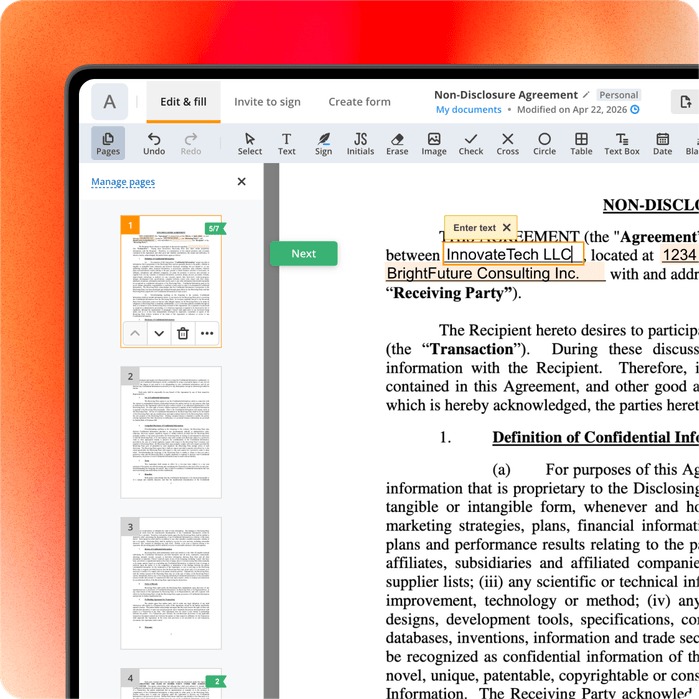
Edit Mode in pdfFiller allows you to directly modify content within your documents. You can access this feature by clicking the Edit button in the toolbar. Once in Edit Mode, you can make changes to the document's text, ensuring that your modifications are straightforward and user-friendly. This mode supports various text formatting options, enabling you to adjust font styles and sizes as needed. Importantly, pdfFiller's Edit Mode works on any device without requiring installation, making it accessible for all users.

Why Modify Text in JPEG?

Modifying text in JPEG documents is essential for several reasons. Common scenarios include correcting typos, updating information, or enhancing the overall professionalism of a document. By correcting text errors, you can significantly improve the clarity and accuracy of your communications. This is particularly important for small businesses that rely on professional documents to make a good impression. Ensuring that your documents are error-free can enhance your credibility and foster trust with clients and partners.

How to Access Edit Mode

  • Open pdfFiller in your web browser and log into your account.
  • Click on the Upload button to select the JPEG document you want to edit.
  • Once the document is uploaded, locate the Edit button in the toolbar at the top of the screen.
  • Click the Edit button to enter Edit Mode, where you can modify text directly.
  • Ensure the document is in a compatible format for editing; pdfFiller supports various file types.

Editing Existing Text in JPEG

  • Click on the text block you wish to edit directly within the document.
  • Make the necessary changes to the text, ensuring accuracy and clarity.
  • Use the navigation tools to move between different text elements as needed.
  • After completing your edits, save the changes to ensure they are applied.
  • Review the document to confirm that all edits are correct and complete.

Adding New Text Blocks in JPEG

  • Select the option to insert a new text block from the editing toolbar.
  • Click on the area of the document where you want to place the new text.
  • Set the initial formatting for the new text, including font style and size.
  • Type the desired text into the new block, ensuring it fits well within the layout.
  • Adjust the placement of the text block as necessary to achieve the desired look.

Removing Text from JPEG Documents

  • Select the text you wish to delete by clicking on it within the document.
  • Press the delete key or click the delete option in the editing toolbar.
  • Confirm the changes before saving to ensure you want to remove the selected text.
  • Consider the importance of maintaining document integrity when deleting text.
  • Identify scenarios where text removal is necessary, such as outdated information.

Text Formatting Options in Edit Mode

In Edit Mode, pdfFiller offers a variety of text formatting options to enhance your documents. Available formatting controls include font styles, sizes, and colors, allowing you to customize the appearance of your text. To apply formatting changes, simply select the text and choose your desired options from the toolbar. Consistent styling is important for maintaining a professional look across your documents. Effective text formatting can significantly improve readability and overall presentation.

Limitations of Editing JPEGs

While editing JPEG documents is convenient, there are some limitations to be aware of. Scanned JPEGs may present challenges, as the text may not be easily editable. Additionally, issues with font matching can arise when the original font is not available. Password-protected documents may restrict editing capabilities, so ensure you have the necessary permissions. Being aware of these constraints can help you choose the right documents for editing.

How Does pdfFiller Compare?

Adobe Acrobat offers extensive features but is often complex and costly for SMBs. Users may find pdfFiller's simplicity and affordability more appealing.

Foxit provides similar functionalities but lacks the intuitive interface of pdfFiller. Users might prefer pdfFiller for its ease of use and accessibility.

Nitro is known for powerful editing tools, but it may require more technical setup. pdfFiller stands out with no installation needed and a user-friendly approach.

Next Steps for Editing JPEGs

After editing your JPEG documents, saving the changes is crucial to ensure your modifications are retained. You can share the edited JPEGs directly from pdfFiller, making collaboration easy. It's important to review all changes before finalizing to catch any errors. Connecting your edited documents to broader workflows can enhance your productivity and streamline your processes.

Try most popular PDF tools

Discover a full set of tools to handle any document task.

Edit PDFs

Make quick PDF edits online.

Sign

Add legally binding signatures.

Merge

Combine multiple PDFs.

Request signatures

Send a document for signing.

Convert

Transform PDFs into other formats.

Rearrange

Change the order of pages.

Share

Send PDFs for review or editing.

Compress

Reduce PDF file sizes.

How to edit PDFs with pdfFiller

1. Upload or create

The online PDF editor that has it all

  • Edit PDFs without workarounds Quickly add, erase, replace, or reformat text in PDFs without converting files back and forth or using clunky desktop software. Our editor works on any device, allowing you to fill out forms and make edits wherever you are.
  • Add legally binding signatures Sign PDFs directly in the editor—no extra eSignature tools needed. Add your signature or initials after editing a contract or agreement and send it out to sign.
  • Make a lasting impression with your PDFs Add images, logos, tables, and watermarks to maintain a professional look of your documents on any device. Draw lines and arrows, insert checkmarks and shapes, or draw freehand to make quick markings or organize information.
  • Annotate and collaborate Highlight important data, redact sensitive details, add sticky notes, and exchange comments for speedy document reviews. Share files instantly to request edits, feedback, or approval—no need for email attachments.
  • Create fillable PDF forms Turn static PDFs into interactive fillable forms anyone can complete online. Drag and drop text boxes, signature fields, dropdowns, and checkboxes, then share your form via a link or publish it on your website.
  • Split, merge, and rearrange Edit and reorganize your PDFs in one place. Split a large PDF into bite-sized docs or merge separate files into one comprehensive document. Need a smaller file size? Compress your document with just one click!

Who needs this?

Explore how professionals across industries use pdfFiller to edit PDFs.

Education

Educators and administrators use pdfFiller to edit lesson plans, sign permission slips, and collaborate on curriculum updates. Create fillable forms for enrollment or evaluations, and organize PDFs with ease, all on one platform.

  • Lesson plans
  • Permission slips
  • Enrollment forms
  • Course registration forms
Education
  • G2 — Users Most Likely To Recommend
  • G2 — Grid Leader in Small-Business
  • G2 — High Performer
  • G2 — Regional Leader
  • G2 — Easiest To Do Business With
  • G2 — Best Meets Requirements
  • G2 — Best Support

pdfFiller scores top ratings on review platforms

pdfFiller is rated 4.6 out of 5 stars across 1,000+ G2 reviews.

I seem to be getting better at using. Still a little clunky filling fields, but getting better!
Scott
You all were very kind and helped solve my problem.
LAURA D. R
What do you like best about the product? I would say what is most helpful is being able to edit all PDF, and it is simple and user-friendly. Works quickly and is very cheap. I would definitely continue to use it. What do you dislike about the product? Honestly nothing really. I have not had any issues with the software. I guess it could be a bit cheaper, but for all of the different capabilities, I think it is a great price. What problems is the product solving and how is that benefiting you? The problem of being able to edit and fill in PDF without creating an entirely new document, or having to write it in and scan it in, definitely has helped my business
Simone Webb
Great easy to use.... Great easy to use....
brad
Easy to use Very to easy to use and share documents with others
Jessica Leto
The only way I could work with password… The only way I could work with password protected files to save them for reading.
David

Edit PDFs with an all-in-one solution

Try easy-to-use tools for all your document management needs.

pdfFiller workspace for creating, filling and managing PDF forms

PDF editing is just the beginning

More than a PDF editor

Watch our PDF editor in action

Check out a quick video tutorial that shows how to edit any file into an editable PDF in three easy steps.

FAQs

If you can't find what you're looking for, please contact us anytime!

To modify text in a JPEG image without losing quality, use a dedicated image editing tool like pdfFiller. Start by uploading your JPEG file to the platform. Once uploaded, utilize the text editing feature to select and edit the text directly. This method preserves the image's original quality while allowing for precise modifications. For best results, ensure you save the edited image in a high-resolution format to maintain clarity. Additionally, consider using layers if your software supports it, as this can help manage changes without affecting the entire image.

The best tools to modify text in JPEG files include pdfFiller, Adobe Photoshop, and GIMP. pdfFiller stands out for its user-friendly interface and cloud-based capabilities, allowing for easy access and collaboration. To modify text, simply upload your JPEG, select the text editing option, and make your changes. For more advanced editing, Photoshop offers extensive features, but may require a steeper learning curve. GIMP is a free alternative that provides robust editing tools. Always ensure that the tool you choose supports cross-platform compatibility for seamless use across devices.

Yes, it is possible to modify text in a JPEG without converting it to another format by using tools like pdfFiller that allow direct editing. Simply upload your JPEG image to the platform, and utilize the text editing feature to make changes directly on the image. This method is efficient and retains the original format, ensuring that no additional conversion steps are necessary. For enhanced security, ensure that the platform uses secure protocols to protect your document during the editing process.

When modifying text in JPEG images, you may encounter challenges such as loss of image quality, difficulty in selecting text, or the inability to edit certain text styles. JPEGs are raster images, meaning they are made up of pixels, which can complicate text editing. To overcome these challenges, use pdfFiller, which allows for precise text selection and editing without compromising quality. Additionally, consider using vector-based formats for text-heavy images in the future, as they offer more flexibility for edits. Always back up your original image before making modifications.

pdfFiller ensures security when modifying text in JPEG files by implementing robust security protocols, including encryption and secure cloud storage. When you upload a JPEG to modify text, your data is protected with advanced encryption methods, ensuring that your sensitive information remains confidential. Additionally, pdfFiller complies with industry standards for data protection, making it a reliable choice for remote professionals and legal teams. Always review the platform's security features and privacy policies to ensure they meet your organization's requirements.

Yes, you can modify text in JPEG images on mobile devices using pdfFiller's mobile app or responsive web platform. This flexibility allows remote professionals to edit documents on-the-go, ensuring productivity regardless of location. Simply download the app or access the web platform from your mobile browser, upload your JPEG, and use the text editing tools provided. For optimal performance, ensure your device is updated and has a stable internet connection. This capability is particularly beneficial for legal teams needing to make quick edits during client meetings.

Using pdfFiller to modify text in JPEG images offers several advantages, including ease of use, cloud-based accessibility, and comprehensive editing features. The platform allows users to upload JPEGs directly and edit text without needing complex software. Additionally, pdfFiller supports collaboration, enabling multiple users to work on the same document simultaneously. This is especially useful for SMEs and legal teams that require efficient document management. Furthermore, the platform's commitment to security ensures that your documents are protected throughout the editing process.

Transforming businesses with pdfFiller

Check out these success stories.

I was happy to do this for patients, but I simply didn't have 30–60 minutes to fill out each form. It was a true waste of resources to do it that way, and as a surgeon, my time is better spent in patient care, which was often delayed.

Marshall Orthopaedics

One tool. Every document task.

One workflow shouldn’t take five tools

Start free trial