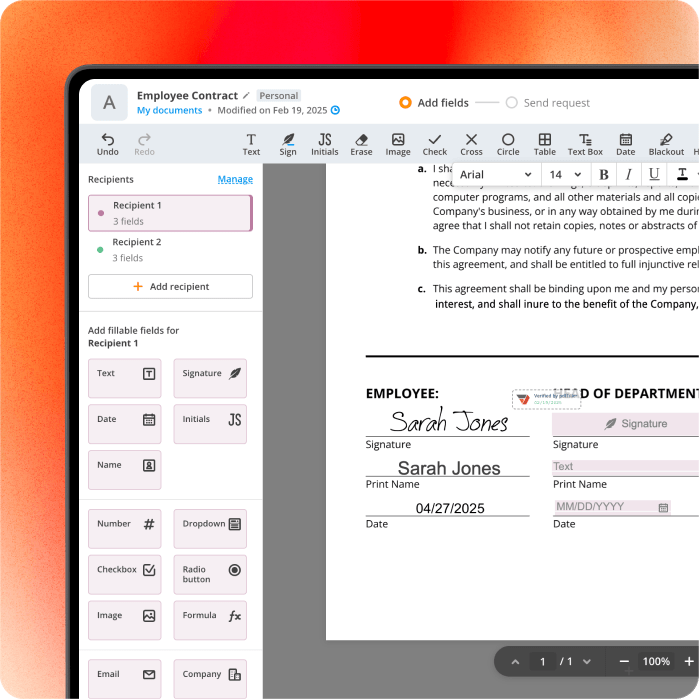
Replace Date in PDF
Replace dates in your PDF documents quickly and easily using pdfFiller's intuitive interface.
What is the Replace Date Feature?
The Replace Date feature in pdfFiller allows you to quickly update dates in your PDF documents. Accessible via the pdfFiller editor, this tool enables users to make changes without the need for complex editing software. You can replace dates efficiently while maintaining the original document formatting, ensuring that your PDFs look professional. This feature works on any device, making it convenient for you to edit documents from anywhere without being tied to a specific platform.
Why Replace Dates in PDFs?
Updating dates in your PDF documents is crucial for ensuring legal compliance and maintaining document relevance. Outdated information can lead to confusion for recipients, which is why regularly replacing dates is important. By keeping your documents accurate, you can avoid potential misunderstandings and ensure that all parties are on the same page regarding timelines and deadlines.
How to Access the Replace Date Feature
- Open the pdfFiller editor on your device.
- Upload your PDF document that requires date updates.
- Locate the Replace Date option in the toolbar.
- Follow the prompts provided by the editor to replace the dates.
Step-by-Step: Replacing Dates in Your PDF
- Open your document in the pdfFiller editor to begin the process.
- Select the date field that you wish to edit within the document.
- Input the new date that you want to replace the old one with.
- Save the changes to your PDF to ensure the new date is updated.
Common Scenarios for Replacing Dates
There are several practical applications for the Replace Date feature. For instance, you may need to update contracts before signing to reflect the current date. Additionally, correcting dates on invoices is essential for accurate billing. Adjusting deadlines in project documents is another common scenario where replacing dates is necessary to keep all stakeholders informed and aligned.
Field Properties for Date Replacement
When configuring date fields in pdfFiller, you can set date format preferences according to your needs. You can also mark fields as required, ensuring that users fill in necessary information. Additionally, customizing the appearance of the date fields can enhance the overall look of your document, making it more user-friendly and visually appealing.
Limitations of Replacing Dates in PDFs
While the Replace Date feature is powerful, it does come with certain limitations. There is a maximum number of editable fields that you can modify within a single document. Additionally, only specific field types can be replaced, which may restrict some users. Compatibility with scanned documents is another consideration, as this feature primarily works with text-based PDFs.
Security of Your PDF Documents
pdfFiller prioritizes the security of your documents. All files are encrypted during upload, ensuring that your data remains safe. Additionally, files are automatically deleted from the server after processing, which further protects your privacy. pdfFiller also complies with data protection standards, giving you peace of mind when managing sensitive information.
How Does pdfFiller Compare?
Adobe Acrobat offers comprehensive features but is more complex and costly. Users may find pdfFiller's simplicity and affordability more appealing. DocuSign focuses on e-signatures but lacks extensive editing features. pdfFiller provides a more rounded document management solution. JotForm primarily serves as a form builder with limited PDF editing capabilities, while pdfFiller excels in versatile document editing and management.
Next Steps After Replacing Dates
Once you have replaced the dates in your PDF, the next steps are crucial for effective document management. First, save the updated document to ensure that all changes are retained. Then, share the document securely with recipients to maintain confidentiality. Finally, consider creating templates for future use, which can save time and ensure consistency in your document management processes.