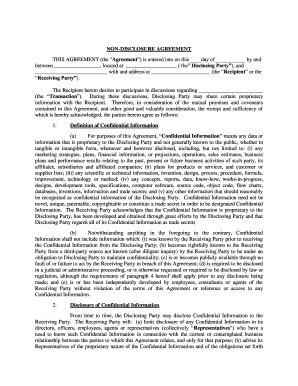
What are One-Way Information Sharing (Non-Disclosure) Agreement Templates?

One-Way Information Sharing (Non-Disclosure) Agreement Templates are legal documents that outline the sensitive information that one party will be sharing with another party. These agreements help protect the confidentiality of the information being shared and prevent it from being disclosed to third parties.

What are the types of One-Way Information Sharing (Non-Disclosure) Agreement Templates?

There are several types of One-Way Information Sharing (Non-Disclosure) Agreement Templates, including but not limited to: 1. Standard One-Way Non-Disclosure Agreement 2. Mutual Non-Disclosure Agreement 3. Unilateral Non-Disclosure Agreement 4. Employee Non-Disclosure Agreement

Standard One-Way Non-Disclosure Agreement
Mutual Non-Disclosure Agreement
Unilateral Non-Disclosure Agreement
Employee Non-Disclosure Agreement

How to complete One-Way Information Sharing (Non-Disclosure) Agreement Templates

To complete a One-Way Information Sharing (Non-Disclosure) Agreement Template, follow these steps: 1. Fill in the parties' names and contact information. 2. Specify the duration of the agreement. 3. Define the confidential information being shared. 4. Outline the obligations of the receiving party to keep the information confidential. 5. Include any additional terms or conditions specific to the agreement.

01
Fill in the parties' names and contact information
02
Specify the duration of the agreement
03
Define the confidential information being shared
04
Outline the obligations of the receiving party to keep the information confidential
05
Include any additional terms or conditions specific to the agreement

pdfFiller empowers users to create, edit, and share documents online. Offering unlimited fillable templates and powerful editing tools, pdfFiller is the only PDF editor users need to get their documents done.
Video Tutorial How to Fill Out One-Way Information Sharing (Non-Disclosure) Agreement Templates

Thousands of positive reviews can’t be wrong

Read more or give pdfFiller a try to experience the benefits for yourself
5.0
The app notifies me of when someone fills out my form.
What do you like best? The app notifies me of when someone fills out my form. What do you dislike? The integration from the link in the email to the app on my phone. For some reason, there is a disconnect. Recommendations to others considering the product: If you have customizations and processes you wish to conform E-signature function in your documents, PDF Filler is a great tool. Great for contract-heavy and approval-required documents for our business. Great for folks who have medium to advanced level of word processing abilities and technical capabilities with graphic apps. If that's you, you will be a quick study. If you find it dificult to work in a Word document or Powerpoint or other types of programs, this app will have a learning curve for you. What problems are you solving with the product? What benefits have you realized? I cut down my use of paper and ink. I save time by modifying PDF's within the application. I can merge multiple documents. It has streamlined processes in our business to get paid faster and run more efficiently.
Administrator in Architecture & Planning
4.0
I use the pdf merge feature constantly.
What do you like best? I use the pdf merge feature constantly. It's great for compiling packets, assorted documents, expense reports etc. What do you dislike? It's not cheap, limited to uploading 5 docs. What problems are you solving with the product? What benefits have you realized? Compiling meeting materials. Digital signatures.
Administrator in Non-Profit Organization Management
5.0
I love that you can use one of their templates, or upload a form of your own to...
What do you like best? I love that you can use one of their templates, or upload a form of your own to complete! What do you dislike? I haven't been able to find any cons yet! What problems are you solving with the product? What benefits have you realized? I have clients that need medical claim forms sent to insurance companies (they keep their own books). I can enter in the info and go!
Sandra Durant
5.0
Very great experience with editing pdf files.
What do you like best? Very great experience with editing pdf files. Helps to create a digital signature, no need to print the documents to sign them. PDFfiller does it all for you. What best is to save the paper save the environment. Best website during such a pandemic situation, while working at home. What do you dislike? There is just one problem that it just provides limited font styles. Please provide more font options and some more features like double spacing etc. Recommendations to others considering the product: It is the best website if you are working from home if you are an environment lover and want to save the earth by not printing paper and also save money. What problems are you solving with the product? What benefits have you realized? We are in the transportation business, so we have to send the documents for the Border clearance. Earlier, we used to print the documents and then put a border sticker and write notes with a pen on it. But, with the help of this, we are saving a lot of paper. Just upload the docs to pdffiller and copy, paste border sticker, and write notes with edit text icon. Everything is easy now.
Amalok Chauhan

Questions & answers

You do not need a lawyer to create and sign a non-disclosure agreement. However, if the information you are trying to protect is important enough to warrant an NDA, you may want to have the document reviewed by someone with legal expertise.
When an NDA has only one disclosing and one receiving party, it's called a one-way NDA. A one-way NDA is the simplest NDA type. It prohibits the receiver from sharing confidential business information with third parties and determines the consequences of doing so.
Some common examples of unilateral NDAs include: Employer-employee NDA: Restricts employees from revealing trade secrets and business information. Company-contractor NDA: Restricts hired contractors from taking business information and sharing it with competitors or using it for themselves.
Most standard NDAs follow this format: Introduction. Definition of confidential information. How to handle confidential information. Exclusions from confidential information. Obligations of receiving party. Duration of agreement. Resolving disputes. Integration.
Unilateral NDAs are used when only one party is disclosing information such as an employer, a startup or a company to an employee, investor or consultant respectively. On the other hand, a mutual NDA is used when both parties are disclosing confidential information.
The Receiving Party agrees to use the Confidential Information solely in connection with the current or contemplated business relationship between the parties and not for any purpose other than as authorized by this Agreement without the prior written consent of an authorized representative of the Disclosing Party.