
Last updated on
Oct 2, 2026

Get the free Maryland Retiree Beneficiary Change Request
We are not affiliated with any brand or entity on this form

Fill out
Complete the form online in a simple drag-and-drop editor.

eSign
Add your legally binding signature or send the form for signing.

Share
Share the form via a link, letting anyone fill it out from any device.

Export
Download, print, email, or move the form to your cloud storage.
Why pdfFiller is the best tool for your documents and forms


End-to-end document management
From editing and signing to collaboration and tracking, pdfFiller has everything you need to get your documents done quickly and efficiently.
Accessible from anywhere
pdfFiller is fully cloud-based. This means you can edit, sign, and share documents from anywhere using your computer, smartphone, or tablet.
Secure and compliant
pdfFiller lets you securely manage documents following global laws like ESIGN, CCPA, and GDPR. It's also HIPAA and SOC 2 compliant.
What is Maryland Beneficiary Change
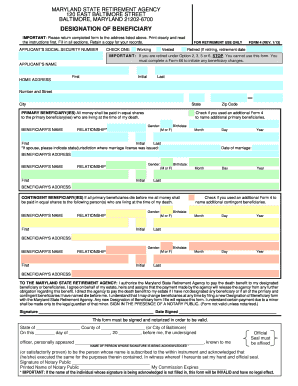
The Maryland Retiree Beneficiary Change Request is a government form used by retirees to request a change of their beneficiary information for retirement benefits.
pdfFiller scores top ratings on review platforms




Who needs Maryland Beneficiary Change?
Explore how professionals across industries use pdfFiller.

Maryland Beneficiary Change is needed by:
-
Maryland retirees looking to update their beneficiary details
-
Individuals requiring joint survivorship benefit calculations
-
Members of the Maryland State Retirement Agency
-
Financial advisors assisting retirees with beneficiary changes
-
Family members of retirees needing to understand the process
-
Legal representatives managing retiree affairs
Comprehensive Guide to Maryland Beneficiary Change
What is the Maryland Retiree Beneficiary Change Request?
The Maryland Retiree Beneficiary Change Request, specifically Form 66A, plays a crucial role in managing beneficiary designations for retirees. This form is essential for retirees considering changes to their beneficiary information, especially regarding joint survivorship benefits. It is mandatory for retirees to provide their signature, ensuring the authenticity and validity of the request.
Purpose and Benefits of the Maryland Retiree Beneficiary Change Request
Submitting the Maryland Retiree Beneficiary Change Request allows retirees to ensure their beneficiary information is current and accurately reflects their wishes. The advantages of updating this information include potential improvements in retirement benefit arrangements and the safeguarding of joint survivorship rights. Additionally, maintaining up-to-date records with the State Retirement Agency is critical to avoid any complications regarding beneficiaries.
Who Needs the Maryland Retiree Beneficiary Change Request?
This form is necessary for retirees in various situations, such as changing a previous beneficiary or adding a new one. Retirees contemplating these changes benefit greatly from submitting this form, as it directly affects the rights and benefits of spouses or dependents. Identifying when to use this form is vital for ensuring that all beneficiaries are appropriately designated and protected under retirement plans.
Eligibility Criteria for the Maryland Retiree Beneficiary Change Request
Eligibility to use the Maryland Retiree Beneficiary Change Request requires that the applicant be a retiree in Maryland. Specific criteria include being a participant in a retirement plan and satisfying any additional requirements that pertain to the beneficiary structure, particularly in cases involving joint survivorship. Understanding these eligibility requirements is crucial to facilitate effective and timely changes to beneficiary designations.
How to Fill Out the Maryland Retiree Beneficiary Change Request Online (Step-by-Step)
Filling out the Maryland Retiree Beneficiary Change Request online is a straightforward process. Follow these steps to ensure completion:
-
Access the form and enter your full name.
-
Provide your social security number and address accurately.
-
Indicate your date of retirement.
-
Review all sections for missing information.
-
Ensure accuracy in the information provided before submission.
Double-checking your entries can help avoid unnecessary delays in processing.
Common Errors and How to Avoid Them
When completing the Maryland Retiree Beneficiary Change Request, retirees often encounter several common mistakes that can hinder processing. Frequent errors include:
-
Leaving fields incomplete or incorrectly filled.
-
Failing to sign the form where required.
-
Not updating beneficiary information that has changed.
To minimize errors, carefully review the form before submission, as inaccuracies can result in delays.
How to Submit the Maryland Retiree Beneficiary Change Request
Submitting the completed Maryland Retiree Beneficiary Change Request can be done through various methods:
-
Mailing the form directly to the State Retirement Agency.
-
Ensuring the form is signed by the retiree.
-
Understanding if notarization is required, based on individual circumstances.
Tracking the submission ensures that users can monitor their request's progress effectively.
Security and Privacy of Your Information
Handling sensitive information securely is paramount in the Maryland Retiree Beneficiary Change Request process. Robust security measures, including encryption protocols, are employed to protect retiree data. Compliance with HIPAA and GDPR standards ensures that all documents are managed with the utmost care. Retirees can have confidence in the handling of their personal information throughout the process.
Using pdfFiller for Your Maryland Retiree Beneficiary Change Request
pdfFiller enhances the experience of filling out the Maryland Retiree Beneficiary Change Request with its advanced editing and signing features. Users can benefit from:
-
Seamless form completion and eSigning capabilities.
-
Editing features that allow for easy adjustments to entries.
-
Secure document management compliant with industry standards.
This online platform makes it easier for retirees to manage their beneficiary change requests efficiently.
Next Steps After Submission
After submitting the Maryland Retiree Beneficiary Change Request, retirees should expect to receive confirmation of receipt. Important next steps include:
-
Understanding the expected processing timelines for changes.
-
Knowing how to make post-submission changes if necessary.
-
Checking the application status with the State Retirement Agency as needed.
Staying informed about application progress helps retirees maintain control over their beneficiary designations.
How to fill out the Maryland Beneficiary Change
-
1.To access the Maryland Retiree Beneficiary Change Request form on pdfFiller, open your web browser and navigate to the pdfFiller website.
-
2.In the search bar, type 'Maryland Retiree Beneficiary Change Request' to locate the form quickly or browse through the Government Forms section.
-
3.Once you find the form, click on it to open it in the pdfFiller interface. You can start filling it out directly from this screen.
-
4.Prepare all necessary personal information, including your name, address, Social Security number, date of birth, and details of the new beneficiary such as their relationship to you.
-
5.Carefully navigate the fillable fields marked clearly within the form. Click on each field to enter your information and follow any in-form instructions provided.
-
6.Make sure to double-check all entered information for accuracy, as mistakes could delay processing your request.
-
7.After completing all required fields, review the form thoroughly. Ensure your personal information is correct, and all beneficiary details are accurately represented.
-
8.Once you are satisfied with your input, use the 'Save' option to store your form, or choose 'Download' to save it as a PDF to your device.
-
9.To submit, check if there are submission options available through pdfFiller, or print the form to mail it to the Maryland State Retirement Agency.

Who is eligible to use the Maryland Retiree Beneficiary Change Request form?
This form is intended for retirees of Maryland who wish to change their retirement benefits beneficiary. You must be a member of the Maryland State Retirement Agency.
Are there deadlines for submitting this form?
While the form does not specify a submission deadline, it is advisable to submit it as soon as you wish to make beneficiary changes to ensure prompt processing of your request.
How do I submit the Maryland Beneficiary Change Request form?
You can submit the completed form by mailing it to the Maryland State Retirement Agency once it is properly filled out and signed. Make sure to check for any submission methods noted on the form itself.
What supporting documents are needed with this form?
Typically, you may need to provide identification information such as Social Security numbers for both you and the new beneficiary. However, check specific requirements from the Maryland State Retirement Agency.
What are common mistakes to avoid when filling out this form?
Make sure to avoid leaving fields blank and double-check the accuracy of names and Social Security numbers. Incorrect information can delay processing and necessitate further correspondence.
How long does it take to process the request after submission?
Processing times can vary, but generally, expect several weeks before you receive notification about the status of your beneficiary change request. It’s advisable to follow up if you do not hear back.
Is notarization required for this form?
No, the Maryland Retiree Beneficiary Change Request form does not require notarization. However, the form must be signed by the retiree.
Related Content
Related Forms




Related Catalogs
Get the latest insights from our blog



If you believe that this page should be taken down, please follow our DMCA take down process
here
.
This form may include fields for payment information. Data entered in these fields is not covered by PCI DSS compliance.