
Last updated on
Sep 27, 2026

Get the free RL360 Policy Withdrawal Request Form
We are not affiliated with any brand or entity on this form

Fill out
Complete the form online in a simple drag-and-drop editor.

eSign
Add your legally binding signature or send the form for signing.

Share
Share the form via a link, letting anyone fill it out from any device.

Export
Download, print, email, or move the form to your cloud storage.
Why pdfFiller is the best tool for your documents and forms


End-to-end document management
From editing and signing to collaboration and tracking, pdfFiller has everything you need to get your documents done quickly and efficiently.
Accessible from anywhere
pdfFiller is fully cloud-based. This means you can edit, sign, and share documents from anywhere using your computer, smartphone, or tablet.
Secure and compliant
pdfFiller lets you securely manage documents following global laws like ESIGN, CCPA, and GDPR. It's also HIPAA and SOC 2 compliant.
What is Withdrawal Request
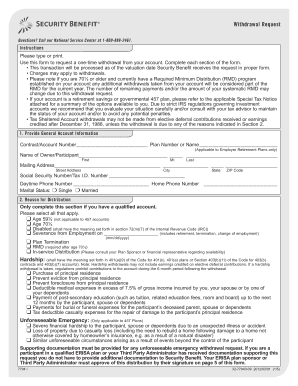
The RL360 Policy Withdrawal Request Form is an official document used by policyholders to request withdrawals from their insurance policies.
pdfFiller scores top ratings on review platforms




Who needs Withdrawal Request?
Explore how professionals across industries use pdfFiller.

Withdrawal Request is needed by:
-
Policyholders seeking to access their funds
-
Trustees managing policy-related transactions
-
Authorized signatories representing policyholders
-
Insurance agents assisting clients with withdrawals
-
Financial advisors guiding clients in withdrawal processes
Comprehensive Guide to Withdrawal Request
What is the RL360 Policy Withdrawal Request Form?
The RL360 Policy Withdrawal Request Form serves as a crucial tool for policyholders seeking to execute a withdrawal from their investment policy. This form is designed to facilitate both one-off and regular withdrawals, catering to various financial needs. The intended users of this form include policyholders, trustees, and authorized signatories responsible for managing these policies. Completing this form is essential for ensuring that requests for withdrawal are processed accurately and efficiently.
Purpose and Benefits of the RL360 Policy Withdrawal Request Form
This form is vital for accessing funds accrued in a policy, making it an indispensable aspect of financial management for policyholders. Utilizing the RL360 Policy Withdrawal Request Form allows individuals to efficiently handle their financial obligations through withdrawals when necessary. It is important to consider potential tax implications and penalties associated with these withdrawals to make informed decisions regarding financial strategies.
Who Needs the RL360 Policy Withdrawal Request Form?
Policyholders and authorized signatories are the primary individuals who require the RL360 Policy Withdrawal Request Form. Various scenarios may necessitate its use, such as changes in financial circumstances or the desire to access accumulated benefits. Understanding eligibility criteria before submitting the form is critical to ensure compliance with policy requirements.
How to Fill Out the RL360 Policy Withdrawal Request Form Online
Completing the RL360 Policy Withdrawal Request Form online is a streamlined process. Start by accessing the form through the designated platform. Essential fields to fill include:
-
First name(s)
-
Last name(s)
-
Current residential address
-
Policy number
To ensure accuracy, double-check all provided information before proceeding with the submission. Each piece of information plays a pivotal role in the processing of withdrawal requests.
Field-by-Field Instructions for the RL360 Policy Withdrawal Request Form
Each section of the form requires specific information, with some fields marked as mandatory. Detailed instructions for completing the form include:
-
Providing accurate personal identification in the 'First name(s)' and 'Last name(s)' fields.
-
Ensuring the correct 'Current residential address' is inputted, as this validates your identity.
-
Noting the importance of the 'Signature' and 'Date' fields, as they confirm the authenticity of your submission.
Avoid common mistakes by reviewing each section carefully and providing all necessary details accurately.
Submission Methods and Delivery for the RL360 Policy Withdrawal Request Form
Once the RL360 Policy Withdrawal Request Form is completed, users have several options for submission. This includes:
-
Submitting the form online through the designated platform.
-
Mailing the completed form to the specified address.
Users should be aware of the timelines for processing and the subsequent steps after submission. It's essential to track the status of your submission to confirm receipt and any follow-up actions required.
What Happens After You Submit the RL360 Policy Withdrawal Request Form
Following the submission of the RL360 Policy Withdrawal Request Form, requests undergo a review and approval process. Anticipate a specific timeline for processing, as it varies based on several factors. In case of issues with the submission, users have options to amend or correct information to avoid potential delays in receiving funds.
Security and Compliance when Using the RL360 Policy Withdrawal Request Form
When handling sensitive information through the RL360 Policy Withdrawal Request Form, security measures are paramount. Robust security protocols protect personal data, ensuring compliance with regulations such as HIPAA and GDPR. Users are advised to utilize trusted platforms for submitting their forms to safeguard their information.
Why Choose pdfFiller for Your RL360 Policy Withdrawal Request Form?
pdfFiller stands out as the optimal solution for filling out the RL360 Policy Withdrawal Request Form. Its user-friendly interface allows for seamless document management, including features like eSigning and cloud functionality. By leveraging pdfFiller, users can benefit from a streamlined experience when completing and submitting their forms, ensuring efficiency and security throughout the process.
Start Your RL360 Policy Withdrawal Request Form Today!
Experience the convenience of filling out the RL360 Policy Withdrawal Request Form online using pdfFiller's platform. Creating an account provides access to various tools designed to simplify the form-filling process. Should you encounter any issues, support is readily available to assist you along the way.
How to fill out the Withdrawal Request
-
1.To access the RL360 Policy Withdrawal Request Form on pdfFiller, type the form's name in the search bar and select the document from the results.
-
2.Once opened, familiarize yourself with the layout, noting the sections that require input, such as personal information and signatures.
-
3.Gather necessary information including your policy number, full name, current residential address, and payment instructions prior to starting the form.
-
4.Fill in the blank fields carefully; ensure that all required sections are completed, such as 'First name(s)', 'Last name(s)', 'Current residential address', 'Signature', and 'Date (dd/mm/yyyy)'.
-
5.Review all entries for accuracy to prevent mistakes that may delay processing. Double-check that all necessary fields are filled.
-
6.Finalize the form by ensuring the signature is included and all information is correct. Utilize pdfFiller's built-in validation tools if available.
-
7.Once completed, save your document by clicking the save option. You can then choose to download a copy or submit directly through pdfFiller to RL360°.

Who is eligible to complete the RL360 Policy Withdrawal Request Form?
Eligibility for this form is generally granted to policyholders, trustees, or authorized signatories that have the necessary authority to initiate a withdrawal.
What is the deadline for submitting this withdrawal request?
Submission deadlines can vary based on policy terms. It is advisable to check your policy documents or contact RL360° directly for specific timeline requirements.
How do I submit the completed form?
After completing the RL360 Policy Withdrawal Request Form, you can submit it directly through pdfFiller by following the provided submission options, or you may send a printed copy to RL360° via postal mail.
What supporting documents are required with the withdrawal request?
Typically, no additional documents are required beyond the completed form. However, it is prudent to check your policy specifics for any additional requirements.
What common mistakes should I avoid when filling out the form?
Be sure to avoid incomplete fields, incorrect signatures, and failure to include the policy number. Review the form carefully before submission to ensure all information is accurate.
How long does it take to process withdrawal requests?
Withdrawal processing times vary based on policy types and terms. Generally, expect a processing period of 5-10 business days after submission.
Are there any fees associated with making a withdrawal?
Potential fees may apply for early withdrawals or specific transactions. Review your policy documentation for fee details related to withdrawals.
Related Content
Related Forms





Get the latest insights from our blog


If you believe that this page should be taken down, please follow our DMCA take down process
here
.
This form may include fields for payment information. Data entered in these fields is not covered by PCI DSS compliance.