
Last updated on
Oct 19, 2026

Get the free Printing Specifications Worksheet
We are not affiliated with any brand or entity on this form

Fill out
Complete the form online in a simple drag-and-drop editor.

eSign
Add your legally binding signature or send the form for signing.

Share
Share the form via a link, letting anyone fill it out from any device.

Export
Download, print, email, or move the form to your cloud storage.
Why pdfFiller is the best tool for your documents and forms


End-to-end document management
From editing and signing to collaboration and tracking, pdfFiller has everything you need to get your documents done quickly and efficiently.
Accessible from anywhere
pdfFiller is fully cloud-based. This means you can edit, sign, and share documents from anywhere using your computer, smartphone, or tablet.
Secure and compliant
pdfFiller lets you securely manage documents following global laws like ESIGN, CCPA, and GDPR. It's also HIPAA and SOC 2 compliant.
What is Printing Specs
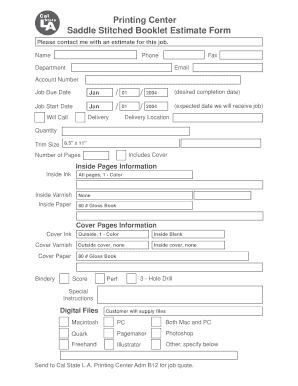
The Printing Specifications Worksheet is a business form used by printing companies to collect essential details about a print job from customers.
pdfFiller scores top ratings on review platforms




Who needs Printing Specs?
Explore how professionals across industries use pdfFiller.

Printing Specs is needed by:
-
Printing business owners looking to streamline customer orders
-
Graphic designers needing a reliable specifications template
-
Marketing professionals coordinating print materials
-
Customer service representatives managing print job details
-
Freelance printers fulfilling client specifications
Comprehensive Guide to Printing Specs
What is the Printing Specifications Worksheet?
The Printing Specifications Worksheet is a critical form used by printing businesses to gather detailed information about print jobs from customers. It serves to ensure accuracy and efficiency throughout the printing process. Key input fields in the worksheet include job number, due date, and customer details, all of which facilitate organized and effective communication about print requirements.
Purpose and Benefits of Using the Printing Specifications Worksheet
Having a detailed print order form like the Printing Specifications Worksheet offers significant advantages. It aids in ensuring that all necessary specifications are captured upfront, leading to fewer errors during production. By using this worksheet, printing businesses can enhance the accuracy and efficiency of their operations, reducing the chances of miscommunication and project delays.
Key Features of the Printing Specifications Worksheet
-
Includes essential fields such as press type, size, and quantity.
-
Allows for customization to accommodate unique print job requirements.
-
Helps in minimizing errors by providing clear, structured input fields.
-
Facilitates effective communication between clients and printing professionals.
Who Needs the Printing Specifications Worksheet?
The primary users of the Printing Specifications Worksheet include businesses and individual clients seeking print services. Various industries, such as marketing and publishing, commonly utilize this form to ensure their print specifications are detailed and clear. Additionally, professionals like printers and designers find the worksheet beneficial for managing print jobs efficiently.
How to Fill Out the Printing Specifications Worksheet Online
-
Access the worksheet via pdfFiller.
-
Locate the input fields for job number, due date, and customer details.
-
Fill in all the sections accurately, ensuring that all information is complete.
-
Review the details entered for any potential discrepancies.
-
Save the completed document for your records.
Common Errors and How to Avoid Them When Using the Printing Specifications Worksheet
-
Incomplete or missing fields that can lead to confusion.
-
Ambiguous descriptions that may confuse the printing team.
-
Incorrect quantities or specifications not matching the job requirements.
-
Neglecting to double-check details before submission.
How to Download, Print, and Save the Printing Specifications Worksheet
To download and save the Printing Specifications Worksheet as a PDF, users can follow several methods through pdfFiller. Options include using the 'Download' feature for file storage and various printing options available for immediate hard copies. Furthermore, pdfFiller offers the convenience of securely saving documents in the cloud for easy access at any time.
Submitting the Completed Printing Specifications Worksheet
After completing the Printing Specifications Worksheet, users can submit it through various methods, such as email or direct upload to the printing service’s platform. It is advisable to follow best practices when submitting print jobs according to the worksheet to ensure it reaches the intended destination promptly. Be aware of any potential fees or processing times associated with the submission.
Enhance Your Workflow with pdfFiller's Features
pdfFiller provides multiple capabilities that streamline the printing process, including eSigning, form filling, and document editing. The robust security features guarantee safe handling of sensitive documents, offering users peace of mind. Managing documents online without the need for downloads further enhances user convenience, allowing for effortless organization.
Start Using the Printing Specifications Worksheet Today!
Utilizing the Printing Specifications Worksheet through pdfFiller simplifies the form filling and management process. With user-friendly features and reliable support, users experience a positive impact on their printing workflows by integrating this essential tool into their operations.
How to fill out the Printing Specs
-
1.To access the Printing Specifications Worksheet on pdfFiller, go to the pdfFiller website and use the search bar to find the form by name.
-
2.Once found, click on the form to open it in pdfFiller's editing interface, which allows easy navigation and input.
-
3.Before starting to complete the form, gather all necessary information such as job specifications, customer details, and any specific printing requirements.
-
4.Navigate the form by clicking on each labeled input field. Use the text areas and dropdown menus to fill in information such as 'JOB NUMBER', 'DATE DUE', and 'CUSTOMER NAME'.
-
5.Be sure to fill out all required fields including job description, press type, size, quantity, and specifics about paper and ink.
-
6.After completing the form, take a moment to review all filled information for accuracy. Ensure that all specifications align with the customer’s request.
-
7.Once reviewed, save and download the completed form by clicking on the 'Save' button. You can also choose to submit the form directly through pdfFiller if that option is available.

Who is eligible to use the Printing Specifications Worksheet?
The Printing Specifications Worksheet is designed for use by professionals in the printing industry, including print business owners, graphic designers, and freelance printers, who need to gather detailed job specifications from clients.
What is the deadline for submitting this form?
While the Printing Specifications Worksheet does not have a strict deadline, it's important to complete it as soon as possible to ensure timely processing and delivery of print jobs.
How should I submit the Printing Specifications Worksheet?
You can submit the completed Printing Specifications Worksheet directly through pdfFiller if that feature is enabled. Alternatively, print the form and send it via email or mail, following your specific business procedures.
What supporting documents do I need when filling out this form?
Typically, you will need details such as customer contact information, specific job requirements, and any previous communication with the client regarding the print job to complete the worksheet accurately.
What are common mistakes to avoid when filling out this form?
Ensure all required fields are filled to avoid delays. Common mistakes include incomplete job descriptions and incorrect paper or ink specifications. Double-checking information prevents errors.
How long does it take to process the Printing Specifications Worksheet?
Processing times may vary based on the printer’s workload, but typically, once submitted, you should expect to receive an update within a few business days.
What if I need to make changes after submitting the form?
If you need to make changes to the Printing Specifications Worksheet after submission, contact the printer immediately with your updated instructions to rectify any errors.
Related Content
Related Forms




Get the latest insights from our blog



If you believe that this page should be taken down, please follow our DMCA take down process
here
.
This form may include fields for payment information. Data entered in these fields is not covered by PCI DSS compliance.