
Last updated on
Nov 5, 2026
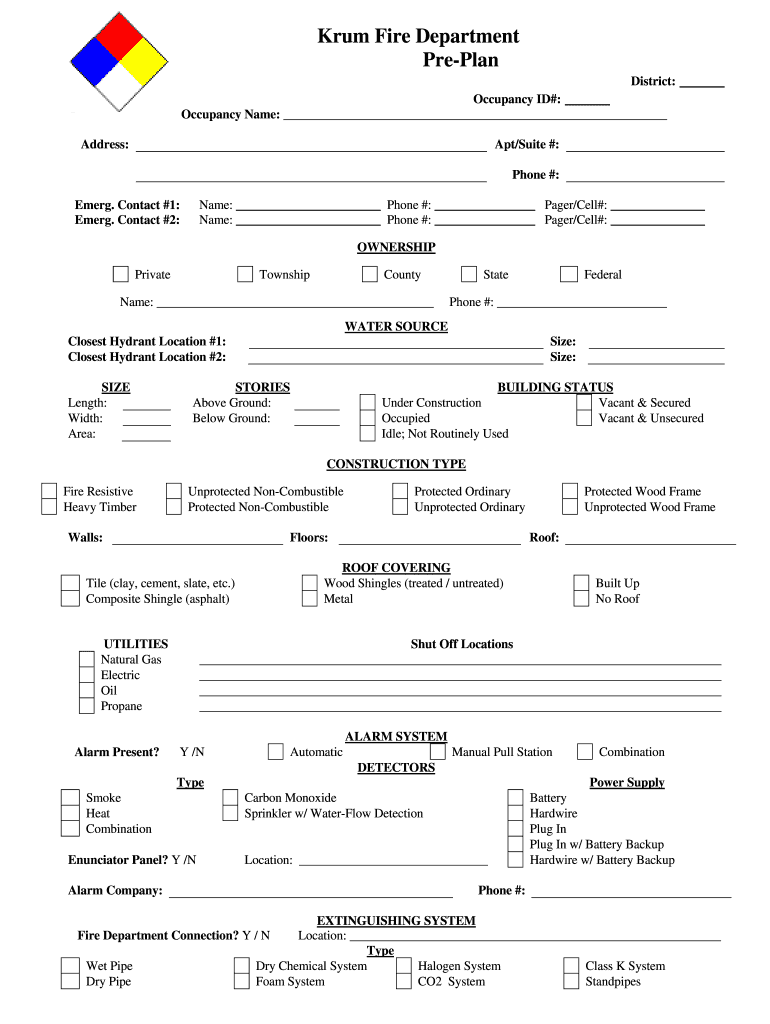
TX Krum Fire Department Pre-Plan free printable template
pdfFiller is not affiliated with any government organization

Fill out
Complete the form online in a simple drag-and-drop editor.

eSign
Add your legally binding signature or send the form for signing.

Share
Share the form via a link, letting anyone fill it out from any device.

Export
Download, print, email, or move the form to your cloud storage.
Why pdfFiller is the best tool for your documents and forms


End-to-end document management
From editing and signing to collaboration and tracking, pdfFiller has everything you need to get your documents done quickly and efficiently.
Accessible from anywhere
pdfFiller is fully cloud-based. This means you can edit, sign, and share documents from anywhere using your computer, smartphone, or tablet.
Secure and compliant
pdfFiller lets you securely manage documents following global laws like ESIGN, CCPA, and GDPR. It's also HIPAA and SOC 2 compliant.
What is TX Krum Fire Department Pre-Plan
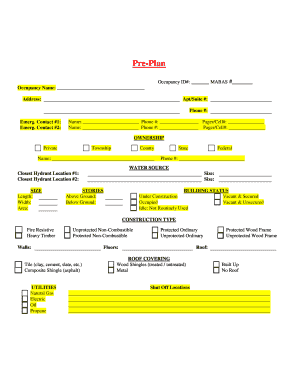
The Krum Fire Department Pre-Plan Form is a government document used by fire departments to outline emergency response strategies for specific occupancy types.
pdfFiller scores top ratings on review platforms




It is a good user friendly, useful software with very good features.
This tool provides professional documents. Highly recommended.
Who needs TX Krum Fire Department Pre-Plan?
Explore how professionals across industries use pdfFiller.

TX Krum Fire Department Pre-Plan is needed by:
-
Fire department personnel
-
Building managers and owners
-
Emergency response teams
-
Local government officials
-
Safety inspectors
-
First responders
Comprehensive Guide to TX Krum Fire Department Pre-Plan
What is the Krum Fire Department Pre-Plan Form?
The Krum Fire Department Pre-Plan Form plays a crucial role in emergency preparedness by serving as a critical tool for emergency response planning. This form is utilized to document essential details regarding specific occupancies, ensuring that responders have the necessary information at their disposal. Key information included in the form encompasses occupancy details, available water sources, and the building's construction type.
By capturing vital data, the Krum Fire Department Pre-Plan Form augments the effectiveness of emergency responses, promoting overall safety within the community.
Purpose and Benefits of the Krum Fire Department Pre-Plan Form
This form offers numerous advantages for both the Krum Fire Department and building occupants. Utilizing the Krum Fire Department Pre-Plan Form enhances building safety by ensuring that firefighters are well-informed about potential hazards before they arrive at the scene.
Furthermore, proper documentation minimizes response times during emergencies, as the fire department can quickly access vital information, improving their operational efficiency in high-pressure situations.
Key Features of the Krum Fire Department Pre-Plan Form
Essential features of the Krum Fire Department Pre-Plan Form include various fillable sections designed to capture critical information pertinent to emergency response. Some of the key fields featured in the form consist of:
-
Occupancy information
-
Utilities and water sources
-
Hazardous materials present on-site
-
Alarm systems in place
The inclusion of signatures in the documentation emphasizes accountability, ensuring that all information is verified by the appropriate parties.
Who Needs to Use the Krum Fire Department Pre-Plan Form?
The Krum Fire Department Pre-Plan Form is primarily required to be filled out by property owners and fire inspectors. Understanding the specific regulations that apply to various occupancy types helps ensure that the form is completed accurately and comprehensively.
This structured approach is vital for maintaining safety standards and compliance within the community, allowing the fire department to effectively respond to emergencies.
How to Fill Out the Krum Fire Department Pre-Plan Form Online (Step-by-Step)
Completing the Krum Fire Department Pre-Plan Form online is a straightforward process when using pdfFiller. Follow these steps to fill out the form digitally:
-
Access the Krum Fire Department Pre-Plan Form on pdfFiller.
-
Locate the fillable fields for occupancy ID, water source, and utility details.
-
Carefully enter all required information.
-
Utilize editing tools on pdfFiller to ensure accuracy.
-
Save the completed form for submission.
This process ensures a user-friendly experience and the ability to edit entries easily before finalizing the form.
Common Errors and How to Avoid Them When Filling Out the Krum Fire Department Pre-Plan Form
When using the Krum Fire Department Pre-Plan Form, users often encounter typical pitfalls that can undermine the integrity of their submissions. Common errors include missing signatures and inaccurate data entries. To prevent these mistakes, consider the following tips:
-
Double-check all entries for completeness and accuracy.
-
Ensure that all required signatures are captured before submission.
Taking these precautions helps streamline the submission process and improves the overall accuracy of the submitted form.
How to Submit the Krum Fire Department Pre-Plan Form
Submitting the Krum Fire Department Pre-Plan Form can be accomplished via multiple methods, allowing for flexibility based on the submitter's preferences. Users can submit the form in-person, via postal mail, or through an online portal. It's essential to be aware of any necessary fees, deadlines, or additional documentation required during the submission process to ensure timely processing.
This clarity around submission methods aids in facilitating a smooth completion and ensures compliance with local requirements.
What Happens After You Submit the Krum Fire Department Pre-Plan Form?
Once the Krum Fire Department Pre-Plan Form is submitted, users can expect a confirmation process that includes tracking the status of their submission. Users will be notified if the submission is approved or if additional information is required. Typical timelines for processing vary, but being aware of these expectations helps in understanding the post-submission journey.
How pdfFiller Helps You with the Krum Fire Department Pre-Plan Form
pdfFiller simplifies the process of filling out the Krum Fire Department Pre-Plan Form with its extensive platform features. The tools provided offer users capabilities to edit, sign, and securely submit their forms, ensuring a seamless experience. With robust security measures, including 256-bit encryption, pdfFiller guarantees that sensitive data remains protected during the submission process.
Ready to Get Started with Your Krum Fire Department Pre-Plan Form?
Users are encouraged to start filling out the Krum Fire Department Pre-Plan Form using the pdfFiller platform. The convenience of online access, editing features, and eSigning capabilities makes the process efficient and straightforward, promoting enhanced safety and preparedness in emergency situations.
How to fill out the TX Krum Fire Department Pre-Plan
-
1.Access the Krum Fire Department Pre-Plan Form by visiting pdfFiller and searching for the form name in the search bar.
-
2.Once you find the form, click on it to open the PDF in the pdfFiller workspace.
-
3.Before starting to fill out the form, gather all necessary information including occupancy details, water sources, and utility information for accuracy.
-
4.Begin filling in the required fields, such as 'District', 'Occupancy ID#', and 'Inspected By', using the fillable forms feature.
-
5.Utilize tools within pdfFiller to add any required notes or comments in the designated areas provided in the form.
-
6.After completing the form, carefully review all entries to ensure there are no mistakes or omitted information.
-
7.Use the 'Finalize' option in pdfFiller to prepare the form for submission, ensuring that all necessary signatures are obtained.
-
8.Once finalized, save your work within pdfFiller by choosing the 'Save' option. You can download the completed form or opt to submit it directly through the platform.

Who is eligible to complete the Krum Fire Department Pre-Plan Form?
The Krum Fire Department Pre-Plan Form can be completed by fire department personnel and building inspectors. It is important that the form is filled out by individuals who have firsthand knowledge of the premises being inspected.
Are there deadlines for submitting the Krum Fire Department Pre-Plan Form?
While there are typically no strict deadlines for submitting this form, it is recommended to have it completed prior to any fire inspections or emergency response exercises to ensure accurate planning.
What methods can be used to submit the Pre-Plan Form?
The completed Krum Fire Department Pre-Plan Form can be submitted electronically via pdfFiller by sharing it directly with the fire department or printing and delivering it in person.
What supporting documents are required with the form?
No specific supporting documents are typically required with the Krum Fire Department Pre-Plan Form. However, it may be beneficial to include site plans or previous inspection reports for reference.
What are some common mistakes to avoid when filling out this form?
Ensure all required fields are completed accurately to avoid delays. Common mistakes include missing signatures, incorrect occupancy details, or failing to provide adequate emergency contact information.
What is the processing time for the Pre-Plan Form after submission?
Processing times for the Krum Fire Department Pre-Plan Form may vary. Generally, expect feedback or approval within a few days, but it’s advisable to follow up with the fire department for specific timelines.
How do I ensure my form is properly signed?
To ensure proper signing, you must use the designated signature field for 'Inspected By' on the Krum Fire Department Pre-Plan Form. Make sure that the individual inspecting the premises signs before submission.
Related Forms

Related Catalogs
Get the latest insights from our blog


If you believe that this page should be taken down, please follow our DMCA take down process
here
.
This form may include fields for payment information. Data entered in these fields is not covered by PCI DSS compliance.