
Last updated on
Nov 4, 2026

SG PSA Pass Renewal Form 2015-2026 free printable template
We are not affiliated with any brand or entity on this form

Fill out
Complete the form online in a simple drag-and-drop editor.

eSign
Add your legally binding signature or send the form for signing.

Share
Share the form via a link, letting anyone fill it out from any device.

Export
Download, print, email, or move the form to your cloud storage.
Why pdfFiller is the best tool for your documents and forms


End-to-end document management
From editing and signing to collaboration and tracking, pdfFiller has everything you need to get your documents done quickly and efficiently.
Accessible from anywhere
pdfFiller is fully cloud-based. This means you can edit, sign, and share documents from anywhere using your computer, smartphone, or tablet.
Secure and compliant
pdfFiller lets you securely manage documents following global laws like ESIGN, CCPA, and GDPR. It's also HIPAA and SOC 2 compliant.
What is SG PSA Pass Renewal Form
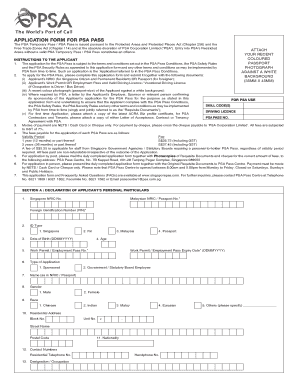
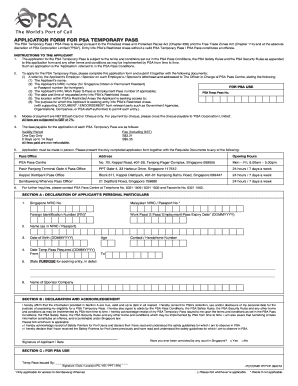
The PSA Pass Renewal Form is a government document used by individuals and employers in Singapore to renew access to PSA's Restricted Areas.
pdfFiller scores top ratings on review platforms




Who needs SG PSA Pass Renewal Form?
Explore how professionals across industries use pdfFiller.

SG PSA Pass Renewal Form is needed by:
-
Individuals requiring access to PSA restricted areas
-
Employers sponsoring employees for PSA access
-
Human Resource managers managing employee permits
-
Legal representatives handling permit documentation
-
Compliance officers ensuring regulatory adherence
Comprehensive Guide to SG PSA Pass Renewal Form
What is the PSA Pass Renewal Form?
The PSA Pass Renewal Form is a crucial document used in Singapore for individuals and their employers to renew access to Restricted Areas governed under the Protected Areas and Protected Places Act. This form must be filled out correctly to facilitate the renewal process, ensuring both compliance and efficiency in handling access permissions.
For applicants, the form represents the gateway to maintain essential access, while employers also benefit from ensuring their employees can operate within prescribed areas. Understanding the role of this form is vital for all parties involved, as it directly impacts operational capabilities in secure zones.
Purpose and Benefits of the PSA Pass Renewal Form
The primary purpose of the PSA Pass Renewal Form is to streamline the renewal process for access permissions. By utilizing efficient procedures, both individuals and employers can ensure that they remain compliant with regulatory requirements in Singapore.
One of the key advantages of the form is the convenience of online completion, especially through features available on platforms like pdfFiller. This not only accelerates the renewal process but also minimizes errors associated with manual submissions, making the experience smoother for everyone involved.
Who Needs the PSA Pass Renewal Form?
The PSA Pass Renewal Form must be filled out by two key roles: the Applicant and the Employer or Sponsor. An Applicant is typically the individual seeking access, while the Employer or Sponsor is responsible for endorsing the application, affirming the need for access to Restricted Areas.
Renewal situations vary, including scenarios involving changes in employment or access needs. Both parties are required to provide signatures on the form, highlighting the collaborative aspect of the renewal process that ensures accountability.
Required Documents and Supporting Materials
For a successful submission of the PSA Pass Renewal Form, various documents are essential. Key requirements include:
-
NRIC or passport details
-
Employment details such as the employee's role and their supervisor's information
-
Documentation supporting the need for access
Providing complete and accurate supporting materials is critical, as it helps prevent delays in the application process and allows for efficient handling by the relevant authorities.
How to Fill Out the PSA Pass Renewal Form Online
Filling out the PSA Pass Renewal Form online can be easily navigated through a step-by-step approach:
-
Access the online interface and select the appropriate form.
-
Carefully enter data in each fillable field, such as personal details and employment information.
-
Review all entered information to ensure accuracy before submission.
Utilizing tools like pdfFiller simplifies this process, ensuring that users can complete the form accurately and efficiently.
Common Errors and How to Avoid Them
Filling out the PSA Pass Renewal Form may present some common pitfalls that users should be aware of. Errors often stem from:
-
Incorrectly entered personal or employment information
-
Missing signature from either the Applicant or Employer
-
Failure to provide required supporting documents
To validate information and enhance the likelihood of acceptance, it’s important to review all entries thoroughly before finalizing the application. Employing a checking method can greatly reduce these mistakes.
How to Sign the PSA Pass Renewal Form
Signing the PSA Pass Renewal Form is a necessary step for both Applicants and Employers. There are distinct signing requirements based on the method used:
-
Digital signatures may be utilized via platforms such as pdfFiller, providing convenience and security.
-
Wet signatures are traditionally required for certain documents if digital options are not applicable.
Having proper signatures ensures the validity of the application, making this a critical step in the overall submission process.
Submission Methods for the PSA Pass Renewal Form
Once the form is completed, it's essential to know how to submit it correctly. There are multiple submission methods available:
-
Online submission through designated platforms
-
Mailing the form to the appropriate authorities
Tracking the application status after submission helps in managing expectations, and being aware of deadlines is crucial for timely renewal to avoid lapses in access.
What Happens After You Submit the PSA Pass Renewal Form?
After submitting the PSA Pass Renewal Form, applicants can expect a processing period influenced by several factors, including volume and completeness of submitted data. Upon processing, applicants will generally receive notifications regarding the status of their application.
Potential outcomes include approvals, requests for additional information, or rejections. Knowing how to effectively address common issues that may arise post-submission can help facilitate a smoother renewal experience.
Experience Seamless Form Management with pdfFiller
Using pdfFiller for managing the PSA Pass Renewal Form offers numerous benefits, including robust security features that comply with data protection standards. The platform enhances user experience through ease of use and provides efficient editing, eSigning, and sharing capabilities.
Choosing pdfFiller as your go-to solution empowers you to handle your PSA Pass Renewal efficiently and securely, ensuring a hassle-free approach to accessing Restricted Areas in Singapore.
How to fill out the SG PSA Pass Renewal Form
-
1.To start, access pdfFiller and search for 'PSA Pass Renewal Form' within the platform's document library.
-
2.Once you locate the form, click on it to open it in the pdfFiller editor.
-
3.Familiarize yourself with the layout of the form. Ensure you have the necessary information ready, such as personal details, employment information, and any supporting documents.
-
4.Begin filling in your details. Click on each form field to enter your information. You can use the fillable fields to input text, and checkboxes for options required in the form.
-
5.After completing your sections as the applicant, ensure you leave space for the employer's details and signature.
-
6.If you need to gather supporting documents such as identification or employment letters, do so before finalizing the form to avoid delays.
-
7.Once all information is filled in, review the document carefully. Double-check for any missing information or errors in the fields you’ve completed.
-
8.After reviewing, finalize your entries. Make sure both the applicant and employer sign electronically in the designated areas.
-
9.To save and download your completed form, click on the save icon or select the download option from the menu.
-
10.You can then save it as a PDF file, or choose to submit it directly if your submission method is online.

Who is eligible to submit the PSA Pass Renewal Form?
The PSA Pass Renewal Form can be submitted by individuals applying for a PSA pass renewal, as well as their employers who sponsor their access to Restricted Areas in Singapore.
What is the deadline for submitting the PSA Pass Renewal Form?
It's important to submit your PSA Pass Renewal Form well in advance of your current pass expiration. Check with the PSA guidelines for specific deadlines based on current processing times.
How should I submit the completed PSA Pass Renewal Form?
You can typically submit the completed PSA Pass Renewal Form either electronically, through the designated online portal, or in person at a relevant PSA office. Ensure you follow the specific instructions provided.
What supporting documents are required for the PSA Pass Renewal Form?
You'll need to provide identification documents, proof of employment, and any other supporting materials requested in the form. Be sure these documents are up-to-date and clear.
What are common mistakes to avoid when filling out the PSA Pass Renewal Form?
Common mistakes include missing signatures, incomplete fields, or forgetting to attach required supporting documents. Always double-check your form before submission.
How long does it take to process the PSA Pass Renewal Form?
Processing times can vary, but generally, you should expect a few days to a few weeks. It's advisable to submit your form early to allow ample time for processing.
What if I need to make changes after submitting the PSA Pass Renewal Form?
If changes are necessary, you may need to contact the relevant PSA office to inquire about the procedure for amendments, which often involves resubmitting the updated form and documents.
SG PSA Pass Renewal Form Form Versions
Related Forms





Get the latest insights from our blog



If you believe that this page should be taken down, please follow our DMCA take down process
here
.
This form may include fields for payment information. Data entered in these fields is not covered by PCI DSS compliance.