
Last updated on
Nov 9, 2026
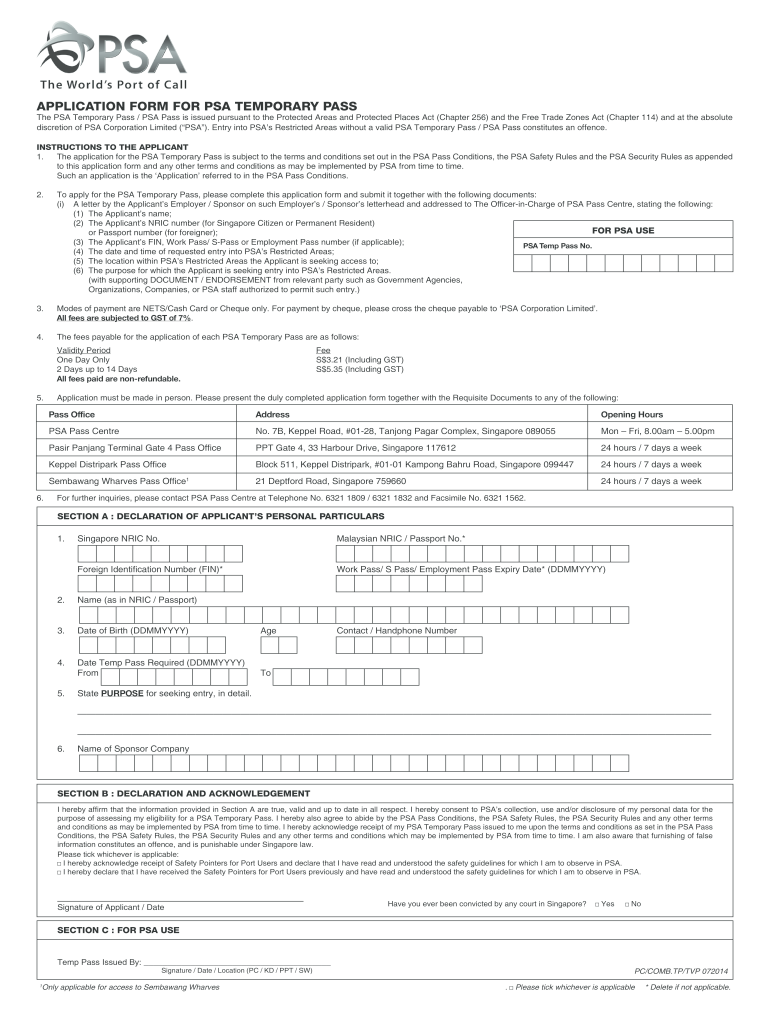
SG PSA PC/COMB.TP/TVP 2014 free printable template
We are not affiliated with any brand or entity on this form

Fill out
Complete the form online in a simple drag-and-drop editor.

eSign
Add your legally binding signature or send the form for signing.

Share
Share the form via a link, letting anyone fill it out from any device.

Export
Download, print, email, or move the form to your cloud storage.
Why pdfFiller is the best tool for your documents and forms


End-to-end document management
From editing and signing to collaboration and tracking, pdfFiller has everything you need to get your documents done quickly and efficiently.
Accessible from anywhere
pdfFiller is fully cloud-based. This means you can edit, sign, and share documents from anywhere using your computer, smartphone, or tablet.
Secure and compliant
pdfFiller lets you securely manage documents following global laws like ESIGN, CCPA, and GDPR. It's also HIPAA and SOC 2 compliant.
What is SG PSA PC/COMB.TP/TVP
The PSA Temporary Pass Application Form is a permit application used by individuals seeking access to PSA's Restricted Areas in Singapore.
pdfFiller scores top ratings on review platforms




Who needs SG PSA PC/COMB.TP/TVP?
Explore how professionals across industries use pdfFiller.

SG PSA PC/COMB.TP/TVP is needed by:
-
Individuals applying for temporary access to PSA Restricted Areas
-
Contractors requiring entry for work-related tasks
-
Visitors needing to enter specific port zones
-
Shipping personnel involved in logistics
-
Representatives from companies engaging with PSA services
Comprehensive Guide to SG PSA PC/COMB.TP/TVP
What is the PSA Temporary Pass Application Form?
The PSA Temporary Pass Application Form is a crucial document for individuals and organizations seeking access to restricted areas in Singapore. This form allows applicants to formally request permission to enter locations governed by the Protected Areas and Protected Places Act. It is designed for a variety of users, including contractors, visitors, and employees who require temporary entry for specific purposes.
Understanding the significance of this form is essential, as it ensures compliance with local regulations and contributes to the overall security of sensitive zones.
Purpose and Benefits of the PSA Temporary Pass Application Form
Individuals and organizations need the PSA Temporary Pass Application Form primarily to gain effective access to the PSA's restricted areas. The validity periods of these passes can vary based on the applicant’s specific needs, adapting to different access requirements.
Utilizing this form not only streamlines the entry process but also ensures adherence to local regulations, ultimately benefiting compliance efforts for all involved parties.
Eligibility Criteria for the PSA Temporary Pass Application Form
The eligibility to apply for the PSA Temporary Pass is defined by various criteria that depend on the applicant's role or position. Applicants can include security personnel, contractors, and essential service workers who require authorized access to perform their duties.
To confirm eligibility, specific documentation is required, which may involve providing personal and professional details to validate the application.
How to Fill Out the PSA Temporary Pass Application Form Online (Step-by-Step)
Completing the PSA Temporary Pass Application Form online involves several steps to ensure accuracy and compliance:
-
Visit the official application portal and select the PSA Temporary Pass Application Form.
-
Fill in your personal information, such as your name and identification details.
-
Specify the purpose of your entry clearly in the designated section.
-
Upload any required supporting documents as PDF files.
-
Review all entries for accuracy to avoid common errors.
Attention to detail is key, as incorrect information can lead to processing delays or rejections.
Required Documents and Supporting Materials
To ensure a successful application, the following documents are typically required:
-
Valid government-issued identification (NRIC or passport).
-
Justification for the purpose of entry to the restricted area.
-
Any relevant permits or previous access documentation if applicable.
Providing complete supporting materials is vital for validating your application and expediting the review process.
Fees, Deadlines, and Processing Time for the PSA Temporary Pass Application Form
Applicants should be aware of the associated fees for submitting the PSA Temporary Pass Application Form. The costs may vary based on the type of access requested. Typical submission deadlines should be observed, along with estimated processing times, which can affect the planning of your visit to the restricted area.
Payment methods available for applicants typically include online transactions through credit or debit cards.
Where and How to Submit the PSA Temporary Pass Application Form
The submission process for the PSA Temporary Pass Application Form may differ depending on the chosen method:
-
Online submissions should be completed via the official application portal.
-
Paper submissions must be sent to the designated government office, following specified guidelines.
-
Confirmation of receipt will usually be provided after successful submission.
Clarifying these methods ensures a smooth submission experience for all applicants.
What Happens After You Submit the PSA Temporary Pass Application Form
Once you submit the PSA Temporary Pass Application Form, you can track its status through the application portal. Common outcomes include approval, where you will receive your pass, or notifications for additional information if your application requires more details.
Understanding common rejection reasons can help applicants address potential issues promptly, ensuring they can reapply if necessary.
Security and Compliance for the PSA Temporary Pass Application Form
When handling sensitive documents such as the PSA Temporary Pass Application Form, maintaining security is paramount. The platform utilizes data protection measures to secure user information throughout the submission process.
Compliance with local regulations on document handling further reinforces the integrity of personal data submitted by applicants.
Empowering Your Application with pdfFiller
Using pdfFiller to fill out the PSA Temporary Pass Application Form can enhance your experience. This platform offers capabilities for editing, eSigning, and managing your documents efficiently, making the application process more straightforward.
Additionally, pdfFiller ensures that security and compliance are prioritized, allowing users to focus on completing their applications without concerns about data protection.
How to fill out the SG PSA PC/COMB.TP/TVP
-
1.Access the PSA Temporary Pass Application Form on pdfFiller by searching for the form name or finding it in the Government Forms category.
-
2.Open the form in pdfFiller's interface, which allows you to fill out the document electronically.
-
3.Before starting, gather required information such as your NRIC or Passport details, purpose of entry, and any supporting documents.
-
4.Use pdfFiller's text fields to enter your personal information precisely where indicated. Be careful to follow any field instructions provided.
-
5.Complete any checkboxes for additional requirements, ensuring clarity in your intentions stated in the application.
-
6.Review all entered information for accuracy, particularly names and the purpose of the visit.
-
7.Once reviewed, use the signature tool on pdfFiller to sign your application electronically and date it accordingly.
-
8.Finalize your form by saving it to your device. Choose the download option and select your preferred format.
-
9.If applicable, submit the completed form through the designated submission channels provided on the form or as directed.

Who is eligible to apply for the PSA Temporary Pass?
Individuals who require access to PSA's Restricted Areas, including employees, contractors, and authorized visitors, are eligible to apply for the PSA Temporary Pass.
What documents do I need to submit with the application?
Typically, you'll need to provide a copy of your NRIC or Passport, proof of the purpose of entry, and any other documents specified in the application instructions.
How long does it take to process the application?
Processing times can vary; however, it generally takes a few business days. Make sure to apply well in advance of your intended access date.
What are the payment options for the application fee?
Payment methods may vary; typically, credit card or bank transfer options are available upon submission. Ensure you check the latest payment instructions on the form.
What common mistakes should I avoid when filling out the form?
Avoid incomplete fields, incorrect naming conventions, and missing required documents. Double-check all information before finalizing your submission to prevent delays.
Can I submit the application online?
Yes, applications may often be submitted online via specified portals or by email, depending on PSA's guidelines. Refer to the form instructions for precise submission methods.
Is notarization required for this application?
No, notarization is not required for the PSA Temporary Pass Application. Make sure all information provided is accurate and truthful.
SG PSA PC/COMB.TP/TVP Form Versions
Related Forms





Related Catalogs
Get the latest insights from our blog


If you believe that this page should be taken down, please follow our DMCA take down process
here
.
This form may include fields for payment information. Data entered in these fields is not covered by PCI DSS compliance.