
Last updated on
Nov 7, 2026

MY Maybank Customer Information Form 2012 free printable template
We are not affiliated with any brand or entity on this form

Fill out
Complete the form online in a simple drag-and-drop editor.

eSign
Add your legally binding signature or send the form for signing.

Share
Share the form via a link, letting anyone fill it out from any device.

Export
Download, print, email, or move the form to your cloud storage.
Why pdfFiller is the best tool for your documents and forms


End-to-end document management
From editing and signing to collaboration and tracking, pdfFiller has everything you need to get your documents done quickly and efficiently.
Accessible from anywhere
pdfFiller is fully cloud-based. This means you can edit, sign, and share documents from anywhere using your computer, smartphone, or tablet.
Secure and compliant
pdfFiller lets you securely manage documents following global laws like ESIGN, CCPA, and GDPR. It's also HIPAA and SOC 2 compliant.
What is MY Maybank Customer Information Form
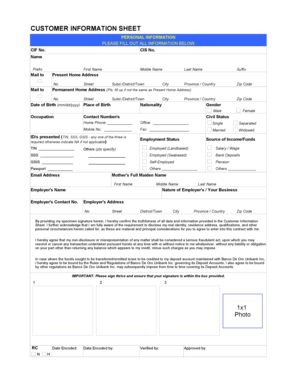
The Customer Information Form is a business document used by customers to provide personal and financial details to a bank.
pdfFiller scores top ratings on review platforms




Who needs MY Maybank Customer Information Form?
Explore how professionals across industries use pdfFiller.

MY Maybank Customer Information Form is needed by:
-
Individual bank customers filling out personal details.
-
Businesses registering for bank services.
-
Financial institutions requiring updated customer information.
-
Compliance officers ensuring identity verification.
-
New account applicants for financial services.
Comprehensive Guide to MY Maybank Customer Information Form
What is the Customer Information Form?
The Customer Information Form is a critical document used in the banking sector for collecting essential personal and financial details from customers. It serves the primary function of facilitating bank registration by gathering necessary information directly from the customer. Filling out the form is vital, as it ensures that the bank has accurate records and can provide better service to its clients. The form may also be referred to as a bank customer form or identity document form, highlighting its significance in identifying the account holder.
Purpose and Benefits of the Customer Information Form
This form is designed to enable banks to collect and maintain updated records of their customers. By providing accurate customer details, individuals not only assist their banks in adhering to regulatory compliance but also optimize the efficiency of the services rendered. The benefits of this form extend to both customers and the banking institution. For customers, it leads to a seamless banking experience by ensuring that their information is kept current. Banks, in turn, can rely on accurate data to optimize their operations and customer service initiatives.
Who Needs to Complete the Customer Information Form?
All new customers, as well as existing customers seeking to update their information, are required to fill out the Customer Information Form. This includes those opening an account for the first time or updating personal information due to changes in circumstances. Existing customers may also need to re-register or provide additional documentation to ensure that their financial details are up to date.
Information You’ll Need to Gather Before Filling Out the Form
Before completing the Customer Information Form, it is essential to gather the following details:
-
Full name
-
Contact details, including phone number and email address
-
Identity document number
-
Residential and mailing addresses
-
Salary range
-
A clear copy of your identity document
Accurate addresses are particularly important to ensure effective communication from the bank.
How to Fill Out the Customer Information Form Online
To fill out the Customer Information Form online using pdfFiller, follow these steps:
-
Access the form through pdfFiller’s platform.
-
Fill in each section accurately, making sure to double-check entered information.
-
Review the completed form for any missing fields or spelling errors.
-
Sign the form using the signature specimen you have on file with the bank.
By adhering to these steps, you can ensure that your form submission is complete and accurate.
Review and Validation Checklist for the Customer Information Form
Before submitting the completed Customer Information Form, it is advisable to use the following checklist to avoid common errors:
-
Ensure all fields are completed without any omissions.
-
Double-check your contact information and identity document details.
-
Confirm that your signature specimen matches the one provided to the bank.
Taking these precautions will help streamline the submission process.
How to Sign the Customer Information Form?
The signing process for the Customer Information Form can be conducted either digitally or via traditional wet signing. When signing digitally, be sure to use the signature specimen previously provided to the bank. Additionally, pdfFiller offers convenient eSigning options that facilitate a quick signing process, ensuring that the form is ready for submission.
Submission Methods for the Completed Customer Information Form
Once you have completed and signed the Customer Information Form, you have several submission methods available:
-
Submit in person at your bank branch.
-
Email the completed form to your bank’s specified address.
Be aware of any deadlines to ensure timely processing of your form.
What Happens After You Submit the Customer Information Form?
After submission, the bank will begin reviewing the information provided in the Customer Information Form. You may receive communication regarding any updates or changes required to your submission. In some cases, tracking your application status may be available to keep you informed on the progress of your registration.
Enhancing Your Document Management with pdfFiller
Using pdfFiller not only simplifies the process of filling out forms like the Customer Information Form but also enhances document management. With a secure environment ensured by 256-bit encryption, you can confidently fill and sign documents knowing that your personal data is protected. Beyond just this form, pdfFiller offers a broad range of capabilities for editing, converting, and managing documents, making it a versatile tool for all your document needs.
How to fill out the MY Maybank Customer Information Form
-
1.To begin, access pdfFiller and search for the Customer Information Form in the form library.
-
2.Once you locate the form, click on it to open it in the pdfFiller editor.
-
3.Gather the necessary information, including your full name, contact details, identity document number, and addresses before starting.
-
4.Begin filling in each field accurately, using the fillable sections and checkboxes provided in the form.
-
5.Use the instructions available in the form to help guide you through completing each section.
-
6.After filling in your details, double-check all entered information for accuracy and completeness.
-
7.Once you are satisfied with the content, review your entries one final time to ensure everything is correct.
-
8.To finalize, use the signature tool in pdfFiller to add your electronic signature where indicated.
-
9.Ensure you attach a clear copy of your identity document by uploading it through the document upload feature.
-
10.Finally, save the completed form in your preferred format, or submit it directly via email using the pdfFiller submission options.

Who is eligible to fill out the Customer Information Form?
Eligibility to fill out the Customer Information Form is open to individual customers and business representatives who wish to provide their personal or business financial details to a bank.
What documents do I need to complete the form?
You will need your identity document, such as a national ID or passport, as well as your contact information and residential addresses to complete the Customer Information Form.
Can I submit the form electronically?
Yes, you can submit the completed Customer Information Form electronically via email. Ensure that you attach the form along with any necessary supporting documents.
What common mistakes should I avoid when filling out the form?
Common mistakes include overlooking mandatory fields, providing incorrect information, or failing to sign the form where required. Always double-check before submission.
Is there a deadline for submitting the Customer Information Form?
While there is typically no strict deadline, it is advisable to submit the Customer Information Form promptly to ensure that your details are updated without delay.
How will I know if my form was processed successfully?
You should receive confirmation from the bank regarding the processing of your Customer Information Form, which may take a few business days depending on their internal procedures.
Is notarizing the form required?
No, notarizing the Customer Information Form is not required. You must, however, provide a valid signature as indicated on the form.
MY Maybank Customer Information Form Form Versions
Related Forms





Related Catalogs
Get the latest insights from our blog



If you believe that this page should be taken down, please follow our DMCA take down process
here
.
This form may include fields for payment information. Data entered in these fields is not covered by PCI DSS compliance.