
Last updated on
Nov 9, 2026

NJ IMT-94 - Mercer County 2006-2026 free printable template
pdfFiller is not affiliated with any government organization

Fill out
Complete the form online in a simple drag-and-drop editor.

eSign
Add your legally binding signature or send the form for signing.

Share
Share the form via a link, letting anyone fill it out from any device.

Export
Download, print, email, or move the form to your cloud storage.
Why pdfFiller is the best tool for your documents and forms


End-to-end document management
From editing and signing to collaboration and tracking, pdfFiller has everything you need to get your documents done quickly and efficiently.
Accessible from anywhere
pdfFiller is fully cloud-based. This means you can edit, sign, and share documents from anywhere using your computer, smartphone, or tablet.
Secure and compliant
pdfFiller lets you securely manage documents following global laws like ESIGN, CCPA, and GDPR. It's also HIPAA and SOC 2 compliant.
What is NJ IMT-94 - Mercer County
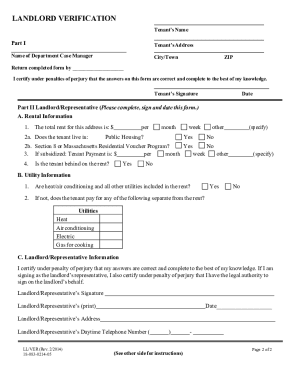
The Residency Change Verification Form is a tenant screening document used by landlords and property managers to confirm an applicant's living situation and rental details.
pdfFiller scores top ratings on review platforms




Who needs NJ IMT-94 - Mercer County?
Explore how professionals across industries use pdfFiller.

NJ IMT-94 - Mercer County is needed by:
-
Landlords managing rental properties
-
Property managers overseeing tenant applications
-
Housing authorities for tenant verification
-
Real estate agents assisting with rental agreements
-
Financial institutions requiring residency proof
-
Government agencies for income maintenance assessments
Comprehensive Guide to NJ IMT-94 - Mercer County
What is the Residency Change Verification Form?
The Residency Change Verification Form, commonly known as the IMT-94 form, serves a vital role in tenant screening. Its primary purpose is to validate an applicant's residency status during the rental process. This form not only aids landlords in confirming essential living details but also plays a significant part in establishing a trustworthy relationship with tenants. Proper residency verification is crucial for ensuring that all applicants meet the necessary requirements for rental agreements.
Purpose and Benefits of the Residency Change Verification Form
The Residency Change Verification Form comes with several benefits for both landlords and tenants. It acts as a reliable method to establish trust by verifying living situations accurately. For landlords, this form helps safeguard against potential issues related to false representations of residency. Additionally, it provides significant advantages for MCBSS Income Maintenance EW in confirming eligibility for assistance programs, ensuring that applicants comply with regulations and policies.
Key Features of the Residency Change Verification Form
This form boasts various features designed to streamline the verification process. Important aspects include:
-
Fillable sections for easy input of resident details
-
Signature requirements to validate the information provided
-
Involvement of the owner or manager in supplying necessary details
-
Utility entitlement verification to confirm living conditions
-
Information on household composition for accurate assessments
Who Needs the Residency Change Verification Form?
The primary users of the Residency Change Verification Form include property owners, managers, and MCBSS Income Maintenance Economic Workers (EW). Various scenarios may necessitate this form, particularly when tenants need to establish their current living situations for rental verification purposes. Understanding who requires this form is essential for a smooth rental process.
How to Fill Out the Residency Change Verification Form Online (Step-by-Step)
Filling out the Residency Change Verification Form online is straightforward. Follow these steps for a seamless experience:
-
Access the form on the designated platform.
-
Enter the case name and case number in the specified fields.
-
Complete all fillable sections accurately, ensuring no detail is omitted.
-
Review the form for any mistakes or missing information.
-
Save your progress and prepare for submission.
Review and Validation Checklist for the Residency Change Verification Form
To ensure the Residency Change Verification Form is correctly filled out, consider the following checklist before submission:
-
Verify that all necessary fields are completed.
-
Check for accurate spelling of names and addresses.
-
Ensure the owner or manager's signature is included.
-
Look for any missing information that could delay processing.
Common errors include incorrect case numbers and unfilled sections that can lead to complications during validation.
How to Sign the Residency Change Verification Form
The signing process for the Residency Change Verification Form is crucial. The owner or manager must provide a signature to validate the information submitted. Options for signing include traditional handwritten signatures or using digital signing methods, such as eSigning through pdfFiller, ensuring compliance with modern standards.
Submission Methods and What Happens After You Submit?
Once the Residency Change Verification Form is completed, it can be submitted through various methods. Online submission is available for convenience, while offline submission may be required in some cases.
After submitting the form, users typically receive a confirmation of receipt. It is essential to submit this form promptly, as delays could result in complications or consequences affecting tenant eligibility or compliance.
Security and Compliance for the Residency Change Verification Form
When handling the Residency Change Verification Form, security is paramount. Platforms like pdfFiller employ 256-bit encryption to ensure your information remains confidential. Compliance with privacy laws, including GDPR and HIPAA, protects sensitive data related to residency verification, enabling secure document management for all users.
Get Started with the Residency Change Verification Form Using pdfFiller
Utilizing pdfFiller for the Residency Change Verification Form allows for efficient creation, editing, and eSigning. The platform offers cloud-based management, ensuring that form completion is both secure and straightforward. Users benefit from reliable features designed to handle sensitive documents with care, making it an ideal solution for residency verification processes.
How to fill out the NJ IMT-94 - Mercer County
-
1.Start by navigating to pdfFiller and log in to your account. If you don't have an account, create one to access the form.
-
2.Search for the Residency Change Verification Form using the search bar or browse through property management forms until you find it.
-
3.Open the form and review the fillable fields. Prepare to gather information such as the tenant's current address, rent payment status, and utility entitlements.
-
4.Click on each relevant field to enter the required details. Use the provided prompts to guide you if needed.
-
5.Make sure to fill out all required fields including those for the owner's name, case name, and case number.
-
6.Once you've completed the form, review all entries for accuracy. Check for any missing information or errors that need corrections.
-
7.Finalize the document by ensuring all necessary signatures are obtained. The Owner/Manager must sign to validate the form.
-
8.Save the completed form on pdfFiller using the designated save option. You can also download it for your records or print it directly if needed.
-
9.If required, submit the form electronically or manually according to the recipient's guidelines. Follow up to confirm receipt if necessary.

Who needs to sign the Residency Change Verification Form?
The Residency Change Verification Form requires a signature from the owner or manager of the property. Additionally, the MCBSS Income Maintenance EW may need to verify household information without needing to sign.
What is the purpose of the Residency Change Verification Form?
The form serves to confirm an applicant's living situation, rent payment status, and living conditions, supporting tenant verifications for property management.
Is notarization required for this form?
No, the Residency Change Verification Form does not require notarization. However, it must be signed by the owner or manager to be considered valid.
How should I submit the completed form?
Completed forms can be submitted electronically via email or uploaded to the necessary housing authority's portal. Ensure to follow specific submission guidelines provided by the recipient.
Are there any specific deadlines for submitting this form?
While specific deadlines can vary depending on the purpose or agency, it’s best to submit the Residency Change Verification Form as soon as the necessary information is gathered to avoid any delays in approval.
What common mistakes should I avoid when filling out this form?
Common mistakes include leaving required fields blank, entering inaccurate information, or forgetting to obtain the necessary signatures. Always double-check your entries before submission.
What supporting documents may be needed with this form?
In some cases, supplementary documents that verify income, utility entitlements, or prior rental agreements may be requested along with the Residency Change Verification Form.
Related Forms




Get the latest insights from our blog


If you believe that this page should be taken down, please follow our DMCA take down process
here
.
This form may include fields for payment information. Data entered in these fields is not covered by PCI DSS compliance.