
Last updated on
Oct 31, 2026

UT HealthEquity Employee HSA Contribution Form 2013-2026 free printable template
pdfFiller is not affiliated with any government organization

Fill out
Complete the form online in a simple drag-and-drop editor.

eSign
Add your legally binding signature or send the form for signing.

Share
Share the form via a link, letting anyone fill it out from any device.

Export
Download, print, email, or move the form to your cloud storage.
Why pdfFiller is the best tool for your documents and forms


End-to-end document management
From editing and signing to collaboration and tracking, pdfFiller has everything you need to get your documents done quickly and efficiently.
Accessible from anywhere
pdfFiller is fully cloud-based. This means you can edit, sign, and share documents from anywhere using your computer, smartphone, or tablet.
Secure and compliant
pdfFiller lets you securely manage documents following global laws like ESIGN, CCPA, and GDPR. It's also HIPAA and SOC 2 compliant.
What is UT HealthEquity Employee HSA Contribution Form
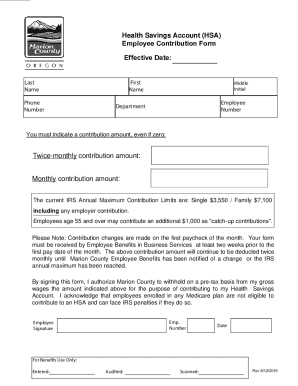
The Employee HSA Contribution Form is a payroll document used by employees to specify their monthly contributions to a Health Savings Account (HSA).
pdfFiller scores top ratings on review platforms




Who needs UT HealthEquity Employee HSA Contribution Form?
Explore how professionals across industries use pdfFiller.

UT HealthEquity Employee HSA Contribution Form is needed by:
-
Employees participating in a Health Savings Account (HSA)
-
Human resources departments for payroll processing
-
Employers managing employee benefits programs
-
Financial advisors assisting clients with HSAs
-
Payroll administrators responsible for benefits compliance
Comprehensive Guide to UT HealthEquity Employee HSA Contribution Form
What is the Employee HSA Contribution Form?
The Employee HSA Contribution Form is a crucial document that allows employees to specify their contributions to a Health Savings Account (HSA). This form is designed for employees wishing to define how much they want to contribute monthly toward their HSA, ensuring effective management of their personal finances. To fill out the form, employees must provide essential information such as their name, social security number, and necessary signatures.
Purpose and Benefits of the Employee HSA Contribution Form
Utilizing the Employee HSA Contribution Form provides several advantages for employees. By using this form, employees can effectively manage their HSA contributions, leading to significant tax benefits, including tax-free growth on contributions. Additionally, it aids in financial planning, as contributions can be adjusted according to individual needs. This form also serves a functional purpose in employer payroll processing, maintaining an accurate record of contributions.
Who Needs the Employee HSA Contribution Form?
The Employee HSA Contribution Form is essential for employees eligible to make contributions to their HSAs. This includes individuals enrolled in qualifying high-deductible health plans (HDHPs) and those looking to maximize their benefits. Specific groups, such as employees aged 55 and older, may also require this form for catch-up contributions, ensuring they can take advantage of higher contribution limits.
How to Fill Out the Employee HSA Contribution Form (Step-by-Step)
Completing the Employee HSA Contribution Form involves several steps to ensure accuracy:
-
Begin by clearly writing your full name and social security number.
-
Indicate the desired contribution amount for the specified period.
-
Review the fields to ensure all required information is completed.
-
Sign the form to validate your contributions.
Double-checking the information on the form is crucial to avoid errors in the submission process.
Common Errors and How to Avoid Them
When filling out the Employee HSA Contribution Form, employees often encounter common errors that can hinder processing. Frequent mistakes include:
-
Omitting necessary personal information.
-
Incorrectly entering contribution amounts.
-
Failing to sign the form appropriately.
To avoid these issues, employees should double-check all entries and ensure they are within the contribution limits established by the IRS.
Submission Methods for the Employee HSA Contribution Form
Employees have several options for submitting the completed Employee HSA Contribution Form:
-
Electronic submission through the employer's designated portal.
-
Mailing the form to the HR department.
Best practices for submitting the form include tracking it to confirm that it has been received and processed properly.
What Happens After You Submit the Employee HSA Contribution Form?
After submission, the employer reviews the Employee HSA Contribution Form. Contributions will be reflected in payroll and benefit statements, allowing employees to monitor their benefits continually. In cases where further clarification is needed, employees may be contacted for follow-up documentation or information.
How pdfFiller Can Help with Your Employee HSA Contribution Form
pdfFiller provides advanced capabilities for employees to manage their Employee HSA Contribution Form efficiently. Users can edit, fill out, and eSign the form directly within the platform. pdfFiller prioritizes security, employing measures such as 256-bit encryption to protect sensitive information during the form-filling process.
Security and Compliance for the Employee HSA Contribution Form
Protecting personal information on the Employee HSA Contribution Form is of utmost importance. pdfFiller adheres to strict compliance standards, including HIPAA and GDPR, ensuring that sensitive data is handled with care. Users can feel reassured about the security of their documents when using the platform to manage their forms.
Final Steps and Recommendations for Using the Employee HSA Contribution Form
Once employees have determined their HSA contributions, they are encouraged to submit the Employee HSA Contribution Form promptly. It's essential to be aware of annual contribution limits and to keep accurate records of submissions. Utilizing pdfFiller can enhance the process, providing robust support for completing the form and ensuring compliance with regulations.
How to fill out the UT HealthEquity Employee HSA Contribution Form
-
1.To begin, access the Employee HSA Contribution Form on pdfFiller by searching for its name in the templates section or by uploading your copy if you have it saved locally.
-
2.Once you have the form open in pdfFiller, locate the fields that require your input. These typically include sections for your name, social security number, and desired contribution amounts.
-
3.Before filling out the form, gather the necessary information, including your monthly contribution goals and your social security number to ensure accuracy in your entries.
-
4.Fill in each field carefully using pdfFiller's user-friendly interface. You can click on each blank area to input data and utilize features such as text boxes to adjust font size and style.
-
5.After completing all required fields, review your entries for accuracy. Be sure to check that your name and social security number are correct, and ensure the contribution amounts match your intentions.
-
6.Finally, once you have reviewed all information and corrected any errors, save the form. You can download it to your device or submit it directly to your employer's HR department through pdfFiller’s submission features.

Who is eligible to fill out the Employee HSA Contribution Form?
Employees eligible to participate in a Health Savings Account (HSA) as part of their company's benefits package should fill out the Employee HSA Contribution Form.
What information is needed to complete the form?
To complete the Employee HSA Contribution Form, you will need your name, social security number, and the desired monthly contribution amounts for your HSA.
How do I submit the completed form?
The completed Employee HSA Contribution Form should be submitted directly to your employer's HR or payroll department. It is for internal use only and should not be sent to your health plan or HSA administrator.
Is there a deadline for submitting this form?
While specific deadlines may vary by employer, it is generally advisable to submit the Employee HSA Contribution Form during open enrollment or when beginning employment to ensure your contributions are processed in a timely manner.
Are there maximum contribution limits for HSAs?
Yes, there are maximum contribution limits for Health Savings Accounts set by the IRS. The form provides this information, including limits for single and family coverage types and catch-up contributions for individuals aged 55 and older.
What should I do if I make a mistake on the form?
If you make a mistake on the Employee HSA Contribution Form, it is essential to correct it before submission. You can do this by crossing out the error and writing the correct information above it, or by filling out a new form entirely.
Do I need my form notarized?
No, the Employee HSA Contribution Form does not require notarization. You only need to provide your signature as verification of the information you have supplied.
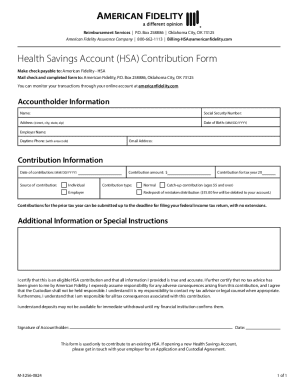
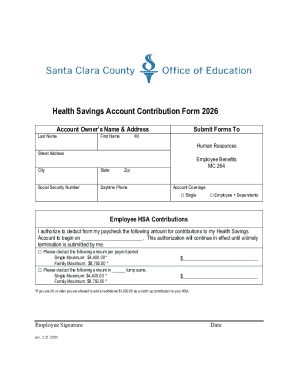
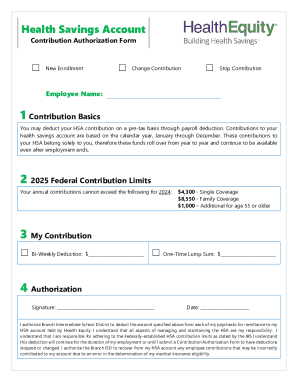
UT HealthEquity Employee HSA Contribution Form Form Versions
Related Forms



Get the latest insights from our blog


If you believe that this page should be taken down, please follow our DMCA take down process
here
.
This form may include fields for payment information. Data entered in these fields is not covered by PCI DSS compliance.