
Last updated on
Nov 9, 2026

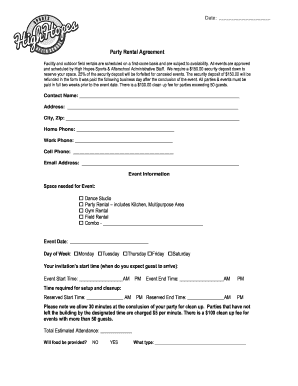
CA Soccer Central Indoor Field Rental Contract 2001 free printable template
pdfFiller is not affiliated with any government organization

Fill out
Complete the form online in a simple drag-and-drop editor.

eSign
Add your legally binding signature or send the form for signing.

Share
Share the form via a link, letting anyone fill it out from any device.

Export
Download, print, email, or move the form to your cloud storage.
Why pdfFiller is the best tool for your documents and forms


End-to-end document management
From editing and signing to collaboration and tracking, pdfFiller has everything you need to get your documents done quickly and efficiently.
Accessible from anywhere
pdfFiller is fully cloud-based. This means you can edit, sign, and share documents from anywhere using your computer, smartphone, or tablet.
Secure and compliant
pdfFiller lets you securely manage documents following global laws like ESIGN, CCPA, and GDPR. It's also HIPAA and SOC 2 compliant.
What is CA Soccer Central Indoor Field Rental Contract
The Field Rental Contract is a service agreement used by individuals or organizations to rent a soccer field at Soccer Central.
pdfFiller scores top ratings on review platforms




Who needs CA Soccer Central Indoor Field Rental Contract?
Explore how professionals across industries use pdfFiller.

CA Soccer Central Indoor Field Rental Contract is needed by:
-
Individuals renting sports facilities
-
Sports organizations seeking field rentals
-
Event planners coordinating soccer events
-
Coaches requiring field access for practice
-
Local businesses hosting community sports events
Comprehensive Guide to CA Soccer Central Indoor Field Rental Contract
What is the Field Rental Contract?
The Field Rental Contract is a crucial document used for renting sports facilities, specifically soccer fields at Soccer Central. This contract outlines the rental date, field size, and payment details, providing a clear framework for both parties involved. Signing the contract is necessary for the renter, ensuring mutual understanding of the terms and conditions applicable to the field rental.
Purpose and Benefits of the Field Rental Contract
The purpose of the Field Rental Contract is to protect both renters and property owners by clearly defining the terms of the rental agreement. This written document helps clarify various aspects such as deposits, cancellations, and liability waivers, reducing the potential for disputes. By having a formal agreement, all parties are more likely to have a positive experience and avoid misunderstandings.
-
Protects the interests of both renters and property owners.
-
Clarifies terms like cancellation policies.
-
Minimizes disputes and misunderstandings.
Key Features of the Field Rental Contract
The Field Rental Contract contains multiple key features that are essential for completing the document effectively. Renters must provide pertinent information, including their name, rental duration, and participant limits. Additionally, sections detailing payment methods and cancellation policies must be properly filled out to ensure compliance with the contract requirements. Other clauses may include checkboxes that require acknowledgment by the renter.
-
Renter's name and contact information.
-
Rental duration and field size specifics.
-
Payment details and methods.
Who Needs the Field Rental Contract?
This contract is necessary for various individuals and organizations looking to rent sports fields for events or activities. Typical users include sports leagues, schools, and community organizations. Various scenarios, including tournaments and practice sessions, present ideal opportunities where a field rental contract is essential.
How to Fill Out the Field Rental Contract Online
Filling out the Field Rental Contract online is a straightforward process through pdfFiller's platform. Users can easily access the contract, ensuring a convenient experience. Once open, follow these specific field-by-field instructions to accurately complete the form:
-
Enter the renter's name in the designated field.
-
Specify the rental date and duration.
-
List the expected number of participants.
-
Include payment details.
After completing the contract, it’s advisable to review all information before submission to ensure accuracy.
Review and Validation Checklist for the Field Rental Contract
Before submitting the Field Rental Contract, it is crucial to utilize a review and validation checklist to avoid common errors. Missteps can arise from missing information or incorrect details. To ensure all necessary information has been entered accurately, consider the following:
-
Review all entries against the rental agreement requirements.
-
Avoid omitting essential details like payment methods.
-
Have a second party review the completed contract.
How to Sign the Field Rental Contract
Signing the Field Rental Contract can be done digitally or with a wet signature. Using pdfFiller's tools streamlines this process for the user. eSigning is significant as it validates the document and confirms the agreement of the terms set forth. Understanding the legal differences between digital and wet signatures is also essential for compliance.
Submission Methods and Next Steps for the Field Rental Contract
Once the Field Rental Contract has been filled out and signed, users can submit it through various methods. Options include online submission, via email, or in person at Soccer Central. Following submission, the contract is typically tracked, and users may receive confirmation regarding processing timelines.
-
Submit the contract online for immediate processing.
-
Email a scanned copy or bring it in person.
-
Await confirmation of receipt and review timelines.
Security and Compliance with the Field Rental Contract
Handling sensitive documents like the Field Rental Contract requires robust security measures. pdfFiller employs 256-bit encryption and ensures compliance with regulations such as HIPAA and GDPR. Users can trust pdfFiller to protect their documents and are encouraged to follow best practices for maintaining personal data security while utilizing online forms.
Experience Easy Field Rentals with pdfFiller
Utilizing pdfFiller simplifies the process of completing the Field Rental Contract and other essential documentation. This platform provides step-by-step support, enhancing user experience and ensuring convenience. Users are encouraged to start filling out their Field Rental Contract today for an efficient and hassle-free experience.
How to fill out the CA Soccer Central Indoor Field Rental Contract
-
1.Access the Field Rental Contract on pdfFiller by navigating to the website and searching for the form’s title in the search bar.
-
2.Once opened, review the document to understand required information such as rental dates, field size, and payment details.
-
3.Begin filling in the form by entering your name in the 'Name of Person Renting the Field' field, ensuring that all required fields are marked clearly.
-
4.Navigate through the document using the scroll function or the navigation panel to reach sections detailing rental dates and field specifics.
-
5.Enter your rental date and any other necessary details in the designated fillable fields, following prompts for clarity.
-
6.If applicable, use checkboxes to indicate understanding and acceptance of policies on deposits, cancellations, and participant limits.
-
7.Continue filling out any fields concerning payment as required to complete the agreement.
-
8.Review your entries for accuracy by reading through each filled section and ensuring no important information is overlooked.
-
9.Finalise the form by adding your signature in the designated area to confirm acceptance of the terms outlined in the contract.
-
10.Save your completed form by clicking on the save icon or the 'Download' option to secure a copy of your Field Rental Contract.
-
11.If submitting online is required, follow on-screen prompts to complete the submission process directly through pdfFiller.

Who can use the Field Rental Contract?
The Field Rental Contract can be used by individuals renting fields, sports organizations, coaches, or event planners coordinating soccer activities.
What information is required to complete the form?
You will need personal information such as your name, rental dates, field size needed, payment details, and any additional requirements specified in the contract.
Is there a specific deadline for submitting the form?
While there’s no set deadline indicated, it's advisable to complete and submit the Field Rental Contract well in advance of your desired rental date to ensure availability.
How do I submit the completed form?
After completing the Field Rental Contract, you can submit it directly through pdfFiller if it has an online submission option, or download it and manually submit it to Soccer Central.
What common mistakes should I avoid while filling out the form?
Common mistakes include missing required fields, incorrect dates, and failing to read and check the policies related to deposits and cancellations.
Can the contract be notarized?
No, the Field Rental Contract does not require notarization, simplifying the rental process while confirming agreement terms.
How do I find help if I have trouble filling out the form?
If you encounter difficulties, refer to pdfFiller's support resources, or consult Soccer Central directly for assistance with the Field Rental Contract.
CA Soccer Central Indoor Field Rental Contract Form Versions
Related Forms




Related Catalogs
Get the latest insights from our blog


If you believe that this page should be taken down, please follow our DMCA take down process
here
.
This form may include fields for payment information. Data entered in these fields is not covered by PCI DSS compliance.