
Last updated on
Nov 9, 2026

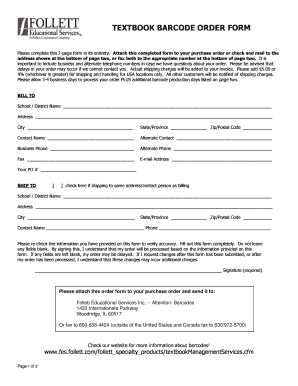
Riverside Insights Barcode Form 2014 free printable template
We are not affiliated with any brand or entity on this form

Fill out
Complete the form online in a simple drag-and-drop editor.

eSign
Add your legally binding signature or send the form for signing.

Share
Share the form via a link, letting anyone fill it out from any device.

Export
Download, print, email, or move the form to your cloud storage.
Why pdfFiller is the best tool for your documents and forms


End-to-end document management
From editing and signing to collaboration and tracking, pdfFiller has everything you need to get your documents done quickly and efficiently.
Accessible from anywhere
pdfFiller is fully cloud-based. This means you can edit, sign, and share documents from anywhere using your computer, smartphone, or tablet.
Secure and compliant
pdfFiller lets you securely manage documents following global laws like ESIGN, CCPA, and GDPR. It's also HIPAA and SOC 2 compliant.
What is Riverside Insights Barcode Form
The Barcode Transmittal Form is an educational document used by test coordinators to order and ship barcodes for student assessments in Iowa.
pdfFiller scores top ratings on review platforms




Who needs Riverside Insights Barcode Form?
Explore how professionals across industries use pdfFiller.

Riverside Insights Barcode Form is needed by:
-
Test coordinators in Iowa
-
Educational institutions administering Iowa Assessments®
-
Facilities ordering student barcode labels
-
Schools conducting assessments
-
Administrative staff handling education testing
Comprehensive Guide to Riverside Insights Barcode Form
What is the Barcode Transmittal Form?
The Barcode Transmittal Form is a critical document used particularly for Iowa Assessments® Forms E/F and CogAT® Form 7. This education assessment form serves as a means for test coordinators to manage the ordering and shipment of barcode labels essential for student assessments. Required information includes school details, test dates, and the quantities of labels needed for accurate data collection. The significance of this form lies in its role in ensuring seamless logistics during the assessment process.
Benefits of Using the Barcode Transmittal Form
Utilizing the Barcode Transmittal Form brings numerous advantages for educational institutions. It streamlines the process of collecting and managing barcode data for assessments, ensuring accurate labeling and tracking of student assessments. Moreover, it facilitates timely order and shipment of necessary materials, thereby enhancing efficiency in the testing process.
Key Features of the Barcode Transmittal Form
The Barcode Transmittal Form is designed with various essential features to aid users. It includes fillable fields and multiple blank spaces for inputting necessary information. The form also provides clear instructions for completion and submission, emphasizing accessibility and ease of use as a digital form. Users can benefit from this fillable form template, making submissions straightforward and efficient.
Who Needs the Barcode Transmittal Form?
This form is essential for a range of individuals in the educational sector. Test coordinators, teachers, and administrators within various educational settings qualify to use the Barcode Transmittal Form. Its applicability spans across individual schools and educational authorities, serving as an important resource for logistical organization during assessments.
How to Fill Out the Barcode Transmittal Form Online
Filling out the Barcode Transmittal Form online is a simple process. Follow these steps to ensure your submission is complete:
-
Access the digital form via the provided links.
-
Carefully fill in all the required fields, ensuring accuracy.
-
Pay attention to specific areas that necessitate additional information.
-
Review your entries thoroughly to validate all information before submission.
Submission Methods for the Barcode Transmittal Form
Once completed, the Barcode Transmittal Form can be submitted through various methods. The options include online submission directly through the educational portal, emailing the form to designated recipients, or sending it via postal service. Users should be aware of specific deadlines and the procedures following submission to ensure timely processing.
Common Errors When Using the Barcode Transmittal Form
While filling out the Barcode Transmittal Form, users may encounter several common errors. These can include missing fields, incorrect label quantities, or submission of outdated information. To minimize these issues, it is crucial to double-check all entries and correct any discrepancies prior to submission. By staying vigilant, users can ensure a smoother submission process.
Security and Compliance for the Barcode Transmittal Form
Security and compliance are paramount when handling the Barcode Transmittal Form. There are robust security measures in place to protect sensitive information, including user data encryption and compliance with regulations such as HIPAA and GDPR. The PDF security features provided by platforms like pdfFiller add an additional layer of data protection, ensuring that user privacy is maintained throughout the process.
Using pdfFiller for Barcode Transmittal Form Completion
pdfFiller emerges as an effective solution for completing the Barcode Transmittal Form and managing related documents. With features tailored for this form, users can edit text and images, create fillable forms, and utilize eSignature options. These tools significantly streamline the overall process, enhancing user experience and efficiency.
Final Thoughts on the Barcode Transmittal Form
The Barcode Transmittal Form is vital for ensuring organization and efficiency in the assessment process. With the availability of tools like pdfFiller, completing the form has never been easier. Users are encouraged to explore these resources to streamline their filing experience and share their experiences with others in the educational community.
How to fill out the Riverside Insights Barcode Form
-
1.Access the Barcode Transmittal Form on pdfFiller by searching for its name in the template library.
-
2.Once opened, familiarize yourself with the form layout which includes multiple fields to fill out regarding school details and test information.
-
3.Before completing the form, gather essential information such as school name, test dates, and the number of barcode labels required.
-
4.Use your mouse or keyboard to navigate through the fields. Click on each blank field and enter the necessary information as indicated.
-
5.For fields requiring selections, use the checkboxes provided to make your choices clearly.
-
6.Double-check to ensure all the required fields are completed, paying attention to any specific instructions mentioned in the form.
-
7.After filling out the form, review all entered information for accuracy and completeness, correcting any errors identified.
-
8.Once satisfied with your entries, save the form. You can download a copy to your device or directly submit it through the provided submission option on pdfFiller.

Who is eligible to use the Barcode Transmittal Form?
The Barcode Transmittal Form is designed for test coordinators and administrative staff at educational institutions in Iowa who are responsible for ordering barcodes for student assessments.
What information do I need before starting the form?
Before starting the Barcode Transmittal Form, gather your school details, upcoming test dates, and the quantity of barcode labels needed to ensure a smooth filling process.
How should I submit the completed form?
Completed forms can be submitted electronically through pdfFiller. You can also download the form and submit it via traditional mail if required by your school district.
Are there any deadlines for submitting the form?
While specific deadlines can vary by institution, it is advisable to complete and submit the Barcode Transmittal Form well ahead of the assessment dates to ensure timely processing.
What are common mistakes to avoid when filling out the form?
Common mistakes include leaving required fields blank, incorrectly entering quantities of labels, or failing to review your information for accuracy. Always double-check your completed form before submission.
How long does it take to process the form once submitted?
Processing times for the Barcode Transmittal Form can vary; however, it typically takes a few business days. Check with your educational institution for specific timelines.
Do I need to notarize the form?
No, the Barcode Transmittal Form does not require notarization, making it a straightforward document primarily handled by test coordinators.
Riverside Insights Barcode Form Form Versions
Related Content
Related Forms





Related Catalogs
Get the latest insights from our blog


If you believe that this page should be taken down, please follow our DMCA take down process
here
.
This form may include fields for payment information. Data entered in these fields is not covered by PCI DSS compliance.