
Last updated on
Oct 2, 2026

AU Queensland Police Service Confirmation of Aboriginality 2011-2026 free printable template
We are not affiliated with any brand or entity on this form

Fill out
Complete the form online in a simple drag-and-drop editor.

eSign
Add your legally binding signature or send the form for signing.

Share
Share the form via a link, letting anyone fill it out from any device.

Export
Download, print, email, or move the form to your cloud storage.
Why pdfFiller is the best tool for your documents and forms


End-to-end document management
From editing and signing to collaboration and tracking, pdfFiller has everything you need to get your documents done quickly and efficiently.
Accessible from anywhere
pdfFiller is fully cloud-based. This means you can edit, sign, and share documents from anywhere using your computer, smartphone, or tablet.
Secure and compliant
pdfFiller lets you securely manage documents following global laws like ESIGN, CCPA, and GDPR. It's also HIPAA and SOC 2 compliant.
What is AU Queensland Police Service Confirmation of Aboriginality
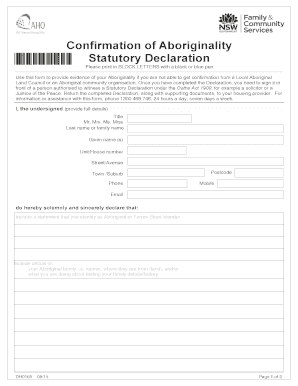
The Queensland Police Aboriginality Confirmation Form is a government document used by applicants to verify their Aboriginal and/or Torres Strait Islander descent for police recruitment purposes.
pdfFiller scores top ratings on review platforms




Who needs AU Queensland Police Service Confirmation of Aboriginality?
Explore how professionals across industries use pdfFiller.

AU Queensland Police Service Confirmation of Aboriginality is needed by:
-
Job applicants to Queensland Police Service
-
Aboriginal and Torres Strait Islander organisations confirming descent
-
Recruitment officers assessing applications
-
Community leaders supporting applicants
-
Policy makers monitoring recruitment strategies
Comprehensive Guide to AU Queensland Police Service Confirmation of Aboriginality
What is the Queensland Police Aboriginality Confirmation Form?
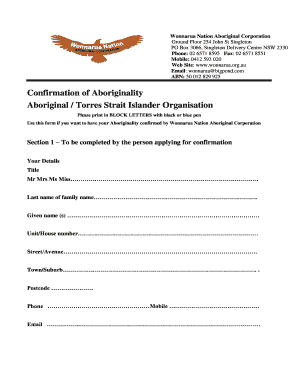
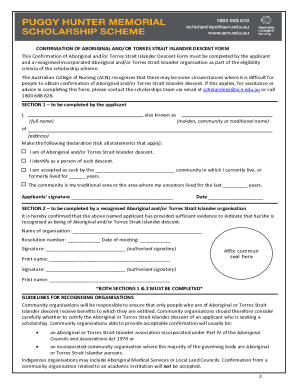
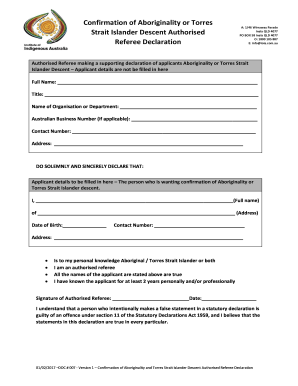
The Queensland Police Aboriginality Confirmation Form is vital for verifying Aboriginal and Torres Strait Islander descent during the recruitment process for the Queensland Police Service. This form requires signatures from the applicant and officials from a recognized Aboriginal and Torres Strait Islander organization, along with the organization’s common seal. By facilitating proper documentation, this form plays an essential role in ensuring the integrity and fairness of recruitment.
Document requirements include various fields for personal details, necessary signature lines, and the organizational details aimed at confirming Aboriginality. This form is crucial for maintaining accurate and respectful verification processes necessary for police applications.
Purpose and Benefits of the Queensland Police Aboriginality Confirmation Form
The Queensland Police Aboriginality Confirmation Form primarily supports the recruitment processes within the Queensland Police Service by ensuring applicants belong to Aboriginal and Torres Strait Islander communities. This verification not only enhances transparency in recruitment but also promotes diversity within the police force, contributing to a more inclusive organizational culture.
Its significance is reflected in the emphasis on recruiting individuals who reflect the diverse population of Queensland. This form is an instrumental tool in fostering connections between the police force and Indigenous communities.
Key Features of the Queensland Police Aboriginality Confirmation Form
This form includes several essential features that streamline the application process. It comprises various fillable fields for capturing personal information and signature lines necessary for verification. Additionally, the application mandates that the document be secured with the common seal of the applicant’s supporting organization.
-
Multiple fillable fields for comprehensive data entry
-
Signature lines for the applicant and endorsers
-
Organizational details required for verification
-
Mandatory use of the organization's common seal
Who Needs the Queensland Police Aboriginality Confirmation Form?
This form is necessary for applicants seeking roles within the Queensland Police Service who identify as Aboriginal or Torres Strait Islander. Organizations that regularly support individuals in need of Aboriginal and Torres Strait Islander verification play a crucial role in this process. These organizations typically confirm the heritage of the applicants, facilitating a smoother pathway into policing careers.
Eligibility is expressly defined, requiring individuals to provide proof of their heritage through legitimate channels.
How to Fill Out the Queensland Police Aboriginality Confirmation Form Online
Filling out the Queensland Police Aboriginality Confirmation Form can be accomplished effortlessly using pdfFiller. Follow these straightforward steps:
-
Access the form through pdfFiller.
-
Complete all personal information fields accurately.
-
Ensure that all required signatures are obtained.
-
Secure the document with the appropriate common seal.
This simple process ensures that all necessary sections are correctly completed for submission, safeguarding the integrity of your application.
Common Errors When Completing the Queensland Police Aboriginality Confirmation Form
Applicants often encounter various mistakes while filling out the Queensland Police Aboriginality Confirmation Form. Here are some common errors to avoid:
-
Failing to sign in the designated areas
-
Neglecting to include the organization’s common seal
-
Inaccurate personal information
-
Not providing a complete set of documents for verification
By carefully reviewing the form for completeness and accuracy, applicants can significantly reduce the likelihood of rejections.
Submission Methods and Requirements for the Queensland Police Aboriginality Confirmation Form
Once completed, the Queensland Police Aboriginality Confirmation Form must be submitted to the designated authorities. The submission can typically be done by mail or in person, depending on local regulations and processes.
Applicants should be aware of certain requirements which may include:
-
Possible submission fees
-
Deadlines for application submissions
-
Processing times for application review
Understanding these details can help streamline the submission process and ensure timely processing of applications.
What Happens After You Submit the Queensland Police Aboriginality Confirmation Form?
After submitting the Queensland Police Aboriginality Confirmation Form, applicants can expect a defined post-submission process. This may include receiving confirmation of their application and instructions for tracking its status.
In the event of any issues or rejections, applicants may be provided with guidelines on how to rectify common problems, ensuring transparency in the review process.
Security and Compliance When Using the Queensland Police Aboriginality Confirmation Form
Prioritizing security and compliance is essential when handling the Queensland Police Aboriginality Confirmation Form due to the sensitive nature of the information contained within. pdfFiller implements robust security measures to protect user data, including 256-bit encryption and compliance with standards such as HIPAA and GDPR.
This commitment to security ensures that all personal and organizational information remains confidential and secure, fostering trust among users during the completion of the form.
Streamline Your Queensland Police Aboriginality Confirmation Form Experience with pdfFiller
Utilizing pdfFiller can significantly enhance your experience when filling out the Queensland Police Aboriginality Confirmation Form. The platform offers efficient tools for form editing, eSigning, and cloud-based access, ensuring a seamless process from start to finish.
By leveraging these tools, applicants can complete their forms promptly while maintaining the highest levels of security and compliance with relevant regulations.
How to fill out the AU Queensland Police Service Confirmation of Aboriginality
-
1.Access the form by visiting pdfFiller's website and searching for the Queensland Police Aboriginality Confirmation Form in the search bar.
-
2.Open the document once you find it. Familiarize yourself with the structure and fields available.
-
3.Before you fill out the form, prepare the necessary personal information such as your given name(s), contact details, and relevant history to ensure accuracy.
-
4.Using pdfFiller's interface, navigate to the fillable fields where you will input your details, including your Aboriginal and/or Torres Strait Islander status.
-
5.Make sure to fill in all sections completely, including signature lines where required, ensuring that all information is accurate and up-to-date.
-
6.Once all fields are completed, review your entries carefully for any potential errors, particularly in spelling or numerical information.
-
7.Utilize pdfFiller's review tools to check your form before finalizing, ensuring there are no missed fields or signatures.
-
8.After reviewing, you can save your progress. Choose the option to download your completed form in your preferred format or submit it directly through pdfFiller, following the provided submission guidelines.
-
9.Be sure to check your email or pdfFiller account for confirmation of submission if you choose to send it digitally.

Who is eligible to complete the Queensland Police Aboriginality Confirmation Form?
To complete the form, you must be an applicant seeking to verify your Aboriginal and/or Torres Strait Islander descent for recruitment with the Queensland Police Service.
What supporting documents are required with the form submission?
You will need to provide evidence confirming your Aboriginal and/or Torres Strait Islander descent. This could include documentation from an Aboriginal and/or Torres Strait Islander organization.
How do I submit the Queensland Police Aboriginality Confirmation Form?
You can submit the form either by downloading it and mailing it to the Queensland Police Service or submitting it directly through pdfFiller if you choose that option.
Are there any deadlines for submitting this form?
While no specific deadlines are provided, it is advised to submit the form as early as possible to ensure timely processing for recruitment applications.
What are common mistakes to avoid when completing the form?
Common mistakes include incomplete fields, missing signatures, and failing to provide required supporting documentation. Always double-check your entries.
How long does it take to process the form after submission?
Processing times can vary, but it typically takes a few weeks for applications to be reviewed and confirmations of Aboriginal and/or Torres Strait Islander descent to be issued.
Can I edit the form after completing it on pdfFiller?
Yes, pdfFiller allows you to edit your entries before finalizing and saving the document, so ensure you check all information thoroughly.
Related Content
Related Forms





Get the latest insights from our blog


If you believe that this page should be taken down, please follow our DMCA take down process
here
.
This form may include fields for payment information. Data entered in these fields is not covered by PCI DSS compliance.