
Last updated on
Oct 31, 2026

Get the free Lab Report Rubric
We are not affiliated with any brand or entity on this form

Fill out
Complete the form online in a simple drag-and-drop editor.

eSign
Add your legally binding signature or send the form for signing.

Share
Share the form via a link, letting anyone fill it out from any device.

Export
Download, print, email, or move the form to your cloud storage.
Why pdfFiller is the best tool for your documents and forms


End-to-end document management
From editing and signing to collaboration and tracking, pdfFiller has everything you need to get your documents done quickly and efficiently.
Accessible from anywhere
pdfFiller is fully cloud-based. This means you can edit, sign, and share documents from anywhere using your computer, smartphone, or tablet.
Secure and compliant
pdfFiller lets you securely manage documents following global laws like ESIGN, CCPA, and GDPR. It's also HIPAA and SOC 2 compliant.
What is Lab Rubric
The Lab Report Rubric is an educational evaluation tool used by educators to assess students' lab reports effectively.
pdfFiller scores top ratings on review platforms




Who needs Lab Rubric?
Explore how professionals across industries use pdfFiller.

Lab Rubric is needed by:
-
Teachers looking for grading tools for science labs
-
Educational institutions needing standardized evaluation methods
-
Students aiming for clarity in lab report expectations
-
Education professionals involved in curriculum development
-
Parents wanting to understand grading criteria for lab reports
Comprehensive Guide to Lab Rubric
What is the Lab Report Rubric?
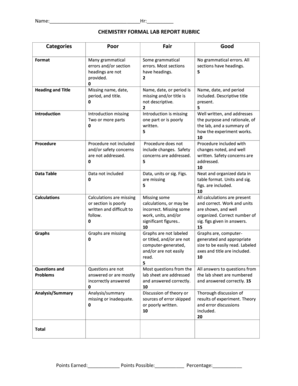
The Lab Report Rubric is a standardized tool designed to assess student lab reports. Its primary purpose is to provide educators with a clear definition and a structured format for evaluation. This rubric aids in identifying strengths and weaknesses in student submissions, facilitating consistent scoring across multiple reports.
The structure of the rubric includes sections dedicated to various essential components, such as appearance, procedure, results, and conclusions. By utilizing this rubric, teachers can evaluate student lab reports more effectively, ensuring that feedback is constructive and informative.
Purpose and Benefits of Using the Lab Report Rubric
The Lab Report Rubric plays a crucial role in academic assessment by providing a transparent framework for grading. This consistency helps create standardized evaluation criteria that both educators and students can understand. As a result, it promotes fair evaluations and clear feedback, which can lead to improved student performance.
Utilizing this rubric enhances education evaluation by allowing teachers to focus on specific criteria, thus enabling them to deliver precise feedback. Consequently, students gain insights into their performance, fostering a supportive learning environment.
Key Features of the Lab Report Rubric
The Lab Report Rubric includes several key features that facilitate effective evaluation. Among these, detailed scoring sections assess various components, such as appearance, procedure, results, and conclusions.
-
Fillable fields for student information.
-
Checkboxes for easy navigation and marking.
-
Clear criteria for each scoring section.
This combination of features ensures that both teachers and students can efficiently assess the quality of lab reports.
Who Needs the Lab Report Rubric?
The Lab Report Rubric is essential for various users in the educational field. Primarily, it serves educators and teachers across different science disciplines who seek a reliable method to evaluate lab reports.
Additionally, students benefit significantly from this rubric, as it guides them in understanding the expectations for their lab submissions. By providing structured feedback, it enhances their ability to produce high-quality reports.
How to Fill Out the Lab Report Rubric Online (Step-by-Step)
Using the Lab Report Rubric online is straightforward. Follow these steps to complete the process effectively:
-
Access the rubric and fill out the student details including name and experiment title.
-
Rate each section based on the established scoring criteria.
-
Save and submit the completed rubric electronically.
This process streamlines the grading workflow, allowing for easy documentation and tracking of student progress.
Common Errors and How to Avoid Them in Lab Reports
Students often encounter typical pitfalls in their lab reports that can negatively impact their grades. Common issues include missing essential components and failing to state objectives clearly.
To avoid these mistakes, students should focus on writing with clarity and precision. Here are some tips for crafting effective lab reports:
-
Ensure all required sections are included.
-
State objectives clearly to guide readers.
-
Revise for clarity and coherence before submission.
Digital Signature vs. Wet Signature Requirements
Understanding the signing process for the Lab Report Rubric is essential for proper submission. Digital signatures offer significant advantages, including enhanced security and convenience for submitting reports.
Using pdfFiller, educators can electronically sign the rubric, ensuring an efficient and secure method of documentation. This functionality eliminates the need for physical copies, streamlining the entire process.
Security and Compliance for the Lab Report Rubric
Users can trust the security features of pdfFiller when handling the Lab Report Rubric. The platform employs 256-bit encryption, ensuring that sensitive information is well-protected.
Additionally, pdfFiller complies with HIPAA and GDPR regulations, further enhancing user confidence in the safeguarding of educational documents. These privacy measures ensure a secure environment for both educators and students.
How to Download and Save the Lab Report Rubric PDF
To download and save the completed Lab Report Rubric, follow these simple steps:
-
Select the desired format for your download (such as PDF or DOCX).
-
Click the download button to save the rubric to your device.
-
Share or print the rubric as needed for submission.
This accessibility ensures that all users can easily manage their lab report evaluations.
Unlock the Potential of Effective Lab Report Evaluation
Explore the benefits of using pdfFiller for your Lab Report Rubric needs. This powerful tool simplifies the process of filling out, signing, and sharing documents.
By leveraging pdfFiller, both educators and students can experience enhanced functionality and ease of use, ultimately leading to more productive lab report evaluations.
How to fill out the Lab Rubric
-
1.Access pdfFiller and search for the Lab Report Rubric template in the available document section.
-
2.Open the document and familiarize yourself with the sections provided for grading various components of the lab report.
-
3.Gather necessary information before starting by reviewing the student’s lab report to ensure all required fields can be accurately filled.
-
4.Use the fillable fields, which include 'Student Name', 'Experiment Title', and 'Period', by clicking on each respective field and entering the required information.
-
5.Utilize the checkboxes and tables present to score each component of the lab report as per the outlined criteria.
-
6.Take your time to review the filled criteria and ensure accuracy in scoring based on the specific guidelines provided in the rubric.
-
7.Once everything is complete, save your changes to the document in pdfFiller by clicking on the save option.
-
8.If you need to submit the rubric, download it in your preferred format or follow your institution's submission guidelines.

Who can use the Lab Report Rubric?
The Lab Report Rubric can be used by educators, including teachers and administrators, to evaluate students' science lab reports. It's an essential tool for ensuring consistent grading across different students and classes.
Are there deadlines for grading lab reports using this rubric?
There are no specific deadlines associated with the Lab Report Rubric itself. Educators should establish their own timelines for grading based on the submission schedules of their science classes.
How should I submit the completed rubric?
After grading the lab report using the rubric, educators can submit it as per their institution's protocol. This may involve storing it physically with the lab report or submitting it online if required.
What supporting documents do I need to assess students with this rubric?
The primary document needed is the student’s completed lab report. You may also want any specific guidelines or curriculum materials that outline the criteria used in the rubric.
What common mistakes should be avoided when using the Lab Report Rubric?
Ensure to read the criteria carefully to avoid errors in scoring. Also, remember to provide constructive feedback for each section to enhance student learning instead of just focusing on the scores.
How long does it take to process grading using the rubric?
Processing time can vary depending on the length of the lab reports and the number of students being graded. Typically, it should take each educator a few minutes per lab report to assess accurately.
Can I customize the Lab Report Rubric?
Yes, educators are encouraged to adapt the Lab Report Rubric to fit specific assignment goals or classroom needs, ensuring that the evaluation reflects the learning objectives of their curriculum.
Related Forms






Related Catalogs
Get the latest insights from our blog


If you believe that this page should be taken down, please follow our DMCA take down process
here
.
This form may include fields for payment information. Data entered in these fields is not covered by PCI DSS compliance.