
Last updated on
Oct 2, 2026

NC FingerprintCriminal Background Packet free printable template
pdfFiller is not affiliated with any government organization

Fill out
Complete the form online in a simple drag-and-drop editor.

eSign
Add your legally binding signature or send the form for signing.

Share
Share the form via a link, letting anyone fill it out from any device.

Export
Download, print, email, or move the form to your cloud storage.
Why pdfFiller is the best tool for your documents and forms


End-to-end document management
From editing and signing to collaboration and tracking, pdfFiller has everything you need to get your documents done quickly and efficiently.
Accessible from anywhere
pdfFiller is fully cloud-based. This means you can edit, sign, and share documents from anywhere using your computer, smartphone, or tablet.
Secure and compliant
pdfFiller lets you securely manage documents following global laws like ESIGN, CCPA, and GDPR. It's also HIPAA and SOC 2 compliant.
What is NC FingerprintCriminal Background Packet
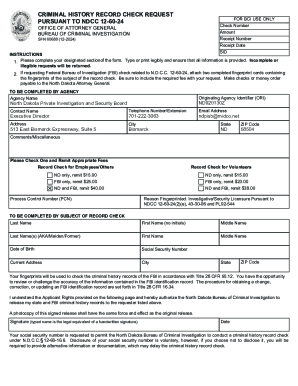
The North Carolina Insurance Producer Fingerprint Packet is a professional license application used by individuals to apply for an insurance producer license in North Carolina.
pdfFiller scores top ratings on review platforms




Who needs NC FingerprintCriminal Background Packet?
Explore how professionals across industries use pdfFiller.

NC FingerprintCriminal Background Packet is needed by:
-
Applicants for an insurance producer license in North Carolina
-
Individuals undergoing a fingerprint background check
-
Insurance professionals looking to expand their credentials
-
Law firms assisting clients in obtaining insurance licenses
-
Background check service providers
-
State licensing offices managing insurance applications
Comprehensive Guide to NC FingerprintCriminal Background Packet
What is the North Carolina Insurance Producer Fingerprint Packet?
The North Carolina Insurance Producer Fingerprint Packet is a crucial document for individuals seeking an insurance producer license in North Carolina. It serves as an integral part of the insurance licensing process, primarily focused on conducting comprehensive background checks. The completion of this packet ensures that applicants meet the necessary legal and professional standards, reinforcing the importance of transparency in the insurance industry.
Purpose and Benefits of the North Carolina Insurance Producer Fingerprint Packet
The form is essential for enabling a thorough criminal background check process, helping to assess an applicant's eligibility for a license. By completing the fingerprint packet, candidates can experience a more streamlined licensing timeline, which can lead to an expedited application process. Leveraging this process not only enhances the efficiency of applications but also promotes a safer environment for consumers.
Who Needs the North Carolina Insurance Producer Fingerprint Packet?
The North Carolina Insurance Producer Fingerprint Packet is mandatory for various individuals, particularly those applying for an insurance producer license. Applicants must meet specific age and residency requirements established by the state. The packet's role extends to diverse licensing scenarios, ensuring that all potential insurance producers undergo the same rigorous background evaluation process.
How to Fill Out the North Carolina Insurance Producer Fingerprint Packet Online
Filling out the packet correctly is essential to avoid delays. Follow these step-by-step instructions:
-
Access the North Carolina Insurance Producer Fingerprint Packet online.
-
Enter your demographic information, including your name and address.
-
Input your Social Security Number (SSN) and relevant identification fields.
-
Review all completed sections to ensure accuracy.
-
Sign the form where indicated.
Remember to cross-check all necessary data and look out for common fields that applicants may overlook, such as contact phone numbers and email addresses.
Submission Process for the North Carolina Insurance Producer Fingerprint Packet
The submission of the completed fingerprint packet can be done through various methods. You may choose to submit the packet online or via postal mail. Ensure you send it to the designated address specified by the North Carolina Licensing Office of Pearson VUE. Be aware of any applicable fees and submission deadlines to prevent processing delays.
Common Errors to Avoid When Completing the North Carolina Insurance Producer Fingerprint Packet
Applicants often make several common errors when filling out the fingerprint packet. Avoid these mistakes:
-
Leaving fields incomplete or failing to provide required information.
-
Entering an incorrect Social Security Number (SSN).
-
Omitting signatures or dates in relevant sections.
It’s crucial to review the packet thoroughly for accuracy before submission, ensuring that all areas are properly completed.
What Happens After You Submit the North Carolina Insurance Producer Fingerprint Packet?
After submitting the fingerprint packet, applicants can expect specific next steps regarding the processing of their background checks. Typically, the background check process takes several weeks, and you can track the status of your application after submission. Be prepared for notifications regarding the acceptance of your application or any potential issues that need addressing.
Security and Compliance for the North Carolina Insurance Producer Fingerprint Packet
It is vital to reassure applicants about the safety of their personal information. The handling of sensitive documents is managed with stringent security measures to protect data privacy. Compliance with industry standards, such as HIPAA and GDPR, emphasizes the importance of secure platforms when filing the fingerprint packet, ensuring applicants can submit their information with confidence.
How pdfFiller Enhances Your Experience with the North Carolina Insurance Producer Fingerprint Packet
pdfFiller significantly improves the experience of completing the North Carolina Insurance Producer Fingerprint Packet. The platform offers features such as easy editing, eSigning, and secure document management, providing a user-friendly interface designed for accuracy and efficiency. Utilizing pdfFiller ensures that your information is well-handled and the processing of your form is expedited smoothly.
Get Started with the North Carolina Insurance Producer Fingerprint Packet Today
Begin your journey toward obtaining your insurance producer license by accessing the North Carolina Insurance Producer Fingerprint Packet on pdfFiller. The platform's user-friendly capabilities make it easier than ever to complete your application accurately. Take advantage of the benefits offered by pdfFiller and streamline your licensing process today.
How to fill out the NC FingerprintCriminal Background Packet
-
1.Access the North Carolina Insurance Producer Fingerprint Packet on pdfFiller by searching with its name or using the provided link.
-
2.Open the form within pdfFiller. Familiarize yourself with the interface, where fillable fields will be highlighted for easy navigation.
-
3.Gather the necessary information before starting the form. This includes your full name, Social Security Number (SSN), address, phone numbers, and email address.
-
4.Begin completing the fillable fields, entering your demographic information accurately. Use clear and legible handwriting if required.
-
5.In the designated fields, input your SSN, contact details, and any other requested information as per the instructions provided.
-
6.Carefully review the details you have entered to ensure there are no mistakes. Use the preview function in pdfFiller to check for accuracy.
-
7.Once all fields are filled out correctly, provide your signature in the appropriate signature section of the form.
-
8.After you have reviewed and finalized the form, click on the 'Save' option in pdfFiller to retain a copy for your records.
-
9.You can download the completed document or choose to submit it directly through the pdfFiller platform following the outlined submission steps.

Who is eligible to use the North Carolina Insurance Producer Fingerprint Packet?
Any individual who is applying for an insurance producer license in North Carolina is eligible. This form is specifically designed for those undergoing background checks as part of the licensing process.
What is the submission method for this form?
The completed North Carolina Insurance Producer Fingerprint Packet must be submitted to the NC Licensing Office of Pearson VUE. You may need to follow the specific submission guidelines provided within the form or by Pearson VUE.
Are there any deadlines for submitting this form?
While specific deadlines may vary, it is generally advised to complete and submit the form as soon as possible after gathering the required information to avoid delays in processing your insurance producer application.
What supporting documents are required with this form?
Typically, along with the Fingerprint Packet, you may need to include a form of identification and possibly other documents as specified by the licensing office or guidelines provided by Pearson VUE.
What common mistakes should I avoid when filling out this form?
Common mistakes include leaving fields blank, incorrect SSN entries, and failing to sign the form. Double-check all sections for accuracy before submission to ensure compliance with requirements.
How long does it take to process this form?
Processing times can vary, but once submitted, applicants typically receive information on their background check status within several weeks. It's best to check directly with Pearson VUE for the most accurate timelines.
Do I need to notarize this form?
No, the North Carolina Insurance Producer Fingerprint Packet does not require notarization, which simplifies the submission process for applicants.
Related Forms



Get the latest insights from our blog


If you believe that this page should be taken down, please follow our DMCA take down process
here
.
This form may include fields for payment information. Data entered in these fields is not covered by PCI DSS compliance.