
Last updated on
Nov 10, 2026

MI Harold F. Roth Patient Registration 2016-2026 free printable template
pdfFiller is not affiliated with any government organization

Fill out
Complete the form online in a simple drag-and-drop editor.

eSign
Add your legally binding signature or send the form for signing.

Share
Share the form via a link, letting anyone fill it out from any device.

Export
Download, print, email, or move the form to your cloud storage.
Why pdfFiller is the best tool for your documents and forms


End-to-end document management
From editing and signing to collaboration and tracking, pdfFiller has everything you need to get your documents done quickly and efficiently.
Accessible from anywhere
pdfFiller is fully cloud-based. This means you can edit, sign, and share documents from anywhere using your computer, smartphone, or tablet.
Secure and compliant
pdfFiller lets you securely manage documents following global laws like ESIGN, CCPA, and GDPR. It's also HIPAA and SOC 2 compliant.
What is MI Harold F. Roth Patient Registration
The Patient Registration Form is a critical document used by healthcare providers to gather essential patient information for medical records and onboarding.
pdfFiller scores top ratings on review platforms




Who needs MI Harold F. Roth Patient Registration?
Explore how professionals across industries use pdfFiller.

MI Harold F. Roth Patient Registration is needed by:
-
New patients seeking medical care
-
Healthcare providers and clinics
-
Medical administrative staff
-
Insurance companies requiring patient details
-
Caregivers for minor patients
-
Health information management professionals
Comprehensive Guide to MI Harold F. Roth Patient Registration
What is the Patient Registration Form?
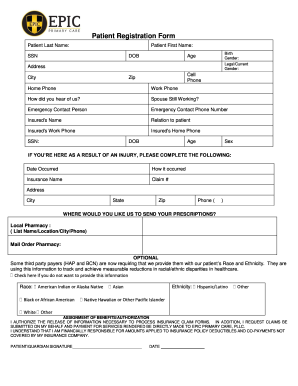
The Patient Registration Form is a crucial component of the healthcare process, primarily used for patient onboarding. This form serves as a tool for healthcare providers to gather essential information such as personal details, emergency contacts, and insurance information. Understanding its significance helps ensure that medical records are accurate and up-to-date, ultimately facilitating better patient care.
By collecting comprehensive data, the healthcare registration form aids in creating a reliable medical profile for each patient. This is particularly important for new patients entering a healthcare system, as the form lays the foundation for their future interactions with medical professionals.
Purpose and Benefits of the Patient Registration Form
The Patient Registration Form offers numerous benefits for both healthcare providers and patients. It streamlines patient onboarding, making the initial process more efficient and less cumbersome. In addition, the form enhances communication between patients and healthcare staff by capturing vital information needed for treatment and follow-up.
Moreover, accurate data collection via the patient information form is essential for improving service delivery. When healthcare providers have all the necessary information upfront, they can offer tailored care and address patient needs more effectively.
Key Features of the Patient Registration Form
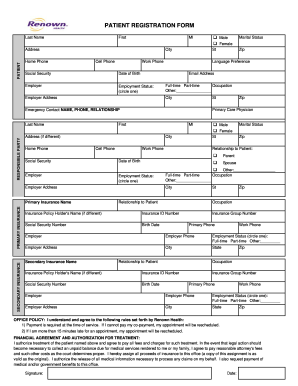
The Patient Registration Form includes several key fields that users must complete. Essential information required on this form includes:
-
Patient name
-
Date of birth
-
Address
-
Phone numbers
-
Preferred language
-
Smoking status
Additionally, there are sections dedicated to insurance details and responsible party information, which is particularly important for minor patients. The form is designed for user-friendliness, incorporating fillable templates that facilitate smooth completion.
Who Needs the Patient Registration Form?
The Patient Registration Form is essential for a variety of healthcare settings. Medical practices, clinics, and hospitals all require this form for their new patients. It is especially vital for new patients, minors, as well as those who are insured and uninsured.
Through completing the healthcare registration form, all patient demographics can provide pertinent details necessary for their medical care, ensuring the healthcare provider has the right information from the start.
How to Fill Out the Patient Registration Form Online
Filling out the Patient Registration Form online is straightforward. Follow these steps to complete the form digitally:
-
Access the form through pdfFiller.
-
Fill in required fields with accurate information.
-
Review each section for completeness.
-
Submit the form after verifying all details.
To avoid common errors, double-check personal details and ensure that all required fields are filled out correctly. This careful approach helps ensure that the healthcare onboarding form is completed without any issues.
Security and Compliance in Using the Patient Registration Form
When handling sensitive patient data, security is paramount. PdfFiller employs robust security features, including 256-bit encryption, to protect the information collected through the healthcare registration form. Compliance with regulations such as HIPAA and GDPR further ensures that patient data remains confidential and secure.
Healthcare providers must prioritize patient data protection, as maintaining confidentiality is critical for building trust and ensuring compliance with legal requirements.
Submitting the Patient Registration Form
Submitting the completed Patient Registration Form can be done through various methods. Patients can choose to submit the form online or in-person, depending on their preference and the healthcare provider's options. Once submitted, patients can expect to receive confirmation of their form, and tracking submissions is usually available.
Post-submission, healthcare providers may email or contact patients regarding any follow-up requirements, ensuring that all necessary information is confirmed for effective care.
Enhancing Your Experience with pdfFiller
PdfFiller significantly enhances user experience when managing the Patient Registration Form. The platform offers numerous benefits, including editing, filling, and eSigning documents efficiently. Users also have access to additional healthcare-related resources that support their registration experience.
By leveraging pdfFiller, users can ensure their documents are completed accurately and securely, making the process of managing important healthcare forms much easier.
How to fill out the MI Harold F. Roth Patient Registration
-
1.Access the Patient Registration Form on pdfFiller by navigating to the site and entering its name in the search bar.
-
2.Once you find the form, click on it to open it in the pdfFiller interface for editing.
-
3.Before beginning, gather necessary information such as your legal name, date of birth, address, phone numbers, and insurance information.
-
4.Utilize the form fields in pdfFiller; click on a blank space to begin entering your information, ensuring accuracy in each field.
-
5.If the patient is a minor, collect details regarding the responsible party's information and any required emergency contacts.
-
6.Review all completed sections, especially the medical indicators like smoking status, to confirm that nothing is missed.
-
7.Once satisfied with the filled form, use the 'Save' option to store your progress, or choose 'Download' to obtain a copy.
-
8.If required, submit the form via email or print it directly from pdfFiller for physical submissions to your healthcare provider.

Who is eligible to use the Patient Registration Form?
Any new patient seeking to access healthcare services must complete the Patient Registration Form, which is essential for establishing their medical records.
How do I submit the completed Patient Registration Form?
You can submit the completed form directly through pdfFiller via email, or print it out and hand-deliver it to your healthcare provider's office.
What supporting documents do I need to provide?
While the form primarily collects personal and insurance information, you may need to provide a valid ID and insurance card when submitting it.
Are there any common mistakes to avoid when filling out the form?
Common mistakes include missing signature fields, providing incorrect personal information, and not fully completing the emergency contact sections.
How long does it take to complete the Patient Registration Form?
Completing the Patient Registration Form typically takes about 15 to 30 minutes, depending on how quickly you gather the required information.
Can I save my progress while filling out the form online?
Yes, pdfFiller allows you to save your progress. You can return to the form later to complete it or make any necessary changes before submission.
What if I need assistance filling out the form?
If you need help, consult your healthcare provider's administrative staff who can guide you through the process or contact pdfFiller's customer support for technical assistance.
MI Harold F. Roth Patient Registration Form Versions
Related Forms





Get the latest insights from our blog


If you believe that this page should be taken down, please follow our DMCA take down process
here
.
This form may include fields for payment information. Data entered in these fields is not covered by PCI DSS compliance.