
Last updated on
Nov 9, 2026
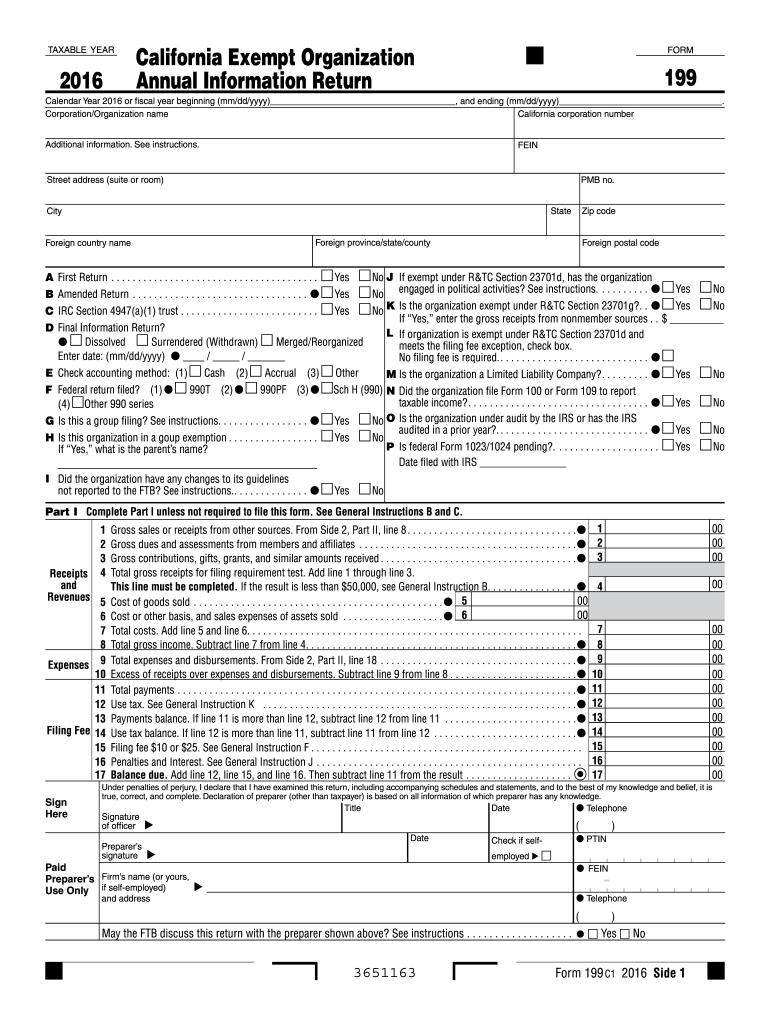
CA FTB 199 2016 free printable template
pdfFiller is not affiliated with any government organization

Fill out
Complete the form online in a simple drag-and-drop editor.

eSign
Add your legally binding signature or send the form for signing.

Share
Share the form via a link, letting anyone fill it out from any device.

Export
Download, print, email, or move the form to your cloud storage.
Why pdfFiller is the best tool for your documents and forms


End-to-end document management
From editing and signing to collaboration and tracking, pdfFiller has everything you need to get your documents done quickly and efficiently.
Accessible from anywhere
pdfFiller is fully cloud-based. This means you can edit, sign, and share documents from anywhere using your computer, smartphone, or tablet.
Secure and compliant
pdfFiller lets you securely manage documents following global laws like ESIGN, CCPA, and GDPR. It's also HIPAA and SOC 2 compliant.
What is CA FTB 199
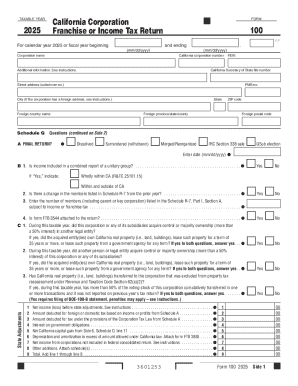
The California Exempt Organization Form 199 is a tax document used by exempt organizations in California to report financial activities and fulfill annual reporting requirements.
pdfFiller scores top ratings on review platforms




ONLY LIMITED USE FOR ME BUT A GREAT WAY TO FILL IN FORMS
Easy to use
Easy to use, Customer service is fast. Great buy for the money.
excellent
excellent excellent excellent
the best pdf filler ever.
great product
GREAT WEBSITE IT HAS EVERYTHING I NEED…
GREAT WEBSITE IT HAS EVERYTHING I NEED WHEN I NEED A DOCUMENT.
Who needs CA FTB 199?
Explore how professionals across industries use pdfFiller.

CA FTB 199 is needed by:
-
Nonprofit organizations in California
-
State-regulated charities
-
Tax-exempt organizations
-
Financial officers of exempt organizations
-
Accountants preparing tax forms
-
Compliance officers maintaining legal standards
Comprehensive Guide to CA FTB 199
What is the California Exempt Organization Form 199?
The California Exempt Organization Form 199 serves as an annual information return for exempt organizations operating within the state. It is designed to ensure these organizations comply with California state tax regulations while maintaining their tax-exempt status.
This form requires specific details, including the organization's name, address, and financial information. It plays a vital role in the transparency of financial reporting for exempt organizations, making it essential for compliance with state requirements.
Purpose and Benefits of the California Exempt Organization Form 199
This form is crucial for exempt organizations because it helps maintain their tax-exempt status through diligent reporting. By completing the California exempt organization annual return, organizations demonstrate their commitment to transparency and accountability.
Timely submission of the form can protect organizations from incurring penalties or losing their tax-exempt status. Annual reporting via Form 199 supports the integrity of the nonprofit sector in California.
Who Needs the California Exempt Organization Form 199?
Organizations that qualify as exempt under California law must file this form. The criteria for exempt status include being a nonprofit corporation or certain types of trusts under specific conditions.
-
Charitable organizations
-
Religious organizations
-
Educational organizations
-
Social welfare organizations
Each category has distinct implications regarding filing requirements, emphasizing the necessity for compliance.
Key Features of the California Exempt Organization Form 199
The form comprises essential fields that must be filled out accurately. Required fields include gross receipts, total expenses, and disbursements, which provide a comprehensive financial overview of the organization.
-
Accompanying schedules for detailed financial statements
-
Officer's signature requirement for validation
Understanding these features is vital for completing the form correctly and ensuring compliance with state tax regulations.
How to Fill Out the California Exempt Organization Form 199 Online
To complete the California Exempt Organization Form 199 online, users can utilize pdfFiller to access the fillable document. Start by navigating to the online form and follow these steps:
-
Open the form template in pdfFiller.
-
Fill in organization details like the name and address in designated fields.
-
Complete the financial sections detailing gross receipts and expenses.
-
Review the form for accuracy before submitting.
Make sure to validate information entry to prevent common mistakes that could lead to complications in the filing process.
Common Errors and How to Avoid Them When Filing Form 199
Organizations may encounter typical mistakes when filling out Form 199. Common errors include omitting required fields and incorrect calculations of financial data.
-
Double-check financial figures for accuracy.
-
Ensure all required fields are completed.
-
Use the online validation features in pdfFiller to review the form.
By following best practices and leveraging available resources, organizations can minimize errors during submission.
Submission Methods and Delivery for the California Exempt Organization Form 199
Once completed, organizations have several options for submitting Form 199. The form can be filed electronically through designated portals or mailed directly to the relevant state office.
-
Submission options include electronic filing through the state portal.
-
Mailing instructions should align with state requirements to avoid delays.
Organizations should also obtain confirmation of submission to track the status of their filing.
What Happens After You Submit the California Exempt Organization Form 199
After submitting the California Exempt Organization Form 199, organizations should be aware that processing times may vary. They can check the status of their application through the state’s online system.
Organizations should also prepare for the possibility of audits or additional information requests from the state, ensuring they are ready to provide necessary documentation if required.
Security and Compliance for the California Exempt Organization Form 199
When handling the California Exempt Organization Form 199, ensuring the security of sensitive financial information is paramount. pdfFiller employs robust security measures, including 256-bit encryption, to protect user data.
The platform complies with HIPAA, GDPR, and SOC 2 Type II standards, which guarantees that data is handled safely and responsibly throughout the submission process.
Get Started with pdfFiller for Your California Exempt Organization Form 199
Utilizing pdfFiller for completing the California Exempt Organization Form 199 provides numerous advantages. This online platform simplifies the process of filling, signing, and submitting documents without the need for downloads.
Experience a seamless document management process by leveraging pdfFiller’s capabilities to enhance efficiency when completing essential forms.
How to fill out the CA FTB 199
-
1.Visit the pdfFiller website and log in or create an account if you do not have one already.
-
2.Search for 'California Exempt Organization Form 199' in the template library to locate the form.
-
3.Click on the form to open it in the pdfFiller editor for completion.
-
4.Read through the instructions and verify that you have the necessary financial documents at hand, including revenue, expenses, and disbursement records.
-
5.Start filling in the form by entering your organization's name and California corporation number in the designated fields.
-
6.Proceed by filling in the required financial information such as gross receipts, total expenses, and distributions as instructed on the form.
-
7.Utilize checkboxes for 'Yes' or 'No' responses where applicable, ensuring that you accurately convey your organization's status.
-
8.Once all fields are completed, thoroughly review the form for accuracy, checking for any missing information or errors.
-
9.To finalize, ensure that you sign the form in the designated area after confirming the details are correct.
-
10.After completing, save the edited form, and then you can choose to download it for submission or directly submit it electronically through the pdfFiller interface.

Who needs to file the California Exempt Organization Form 199?
Nonprofit organizations and tax-exempt entities operating in California must file Form 199 annually to report their financial activities and maintain their tax-exempt status.
What is the deadline for submitting Form 199?
Form 199 should be filed by the 15th day of the 5th month after the organization’s fiscal year ends, ensuring timely compliance and reporting.
What information do I need to complete the form?
Before filling out Form 199, gather information about your organization's financial activities, including revenues, expenses, disbursements, and your organization’s specific identification numbers.
How can I submit Form 199 after filling it out?
Once completed, Form 199 can be submitted electronically through pdfFiller or printed and mailed to the appropriate California tax authorities, depending on your preference.
What documents should accompany Form 199?
Typically, supporting documents such as financial statements and previous year's tax returns may be required, but it’s essential to check specific filing guidelines for your organization.
What are common mistakes to avoid when completing this form?
Common mistakes include omitting financial details, failing to sign where required, and submitting late. Carefully review your entries before finalizing the form to avoid these issues.
How long does it take to process Form 199?
Processing times for Form 199 can vary, but generally, you should allow several weeks to receive confirmation of your filing, especially during peak tax season.
CA FTB 199 Form Versions
Related Content
Related Forms



Related Catalogs
Get the latest insights from our blog


If you believe that this page should be taken down, please follow our DMCA take down process
here
.
This form may include fields for payment information. Data entered in these fields is not covered by PCI DSS compliance.