
Last updated on
Oct 19, 2026
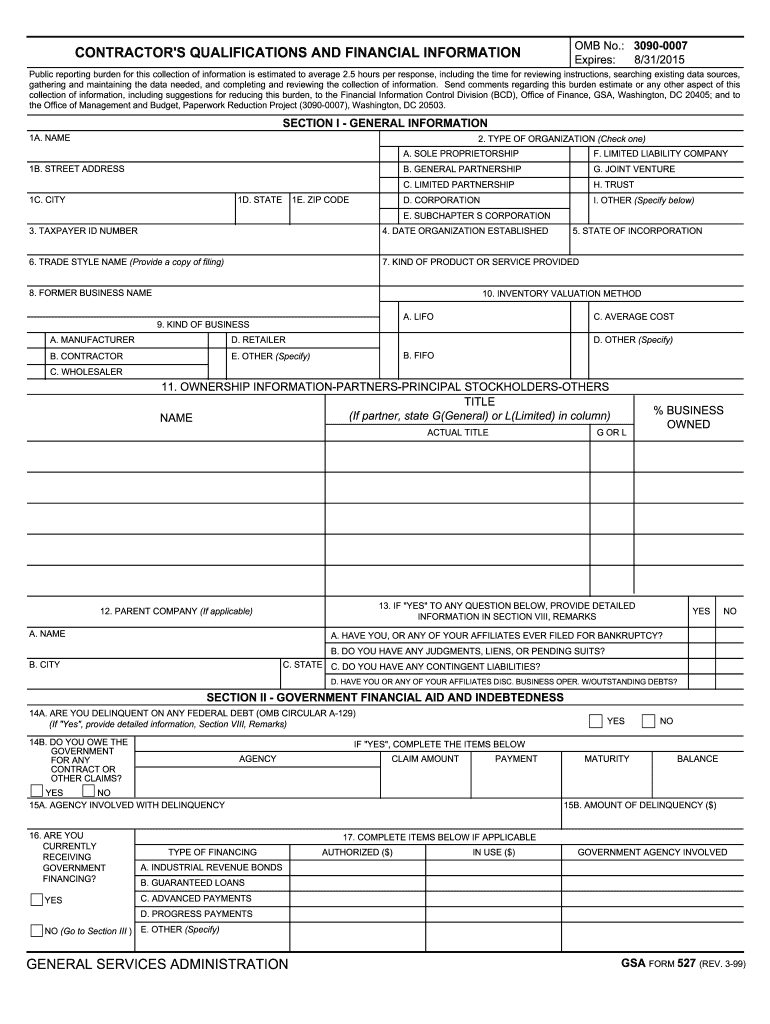
GSA 527 1999 free printable template
pdfFiller is not affiliated with any government organization

Fill out
Complete the form online in a simple drag-and-drop editor.

eSign
Add your legally binding signature or send the form for signing.

Share
Share the form via a link, letting anyone fill it out from any device.

Export
Download, print, email, or move the form to your cloud storage.
Why pdfFiller is the best tool for your documents and forms


End-to-end document management
From editing and signing to collaboration and tracking, pdfFiller has everything you need to get your documents done quickly and efficiently.
Accessible from anywhere
pdfFiller is fully cloud-based. This means you can edit, sign, and share documents from anywhere using your computer, smartphone, or tablet.
Secure and compliant
pdfFiller lets you securely manage documents following global laws like ESIGN, CCPA, and GDPR. It's also HIPAA and SOC 2 compliant.
What is GSA 527
The Contractor's Qualifications and Financial Information Form is a vendor registration document used by contractors to provide detailed information about their business qualifications and financial status.
pdfFiller scores top ratings on review platforms




Who needs GSA 527?
Explore how professionals across industries use pdfFiller.

GSA 527 is needed by:
-
Contractors seeking new business opportunities
-
Government agencies requiring vendor information
-
Private companies verifying contractor qualifications
-
Financial institutions assessing contractor viability
-
Suppliers interested in contractor financial health
Comprehensive Guide to GSA 527
What is the Contractor's Qualifications and Financial Information Form?
The Contractor's Qualifications and Financial Information Form (OMB No. 3) serves a vital purpose in the contractor and client relationship. This form provides essential insights into a contractor's business qualifications and financial health, making it a cornerstone for validating contractors’ ability to undertake projects. Its standardized structure ensures that contractors supply the necessary information that agencies or clients need to evaluate their suitability for contracts.
Utilizing the contractor qualifications form helps streamline the vendor registration process, offering a comprehensive view of a contractor’s qualifications and experience. This form is not only a requirement for many government contracts but also a significant tool for establishing credibility within various industries.
Purpose and Benefits of the Contractor's Qualifications and Financial Information Form
The necessity of the Contractor's Qualifications and Financial Information Form cannot be understated. It equips contractors with a standardized way to present their qualifications and financial metrics, thereby enhancing their competitiveness when bidding for contracts. For agencies and clients, the insights derived from this form build trust and serve as a risk mitigation strategy.
Benefits for contractors include improved chances of securing contracts, while agencies and clients gain access to reliable and structured information. By submitting the vendor registration form, contractors can demonstrate their capability and readiness to deliver on project demands effectively.
Key Features of the Contractor's Qualifications and Financial Information Form
This form is meticulously designed to capture specific details relevant to contractor evaluation. Key features include:
-
General information that outlines the contractor's basic identification and business structure
-
Financial statements that present the contractor's financial status
-
Supplier information detailing the contractor's relationships with key suppliers
-
A fillable form template that facilitates easy data entry with clearly labeled input fields
These elements collectively enhance the form's usability and ensure that all required information is presented in an organized manner.
Who Needs the Contractor's Qualifications and Financial Information Form?
This form is essential for any contractor aiming to bid on government contracts. Typically, contractors from sectors such as construction, engineering, and various service industries must fill it out to demonstrate their qualifications and financial capabilities.
Specific business types, especially those seeking to engage with government agencies or large private clients, are required to submit this document as part of their registration process. The US contractor form opens opportunities by ensuring that only qualified vendors can engage in bidding.
How to Fill Out the Contractor's Qualifications and Financial Information Form Online (Step-by-Step)
Filling out the Contractor's Qualifications and Financial Information Form online is straightforward. Follow these steps:
-
Access the form via pdfFiller and select the fillable template
-
Enter your business name in the "1A. NAME" field
-
Specify the type of organization by checking the appropriate box in section "2. TYPE OF ORGANIZATION"
-
Input required financial information in the financial statements section
-
Review the information for accuracy to avoid common errors
Ensure that all fields are completed accurately to facilitate a smooth review process.
Submission Methods and Delivery for the Contractor's Qualifications and Financial Information Form
Once the Contractor's Qualifications and Financial Information Form is completed, it can be submitted through various methods. Options include:
-
Online submission via pdfFiller, which allows for direct submission to the relevant agency
-
Physical delivery of printed forms to specified addresses
After submission, tracking and confirmation details will be provided to ensure that users can verify the status of their application.
What Happens After You Submit the Contractor's Qualifications and Financial Information Form
Post-submission, the review process typically involves evaluation by the designated agency or client. Applicants can expect various outcomes, including approval or rejection of their submissions. Common reasons for rejection may include incomplete information or discrepancies in financial reporting.
Addressing issues promptly after receiving feedback can significantly enhance the chances of approval in future submissions.
Security and Compliance for the Contractor's Qualifications and Financial Information Form
Security is paramount when handling sensitive information. pdfFiller employs robust measures, including 256-bit encryption and compliance with HIPAA standards, to protect user data. It is crucial for contractors to realize that their privacy and the confidentiality of the data submitted are safeguarded throughout the form submission process.
Understanding these security practices can alleviate concerns regarding data handling and enhance user confidence in the platform.
How to Correct or Amend the Contractor's Qualifications and Financial Information Form
If errors are identified after form submission, timely corrections are essential. The process for making amendments includes:
-
Contacting the agency that received the form to inquire about their amendment procedures
-
Filling out any additional forms required for corrections
-
Resubmitting the corrected information promptly to avoid potential delays in approval
Quick action is necessary to ensure that any amendments do not hinder the bidding process.
Empower Your Business with the Right Tools for the Contractor's Qualifications and Financial Information Form
Utilizing pdfFiller can significantly enhance the experience of filling out the Contractor's Qualifications and Financial Information Form. The platform offers user-friendly features that simplify form completion and management. Key capabilities include the ability to edit, sign, and share forms securely.
By leveraging these tools, contractors can improve efficiency and ensure the accuracy of their submissions, all while maintaining robust security for their sensitive data.
How to fill out the GSA 527
-
1.To access the Contractor's Qualifications and Financial Information Form, visit pdfFiller and search for the form by name.
-
2.Once you find the form, click on it to open it in the pdfFiller interface.
-
3.Before starting to fill out the form, gather all necessary information such as your business qualifications, financial statements, and supplier information.
-
4.Navigate through the document using the side panel or scrolling. Locate the labeled input fields and checkboxes to guide your entries.
-
5.Begin filling in the fields, starting with general information such as name and type of organization.
-
6.Make sure to provide accurate details in the financial statements section, as it's crucial for client evaluations.
-
7.Complete any additional sections required for banking information and supplier details clearly and accurately.
-
8.Once all fields are filled, review your entries carefully to ensure there are no mistakes or omissions.
-
9.After reviewing, save your completed form on pdfFiller. You can also download a copy to your device.
-
10.If necessary, submit the form through pdfFiller’s electronic submission options or print it for manual submission.

Who is eligible to fill out the Contractor's Qualifications and Financial Information Form?
Eligibility to fill out the Contractor's Qualifications and Financial Information Form typically includes contractors who wish to qualify for business opportunities with clients or government agencies. Ensure that your business is registered and has the necessary information available.
Is there a deadline for submitting this form?
The Contractor's Qualifications and Financial Information Form does not specify deadlines in the metadata. However, it's advisable to submit the form well in advance of any bid or contract opportunity to ensure timely processing.
What are the submission methods for this form?
You can submit the Contractor's Qualifications and Financial Information Form electronically through platforms like pdfFiller or print it out for manual submission. Always check specific submission guidelines from your intended recipient.
What supporting documents are required with this form?
Typically, contractors should prepare financial statements, business qualifications, and references indicating past performance along with the Contractor's Qualifications and Financial Information Form. Ensure you have all relevant documentation ready.
What are common mistakes to avoid when filling out this form?
Common mistakes include leaving fields blank, providing inaccurate financial figures, and not including necessary supporting documents. Double-check all information and follow instructions closely to avoid these issues.
How long will it take to process the submitted form?
Processing times for the Contractor's Qualifications and Financial Information Form may vary based on the recipient's organization. Generally, anticipate a few weeks for processing, especially if additional information is needed.
Can I edit this form after submitting it?
Once submitted, modifications may depend on the recipient's policy. If you need to make changes, contact the organization to inquire about their procedures for form amendments.
GSA 527 Form Versions
Related Forms



Get the latest insights from our blog


If you believe that this page should be taken down, please follow our DMCA take down process
here
.
This form may include fields for payment information. Data entered in these fields is not covered by PCI DSS compliance.