
Last updated on
Oct 15, 2026
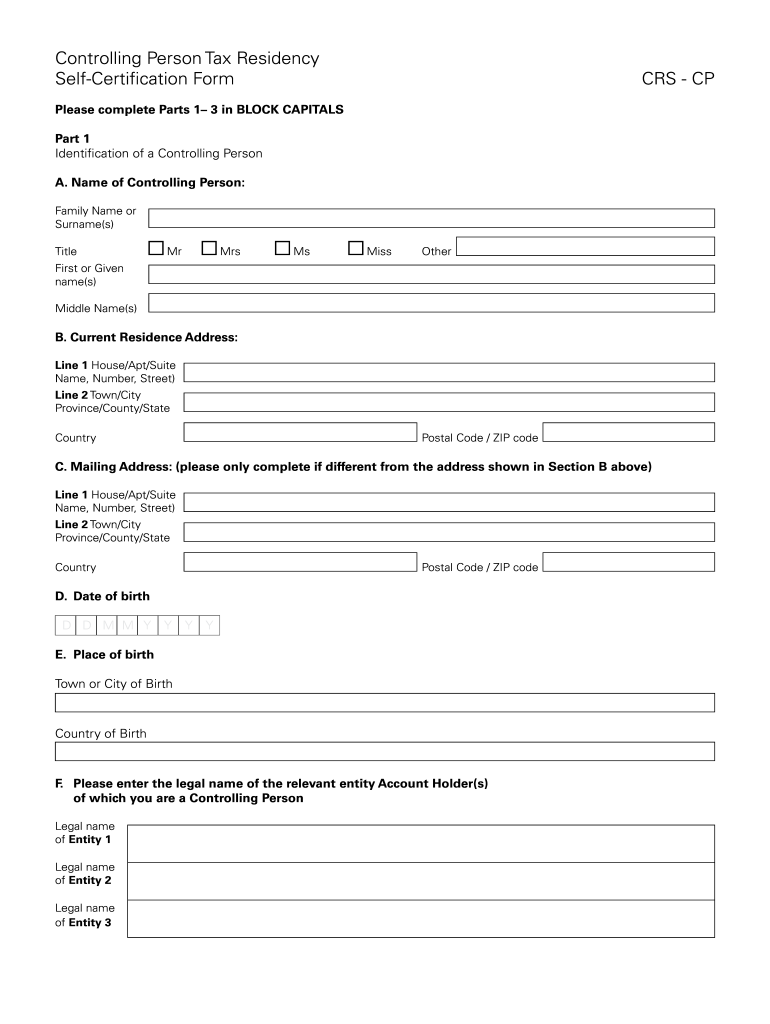
Get the free CRS Controlling Person Self-Certification Form
We are not affiliated with any brand or entity on this form

Fill out
Complete the form online in a simple drag-and-drop editor.

eSign
Add your legally binding signature or send the form for signing.

Share
Share the form via a link, letting anyone fill it out from any device.

Export
Download, print, email, or move the form to your cloud storage.
Why pdfFiller is the best tool for your documents and forms


End-to-end document management
From editing and signing to collaboration and tracking, pdfFiller has everything you need to get your documents done quickly and efficiently.
Accessible from anywhere
pdfFiller is fully cloud-based. This means you can edit, sign, and share documents from anywhere using your computer, smartphone, or tablet.
Secure and compliant
pdfFiller lets you securely manage documents following global laws like ESIGN, CCPA, and GDPR. It's also HIPAA and SOC 2 compliant.
What is CRS CP Form
The CRS Controlling Person Self-Certification Form is a regulatory document used by financial institutions to determine the tax residency of individuals controlling a Passive Entity.
pdfFiller scores top ratings on review platforms




Who needs CRS CP Form?
Explore how professionals across industries use pdfFiller.

CRS CP Form is needed by:
-
Individuals with ultimate control over trusts or investment vehicles
-
Authorized representatives of a Passive Entity
-
Tax professionals assisting clients with compliance
-
Financial institutions conducting tax information exchanges
-
Entities requiring certification for tax residency purposes
Comprehensive Guide to CRS CP Form
What is the CRS Controlling Person Self-Certification Form?
The CRS Controlling Person Self-Certification Form serves a crucial role in global tax compliance. It defines the tax residency for individuals who ultimately control Passive Entities, which include structures like trusts and investment vehicles. This form is vital for ensuring adherence to the Common Reporting Standard (CRS) and facilitating international tax information exchanges.
By accurately completing this form, controlling persons can certify their tax residency to financial institutions, helping maintain transparency and accountability in financial matters.
Purpose and Benefits of the CRS Controlling Person Self-Certification Form
Completing the CRS Controlling Person Self-Certification Form is essential for various reasons. First, it provides tax residency certification required by financial entities. Additionally, filling out this form helps prevent penalties associated with non-compliance with international tax regulations.
Furthermore, the form streamlines the collection of necessary tax information, making the process more efficient for both individuals and institutions involved.
Who Needs the CRS Controlling Person Self-Certification Form?
The CRS Controlling Person Self-Certification Form must be completed by specific individuals and entities. This includes individuals identified as Controlling Persons, who are defined as those with ultimate control over a Passive Entity. Furthermore, authorized Representatives may also be required to fill out this form in certain contexts.
-
Individuals acting as Controlling Persons of Passive Entities.
-
Representatives who are designated to act on behalf of the Controlling Persons.
-
Businesses that engage with Passive Entities may need to utilize this form.
Key Features of the CRS Controlling Person Self-Certification Form
The CRS Controlling Person Self-Certification Form contains several essential components designed to capture necessary information effectively. It requires various fields, including the applicant's name, address, date of birth, and Tax Identification Number (TIN).
-
Fields for personal identification and tax residency information.
-
Checkboxes for declaring tax residency and compliance status.
-
Instructions for correctly completing the form.
How to Fill Out the CRS Controlling Person Self-Certification Form Online (Step-by-Step)
Filling out the CRS Controlling Person Self-Certification Form online can be straightforward if followed step by step. Begin by entering your personal information in the designated fields. Next, navigate through the checkboxes to declare your tax residency status efficiently.
Be vigilant regarding common pitfalls such as incomplete information or incorrect TIN entries that may lead to application delays.
-
Step 1: Enter your personal details accurately.
-
Step 2: Check the appropriate boxes regarding tax residency.
-
Step 3: Review your information carefully before submission.
Submission Methods and Delivery for the CRS Controlling Person Self-Certification Form
Upon completing the CRS Controlling Person Self-Certification Form, various submission methods are available. You can submit the form online, via mail, or choose hand delivery depending on your preference or requirements set by the receiving institution.
To ensure secure delivery, it is advisable to follow established practices, including using registered mail if submitting physically. Moreover, tracking your submission can provide peace of mind that your form has been received.
Security and Compliance for the CRS Controlling Person Self-Certification Form
Security is paramount when handling the CRS Controlling Person Self-Certification Form. To protect sensitive information, various data protection measures are essential, such as encryption and adherence to relevant compliance regulations.
-
Utilization of trusted platforms for form submission, like pdfFiller.
-
Ensuring privacy and confidentiality throughout the process.
Common Errors and How to Avoid Them When Completing the Form
Identifying and avoiding common errors can greatly enhance the accuracy of your form completion. Frequent mistakes include omitting required information or inaccurately entering your TIN.
Strategies for success include double-checking your entries and meticulously following instructions to ensure total compliance with the requirements.
-
Verify all personal and tax details before submission.
-
Consult the instructions included within the form for guidance.
Sample or Example of a Completed CRS Controlling Person Self-Certification Form
Providing a visual reference through a completed CRS Controlling Person Self-Certification Form can be beneficial. Several annotated sections can highlight the necessary details and guide users effectively through each part of the form.
This example helps clarify what information is required and how variations might apply depending on individual circumstances.
Empower Your Tax Compliance with pdfFiller
Utilizing pdfFiller significantly enhances the form-filling experience with its array of tools designed for ease of use. The platform offers features for efficient form filling, secure signing, and streamlined sharing processes.
With robust security measures in place, pdfFiller ensures compliance with data protection laws, making it an ideal choice for managing your tax forms effectively.
How to fill out the CRS CP Form
-
1.Access the CRS Controlling Person Self-Certification Form on pdfFiller by searching its name in the platform's search bar.
-
2.Open the form to begin filling it out. You may zoom in for better visibility of the fields.
-
3.Collect essential personal information such as your full name, address, date of birth, and Tax Identification Number (TIN) before starting.
-
4.Navigate through each blank field in the form using your mouse or keyboard. Click on the field to enter your details, ensuring they match official documents.
-
5.If there are checkboxes related to your tax residency status, carefully read the options and select the appropriate ones based on your circumstances.
-
6.Review the completed form for accuracy, checking all entered information and ensuring no fields are left blank, unless specified.
-
7.Once satisfied with the entries, finalize the form by clicking on the 'Save' option to store your work.
-
8.For submission, download the completed form directly from pdfFiller or send it via email to the required entity as instructed.
-
9.Make sure to keep a copy of the submitted form for your records, either digitally or printed for future reference.

Who is eligible to complete the CRS Controlling Person Self-Certification Form?
Any controlling person or their authorized representative who has ultimate control over a Passive Entity can complete this form to certify their tax residency status.
What should I do if I make a mistake on the form?
If you notice a mistake on your CRS Controlling Person Self-Certification Form, you can correct the error directly in pdfFiller before finalizing or save a new version if needed.
Are there any fees associated with filing the CRS Controlling Person Self-Certification Form?
Typically, there are no fees for submitting the CRS Controlling Person Self-Certification Form itself, but check with your financial institution for any related administrative costs.
How do I submit the completed form?
You can either download the completed form and submit it directly to your financial institution or use pdfFiller's email feature to send it electronically.
Do I need to notarize the completed form?
No, the CRS Controlling Person Self-Certification Form does not require notarization unless your specific financial institution mandates it for submission.
What information is required to fill out the form?
You will need your full name, address, date of birth, and Tax Identification Number (TIN) to complete the CRS Controlling Person Self-Certification Form accurately.
When is the deadline for submitting this form?
Submission deadlines for the CRS Controlling Person Self-Certification Form often vary by institution, but it’s essential to check with your financial institution to ensure compliance with their timelines.
Related Forms




Get the latest insights from our blog


If you believe that this page should be taken down, please follow our DMCA take down process
here
.
This form may include fields for payment information. Data entered in these fields is not covered by PCI DSS compliance.