
Last updated on
Nov 9, 2026
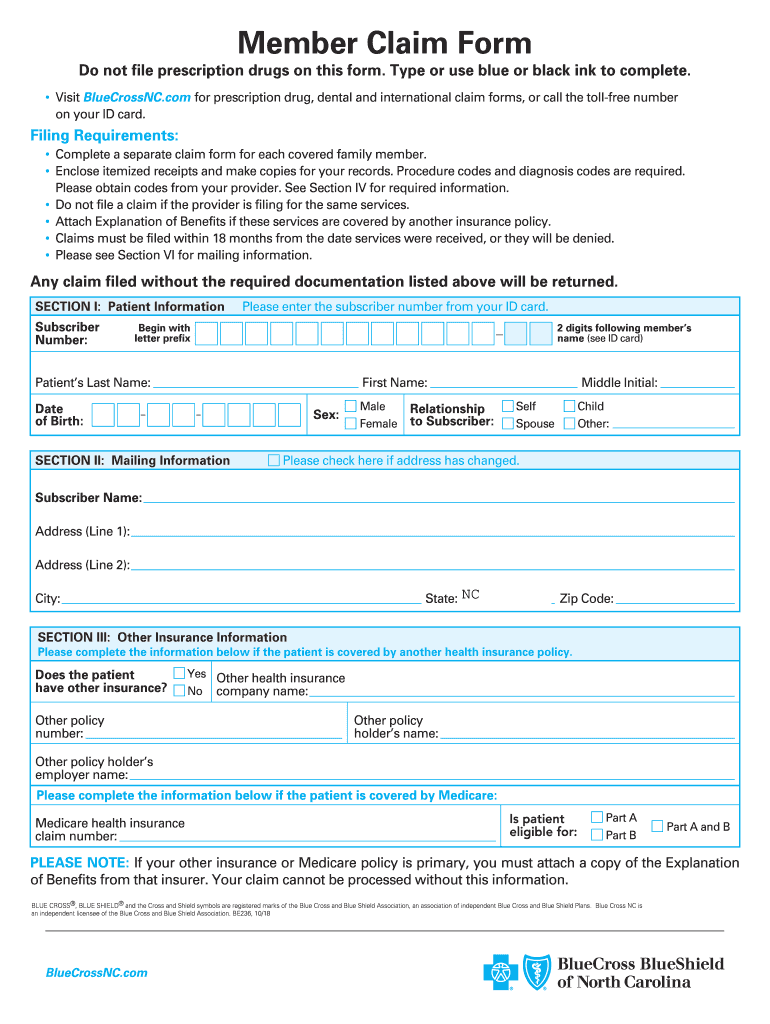
NC BCBS Form BE236 2018 free printable template
pdfFiller is not affiliated with any government organization

Fill out
Complete the form online in a simple drag-and-drop editor.

eSign
Add your legally binding signature or send the form for signing.

Share
Share the form via a link, letting anyone fill it out from any device.

Export
Download, print, email, or move the form to your cloud storage.
Why pdfFiller is the best tool for your documents and forms


End-to-end document management
From editing and signing to collaboration and tracking, pdfFiller has everything you need to get your documents done quickly and efficiently.
Accessible from anywhere
pdfFiller is fully cloud-based. This means you can edit, sign, and share documents from anywhere using your computer, smartphone, or tablet.
Secure and compliant
pdfFiller lets you securely manage documents following global laws like ESIGN, CCPA, and GDPR. It's also HIPAA and SOC 2 compliant.
What is NC BCBS Form BE236
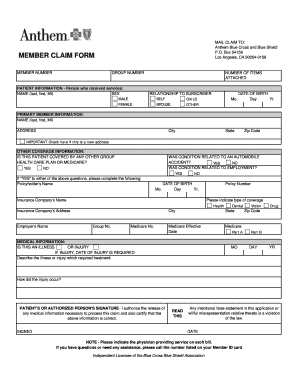
The Member Claim Form is a health insurance document used by patients to file claims with Blue Cross and Blue Shield of North Carolina.
pdfFiller scores top ratings on review platforms




Who needs NC BCBS Form BE236?
Explore how professionals across industries use pdfFiller.

NC BCBS Form BE236 is needed by:
-
Patients who have received medical services
-
Individuals seeking reimbursement from health insurance companies
-
Health care providers assisting patients with claims
-
Caregivers filing on behalf of patients
-
Insurance agents managing claims for clients
Comprehensive Guide to NC BCBS Form BE236
What is the Member Claim Form?
The Member Claim Form is a crucial document used by patients to file health insurance claims with Blue Cross and Blue Shield of North Carolina. This form facilitates the reimbursement process for medical services received. It is essential to complete the form accurately, ensuring all required information is provided to avoid delays in processing claims.
Specifically designed for North Carolina residents, the Member Claim Form plays a significant role in helping individuals seek insurance reimbursements efficiently. Completing the form requires attention to detail, as errors can lead to complications in the claims process.
Purpose and Benefits of the Member Claim Form
The primary purpose of the Member Claim Form is to enable patients to receive reimbursement for their medical expenses. By using this form, patients can clarify the claims process, ensuring all submissions are made on time. This timely filing is vital for avoiding any disruptions in reimbursement.
Additionally, utilizing features provided by pdfFiller for completing the form enhances user experience. With templates and convenient tools available, patients can fill out their claims with ease, leading to a smoother reimbursement process.
Who Needs the Member Claim Form?
This form is intended for patients who have received medical services and wish to claim reimbursement for their expenses. It is equally relevant for legal guardians or representatives submitting claims on behalf of patients. Understanding the eligibility criteria and the categories of services covered by Blue Cross is crucial for proper form completion.
Whether you are a patient or acting as a representative, having the Member Claim Form is essential in initiating the reimbursement process effectively.
When and How to File the Member Claim Form
The deadline for filing claims using the Member Claim Form is within 18 months of receiving medical services. To ensure a successful claim submission, follow these step-by-step instructions:
-
Access the form online using pdfFiller.
-
Complete all required sections accurately.
-
Gather supporting documents such as receipts and procedure codes.
-
Submit your completed form promptly to avoid potential issues.
Be aware that late filings can result in claim denials, making timely submissions critical to reimbursement success.
Filling Out the Member Claim Form: Step-by-Step Process
Completing the Member Claim Form requires careful attention to various sections. Key fields to fill in include:
-
Subscriber Number
-
Patient’s Last Name
-
Date of Birth
-
Signature
-
Date
When filling out the form, ensure you gather necessary supporting documents like itemized receipts and procedure codes. Common errors to look out for include missing signatures or incorrect patient information.
Submission Methods for the Member Claim Form
Submitting the Member Claim Form can be done through various methods. Here are your options:
-
Submit electronically via pdfFiller.
-
Send by mail to the designated address.
-
Use fax if available.
It’s important to track your submission to confirm it has been filed correctly. Be aware of any potential fees, processing times, and payment methods associated with your claim submission.
Security and Compliance for Health Insurance Claims
As you complete the Member Claim Form, security and data privacy are paramount. pdfFiller adheres to compliance standards such as HIPAA and GDPR, ensuring your sensitive information is protected. Key security features include:
-
256-bit encryption.
-
Compliance with established data protection regulations.
Managing and retaining your documentation safely is also important for maintaining your records securely.
After You Submit: What Happens Next?
Once the Member Claim Form is submitted, the claim undergoes a thorough review process by Blue Cross. You can check your application status online following these steps:
-
Log into your Blue Cross account.
-
Navigate to the claims section.
-
Enter your claim details to view the status.
If your claim is rejected, guidelines for amending the form are vital to ensure proper resubmission and increase the chances of approval.
Utilizing pdfFiller for a Stress-Free Form Completion Experience
pdfFiller simplifies the process of filling out and submitting forms by providing user-friendly tools. Key features of pdfFiller include:
-
Easy access to fillable templates.
-
Secure eSigning options for your convenience.
With these capabilities, you can start your claim today, utilizing efficient tools that help save time and effort while enhancing your filing experience.
How to fill out the NC BCBS Form BE236
-
1.Begin by accessing pdfFiller and searching for 'Member Claim Form' in the templates section.
-
2.Once located, open the form in pdfFiller's editor by clicking on it to launch the interactive interface.
-
3.Familiarize yourself with the fields you need to complete, including those for personal information, services received, and any other relevant details.
-
4.Gather your necessary information before filling out the form fully. This includes itemized receipts, procedure and diagnosis codes, and your Subscriber Number.
-
5.Start filling in the form by clicking on each field. Enter your Patient’s Last Name, Date of Birth, and any other requested details accurately.
-
6.Ensure that you fill in detailed information about the services you received, including specific procedure codes and diagnosis codes matched with your medical records.
-
7.Upload any supporting documents, such as itemized receipts, through pdfFiller's upload feature for a complete submission.
-
8.Once completed, review all the entered information for accuracy. Check each section to ensure all required fields have been filled out.
-
9.After confirming your completion, save the form on pdfFiller by clicking the save icon, which allows you to download the final version or save it directly to your account.
-
10.When ready to submit, choose the submission option provided in pdfFiller. Follow prompts to electronically submit the completed form to Blue Cross and Blue Shield of North Carolina.

Who is eligible to use the Member Claim Form?
The Member Claim Form can be used by any patient who has received medical services covered by Blue Cross and Blue Shield of North Carolina and is seeking reimbursement for those services.
What is the deadline for submitting the form?
Claims filed using the Member Claim Form must be submitted within 18 months of receiving the medical services to be considered for reimbursement.
How do I submit the completed form?
You can submit the completed Member Claim Form electronically via pdfFiller or download it to mail to Blue Cross and Blue Shield of North Carolina according to their instructions.
What supporting documents do I need to include?
Include itemized receipts, procedure codes, and diagnosis codes along with your completed Member Claim Form to ensure all necessary information is provided for processing your claim.
What are common mistakes to avoid when filling out the form?
Avoid incomplete fields, inaccurate code entries, and missing signatures. Double-check all information and ensure all required documents are attached before submission.
How long does it take to process a claim submitted with this form?
Processing times can vary; however, you can typically expect to receive updates within a few weeks after submitting the Member Claim Form.
Can I fill out the form on my mobile device?
Yes, pdfFiller's platform is mobile-friendly, allowing you to fill out and submit the Member Claim Form conveniently from your mobile device.
NC BCBS Form BE236 Form Versions
Related Content
Related Forms



Get the latest insights from our blog



If you believe that this page should be taken down, please follow our DMCA take down process
here
.
This form may include fields for payment information. Data entered in these fields is not covered by PCI DSS compliance.