
Last updated on
Oct 31, 2026
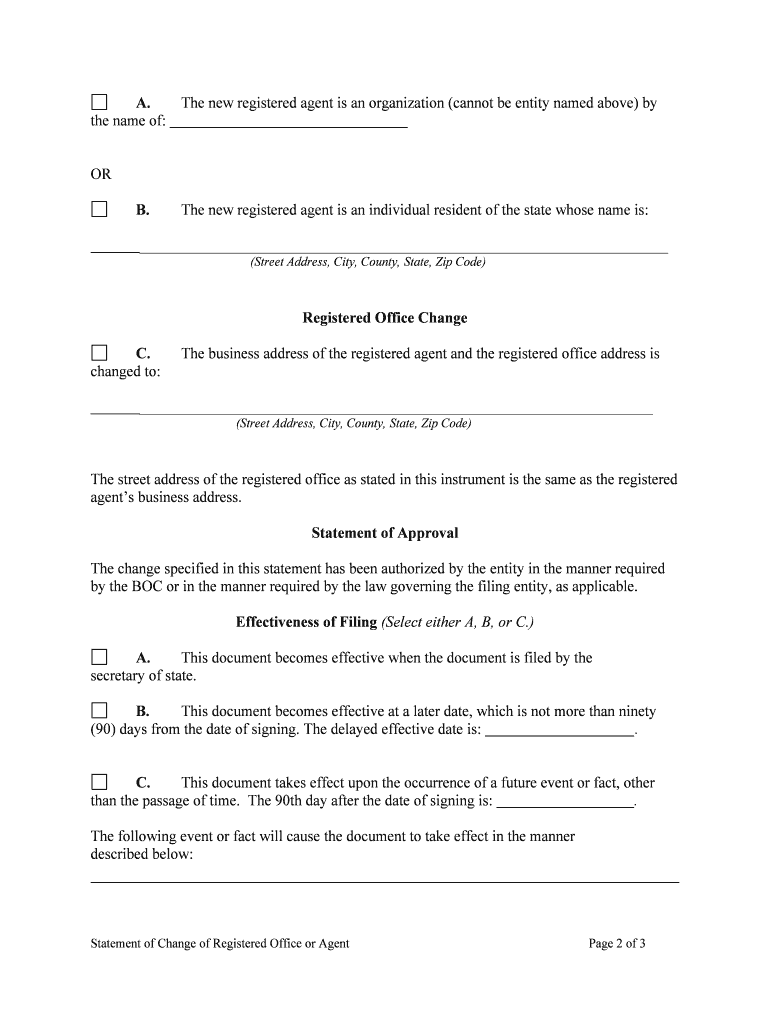
Get the free Texas Statement of Change of Registered Office or Agent
We are not affiliated with any brand or entity on this form

Fill out
Complete the form online in a simple drag-and-drop editor.

eSign
Add your legally binding signature or send the form for signing.

Share
Share the form via a link, letting anyone fill it out from any device.

Export
Download, print, email, or move the form to your cloud storage.
Why pdfFiller is the best tool for your documents and forms


End-to-end document management
From editing and signing to collaboration and tracking, pdfFiller has everything you need to get your documents done quickly and efficiently.
Accessible from anywhere
pdfFiller is fully cloud-based. This means you can edit, sign, and share documents from anywhere using your computer, smartphone, or tablet.
Secure and compliant
pdfFiller lets you securely manage documents following global laws like ESIGN, CCPA, and GDPR. It's also HIPAA and SOC 2 compliant.
What is Change Registered Office
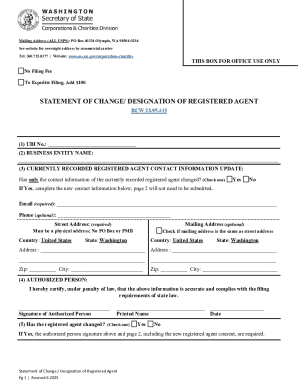
The Texas Statement of Change of Registered Office or Agent (Form 401) is a business form used by Texas entities to update their registered office or agent information with the Secretary of State.
pdfFiller scores top ratings on review platforms




GREAT JOB
Best I have used
Good experience with pdfFiller
Very Helpful and expedient for getting what I requested done!
Very Helpful and expedient for getting what I requested done!
Very Helpful and expedient for getting what I requested done!
Who needs Change Registered Office?
Explore how professionals across industries use pdfFiller.

Change Registered Office is needed by:
-
Business owners updating registered agent information
-
Legal representatives for entities requiring agent changes
-
Filing agents assisting businesses with registration updates
-
Startups needing to establish or change their registered office
-
Non-profits required to maintain current registered agent records
-
Corporations needing to comply with Texas state regulations
Comprehensive Guide to Change Registered Office
What is the Texas Statement of Change of Registered Office or Agent?
The Texas Statement of Change of Registered Office or Agent, known as Form 401, serves a critical function in updating the registered office or agent information for businesses in Texas. This form is essential for ensuring businesses keep their information current with the Texas Secretary of State. Regular updates to registered information are vital for maintaining compliance and operational effectiveness.
Why You Need to File the Texas Statement of Change of Registered Office or Agent
Filing the Texas Statement of Change of Registered Office or Agent is legally required for maintaining accurate registered agent information. Failing to file can lead to significant consequences, including penalties and complications with business operations. Timely updates benefit compliance and smooth business functioning.
-
Prevent legal penalties associated with outdated records
-
Ensure proper communication with the Texas Secretary of State
-
Facilitate seamless business operations
Who Needs the Texas Statement of Change of Registered Office or Agent?
Businesses and entities required to file this form typically include corporations, LLCs, and partnerships. Situations necessitating the form include changes in the registered agent or alterations to the office address. The Authorized Person plays a vital role in submitting the form and ensuring compliance.
-
Corporations and franchises
-
Limited Liability Companies (LLCs)
-
Partnerships
How to Complete the Texas Statement of Change of Registered Office or Agent Online
Completing Form 401 digitally involves a series of straightforward steps. Begin by gathering required information, including business name, current registered agent details, and new office address. Follow these detailed instructions for filling out each section of the form accurately.
-
Access the online form through the Texas Secretary of State’s website.
-
Input your business name and file number.
-
Provide the name and address of the new registered agent.
-
Review all entries for accuracy.
-
Submit the completed form electronically.
Common Mistakes to Avoid When Filing the Texas Statement of Change of Registered Office or Agent
Many businesses encounter frequent errors when filing the Texas Statement of Change of Registered Office or Agent, which can lead to complications. To prevent this, it is critical to utilize a review and validation checklist before submission. If mistakes occur post-submission, understanding how to correct or amend these errors is equally important.
-
Incorrect agent details
-
Missing required signatures
-
Inaccurate office addresses
Submitting the Texas Statement of Change of Registered Office or Agent
There are multiple methods for submitting the Texas Statement of Change of Registered Office or Agent, including online options and traditional mail. To ensure successful delivery, provide all necessary details and follow submission guidelines set by the Texas Secretary of State. Tracking your submission status is also recommended for peace of mind.
-
Online submission through the Texas Secretary of State's website
-
Mailing the completed form to the appropriate address
Fees, Deadlines, and Processing Time for the Texas Statement of Change of Registered Office or Agent
Filing Form 401 incurs specific fees, which vary depending on submission methods. Understanding the timelines and processing periods is essential for compliance. Additionally, various payment methods are accepted, and there may be options for fee waivers under certain circumstances.
-
Standard filing fees
-
Processing times typically range from a few days to weeks
-
Available payment methods, including credit cards
Security and Compliance When Handling the Texas Statement of Change of Registered Office or Agent
Ensuring data protection and privacy is of utmost importance when handling sensitive documents such as the Texas Statement of Change of Registered Office or Agent. pdfFiller provides comprehensive security measures including encryption and compliance with industry standards, enabling users to trust their platform with confidential information.
The Role of pdfFiller in Managing the Texas Statement of Change of Registered Office or Agent
pdfFiller simplifies the form-filling process through its cloud-based tools, making it easier for users to manage documents online. Key features include editing capabilities, eSigning options, and overall form management solutions. Leveraging pdfFiller enhances efficiency and organization during the filing process.
-
Intuitive editing and annotation tools
-
Seamless eSigning functionality
-
Comprehensive form management options
Take the Next Step with Your Texas Statement of Change of Registered Office or Agent
To efficiently manage the Texas Statement of Change of Registered Office or Agent, consider using pdfFiller's services. Utilizing this platform not only facilitates a smoother process but also ensures compliance and accuracy when submitting your form.
How to fill out the Change Registered Office
-
1.To access the Texas Statement of Change of Registered Office or Agent on pdfFiller, visit the website and use the search function to locate Form 401.
-
2.Once you find the form, click on it to open the fillable template directly in the pdfFiller interface.
-
3.Before starting the form, gather essential information including the entity's name, file number, and details of the current registered agent and office.
-
4.Begin filling out the form by entering the entity name in the designated field, followed by the file number associated with your registration.
-
5.Next, provide the current registered agent's information, including their name and address, to ensure accurate records with the Secretary of State.
-
6.If there are changes to the registered agent or office address, fill in the new information clearly in the respective fields provided on the form.
-
7.Complete all required fields, making sure to verify that the information is accurate and complete to avoid processing issues.
-
8.After filling in the form, review all entries to ensure no errors are present, paying special attention to name spellings and address details.
-
9.Once everything is verified, click on the 'Save' option to keep a copy of your completed form on pdfFiller, or proceed to download it for submission.
-
10.To submit the form, print the completed document and ensure it is signed by an authorized person, as required by Texas law.
-
11.Finally, send the completed form in duplicate to the Texas Secretary of State by mail or as instructed on their official website.

Who is eligible to file the Texas Statement of Change of Registered Office or Agent?
Any authorized person for a Texas business entity can file the Statement of Change of Registered Office or Agent. This includes business owners, legal representatives, and designated filing agents.
What is the deadline to submit this form?
There is no specific deadline for submitting the Texas Statement of Change of Registered Office or Agent. However, it is recommended to file as soon as changes occur to avoid compliance issues.
How can I submit the completed form?
After signing the form, you can submit the completed Texas Statement of Change of Registered Office or Agent by mail to the Texas Secretary of State's office. Ensure you send it in duplicate for proper processing.
Are there any supporting documents required with this form?
No additional supporting documents are required to accompany the Texas Statement of Change of Registered Office or Agent. Just ensure the form is completely filled out and signed by the authorized person.
What common mistakes should I avoid when filling out this form?
Common mistakes include incorrect or incomplete information, such as misspelling the entity name or neglecting to sign the form. Always double-check all details before submission.
What is the processing time for this form once submitted?
Processing times can vary, but typically, the Texas Secretary of State processes changes within 3-5 business days. Delays may occur during high-volume periods.
Is notarization required to file this form?
No, notarization is not required for the Texas Statement of Change of Registered Office or Agent. However, it must be signed by an authorized person for it to be valid.
Related Forms





Get the latest insights from our blog


If you believe that this page should be taken down, please follow our DMCA take down process
here
.
This form may include fields for payment information. Data entered in these fields is not covered by PCI DSS compliance.