
Last updated on
Oct 19, 2026

Optum Bank Contribution/Deposit Form 2018 free printable template
pdfFiller is not affiliated with any government organization

Fill out
Complete the form online in a simple drag-and-drop editor.

eSign
Add your legally binding signature or send the form for signing.

Share
Share the form via a link, letting anyone fill it out from any device.

Export
Download, print, email, or move the form to your cloud storage.
Why pdfFiller is the best tool for your documents and forms


End-to-end document management
From editing and signing to collaboration and tracking, pdfFiller has everything you need to get your documents done quickly and efficiently.
Accessible from anywhere
pdfFiller is fully cloud-based. This means you can edit, sign, and share documents from anywhere using your computer, smartphone, or tablet.
Secure and compliant
pdfFiller lets you securely manage documents following global laws like ESIGN, CCPA, and GDPR. It's also HIPAA and SOC 2 compliant.
What is Optum Bank Contribution/Deposit Form
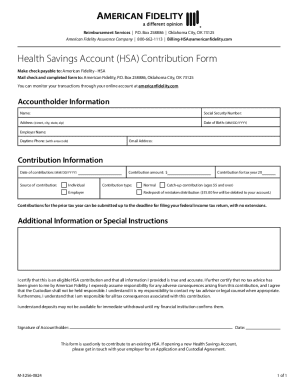
The HSA Contribution Form is a financial document used by account holders to deposit funds into a Health Savings Account (HSA) with Optum Bank.
pdfFiller scores top ratings on review platforms




Who needs Optum Bank Contribution/Deposit Form?
Explore how professionals across industries use pdfFiller.

Optum Bank Contribution/Deposit Form is needed by:
-
Individuals with a Health Savings Account (HSA)
-
Account holders seeking to make contributions
-
Taxpayers looking to utilize tax-advantaged savings
-
Healthcare consumers aiming to manage out-of-pocket expenses
-
Financial planners assisting clients with HSAs
-
Optum Bank customers
Comprehensive Guide to Optum Bank Contribution/Deposit Form
What is the HSA Contribution Form?
The HSA Contribution Form is a key document designed for making deposits into health savings accounts (HSAs) with Optum Bank. Its purpose is to provide account holders with a structured way to contribute funds to their accounts, ensuring that transactions are processed efficiently and accurately. By using this form, account holders facilitate timely deposits that can enhance their financial well-being.
Purpose and Benefits of the HSA Contribution Form
Utilizing the HSA Contribution Form offers several important advantages. Primarily, it serves as an organized method for contributing to HSAs, allowing for financial flexibility regarding healthcare expenditures. Timely contributions can lead to significant tax benefits, enhancing users' overall savings. Furthermore, this form simplifies the process of managing health savings, ensuring that funds are readily available when needed.
Who Needs the HSA Contribution Form?
The primary audience for the HSA Contribution Form includes account holders of health savings accounts. These individuals may require the form in various situations, such as when they want to make voluntary contributions or increase their existing deposits. Understanding who needs this form is critical for ensuring that relevant information is provided and processed accordingly.
How to Fill Out the HSA Contribution Form
Filling out the HSA Contribution Form involves several specific steps:
-
Begin by entering your name and address accurately.
-
Specify the amount you wish to contribute to your HSA.
-
Review all entered information for accuracy.
-
Sign the form as required.
It's essential to ensure that all information is correct and complies with the form's requirements, as errors may lead to delays in processing your contribution.
Field-by-Field Instructions for the HSA Contribution Form
Each section of the HSA Contribution Form has specific requirements:
-
Name: Clearly write your full name.
-
Address: Provide your complete mailing address.
-
Contribution Amount: Indicate the exact amount you wish to deposit.
Avoid common pitfalls, such as misspellings or incorrect amounts, to streamline the submission process.
Submission Methods for the HSA Contribution Form
Once the HSA Contribution Form is completed, users have several submission options:
-
Mail the form directly to the specified address of Optum Bank.
-
Utilize any online submission portals if available.
Timely submission is crucial; therefore, check for any stated deadlines or guidelines related to processing contributions.
Tracking Your HSA Contribution Submission
Upon submitting the HSA Contribution Form, users can confirm that their submission was received. For tracking purposes, consider the following:
-
Keep a copy of the submitted form for your records.
-
Check with Optum Bank regarding typical processing times.
If confirmation of receipt is not received within the expected timeframe, contact customer service for assistance.
Security and Privacy When Submitting the HSA Contribution Form
When submitting the HSA Contribution Form, users can rest assured about the security of their sensitive personal and financial information. Optum Bank adheres to stringent safety measures and complies with regulations such as HIPAA and GDPR, ensuring that your data remains protected throughout the submission process.
How pdfFiller Simplifies the HSA Contribution Process
pdfFiller provides a user-friendly platform that simplifies the completion of the HSA Contribution Form. Users can efficiently fill out, edit, and eSign the form online, taking advantage of features such as cloud access and document security. This ensures that managing health savings contributions is straightforward and accessible from any device.
Get Started with Your HSA Contribution Form
To begin the process, access the HSA Contribution Form through pdfFiller. Follow these brief steps:
-
Visit the pdfFiller platform.
-
Search for the HSA Contribution Form.
-
Begin filling out the necessary information.
The seamless experience provided by pdfFiller enhances your ability to manage your health savings account efficiently.
How to fill out the Optum Bank Contribution/Deposit Form
-
1.To access the HSA Contribution Form on pdfFiller, visit the website and search for 'HSA Contribution Form' in the document library or upload the form directly.
-
2.Once the form is open, familiarize yourself with pdfFiller’s interface which includes editing tools, text fields, and checkboxes.
-
3.Gather necessary information such as your name, address, amount of contribution, and account details before starting to fill out the form for a smooth process.
-
4.Begin filling out the form by clicking on the appropriate fields to enter your information. Use the provided instructions to ensure all sections are completed accurately.
-
5.Pay special attention to the signature field, as this is mandatory and needs to be filled out before submission.
-
6.After filling in all required fields, carefully review the completed form for any errors or missing information. Make any necessary adjustments.
-
7.Once satisfied with your completed form, you can either save it, download it as a PDF, or choose to submit it directly via pdfFiller's submission option as per your preference.

What are the eligibility requirements for using the HSA Contribution Form?
To use the HSA Contribution Form, you must be an account holder of a Health Savings Account (HSA) with Optum Bank. Ensure you meet the HSA eligibility criteria, such as having a qualified high-deductible health plan.
Is there a deadline for submitting the HSA Contribution Form?
While there is no specific submission deadline for the HSA Contribution Form itself, contributions must be made by the tax filing deadline for the respective tax year to qualify for tax deductions.
How can I submit the completed HSA Contribution Form?
The completed HSA Contribution Form should be mailed to the specified address for Optum Bank, as mentioned in the instructions. Ensure you keep a copy for your records.
What supporting documents do I need to provide with my form?
Typically, no additional supporting documents are required when submitting the HSA Contribution Form. However, it’s wise to retain any related documentation regarding your HSA contributions for tax purposes.
What common mistakes should I avoid when filling out the form?
Common mistakes include forgetting to sign the form, leaving required fields blank, or providing incorrect contribution amounts. Always double-check your entries before submission to avoid delays.
How long does it take for contributions to process once submitted?
Processing times for HSA contributions may vary, but typically, it takes a few business days for Optum Bank to process your submitted form and update your account.
Can I make electronic contributions using this form?
The HSA Contribution Form is primarily for paper submissions. For electronic contributions, check with Optum Bank for available online options through their banking platform.
Optum Bank Contribution/Deposit Form Form Versions
Related Forms



Get the latest insights from our blog



If you believe that this page should be taken down, please follow our DMCA take down process
here
.
This form may include fields for payment information. Data entered in these fields is not covered by PCI DSS compliance.