
Last updated on
Nov 9, 2026
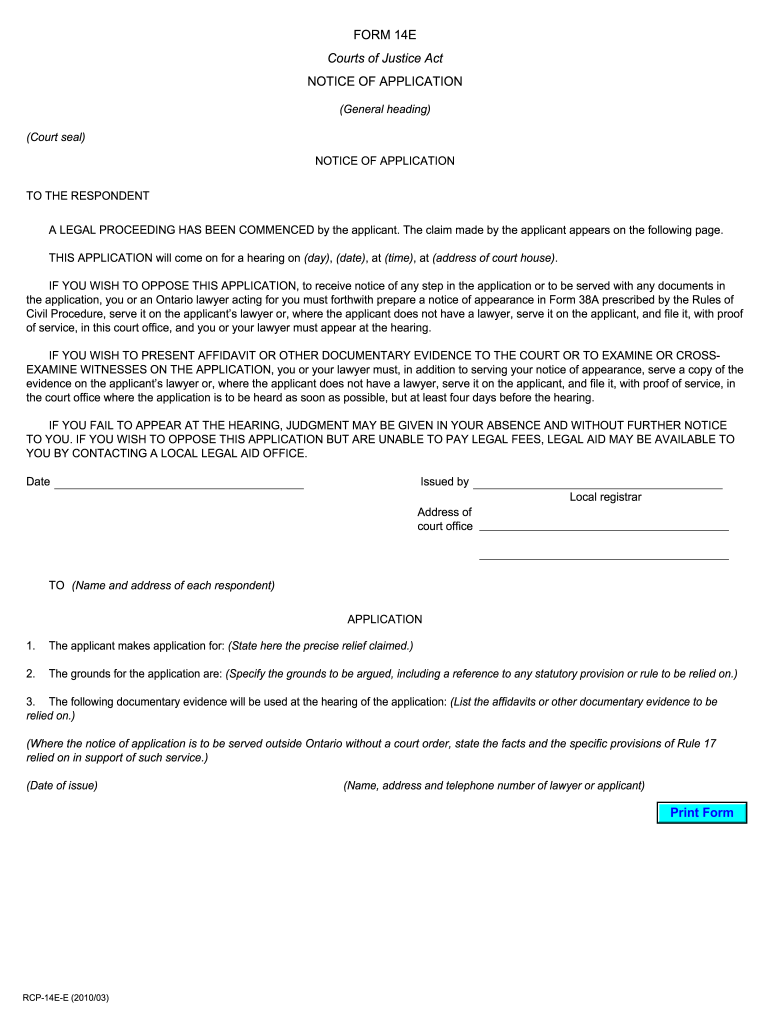
Canada Form 14E - Ontario 2010 free printable template
We are not affiliated with any brand or entity on this form

Fill out
Complete the form online in a simple drag-and-drop editor.

eSign
Add your legally binding signature or send the form for signing.

Share
Share the form via a link, letting anyone fill it out from any device.

Export
Download, print, email, or move the form to your cloud storage.
Why pdfFiller is the best tool for your documents and forms


End-to-end document management
From editing and signing to collaboration and tracking, pdfFiller has everything you need to get your documents done quickly and efficiently.
Accessible from anywhere
pdfFiller is fully cloud-based. This means you can edit, sign, and share documents from anywhere using your computer, smartphone, or tablet.
Secure and compliant
pdfFiller lets you securely manage documents following global laws like ESIGN, CCPA, and GDPR. It's also HIPAA and SOC 2 compliant.
What is Canada Form 14E - Ontario
The Form 14E Notice of Application is a legal document used by individuals in Ontario to formally notify respondents of a legal application and its details.
pdfFiller scores top ratings on review platforms




Who needs Canada Form 14E - Ontario?
Explore how professionals across industries use pdfFiller.

Canada Form 14E - Ontario is needed by:
-
Individuals initiating legal actions in Ontario
-
Legal practitioners filing applications
-
Respondents needing notification of applications
-
Those seeking judicial relief under the Courts of Justice Act
-
Parties involved in civil proceedings
Comprehensive Guide to Canada Form 14E - Ontario
What is Form 14E Notice of Application?
Form 14E is a crucial legal document utilized in Ontario to notify respondents about pending legal applications. This notice is significant within the framework of the Ontario Courts of Justice Act, as it establishes a formal communication method between the applicant and the respondents involved in a legal dispute. The primary function of the document is to ensure that respondents are adequately informed about the claims against them and the subsequent hearing details.
By filing the Form 14E, applicants comply with legal requirements, ensuring clarity throughout the judicial proceedings. The document serves as a vital step in the legal process, allowing parties to prepare for hearings efficiently.
Purpose and Benefits of Form 14E Notice of Application
The primary purpose of the Form 14E Notice of Application is to formally notify respondents of claims and associated hearing details, which is essential for maintaining transparency in legal proceedings. Properly submitting this form not only aids in legal compliance but also clarifies the issues at hand, allowing for a more streamlined judicial process.
Utilizing this legal application notice helps to prevent misunderstandings and ensures that all parties involved understand their rights and responsibilities, paving the way for informed participation in court hearings.
Who Needs to File the Form 14E Notice of Application?
The Form 14E is primarily intended for individuals initiating legal applications in Ontario. This includes those who may be pursuing various legal claims, such as family law matters, small claims, or other civil disputes.
Specific scenarios necessitating the use of this form include instances when an individual needs to formally notify respondents about a claim, thereby ensuring that all parties are legally aware of the proceedings.
How to Fill Out the Form 14E Notice of Application Online
Filling out the Form 14E online can be accomplished in a few straightforward steps:
-
Access the form through pdfFiller's platform.
-
Begin by entering personal details and the names of the parties involved.
-
Specify the relief being claimed and outline the grounds for the application.
-
Review all entered information for accuracy.
-
Save and download the completed form once finished.
Each section of the form is designed to facilitate clarity and ensure that all pertinent information is captured accurately, which is essential for adherence to the Courts of Justice Act.
Common Errors and How to Avoid Them
When completing the Form 14E, certain frequent errors may occur, potentially impacting the validity of the submission. Common pitfalls include failing to accurately describe the relief claimed or leaving essential fields blank.
To avoid these mistakes, users should implement the following strategies:
-
Carefully review each section of the form after filling it out.
-
Utilize a checklist to ensure all necessary information is included.
-
Consult legal resources or seek assistance if unsure about specific claims or terminology.
Submission Methods for Form 14E Notice of Application
After completing the Form 14E, it can be submitted through several methods:
-
Online submission via the courts' designated electronic filing system.
-
Mailing a hard copy to the relevant court office.
It is crucial to watch for submission deadlines to ensure timeliness, which can vary depending on the nature of the application. Understanding these requirements can greatly influence the effectiveness of the legal filing process.
Tracking Your Application Status After Submission
Once the Form 14E has been submitted, tracking its progress can be done through specific channels available within the court system. Users may follow these steps to check their application's status:
-
Log into the court’s online portal, if available.
-
Enter the unique reference number associated with the application.
-
Review any updates or changes to the application status.
Depending on the case type, applicants may need to take follow-up actions as indicated in the status updates provided by the court.
Security and Compliance When Using Form 14E
Handling sensitive information is a critical concern when completing legal forms like the Form 14E. pdfFiller employs robust security measures, including 256-bit encryption, to protect users' data throughout the process.
Moreover, compliance with GDPR and HIPAA ensures that user privacy is upheld, allowing individuals to fill out and submit sensitive information confidently and securely.
Utilizing pdfFiller for Form 14E Notice of Application
Choosing pdfFiller to complete the Form 14E presents users with several compelling benefits. The platform allows for easy editing of text, annotation, and the creation of fillable forms, making the entire process user-friendly.
Additionally, the availability of templates and customer support empowers users to navigate their legal filings smoothly, ensuring they have access to necessary resources at every step.
Success Stories and Testimonials
Many individuals have shared their successful experiences utilizing the Form 14E alongside pdfFiller. Testimonials highlight how the platform simplified their legal filings and made the process more efficient.
Statistics indicate a high rate of satisfaction among users, showcasing how pdfFiller has positively impacted their ability to navigate the legal landscape effectively.
How to fill out the Canada Form 14E - Ontario
-
1.Access pdfFiller and search for 'Form 14E Notice of Application' in the template library.
-
2.Open the form to view the fillable fields and instructions provided.
-
3.Before filling out the form, gather necessary information such as your claims, hearing details, and any evidence you wish to present.
-
4.Begin filling in the fields, starting with your personal information at the top of the form, ensuring accuracy according to the guidelines given.
-
5.Clearly state the precise relief claimed in the designated field, and make sure to double-check the claim details for completeness.
-
6.In the section for grounds to be argued, specify the legal reasons supporting your application clearly and in detail.
-
7.Use the instructions included in the form to assist you with filling out any additional information required from the respondent's perspective.
-
8.After completing all the fields, review your entries for any errors or omissions before finalizing the document.
-
9.Once reviewed, save your progress frequently to avoid data loss, and download the completed form to your device.
-
10.Submit the form following the procedures outlined by the court, ensuring all submission guidelines are adhered to, including any deadlines or filing requirements.

What is the eligibility requirement for using Form 14E?
Any individual who is initiating a legal application in Ontario under the Courts of Justice Act can use Form 14E. Ensure that you meet any specific jurisdictional or procedural requirements relevant to your case.
Are there any deadlines associated with filing Form 14E?
Deadlines for filing Form 14E depend on the particulars of your case. Generally, you should file as soon as possible after initiating legal action, and you may need to adhere to any specific timelines set by the court.
How do I submit Form 14E once completed?
After filling out Form 14E on pdfFiller, you should download and print the form, then submit it to the appropriate court according to their filing procedures, which may include in-person or electronic submission options.
What supporting documents do I need with Form 14E?
While accompanying documents can vary by case, generally you may need evidence supporting your claims, a notice of appearance, and any prior relevant court communications. Please check with legal counsel for specific requirements.
What common mistakes should I avoid when filling out Form 14E?
Common mistakes include incomplete fields, incorrect claim details, and missing supporting documents. Always ensure that all required fields are thoroughly completed, and review your entries to prevent errors.
What is the processing time for Form 14E?
Processing times for Form 14E can vary by court and jurisdiction. Contact the relevant court directly or check their website for estimated processing times once submitted.
Is notarization required for Form 14E?
No, notarization is not required for Form 14E. However, it is essential to ensure all information is accurate and truthful, as it is a legal document.
Canada Form 14E - Ontario Form Versions
Related Content
Related Forms




Get the latest insights from our blog


If you believe that this page should be taken down, please follow our DMCA take down process
here
.
This form may include fields for payment information. Data entered in these fields is not covered by PCI DSS compliance.