
Last updated on
Nov 9, 2026
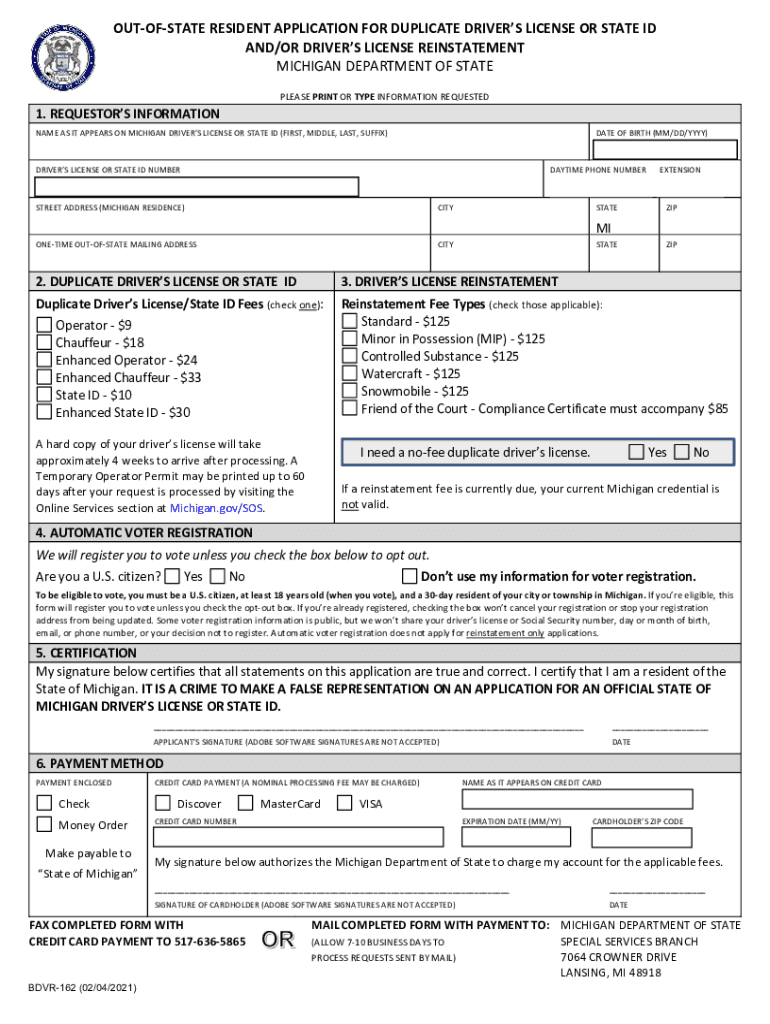
MI BDVR-162 2021 free printable template
pdfFiller is not affiliated with any government organization

Fill out
Complete the form online in a simple drag-and-drop editor.

eSign
Add your legally binding signature or send the form for signing.

Share
Share the form via a link, letting anyone fill it out from any device.

Export
Download, print, email, or move the form to your cloud storage.
Why pdfFiller is the best tool for your documents and forms


End-to-end document management
From editing and signing to collaboration and tracking, pdfFiller has everything you need to get your documents done quickly and efficiently.
Accessible from anywhere
pdfFiller is fully cloud-based. This means you can edit, sign, and share documents from anywhere using your computer, smartphone, or tablet.
Secure and compliant
pdfFiller lets you securely manage documents following global laws like ESIGN, CCPA, and GDPR. It's also HIPAA and SOC 2 compliant.
What is MI BDVR-162
The Michigan Out-of-State Driver’s License Application is a government form used by Michigan residents temporarily out of state to request a duplicate driver’s license or state ID, or to reinstate a suspended license.
pdfFiller scores top ratings on review platforms




Who needs MI BDVR-162?
Explore how professionals across industries use pdfFiller.

MI BDVR-162 is needed by:
-
Michigan residents temporarily living out of state
-
Individuals needing a duplicate driver’s license or state ID
-
Drivers with suspended or revoked driver’s licenses
-
Applicants looking to register to vote through the form
-
Citizens requiring identification for state services
Comprehensive Guide to MI BDVR-162
What is the Michigan Out-of-State Driver’s License Application?
The Michigan Out-of-State Driver’s License Application is a vital form designed for Michigan residents who are temporarily outside of the state. This application serves multiple purposes, including the request for a duplicate driver’s license or the reinstatement of a suspended license. Situations requiring this form may occur in instances such as losing a driver’s license while traveling or needing to reinstate a license after a legal issue.
-
Definition and purpose of the Michigan Out-of-State Driver’s License Application.
-
Required for applying for a duplicate or reinstatement of a license.
Purpose and Benefits of the Michigan Out-of-State Driver’s License Application
This application is essential for Michigan residents who find themselves out of state and in need of a duplicate or reinstated driver’s license. The form not only facilitates the license duplication process but also ensures automatic voter registration for eligible applicants.
-
Critical for obtaining a duplicate driver’s license or reinstated license.
-
Incorporates automatic voter registration as a beneficial feature.
Eligibility Criteria for the Michigan Out-of-State Driver’s License Application
To qualify for the Michigan Out-of-State Driver’s License Application, applicants must meet several criteria. Primarily, those looking to secure a duplicate or to reinstate a license will need to provide proof of residency and proper identification.
-
Applicants must demonstrate the need for a duplicate or reinstatement.
-
Must fulfill requirements such as residency proof and valid identification.
Key Features of the Michigan Out-of-State Driver’s License Application
The Michigan Out-of-State Driver’s License Application boasts various user-friendly characteristics. Its design includes fillable fields where applicants can enter their personal details, such as their name, date of birth, and signature, ensuring ease in completion.
-
Includes fillable sections for name, date of birth, and signature.
-
Options for payment and voter registration integration.
How to Fill Out the Michigan Out-of-State Driver’s License Application Online (Step-by-Step)
Filling out the Michigan Out-of-State Driver’s License Application online is a straightforward process when following these step-by-step instructions:
-
Access the application form on the official website.
-
Enter your name as it appears on your Michigan driver’s license or state ID.
-
Provide your date of birth and driver’s license or state ID number.
-
Select the applicable fee type for duplicate or reinstatement.
-
Review all entered information for accuracy.
-
Submit the form as per the chosen method.
Submission Methods for the Michigan Out-of-State Driver’s License Application
After completing the application, applicants can submit the form through various methods. These options provide flexibility based on individual preferences regarding payment and submission method.
-
Available submission options include online and by mail.
-
Payment can be made via check, money order, or credit card.
Fees and Processing Time for the Michigan Out-of-State Driver’s License Application
The application comes with associated fees and expected processing times that vary based on the type of request. Applicants should be aware of these costs to avoid surprises during the application process.
-
Duplicate driver’s license fees and reinstatement costs are outlined.
-
Typical processing times should be anticipated after submission.
What Happens After You Submit the Michigan Out-of-State Driver’s License Application
Upon submission of the Michigan Out-of-State Driver’s License Application, applicants can expect a confirmation of their submission. It’s also vital to be aware of potential reasons for application rejections and the steps to resolve them.
-
Track your application status post-submission methods.
-
Understand common rejection reasons and how to address them.
Security and Compliance Considerations for the Michigan Out-of-State Driver’s License Application
The handling of personal information within the Michigan Out-of-State Driver’s License Application adheres to security protocols. Compliance with regulations such as HIPAA and GDPR is crucial for safeguarding applicant data.
-
Discuss the importance of data protection protocols.
-
Advise on the safe storage of personal application materials.
Getting Started with pdfFiller for Your Michigan Out-of-State Driver’s License Application
pdfFiller can enhance your experience in completing the Michigan Out-of-State Driver’s License Application. This platform simplifies the document process, offering tools for editing, filling, and signing without the need for downloads.
-
Effortless editing and filling of documents online.
-
Highlight security features that protect user information.
How to fill out the MI BDVR-162
-
1.Access the Michigan Out-of-State Driver’s License Application on pdfFiller by searching the form name or navigating through the Government Forms category.
-
2.Once the form is open, carefully read through the instructions provided on the document to understand what information is required.
-
3.Begin filling out the form by entering your name as it appears on your Michigan driver’s license or state ID in the designated field. Be sure to follow the formatting instructions.
-
4.Proceed to input other personal information such as your date of birth, driver’s license or state ID number, and current address in their respective fields.
-
5.Before moving on, gather your payment information, which may include a check, money order, or credit card details, as this is necessary for the duplicate license or reinstatement fee.
-
6.Utilize checkboxes available in the document for selecting 'Duplicate Driver’s License/State ID Fees' and 'Reinstatement Fee Types' to ensure clarity on your payment intention.
-
7.Review your entries thoroughly to confirm that all information is accurately filled and corresponds with your official identification.
-
8.As you approach the end of the form, navigate to the signature fields. Make sure you sign and date the form, certifying the truthfulness of the provided information.
-
9.Finally, save the completed form on pdfFiller by choosing the 'Save' option. You can also download or submit the form electronically through the platform based on your preference.

Who is eligible to apply for the Michigan Out-of-State Driver’s License Application?
Michigan residents who are temporarily living out of state and need a duplicate driver’s license or wish to reinstate a suspended license are eligible to apply using this form.
What is the processing time for the duplicate license application?
Processing times can vary, but typically, applications for duplicate licenses or reinstatements may take several weeks. It’s advisable to submit your request as soon as possible.
What payment methods are accepted for the application fee?
You can pay the application fee using a check, money order, or credit card. Ensure that the payment method you choose is correctly noted on the form.
Do I need to provide supporting documents with my application?
While the primary form requires your personal information, you may need to submit copies of relevant identification documents, such as your current driver’s license or state ID, to support your application.
Can I submit the application online?
Yes, you can complete and submit the Michigan Out-of-State Driver’s License Application online via platforms such as pdfFiller, making it easy to fill out and send your application electronically.
What common mistakes should I avoid while filling out the form?
Be careful to enter your information accurately, especially your name and driver’s license number. Double-check your payment method and ensure your signature is present to avoid delays.
Is notarization required for this application?
No, the Michigan Out-of-State Driver’s License Application does not require notarization. Just ensure you sign and date the form.
MI BDVR-162 Form Versions
Related Content
Related Forms



Get the latest insights from our blog


If you believe that this page should be taken down, please follow our DMCA take down process
here
.
This form may include fields for payment information. Data entered in these fields is not covered by PCI DSS compliance.