
Last updated on
Nov 9, 2026

NV Application for FMLA - Washoe County 2020-2026 free printable template
pdfFiller is not affiliated with any government organization

Fill out
Complete the form online in a simple drag-and-drop editor.

eSign
Add your legally binding signature or send the form for signing.

Share
Share the form via a link, letting anyone fill it out from any device.

Export
Download, print, email, or move the form to your cloud storage.
Why pdfFiller is the best tool for your documents and forms


End-to-end document management
From editing and signing to collaboration and tracking, pdfFiller has everything you need to get your documents done quickly and efficiently.
Accessible from anywhere
pdfFiller is fully cloud-based. This means you can edit, sign, and share documents from anywhere using your computer, smartphone, or tablet.
Secure and compliant
pdfFiller lets you securely manage documents following global laws like ESIGN, CCPA, and GDPR. It's also HIPAA and SOC 2 compliant.
What is NV Application for FMLA - Washoe County
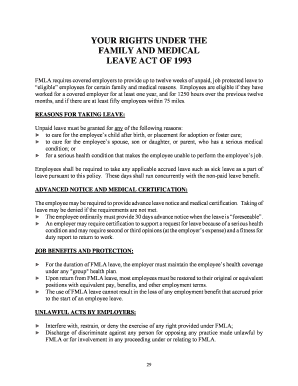
The Washoe County FMLA Application is an employment form used by employees to request leave under the Family and Medical Leave Act (FMLA).
pdfFiller scores top ratings on review platforms




Who needs NV Application for FMLA - Washoe County?
Explore how professionals across industries use pdfFiller.

NV Application for FMLA - Washoe County is needed by:
-
Employees in Washoe County requiring FMLA leave
-
Supervisors responsible for approving leave requests
-
Department heads overseeing employee management
-
Human Resources personnel handling employee leave documentation
-
Legal or compliance teams ensuring adherence to FMLA regulations
-
Healthcare providers needing to release pertinent information
Comprehensive Guide to NV Application for FMLA - Washoe County
What is the Washoe County FMLA Application?
The Washoe County FMLA Application is a crucial form used by employees in Washoe County, Nevada, to request leave under the Family and Medical Leave Act (FMLA). This application aligns with FMLA provisions, ensuring that employees can take necessary leave for medical or family-related reasons.
The application specifically requires details such as the employee's name, department, start date of leave, expected return date, and reason for leave. Submitting the application correctly is vital to secure the right to FMLA leave, which is protected under federal law.
Purpose and Benefits of the Washoe County FMLA Application
The primary role of the Washoe County FMLA Application is to facilitate the process for eligible employees to take leave for family and medical reasons without fear of losing their jobs. Utilizing this application offers significant benefits, including legal protections against job loss during FMLA leave.
Moreover, it enhances understanding of employee rights within Washoe County. Employees can utilize the application to confidently request leave, knowing they are supported by legal provisions under the FMLA.
Who Needs the Washoe County FMLA Application?
The Washoe County FMLA Application is essential for employees who meet specific criteria set under FMLA regulations. These qualifying roles include full-time employees and those who have been with the county for a certain duration.
Situations that warrant the use of this application include serious health conditions affecting the employee or their family members. Understanding who needs this application is important for both employees and supervisors to ensure compliance with FMLA guidelines.
Eligibility Criteria for the Washoe County FMLA Application
To qualify for the Washoe County FMLA Application, employees must meet specific eligibility requirements under FMLA law. These include a minimum duration of employment and working for a qualifying employer, typically defined by the size of the workforce.
Leave reasons are also strictly defined by FMLA regulations, encompassing instances such as serious health conditions or the birth/adoption of a child. It's essential to understand the difference between continuous and intermittent leave types, as this affects how the application should be filled out.
How to Fill Out the Washoe County FMLA Application Online (Step-by-Step)
Filling out the Washoe County FMLA Application online can be accomplished by following these steps:
-
Access the form using a reliable platform like pdfFiller.
-
Enter your employee name and department in the required fields.
-
Specify the leave dates, including the start and expected return dates.
-
Select the reason for leave from the provided options.
-
Review all entries for accuracy before final submission.
Tips for a successful submission include double-checking required fields to ensure all information is complete and accurate.
Common Errors and How to Avoid Them
When completing the Washoe County FMLA Application, several common mistakes can occur. These include missing signatures, incorrect dates, and failing to provide all necessary details, which can delay processing.
To avoid these pitfalls, it's wise to validate the application before submission. Tools like pdfFiller can assist in ensuring that all entries are correctly filled out, which minimizes the risk of errors.
Submission Methods and Delivery of the Washoe County FMLA Application
Submitting the Washoe County FMLA Application can be done through various methods, including in-person delivery, email, or online submission via pdfFiller. Each method has specific steps to follow, and it's essential to adhere to deadlines based on FMLA regulations.
Remember, late submissions can have serious consequences, including potential denial of leave rights, making timely submission critical.
What Happens After You Submit the Washoe County FMLA Application?
Upon submission of the Washoe County FMLA Application, the Human Resources department will initiate a review and approval process. Employees will receive confirmation of application receipt and should expect to track their application status throughout this process.
It is recommended to stay informed about any necessary follow-up actions, as communication will likely occur during the review period.
Security and Compliance for the Washoe County FMLA Application
Data protection is a key concern when handling the Washoe County FMLA Application. Employees can trust that their sensitive information is managed securely throughout the process.
Utilizing pdfFiller not only simplifies form completion but also ensures compliance with legal standards, including HIPAA and GDPR. This commitment to security provides users peace of mind regarding their privacy and sensitive data management.
Empower Your FMLA Leave Process with pdfFiller
Utilizing pdfFiller for completing the Washoe County FMLA Application enhances the overall process, making it more efficient and user-friendly. Features such as easy form filling, eSigning, and sharing help streamline the application process.
Discover how pdfFiller can simplify your form management and provide exceptional security for your documents.
How to fill out the NV Application for FMLA - Washoe County
-
1.To access the Washoe County FMLA Application on pdfFiller, visit the pdfFiller website and use the search function to locate the form by entering 'Washoe County FMLA Application.'
-
2.Once the form appears, click on it to open in the pdfFiller viewer. You’ll see fields ready for completion.
-
3.Before starting, gather necessary information such as your name, department, intended leave dates, and the reasons for your leave. You'll also need any relevant health information for authorization.
-
4.Begin filling out the form by clicking on each designated field. Type in your details directly using your keyboard.
-
5.For checkboxes, click on the appropriate boxes to indicate your intended reason for leave.
-
6.As you fill in the form, ensure accuracy by double-checking all information entered.
-
7.Once completed, review the form carefully for any potential errors or omissions.
-
8.After reviewing, proceed to sign the document electronically by clicking on the signature field.
-
9.Finally, to save, download, or submit the completed form, click on the respective option usually found in the upper right corner. Select your preferred format for saving or opt for direct submission based on instructions.

What are the eligibility requirements for the FMLA?
To be eligible for FMLA leave, employees must have worked for their employer for at least 12 months, have logged at least 1,250 hours during the past 12 months, and work at a location where the company employs 50 or more employees within a 75-mile radius.
What is the deadline for submitting the FMLA application?
Employees should ideally submit their FMLA application as soon as they are aware of the need for leave. There are generally no strict deadlines, but giving advance notice is strongly encouraged to ensure timely processing.
How do I submit the completed FMLA form?
After completing the form on pdfFiller, it can be submitted digitally directly from the platform. Alternatively, you may download the form and send it via email or physical mail to your Human Resources department.
What supporting documents are required with the FMLA application?
Supporting documents may include medical certifications, documentation from healthcare providers regarding the leave reason, and any other information as requested by your employer to validate the leave.
What are common mistakes to avoid when filling out the FMLA form?
Common mistakes include forgetting to sign the form, omitting necessary details such as specific leave dates or reasons, and failing to provide required supporting documents. Ensure all fields are filled out accurately.
How long does it take to process the FMLA application?
Processing times can vary, but generally, employers are required to respond to FMLA requests within five business days of receiving the application. Be sure to allow some time for any additional documentation processing.
What should I do if my FMLA request is denied?
If your FMLA request is denied, you should request a written explanation for the denial from your employer. You may be able to rectify issues or provide further documentation to support your request.
NV Application for FMLA - Washoe County Form Versions
Related Forms





Get the latest insights from our blog


If you believe that this page should be taken down, please follow our DMCA take down process
here
.
This form may include fields for payment information. Data entered in these fields is not covered by PCI DSS compliance.