
Last updated on
Nov 9, 2026
SC SC SCH. TC-38 2021 free printable template
pdfFiller is not affiliated with any government organization

Fill out
Complete the form online in a simple drag-and-drop editor.

eSign
Add your legally binding signature or send the form for signing.

Share
Share the form via a link, letting anyone fill it out from any device.

Export
Download, print, email, or move the form to your cloud storage.
Why pdfFiller is the best tool for your documents and forms


End-to-end document management
From editing and signing to collaboration and tracking, pdfFiller has everything you need to get your documents done quickly and efficiently.
Accessible from anywhere
pdfFiller is fully cloud-based. This means you can edit, sign, and share documents from anywhere using your computer, smartphone, or tablet.
Secure and compliant
pdfFiller lets you securely manage documents following global laws like ESIGN, CCPA, and GDPR. It's also HIPAA and SOC 2 compliant.
What is SC SC SCH. TC-38
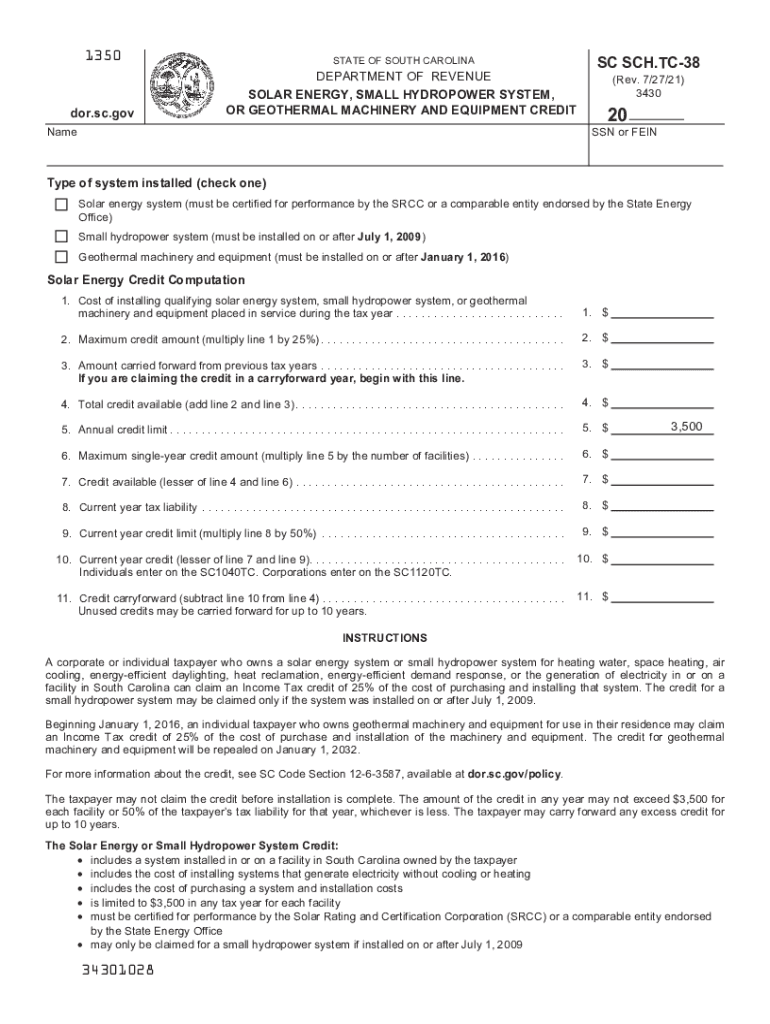
The South Carolina Solar Energy Credit Form is a tax document used by individuals and businesses in South Carolina to claim a 25% credit for purchasing and installing solar energy systems, small hydropower systems, or geothermal machinery and equipment.
pdfFiller scores top ratings on review platforms




Who needs SC SC SCH. TC-38?
Explore how professionals across industries use pdfFiller.

SC SC SCH. TC-38 is needed by:
-
Homeowners installing solar energy systems
-
Businesses utilizing geothermal machinery
-
Property owners of small hydropower systems
-
Tax professionals assisting clients in South Carolina
-
Accountants managing tax credits
-
Individuals seeking tax exemption certificates
Comprehensive Guide to SC SC SCH. TC-38
What is the South Carolina Solar Energy Credit Form?
The South Carolina Solar Energy Credit Form, known as SC SCH.TC-38, is designed to facilitate the claiming of solar energy credits by individuals and businesses. This form enables eligible users to receive tax credits for investing in renewable energy systems, providing substantial financial incentives for sustainable energy practices.
Eligibility extends to both individuals and businesses that install qualifying systems. Understanding the specifics of the south carolina solar energy credit form ensures that applicants can maximize their benefits while complying with the state's tax regulations.
Purpose and Benefits of the South Carolina Solar Energy Credit Form
This form provides a significant tax benefit, offering a 25% credit on installation costs for eligible renewable energy systems. By leveraging the solar energy tax credit in SC, applicants can achieve substantial financial savings while contributing to environmental preservation.
Incorporating renewable energy technologies leads to lower utility bills and reduced carbon footprints for users. The geothermal machinery tax credit serves as additional motivation for homeowners and businesses to invest in these energy-efficient systems, promoting a greener future.
Eligibility Criteria for the South Carolina Solar Energy Credit Form
To qualify for the tax credit, applicants must ensure that their systems meet specific requirements. The following types of systems are eligible for the south carolina solar energy credit form:
-
Solar energy systems
-
Small hydropower systems
-
Geothermal systems
Additionally, there is a limit of $3,500 per facility per year, stipulating that individuals and businesses must be mindful of their installation costs to maximize credit benefits. Familiarity with the sc tax exemption certificates can further enhance compliance with eligibility requirements.
How to Fill Out the South Carolina Solar Energy Credit Form Online (Step-by-Step)
To successfully complete the SC SCH.TC-38 form, gather necessary information beforehand. This includes installation costs, system type, and personal information. Follow these steps for efficient completion:
-
Access the form through a reliable platform like pdfFiller.
-
Input personal details in the relevant fields.
-
Enter the details regarding the renewable energy system installed.
-
Calculate the eligible tax credit based on installation costs.
-
Review all entries for accuracy before submission.
Common Errors and How to Avoid Them
Many applicants make frequent mistakes when submitting the South Carolina Solar Energy Credit Form, which can lead to processing delays or rejections. Common errors include:
-
Incorrectly filled personal details
-
Miscalculation of tax credits
-
Failure to meet submission deadlines
Reviewing the completed form thoroughly before submission minimizes the risk of these errors. Best practices include double-checking calculations and ensuring all required fields are filled.
Where to Submit the South Carolina Solar Energy Credit Form
Applicants have multiple submission options for the South Carolina Solar Energy Credit Form, making it accessible to a wider audience. Users can submit the form online or through traditional mail methods.
It is crucial to be aware of submission deadlines and processing times to ensure that tax credits are applied efficiently. For those opting for mail, keep an eye out for any specific addresses regarding the submission of tax forms.
What Happens After You Submit the Form?
Upon submitting the South Carolina Solar Energy Credit Form, applicants should expect to receive a confirmation notification. Users can check their application status through the relevant state tax portal, which offers insights into the review process.
Common reasons for rejection may include incomplete information or discrepancies in the claimed credit amount, making it essential to verify all details provided in the application.
Security and Compliance for the South Carolina Solar Energy Credit Form
Ensuring the security of personal information is paramount when submitting tax forms such as the SC SCH.TC-38. pdfFiller employs 256-bit encryption and adheres to compliance standards like HIPAA and GDPR.
The platform addresses privacy and data protection concerns, allowing users to submit their forms safely and securely.
Using pdfFiller for the South Carolina Solar Energy Credit Form
pdfFiller simplifies the completion of the South Carolina Solar Energy Credit Form by offering a suite of powerful features. Users can edit, eSign, and share their forms effortlessly, enhancing overall usability.
The ease of access provided by pdfFiller enables users to streamline the filling and submission process, ensuring that they can take full advantage of the available tax credits.
Example of a Completed South Carolina Solar Energy Credit Form
For visual reference, individuals can review a sample completed SC SCH.TC-38 form. This example includes annotations explaining key fields and the required information.
Users are encouraged to use this example as a guide while filling out their personal information in pdfFiller, ensuring accuracy and compliance with all necessary requirements.
How to fill out the SC SC SCH. TC-38
-
1.Visit pdfFiller's website and log in or create an account if you don’t have one.
-
2.Use the search bar to find the 'South Carolina Solar Energy Credit Form' or navigate through the tax form sections.
-
3.Once you access the form, familiarize yourself with the layout including blank fields and checkboxes alongside instructions.
-
4.Before starting, gather required information such as installation costs, types of systems, and any previous credit claims.
-
5.Begin filling in the fields as indicated. Click on each section to type in the necessary data comfortably.
-
6.Ensure that all fields are filled out accurately, especially the cost of installation and type of solar or geothermal system.
-
7.Review the completed form carefully for any missing or inaccurate information.
-
8.Once satisfied with your entries, save the form within pdfFiller for future reference or download it directly to your device.
-
9.If you are ready to submit the form, follow pdfFiller’s instructions to electronically file it or prepare it for mailing with your income tax return.

Who is eligible to use the South Carolina Solar Energy Credit Form?
Eligibility for the South Carolina Solar Energy Credit Form includes homeowners and businesses that have incurred expenses for purchasing and installing eligible solar energy systems, small hydropower systems, or geothermal machinery within South Carolina.
Is there a deadline for submitting this form?
The South Carolina Solar Energy Credit Form should be submitted alongside your income tax return, generally due by April 15. However, check for any specific extensions or changes that may apply annually.
How can I submit the South Carolina Solar Energy Credit Form?
You can submit the form electronically via pdfFiller or print it out and attach it to your income tax return. Ensure that all information is correct before submitting.
What supporting documents do I need when filing this form?
When completing the South Carolina Solar Energy Credit Form, include receipts for installation and purchase, along with any supporting evidence of credit computations and previous claims if applicable.
What are common mistakes to avoid when filling out this form?
Common mistakes include missing fields, incorrect calculation of the credit amount, and failing to attach necessary supporting documents. Double-check all entries for accuracy.
How long does it take to process the South Carolina Solar Energy Credit Form?
Processing times can vary, but generally, credit claims are processed as part of the income tax return, which can take several weeks depending on the volume of submissions.
Is notarization required for the South Carolina Solar Energy Credit Form?
No, the South Carolina Solar Energy Credit Form does not require notarization. You simply need to complete it and attach it to your tax return.
SC SC SCH. TC-38 Form Versions
Related Content
Related Forms





Get the latest insights from our blog



If you believe that this page should be taken down, please follow our DMCA take down process
here
.
This form may include fields for payment information. Data entered in these fields is not covered by PCI DSS compliance.