
Last updated on
Nov 7, 2026
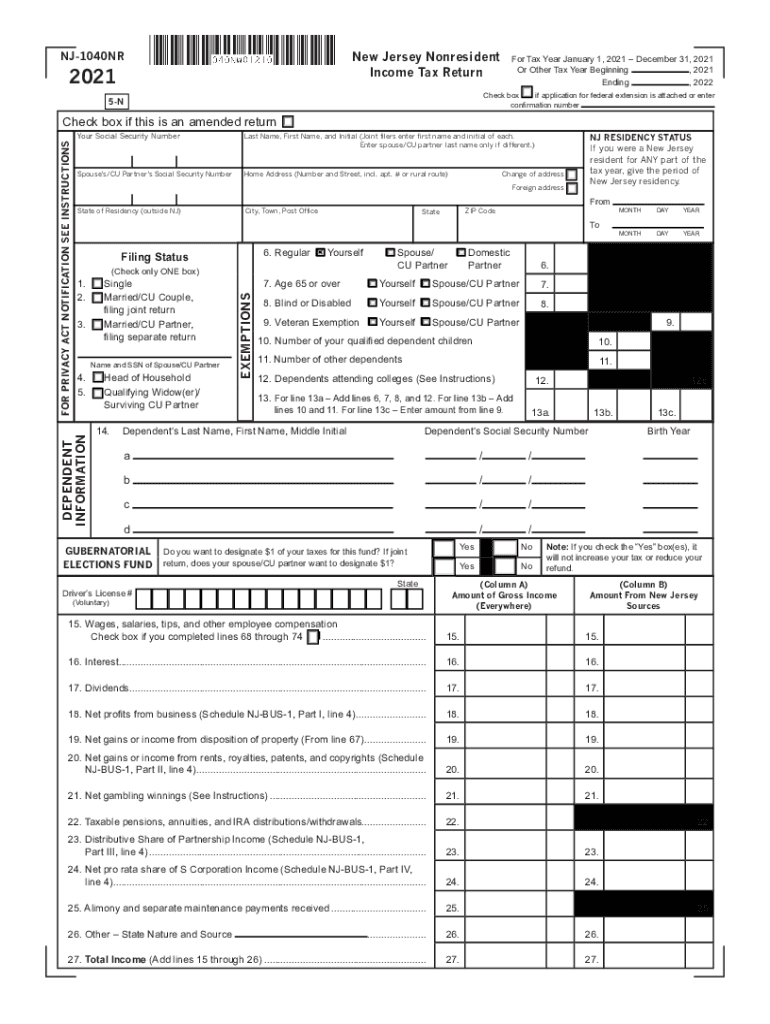
NJ NJ-1040NR 2021 free printable template
pdfFiller is not affiliated with any government organization

Fill out
Complete the form online in a simple drag-and-drop editor.

eSign
Add your legally binding signature or send the form for signing.

Share
Share the form via a link, letting anyone fill it out from any device.

Export
Download, print, email, or move the form to your cloud storage.
Why pdfFiller is the best tool for your documents and forms


End-to-end document management
From editing and signing to collaboration and tracking, pdfFiller has everything you need to get your documents done quickly and efficiently.
Accessible from anywhere
pdfFiller is fully cloud-based. This means you can edit, sign, and share documents from anywhere using your computer, smartphone, or tablet.
Secure and compliant
pdfFiller lets you securely manage documents following global laws like ESIGN, CCPA, and GDPR. It's also HIPAA and SOC 2 compliant.
What is NJ NJ-1040NR
The NJ-1040NR Nonresident Tax Return is a state income tax form used by nonresidents of New Jersey to report state income tax on earnings within New Jersey.
pdfFiller scores top ratings on review platforms




Super easy to use and helps me generate professional looking documents.
so far so good, like the functionality of the program
I WAS SO EXCITED TO FIND THIS. IT MADE MY LIFE EASIER!
Ditto!!
I'm a business owner, not an accountant or bookkeeper, and I found it easy to use.
Thanks!
This is a great program. Easy to use and print and save to my computer. However, I would have liked the option to subscribe and pay by the month instead of an entire year at once.
Easy and user friendly - I thought I would only use it once in a while, and I used it almost daily because it creates more efficiency.
Who needs NJ NJ-1040NR?
Explore how professionals across industries use pdfFiller.

NJ NJ-1040NR is needed by:
-
Nonresidents earning income in New Jersey
-
Spouses or domestic partners filing jointly
-
Individuals filing state tax returns for 2021
-
Tax professionals assisting clients with New Jersey taxes
-
Individuals seeking refunds on New Jersey taxes withheld
-
Residents of other states with New Jersey income
Comprehensive Guide to NJ NJ-1040NR
What is the NJ-1040NR Nonresident Tax Return?
The NJ-1040NR form is designed specifically for nonresidents who earn income in New Jersey. This tax return is pivotal for anyone who needs to accurately report their state income tax obligations. Nonresidents must file this form if they have earned income from New Jersey sources, ensuring that they comply with state tax laws.
Understanding the NJ-1040NR form is crucial for maintaining legal compliance, as failure to file properly can result in penalties. The form is important for various taxpayers, including those who may be unfamiliar with the New Jersey nonresident tax return requirements.
Purpose and Benefits of the NJ-1040NR Nonresident Tax Return
Completing the NJ-1040NR serves several key purposes for nonresidents. Primarily, this form enables you to meet the NJ state income tax obligations, ensuring that your income is reported correctly.
Filing the NJ-1040NR accurately can also lead to potential tax refunds for overpaid taxes. Additionally, documenting income and deductions properly is essential to avoid any potential penalties that may arise from incorrect filings.
Who Needs the NJ-1040NR Nonresident Tax Return?
Generally, individuals who have earned income from New Jersey sources are required to file the NJ-1040NR form. This includes nonresidents who may be working in the state temporarily or have other income that requires reporting.
It's also important to consider that if you are filing jointly with a spouse or civil union partner, both parties will need to sign the return. Understanding the criteria for filing can help ensure compliance and avoid complications.
Eligibility Criteria for the NJ-1040NR Nonresident Tax Return
To qualify to file the NJ-1040NR, you must meet specific residency rules set by New Jersey. Generally, nonresidents are individuals who do not maintain a permanent residence in the state but earn income there.
Additively, certain types of income may necessitate filing the NJ-1040NR, highlighting the need to review any additional requirements based on your income sources.
How to Fill Out the NJ-1040NR Nonresident Tax Return Online (Step-by-Step)
Filling out the NJ-1040NR form online using pdfFiller can be straightforward. Here is a step-by-step guide to assist you:
-
Start by accessing the NJ tax form 1040NR on pdfFiller.
-
Enter your Social Security Number and details about your income.
-
Complete sections dedicated to exemptions and deductions.
-
Utilize pdfFiller’s editing features, including eSigning, to streamline the process.
These steps will guide you in eliminating errors and ensuring your form is filled accurately.
Review and Validation Checklist for the NJ-1040NR Nonresident Tax Return
Before submitting your NJ-1040NR, it’s important to validate the accuracy of your form. Here is a checklist of items to review:
-
Ensure your income allocations are correct.
-
Double-check all deductions being claimed.
-
Look for common mistakes, such as misreported amounts.
Taking the time to validate these fields can enhance the likelihood of successful submission.
Submission Methods for the NJ-1040NR Nonresident Tax Return
Submitting your NJ-1040NR can be done through various methods. You can choose to file online via pdfFiller or mail the completed form to the appropriate tax authority.
When filing, it’s also beneficial to track your submission status to ensure it has been received. Being aware of what to expect after submission can help manage your tax filing experience.
Common Rejection Reasons and Solutions for NJ-1040NR Nonresident Tax Return
Filers may encounter rejections for a variety of reasons when submitting the NJ-1040NR. Some typical issues include:
-
Incorrect income reporting.
-
Missing signatures from either taxpayer or spouse.
Understanding these potential pitfalls can help you amend your filing effectively if necessary.
Security and Compliance when Filing the NJ-1040NR Nonresident Tax Return
When dealing with the NJ-1040NR, ensuring the security of your sensitive information is paramount. pdfFiller adheres to security protocols that comply with state and federal regulations.
Being aware of privacy measures during tax form submissions provides assurance that your data is protected throughout the filing process.
Maximize Your Tax Filing Experience with pdfFiller
Utilizing pdfFiller for your NJ-1040NR provides users with a fast and convenient filing experience. The platform’s features, such as cloud storage and document management, streamline the entire process.
By leveraging these capabilities, you can efficiently complete your tax form while ensuring your sensitive information remains secure throughout the process.
How to fill out the NJ NJ-1040NR
-
1.To start, navigate to pdfFiller and search for 'NJ-1040NR Nonresident Tax Return'. Access the form from the search results.
-
2.Once opened, you'll see a fillable PDF interface. Familiarize yourself with the available tools to edit and complete your form effectively.
-
3.Before filling out the form, gather necessary documents including your Social Security Number, income records from New Jersey sources, and any other relevant tax documents.
-
4.Begin filling out your personal information, ensuring the correct entry of name, address, and Social Security Number in the designated fields.
-
5.Next, provide details about your earned income in New Jersey. Make sure to accurately allocate income based on the given instructions.
-
6.If applicable, complete the section for your spouse or civil union partner, including their Social Security Number and any income they earned in New Jersey.
-
7.As you complete each section, review the instructions carefully. Make use of checkboxes and additional fields to declare exemptions and deductions.
-
8.Once all information is filled out, take a moment to review the entire form for accuracy. Check for any missed fields or potential errors before finalizing.
-
9.Save the form in pdfFiller once completed. You can also download a copy for your records or directly submit it via the platform’s submission options.

Who is eligible to file the NJ-1040NR Nonresident Tax Return?
Nonresidents who have earned income within New Jersey during the tax year 2021 are eligible to file the NJ-1040NR. This includes individuals who had state tax withheld from their wages.
What are the deadlines for submitting the NJ-1040NR form?
The NJ-1040NR must be submitted by the established tax deadline, typically by April 15 of the following year. Ensure you check for any changes regarding deadlines each tax year.
How can I submit my completed NJ-1040NR form?
After completing the NJ-1040NR, you can submit it through pdfFiller directly, or print and mail it to the New Jersey Division of Taxation. Be sure to retain copies for your records.
What documents should I include with my NJ-1040NR submission?
You should include any necessary W-2 forms showing New Jersey income, pay stubs, and records of any deductions or credits claimed. Always check current requirements before submission.
What are some common mistakes to avoid when filling out the NJ-1040NR?
Common mistakes include incorrect personal information, misreporting income, and overlooking the signature requirement for both taxpayer and spouse or partner. Double-checking fields can help avoid these.
What are the processing times for the NJ-1040NR form after submission?
Processing times can vary, but you can generally expect your NJ-1040NR refund to be processed within 8-12 weeks. Check the New Jersey Division of Taxation site for updates.
Is electronic filing available for the NJ-1040NR?
Yes, electronic filing options are available through various tax software platforms and services, including pdfFiller, making it easier to file your NJ-1040NR accurately and efficiently.
NJ NJ-1040NR Form Versions
Related Content
Related Forms





Get the latest insights from our blog


If you believe that this page should be taken down, please follow our DMCA take down process
here
.
This form may include fields for payment information. Data entered in these fields is not covered by PCI DSS compliance.