
Last updated on
Nov 9, 2026
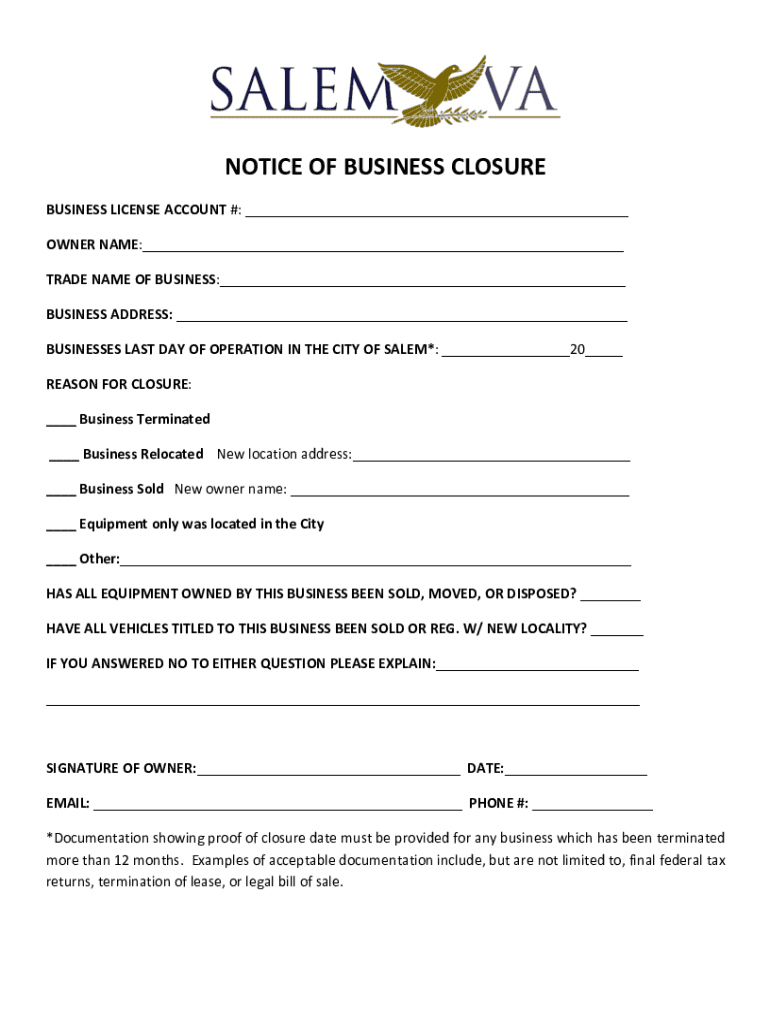
VA Notice of Business Closure - City of Salem 2019-2026 free printable template
pdfFiller is not affiliated with any government organization

Fill out
Complete the form online in a simple drag-and-drop editor.

eSign
Add your legally binding signature or send the form for signing.

Share
Share the form via a link, letting anyone fill it out from any device.

Export
Download, print, email, or move the form to your cloud storage.
Why pdfFiller is the best tool for your documents and forms


End-to-end document management
From editing and signing to collaboration and tracking, pdfFiller has everything you need to get your documents done quickly and efficiently.
Accessible from anywhere
pdfFiller is fully cloud-based. This means you can edit, sign, and share documents from anywhere using your computer, smartphone, or tablet.
Secure and compliant
pdfFiller lets you securely manage documents following global laws like ESIGN, CCPA, and GDPR. It's also HIPAA and SOC 2 compliant.
What is VA Notice of Business Closure - City of Salem
The Notice of Business Closure is a formal document used by business owners to officially notify authorities of their business closure in Salem, Oregon.
pdfFiller scores top ratings on review platforms




Who needs VA Notice of Business Closure - City of Salem?
Explore how professionals across industries use pdfFiller.

VA Notice of Business Closure - City of Salem is needed by:
-
Owners of businesses in Salem, Oregon
-
Entrepreneurs closing their business operations
-
Individuals managing business licenses
-
Those needing to report a permanent closure to state authorities
-
Business compliance officers
-
Legal representatives handling business discontinuations
Comprehensive Guide to VA Notice of Business Closure - City of Salem
Understanding the Notice of Business Closure
The Notice of Business Closure is a crucial document for business owners in Salem, Oregon, used to formally inform relevant authorities about the cessation of business activities. This notification is not just a procedural formality; it serves a vital legal purpose, ensuring compliance with local regulations.
By filing the notice, business owners demonstrate their commitment to transparency and governance. The legal requirement for notifying authorities helps prevent potential misunderstandings or disputes that could arise from unreported closures.
Purpose and Benefits of Filing the Notice of Business Closure
Filing the Notice of Business Closure provides several benefits to business owners. It formally documents the closure, which can help protect owners from potential liabilities and legal implications that may arise from operating without an active business license.
Timely filing avoids complications such as fines or legal challenges, ensuring that business owners can navigate their next steps without unnecessary hindrance. Failure to file this important business closure notification could lead to serious repercussions, emphasizing the importance of adhering to this requirement.
Key Features of the Notice of Business Closure Form
The Notice of Business Closure Form contains several essential features critical for accurate completion. Key sections of the form include:
-
Business License Account #
-
Owner Name
-
Trade Name
-
Business Address
-
Last Day of Operation
Additionally, it includes checkboxes for specifying the reason for closure and requires the owner's signature, ensuring that all necessary information is captured for proper documentation.
Who Needs to Complete the Notice of Business Closure?
This form is specifically designed for business owners in Salem who are officially closing their operations. Situations that require the completion of this notice include consolidations, relocations, or business terminations. Business owners must assess their circumstances to determine the necessity of submitting this form.
Eligibility and Requirements for the Notice of Business Closure
To utilize the Notice of Business Closure Form, business owners must meet specific eligibility criteria. Required documentation may include proof of closure, particularly if the business has been inactive for over 12 months. Owners should prepare the following documents:
-
Business License
-
Identification of Owner
-
Reason for Closure Documentation (if applicable)
Compliance with these requirements is fundamental to the acceptance and processing of the notice.
Step-by-Step Guide to Filling Out the Notice of Business Closure Form
Completing the Notice of Business Closure Form online involves several sequential steps:
-
Access the Notice of Business Closure Form on the designated platform.
-
Fill in the Business License Account #, Owner Name, and Trade Name accurately.
-
Provide the Business Address and Last Day of Operation.
-
Select the reason for closure using the checkboxes provided.
-
Review the form for any errors or missing information.
-
Sign the document and ensure contact information is updated.
Careful adherence to these steps will minimize common errors and streamline the filing process.
How to Submit the Notice of Business Closure and What to Expect
Once the Notice of Business Closure Form is completed, the submission process is straightforward. Acceptable methods for submission include online portals, mail, or in-person delivery at relevant authorities. Upon submission, business owners can expect:
-
Confirmation of receipt
-
Estimated processing times for the notice
Understanding this process helps manage expectations and ensures business owners stay informed about the status of their notice.
Security and Compliance in Filing Your Notice of Business Closure
Ensuring document security while filing the Notice of Business Closure is paramount. pdfFiller employs robust 256-bit encryption, ensuring sensitive information remains protected throughout the filing process. Additionally, the platform complies with legal and data protection standards such as HIPAA and GDPR.
This commitment to security reassures business owners that their data is handled responsibly and in accordance with compliance regulations.
Utilizing pdfFiller to Simplify Your Notice of Business Closure Process
pdfFiller offers a user-friendly platform designed to simplify the filling out of the Notice of Business Closure Form. Key functionalities include:
-
Edit text and images directly within the PDF
-
Easily eSign the document
-
Share the filled form efficiently with relevant parties
These tools enhance the efficiency of the process, making it easier for business owners to manage their documentation effectively.
Next Steps After Filing the Notice of Business Closure
After submitting the Notice of Business Closure, business owners should take the following steps:
-
Check the status of the submission through the appropriate channels.
-
Be prepared to make corrections or provide additional information if requested.
-
Obtain confirmation of submission for records.
Staying proactive after filing ensures that business owners remain informed and can address any issues that might arise promptly.
How to fill out the VA Notice of Business Closure - City of Salem
-
1.To access the Notice of Business Closure form on pdfFiller, navigate to the pdfFiller website and use the search function to find the specific form.
-
2.Once you locate the form, click on it to open the fillable PDF interface where you can begin entering your information.
-
3.Before filling out the form, gather necessary details such as your business license account number, owner name, trade name, business address, and the last day of operation.
-
4.Start by filling in the 'Business License Account #' field with your unique license number.
-
5.Next, input the 'Owner Name' and 'Trade Name of Business.' Be precise in ensuring the trade name matches your registered name.
-
6.Fill out the 'Business Address' section accurately since this reflects your business's physical location.
-
7.Indicate the 'Last Day of Operation' by selecting the date from the provided calendar feature.
-
8.For the 'Reason for Closure,' check the appropriate box that applies to your situation and ensure any relevant notes are included if necessary.
-
9.As you complete the form, remember to review all information for accuracy, especially your contact details and the closure date.
-
10.Once all fields are filled in, carefully read the form to ensure completeness, then proceed to the signing section.
-
11.Click the signature field to digitally sign the form as the owner, confirming your authority over the business closure notification.
-
12.After signing, save your changes using the 'Save' option, ensuring all updates are properly stored.
-
13.You can download the completed form to your device for submission or print it directly from pdfFiller for mailing.
-
14.If you choose to submit the form online, follow the straightforward instructions to send the completed form to the relevant authorities directly through pdfFiller.

Who is required to fill out the Notice of Business Closure?
The Notice of Business Closure must be filled out by business owners in Salem, Oregon, who are officially terminating their business operations.
What documents do I need to submit with the form?
You may need to provide documentation proving the closure date, especially if the business has been inactive for more than 12 months.
Is there a specific deadline for submitting the form?
While there isn't a strict deadline, submitting this form as soon as you decide to close your business is advisable to avoid penalties or complications.
How should I submit the Notice of Business Closure?
You can submit the completed Notice of Business Closure form online through pdfFiller or print it for mailing to the respective authorities.
What are common errors to avoid when filling out this form?
Common errors include missing signature sections, incorrect business names, and not providing supporting documents for the closure date.
How long does it take to process the business closure notification?
Processing times can vary, but typically, you can expect feedback or acknowledgment of your submission within a few weeks.
Do I need to notarize the Notice of Business Closure?
No, notarization is not required for the Notice of Business Closure form.
Related Forms


Get the latest insights from our blog


If you believe that this page should be taken down, please follow our DMCA take down process
here
.
This form may include fields for payment information. Data entered in these fields is not covered by PCI DSS compliance.