
Last updated on
Oct 31, 2026
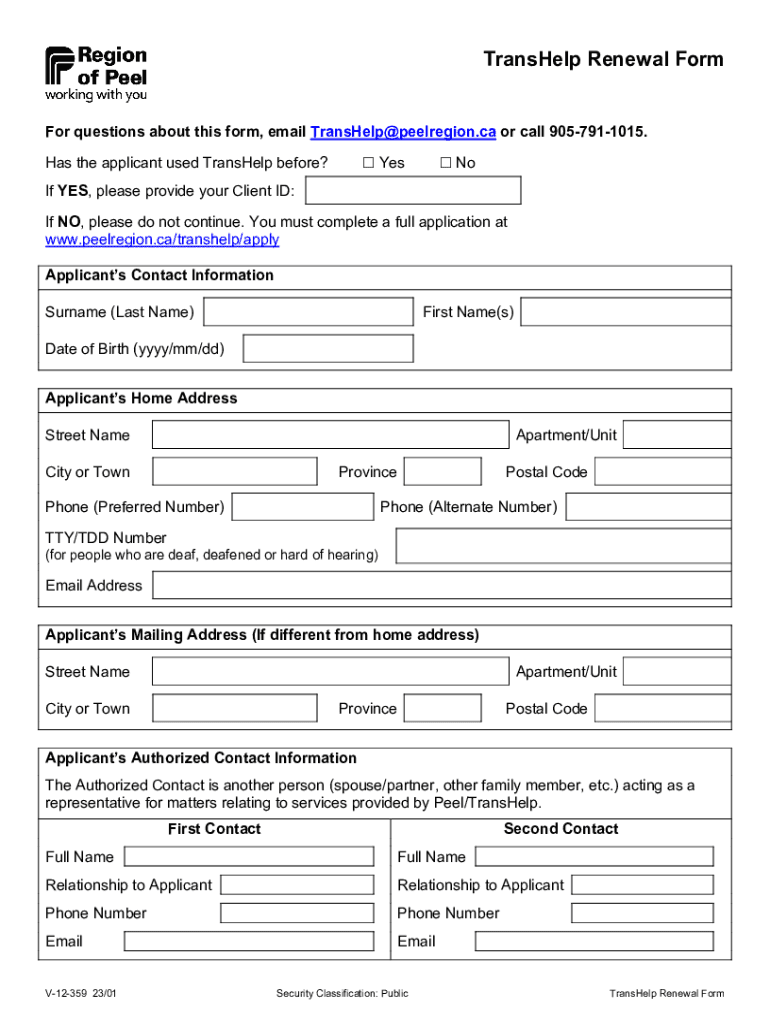
Get the free TransHelp Renewal Form
We are not affiliated with any brand or entity on this form

Fill out
Complete the form online in a simple drag-and-drop editor.

eSign
Add your legally binding signature or send the form for signing.

Share
Share the form via a link, letting anyone fill it out from any device.

Export
Download, print, email, or move the form to your cloud storage.
Why pdfFiller is the best tool for your documents and forms


End-to-end document management
From editing and signing to collaboration and tracking, pdfFiller has everything you need to get your documents done quickly and efficiently.
Accessible from anywhere
pdfFiller is fully cloud-based. This means you can edit, sign, and share documents from anywhere using your computer, smartphone, or tablet.
Secure and compliant
pdfFiller lets you securely manage documents following global laws like ESIGN, CCPA, and GDPR. It's also HIPAA and SOC 2 compliant.
What is TransHelp Renewal
The TransHelp Renewal Form is a document used by residents in Peel Region, Ontario, Canada, to renew access to essential TransHelp services.
pdfFiller scores top ratings on review platforms




Who needs TransHelp Renewal?
Explore how professionals across industries use pdfFiller.

TransHelp Renewal is needed by:
-
Residents of Peel Region requiring disability transit services
-
Individuals needing support for assistive devices
-
Those who utilize TransHelp services regularly
-
Support persons assisting users of TransHelp
-
Healthcare providers submitting on behalf of patients
-
Caregivers managing transportation for disabled individuals
Comprehensive Guide to TransHelp Renewal
What is the TransHelp Renewal Form?
The TransHelp Renewal Form is a crucial document for individuals in Ontario, specifically within the Peel Region, who seek to renew their access to essential TransHelp services. This form plays a significant role in ensuring that users can continue benefitting from specialized transportation options designed for individuals with disabilities.
By submitting this form, applicants can ensure their ongoing eligibility for services tailored to meet their transportation needs. The TransHelp services it supports are vital for enhancing mobility and independence for people with disabilities.
Purpose and Benefits of the TransHelp Renewal Form
The primary purpose of the TransHelp Renewal Form is to streamline the process for individuals who already utilize TransHelp services. Unlike new applications, this renewal process is simplified, allowing users to maintain their transit access without starting from scratch.
Using the form provides numerous benefits, including enhanced accessibility options and a more efficient renewal experience. Individuals are encouraged to renew promptly to avoid any interruptions in their transportation services.
Eligibility Criteria for the TransHelp Renewal Form
To be eligible for renewal using the TransHelp Renewal Form, applicants must meet specific criteria. Generally, individuals with disabilities who require assistive devices or support from caregivers qualify for these services.
Essential documentation that may be required includes proof of disability and identification. This information substantiates eligibility and ensures services are directed to those in genuine need.
How to Fill Out the TransHelp Renewal Form Online
Completing the TransHelp Renewal Form online is a straightforward process that can be done using pdfFiller. Follow these steps to ensure a successful submission:
-
Access the TransHelp Renewal Form on the pdfFiller platform.
-
Fill in your personal information, including contact details.
-
Provide medical needs and details about any assistive devices you use.
-
Include information regarding your support person, if applicable.
-
Review the completed form thoroughly before submission.
Common Errors and How to Avoid Them When Filling Out the TransHelp Form
When filling out the TransHelp Renewal Form, users commonly encounter errors that can lead to delays or rejections. Some frequent mistakes include missing signatures and providing incorrect information.
To avoid these pitfalls, it is crucial to take the time to review the information provided before submitting the form. Checking for accuracy can save significant time and effort in ensuring your application is processed smoothly.
Submission Methods for the TransHelp Renewal Form
There are several methods available for submitting the completed TransHelp Renewal Form. Users can choose from the following options:
-
Email submission
-
Postal mail
-
Fax transmission
-
In-person delivery
Regardless of the submission method chosen, it is essential to ensure that personal information is submitted securely to protect sensitive data.
Tracking Your TransHelp Renewal Submission
Once you have submitted your TransHelp Renewal Form, it is important to know how to track the status of your application. Users can check their application status through various designated channels.
If necessary, following up with the relevant authorities can help clarify any uncertainties regarding the status of your submission. Keeping a record of your submission details will aid in this process.
Security and Privacy When Using the TransHelp Renewal Form
Your privacy and the security of personal information is a top priority when filling out the TransHelp Renewal Form. The form is designed with robust security measures in place, including 256-bit encryption.
Moreover, pdfFiller complies with crucial privacy regulations, ensuring that your data is handled safely. Users can fill out the form with confidence, knowing their information is protected.
Why Use pdfFiller for Your TransHelp Renewal Form?
pdfFiller offers a range of key features that make the process of filling out and managing the TransHelp Renewal Form seamless. Users can easily edit text, annotate documents, e-sign, and convert forms as needed.
Additionally, pdfFiller is known for its reliability and security, making it a trusted choice for handling sensitive documents like the TransHelp Renewal Form.
Sample Completed TransHelp Renewal Form
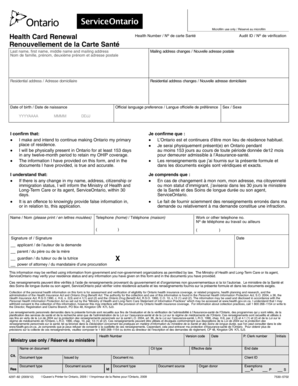
Providing a visual reference, a sample completed TransHelp Renewal Form can significantly aid users in understanding how to accurately fill out their documents. This example will highlight key sections and commonly overlooked details.
Utilizing a sample as a guide can help avoid errors that might occur during completion, ensuring a smoother renewal process for all applicants.
How to fill out the TransHelp Renewal
-
1.Access the TransHelp Renewal Form on pdfFiller by visiting the website and searching for the form's name in the search bar.
-
2.Once you find the form, click on it to open the document in the pdfFiller interface.
-
3.Before filling out the form, gather necessary personal information, including your contact details, assistive device usage history, and any information regarding your support person.
-
4.Navigate through the form by clicking on the fillable fields. Enter your information where prompted, ensuring accuracy and completeness.
-
5.Utilize checkboxes where applicable to indicate your choices. Take your time to ensure all required fields are filled out.
-
6.Refer to the instructions embedded in the form for clarification on each section as you progress through the document.
-
7.Once you have completed all sections of the form, review your entries carefully to ensure there are no mistakes or missing information.
-
8.After reviewing, you can save your progress by selecting the save option or download the completed form onto your device for future reference.
-
9.Decide on your preferred submission method: email, mail, fax, or in-person. Follow the submission guidelines provided within the form.
-
10.If opting to email or fax, ensure you have the correct recipient information before sending the form.

Who is eligible to submit the TransHelp Renewal Form?
Residents of Peel Region who are currently using or wish to renew their access to TransHelp services are eligible to submit this form.
Are there any deadlines for submitting the form?
While specific deadlines may vary, it's best to submit your renewal form at least a month before your current access expires to ensure uninterrupted service.
What submission methods are available for the TransHelp Renewal Form?
You can submit the form via email, mail, fax, or in person at the designated locations outlined in the form’s instructions.
What supporting documents are needed to complete the form?
You may need to provide documents that detail your assistive device usage and any information related to your support person. Always check the specific requirements mentioned in the form.
What common mistakes should I avoid when filling out the form?
Ensure all fields are filled out completely and accurately, especially your contact details and assistive device information. Double-check for typos or omissions before submitting.
How long does it take for the form to be processed?
Processing times can vary. However, allow several weeks for your request to be reviewed and updated access to be granted.
What should I do if I have concerns about the form?
If you have any specific concerns regarding the TransHelp Renewal Form, you may contact TransHelp services directly for guidance or clarification.
Related Forms





Get the latest insights from our blog


If you believe that this page should be taken down, please follow our DMCA take down process
here
.
This form may include fields for payment information. Data entered in these fields is not covered by PCI DSS compliance.