
Last updated on
Nov 9, 2026

IRS Instruction 1099-DIV 2014 free printable template
pdfFiller is not affiliated with IRS

Fill out
Complete the form online in a simple drag-and-drop editor.

eSign
Add your legally binding signature or send the form for signing.

Share
Share the form via a link, letting anyone fill it out from any device.

Export
Download, print, email, or move the form to your cloud storage.
Why pdfFiller is the best tool for your documents and forms


End-to-end document management
From editing and signing to collaboration and tracking, pdfFiller has everything you need to get your documents done quickly and efficiently.
Accessible from anywhere
pdfFiller is fully cloud-based. This means you can edit, sign, and share documents from anywhere using your computer, smartphone, or tablet.
Secure and compliant
pdfFiller lets you securely manage documents following global laws like ESIGN, CCPA, and GDPR. It's also HIPAA and SOC 2 compliant.
What is IRS Instruction 1099-DIV
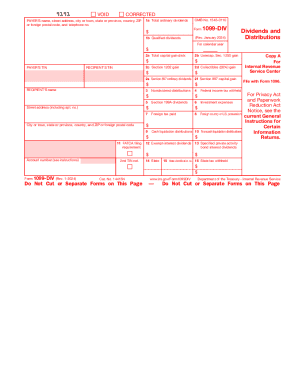
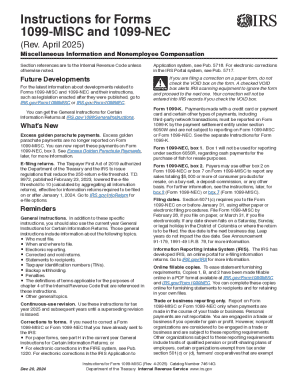
The IRS Form 1099-DIV Instructions 2014 is a set of guidelines used by entities to report dividends and distributions to the IRS for tax year 2014.
pdfFiller scores top ratings on review platforms




Who needs IRS Instruction 1099-DIV?
Explore how professionals across industries use pdfFiller.

IRS Instruction 1099-DIV is needed by:
-
Businesses issuing dividends
-
Financial institutions providing dividends
-
Tax professionals preparing tax documentation
-
Individuals receiving dividend income
-
Corporate accountants handling tax records
-
Estate administrators distributing dividends
Comprehensive Guide to IRS Instruction 1099-DIV
What is the IRS Form 1099-DIV Instructions 2014?
The IRS Form 1099-DIV Instructions 2014 is a crucial document issued by the U.S. Internal Revenue Service (IRS) designed to explain the reporting process for dividends. It provides clear guidance on completing IRS Form 1099-DIV, which is essential for entities that pay dividends to accurately report this financial information to both the IRS and recipients. Understanding these instructions is vital for taxpayers, especially given their relevance to the tax year 2014.
The primary purpose of these instructions is to ensure proper dividend reporting, highlighting the key information required for compliance with tax obligations. With accurate filing, taxpayers can avoid potential penalties associated with incorrect submissions.
Purpose and Benefits of IRS Form 1099-DIV Instructions 2014
Utilizing the IRS Form 1099-DIV Instructions 2014 is essential for accurate financial reporting and compliance with tax laws. Properly following these instructions allows individuals and corporations to fulfill their tax obligations effectively. Accurate reporting helps in minimizing errors that may lead to audits or penalties.
Furthermore, understanding the benefits of these instructions can enhance compliance efforts. Not adhering to the guidance provided may result in significant penalties, impacting financial health. It is, therefore, crucial for filers to utilize these instructions to ensure accurate and timely submissions.
Who Needs the IRS Form 1099-DIV Instructions 2014?
The IRS Form 1099-DIV Instructions 2014 are necessary for various entities involved in dividend distribution. Corporations, mutual funds, and other entities that process dividend payments must be aware of their filing responsibilities. Recipients of dividends also benefit from understanding these instructions as it affects their personal tax filings.
-
Corporations and mutual funds obligated to file dividend reports
-
Individuals receiving dividend distributions who need to understand reporting requirements
-
Taxpayers in specific conditions that mandate the use of this form
When to File the IRS Form 1099-DIV Instructions 2014
Filers must be aware of the key deadlines associated with the IRS Form 1099-DIV for the 2014 tax year. Timely filing is critical to maintaining compliance with IRS regulations.
-
Original filing deadlines for submitting Form 1099-DIV
-
Consequences of late submissions including potential fines
-
Additional deadlines for different submission types
How to Fill Out the IRS Form 1099-DIV Instructions 2014 Online
Filling out IRS Form 1099-DIV online can be convenient when using pdfFiller. To ensure accurate completion, users should be prepared with the necessary documentation before starting the filling process.
-
Gather all required information such as recipient details and dividend amounts.
-
Access the IRS Form 1099-DIV on pdfFiller's platform.
-
Complete each field following the online guidance.
-
Review your entries thoroughly before submission to avoid common errors.
Common Errors When Using IRS Form 1099-DIV Instructions 2014
While filing IRS Form 1099-DIV, certain common errors can hinder the processing of submissions. Recognizing these pitfalls is essential for ensuring accurate filings.
-
Incorrect dates or missing information that could delay processing
-
Neglecting to review entries before submission, risking inaccuracies
-
Failure to understand the specific requirements of the form
How to Download and Save the IRS Form 1099-DIV Instructions 2014 PDF
Downloading the IRS Form 1099-DIV Instructions 2014 as a PDF can facilitate easier reference and filing. It is crucial to follow straightforward steps to ensure easy access to the document.
-
Visit a reliable platform to download the PDF of the 1099-DIV instructions.
-
Follow the prompts to save the document to your device.
-
Organize your files with appropriate naming conventions for easy retrieval.
Submission Methods for IRS Form 1099-DIV Instructions 2014
After completing the IRS Form 1099-DIV, understanding submission methods is vital for proper delivery. Filers can choose between electronic submissions or traditional mail methods.
-
Available electronic submission options that may expedite the process
-
Mailing addresses for paper submissions
-
How to track confirmation after submission for peace of mind
Security and Compliance for IRS Form 1099-DIV Instructions 2014
Security is a major concern when handling sensitive tax documents. The IRS Form 1099-DIV Instructions 2014 allows users to engage in compliant practices while ensuring data protection throughout the filing process.
-
Robust encryption methods to keep personal data safe
-
Compliance with standards such as HIPAA and GDPR
-
Assurance of confidentiality when dealing with tax submissions
Enhance Your Form Experience with pdfFiller
Utilizing pdfFiller can greatly enhance the user experience when filling out IRS Form 1099-DIV. The platform offers a variety of features tailored for tax form completion.
-
User-friendly tools for editing and eSigning documents
-
Capabilities for converting formats, merging, and sharing files securely
-
Encouragement to take advantage of these features for a seamless filing process
How to Fill Out Small Business Tax Forms Online with pdfFiller
Struggling with your Schedule C or not sure how to file business taxes as a sole proprietor, LLC, or self-employed professional? This step-by-step pdfFiller tutorial walks you through completing IRS Schedule C quickly and accurately — no printing, no scanning, no stress. Whether you're handling small business tax deductions, tracking self-employed taxes, or preparing your full business tax return, pdfFiller makes it simple right in your browser.

How to fill out the IRS Instruction 1099-DIV
-
1.Access the IRS Form 1099-DIV Instructions 2014 by visiting pdfFiller's website and using their search function to find the form.
-
2.Open the form in pdfFiller by clicking on the form name, allowing the interface to load with interactive fields.
-
3.Gather necessary information, such as details of dividends paid and recipient information, to ensure accuracy while completing the form.
-
4.Start filling out the required fields by clicking on them. You can enter text directly or use pdfFiller's options to add names, dates, and amounts.
-
5.Use the toolbar in pdfFiller to adjust any text formatting, add checkmarks, or insert annotations as needed for clarity.
-
6.After entering all necessary information, review the completed form closely to check for errors or omissions.
-
7.Once finalized, save your progress using the 'Save' button. You can also select 'Download' to save the document to your computer or 'Submit' to send it directly if applicable.

Who is required to file IRS Form 1099-DIV?
Entities that make distributions of dividends or other distributions to shareholders must file IRS Form 1099-DIV to report this information to the IRS and the recipients.
What is the deadline for filing IRS Form 1099-DIV?
The form must generally be filed by January 31st of the year following the tax year for which the dividends were paid. However, if filed electronically, the deadline extends to March 31st.
How should I submit Form 1099-DIV?
Form 1099-DIV can be submitted to the IRS through paper filing or electronically through the IRS e-file system. Be sure to follow specific guidelines based on your chosen method.
What supporting documents do I need when filing Form 1099-DIV?
You will need records of all dividends paid, including amounts and recipient details, as well as any relevant financial statements to support the figures you report.
What are common mistakes to avoid when filing this form?
Common mistakes include entering incorrect recipient information, failing to file the form on time, and not providing accurate amounts of dividends paid. Double-check all entries to minimize errors.
How long does it take for IRS to process Form 1099-DIV?
Processing times can vary, but typically it takes about six weeks for the IRS to process submitted forms. Follow up if you do not receive confirmation of receipt.
Can I amend Form 1099-DIV after filing?
Yes, if you discover errors after submission, you can file an amended Form 1099-DIV. Ensure to correct any inaccuracies as soon as possible to avoid penalties.
IRS Instruction 1099-DIV Form Versions
Related Content
Related Forms


Get the latest insights from our blog


If you believe that this page should be taken down, please follow our DMCA take down process
here
.
This form may include fields for payment information. Data entered in these fields is not covered by PCI DSS compliance.