
Last updated on
Oct 2, 2026
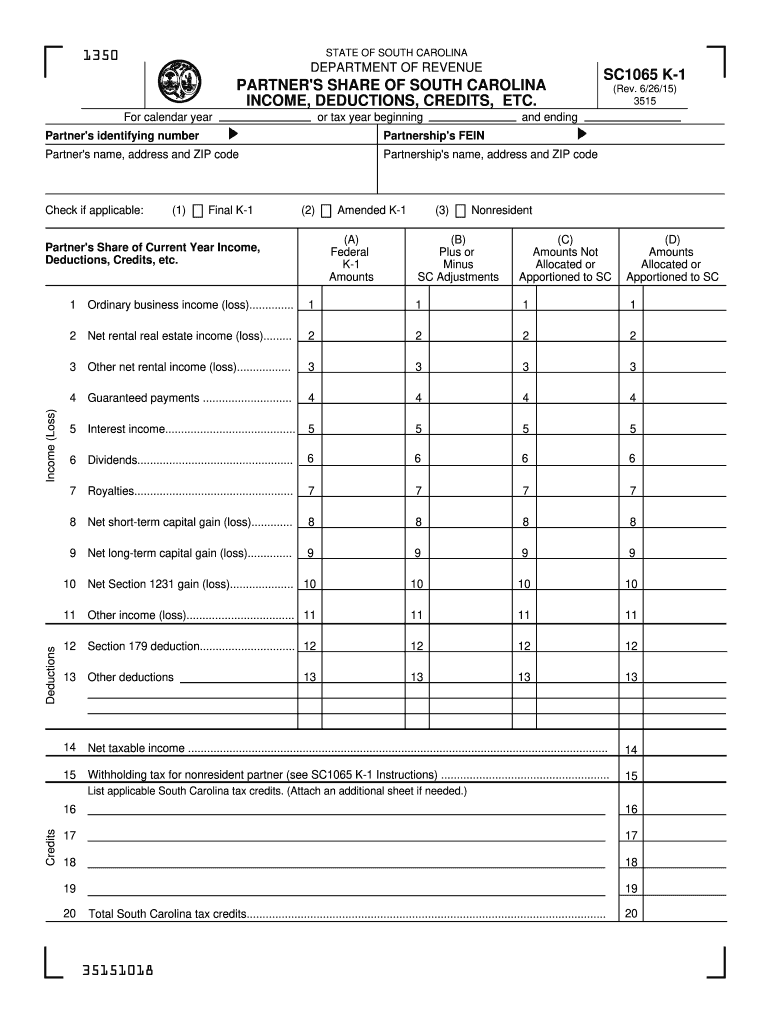
SC SC1065 K-1 2015 free printable template
pdfFiller is not affiliated with any government organization

Fill out
Complete the form online in a simple drag-and-drop editor.

eSign
Add your legally binding signature or send the form for signing.

Share
Share the form via a link, letting anyone fill it out from any device.

Export
Download, print, email, or move the form to your cloud storage.
Why pdfFiller is the best tool for your documents and forms


End-to-end document management
From editing and signing to collaboration and tracking, pdfFiller has everything you need to get your documents done quickly and efficiently.
Accessible from anywhere
pdfFiller is fully cloud-based. This means you can edit, sign, and share documents from anywhere using your computer, smartphone, or tablet.
Secure and compliant
pdfFiller lets you securely manage documents following global laws like ESIGN, CCPA, and GDPR. It's also HIPAA and SOC 2 compliant.
What is SC SC1065 K-1
The South Carolina K-1 Tax Forms are state tax documents used by entities to report a partner's, beneficiary's, or shareholder's share of income, deductions, and credits for state tax purposes.
pdfFiller scores top ratings on review platforms




Who needs SC SC1065 K-1?
Explore how professionals across industries use pdfFiller.

SC SC1065 K-1 is needed by:
-
Partners in partnerships reporting income and deductions.
-
Beneficiaries receiving distributions from estates or trusts.
-
Shareholders of S-corporations needing to report income.
-
Nonresident entities filing state tax returns in South Carolina.
-
Tax professionals assisting clients with state income tax filings.
-
Accountants managing financial records for businesses.
Comprehensive Guide to SC SC1065 K-1
What Are South Carolina K-1 Tax Forms?
The South Carolina K-1 Tax Forms are essential documents used to report a partner's, beneficiary's, or shareholder's share of income, deductions, and credits for state income tax returns. These forms are primarily used by entities such as partnerships, estates, and corporations. Accurate reporting is crucial for compliance with the South Carolina Department of Revenue, ensuring that all taxable income is properly declared.
Understanding the significance of the South Carolina K-1 form helps in navigating the complexities of state tax obligations while avoiding potential penalties associated with inaccurate reporting.
Purpose and Benefits of the South Carolina K-1 Tax Forms
The primary purpose of the South Carolina K-1 Tax Forms is to provide a transparent way to report income, deductions, and credits attributed to partners, beneficiaries, and shareholders. Completing these forms accurately offers several benefits.
-
Reducing overall tax liability for individuals and entities.
-
Ensuring compliance with tax regulations set by the state.
-
Helping partners, beneficiaries, and shareholders understand their specific financial stakes in an entity.
These benefits enhance the financial management of each entity involved and contribute to greater clarity in state income tax returns.
Who Needs to Use the South Carolina K-1 Tax Forms?
Entities required to use the South Carolina K-1 Tax Forms include:
-
Partners in Limited Liability Companies (LLCs).
-
Beneficiaries of estates.
-
Shareholders of S corporations.
Additionally, these forms may be applicable in various circumstances such as final, amended, or non-resident filings. Eligibility criteria can vary based on revenue thresholds or specific types of entities, making it essential for filers to understand their obligations under state law.
How to Fill Out the South Carolina K-1 Tax Forms Online
Completing the South Carolina K-1 Tax Forms online involves several clear steps. Begin by gathering the necessary information, which includes the partner’s name, address, and income details.
-
Access the appropriate form template, such as the SC1065 K-1 template or SC1120S K-1 template.
-
Fill out each field with accurate data, including using checkboxes where required.
-
Review your entries for completeness.
A checklist of required information before starting can further ensure a smooth and accurate form filling experience.
Common Errors When Filing South Carolina K-1 Tax Forms and How to Avoid Them
When filing South Carolina K-1 Tax Forms, several common errors often occur. Frequent mistakes include submitting incorrect figures, leaving out signatures, or misunderstanding specific requirements for each type of entity.
-
Double-check all figures for accuracy.
-
Ensure all required signatures are included before submission.
-
Utilize platforms like pdfFiller for error-free form completion.
Implementing a thorough review and validation checklist before submitting forms aids in avoiding these pitfalls.
How to Submit the South Carolina K-1 Tax Forms
Submitting the South Carolina K-1 Tax Forms can be done through various methods. Users can choose between electronic filing or paper submission based on their preferences.
-
For electronic submission, visit the South Carolina Department of Revenue's online portal.
-
Paper submissions should be mailed to specified addresses provided by the Department.
-
Be aware of submission deadlines and any applicable processing fees.
Understanding these submission methods is crucial to ensure timely compliance.
What Happens After Submitting the South Carolina K-1 Tax Forms?
After submitting the South Carolina K-1 Tax Forms, filers can expect a confirmation of receipt from the South Carolina Department of Revenue. The timeline for processing can vary, and it is beneficial to check the status of submitted forms regularly.
-
Confirmation of receipt will typically be sent via email or through the submission portal.
-
Filers may need to make amendments or corrections if issues arise post-submission.
Being proactive about checking the status ensures any necessary actions can be taken promptly.
Security and Compliance for the South Carolina K-1 Tax Forms
Security is a vital consideration when filling out the South Carolina K-1 Tax Forms, particularly given the sensitive nature of the financial information involved. Compliance with data protection laws, such as HIPAA and GDPR, is crucial when using online tools for form completion.
-
Assure that platforms used adhere to strict data security protocols.
-
Be mindful of privacy protections for personal and financial data.
-
Explore pdfFiller’s security features to enhance document safety.
This focus on data protection helps maintain user trust and compliance with legal requirements.
Get Started with pdfFiller for Your South Carolina K-1 Tax Forms
pdfFiller offers user-friendly features that simplify the process of filling out and managing your South Carolina K-1 Tax Forms. The capabilities include fillable forms, editing tools, and eSigning options, all accessible from any browser without the need for downloads.
Users can benefit from the ease of use, high security standards, and reliable support while navigating their form filling tasks online. Experience the efficiency and convenience of using pdfFiller for your tax forms today.
How to fill out the SC SC1065 K-1
-
1.Access pdfFiller and search for the South Carolina K-1 Tax Form by entering the form name in the search bar.
-
2.Once the form is displayed, click on it to open the interactive template in the pdfFiller workspace.
-
3.Review the form fields carefully and gather necessary financial information such as partner names, income amounts, deductions, and credits before filling.
-
4.Utilize the fillable fields in pdfFiller to enter the required information into the appropriate sections of the form, ensuring accuracy.
-
5.In pdfFiller, use the tools available to check off any applicable boxes for tax scenarios outlined in the form.
-
6.Take advantage of pdfFiller’s preview feature to review your completed form thoroughly before finalizing it.
-
7.After confirming all information is accurate, save your work periodically to avoid data loss.
-
8.Once satisfied with the completed form, download it to your device or submit it directly through pdfFiller, if applicable.

Who needs to fill out the South Carolina K-1 form?
The South Carolina K-1 form is needed by partners in partnerships, beneficiaries of estates, and shareholders of S-corporations to report income, deductions, and credits for state tax purposes.
What is the deadline for filing the South Carolina K-1 form?
Typically, the South Carolina K-1 form should be filed in accordance with the annual state income tax return deadlines, which is generally April 15 or the next business day if it falls on a weekend.
What information is required to complete the South Carolina K-1 form?
You will need detailed financial information including partner or shareholder names, addresses, income amounts, and any deductions or credits applicable for state tax filings.
How do I submit the completed South Carolina K-1 form?
You can submit the completed South Carolina K-1 form by downloading it from pdfFiller and filing it with the South Carolina Department of Revenue either by mail or electronically if allowed.
What are common mistakes to avoid when filling out the K-1 form?
Common mistakes include entering incorrect financial figures, missing signatures, and not checking applicable boxes. Always double-check all entries before submission.
How long does it take for the South Carolina K-1 form to be processed?
Processing times can vary, but typically you should allow several weeks for the South Carolina Department of Revenue to process submitted K-1 forms.
Is notarization required for the South Carolina K-1 form?
No, the South Carolina K-1 form does not require notarization. Simply ensure all required information is accurately filled out and submitted.
SC SC1065 K-1 Form Versions
Related Content
Related Forms




Related Catalogs
Get the latest insights from our blog


If you believe that this page should be taken down, please follow our DMCA take down process
here
.
This form may include fields for payment information. Data entered in these fields is not covered by PCI DSS compliance.