
Last updated on
Oct 31, 2026

AZ DoR Form 301 2023 free printable template
pdfFiller is not affiliated with any government organization

Fill out
Complete the form online in a simple drag-and-drop editor.

eSign
Add your legally binding signature or send the form for signing.

Share
Share the form via a link, letting anyone fill it out from any device.

Export
Download, print, email, or move the form to your cloud storage.
Why pdfFiller is the best tool for your documents and forms


End-to-end document management
From editing and signing to collaboration and tracking, pdfFiller has everything you need to get your documents done quickly and efficiently.
Accessible from anywhere
pdfFiller is fully cloud-based. This means you can edit, sign, and share documents from anywhere using your computer, smartphone, or tablet.
Secure and compliant
pdfFiller lets you securely manage documents following global laws like ESIGN, CCPA, and GDPR. It's also HIPAA and SOC 2 compliant.
What is AZ DoR Form 301
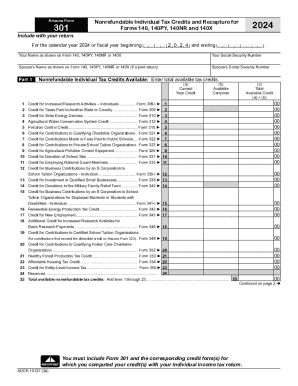
The Arizona Form 301 Nonrefundable Individual Tax Credits 2023 is a state tax form used by individuals to claim nonrefundable tax credits for the 2023 tax year.
pdfFiller scores top ratings on review platforms




Who needs AZ DoR Form 301?
Explore how professionals across industries use pdfFiller.

AZ DoR Form 301 is needed by:
-
Arizona residents seeking to claim tax credits
-
Individuals who contributed to charitable organizations
-
Taxpayers who paid taxes to other states
-
Filers using solar energy devices
-
Applicants for credits related to research activities
-
Joint filers needing to report combined tax credits
Comprehensive Guide to AZ DoR Form 301
What is Arizona Form 301 Nonrefundable Individual Tax Credits 2023?
Arizona Form 301 is designed for individuals to claim nonrefundable tax credits for the 2023 tax year. This essential tax form allows taxpayers to take advantage of various credits, including those related to research activities and solar energy devices. By leveraging Form 301, individuals can accurately report these credits, which directly contribute to their overall tax calculations.
Purpose and Benefits of Arizona Form 301 Nonrefundable Individual Tax Credits 2023
The significance of tax credits extends beyond mere financial relief; they play a vital role in reducing the tax burden for Arizona taxpayers. Utilizing Arizona Form 301 can provide substantial financial benefits, lowering the total tax liability. Understanding the impact of nonrefundable tax credits can lead to more favorable tax outcomes for eligible individuals.
Who Needs Arizona Form 301 Nonrefundable Individual Tax Credits 2023?
This form is essential for individual taxpayers in Arizona who seek to claim specific tax credits. Common scenarios where Form 301 is required include taxpayers earning credits for qualified research activities or solar device installations. Special situations, such as filing joint returns, may also necessitate using this form to ensure all eligible credits are claimed.
Eligibility Criteria for Arizona Form 301 Nonrefundable Individual Tax Credits 2023
To qualify for the tax credits available on Form 301, taxpayers must meet specific eligibility criteria. These may include:
-
Income limits dependent on the type of credit claimed
-
Residency requirements, confirming the taxpayer's status as an Arizona resident
-
Documentation proving eligibility for the credits claimed
How to Fill Out Arizona Form 301 Nonrefundable Individual Tax Credits 2023 Online
Completing Arizona Form 301 online is straightforward when following these steps:
-
Access a suitable online platform.
-
Enter your full name and Social Security number as specified in the required fields.
-
Fill in credit details relevant to your claims.
-
Review your entries for accuracy before submission.
Gathering all necessary information before beginning the process can help streamline filling out the form.
Important Documents and Information Needed When Filing Arizona Form 301
When preparing to file Arizona Form 301, it is critical to have the following supporting materials ready:
-
Income statements from the current tax year
-
Previous year tax documents for reference
-
Any additional documentation supporting the claimed credits
Ensuring accurate information is available can help avoid unnecessary delays during processing.
Submission Methods and Deadlines for Arizona Form 301 Nonrefundable Individual Tax Credits 2023
Taxpayers can submit Arizona Form 301 through various methods, including online platforms and postal services. Deadlines for submission are essential to avoid penalties, so it is recommended to track important dates. After submission, taxpayers can confirm their filing and monitor its status regularly.
What Happens After Submitting Arizona Form 301 Nonrefundable Individual Tax Credits 2023?
Post-submission, the tax assessment process begins, with outcomes that can include approval, rejection, or requests for additional information. If issues arise, correcting or amending Form 301 is possible to ensure claims are accurately represented.
Security and Compliance When Using Arizona Form 301 Nonrefundable Individual Tax Credits 2023
Protecting sensitive information is crucial when filing tax forms online. pdfFiller employs robust security measures, such as encryption and compliance with privacy laws, to safeguard user data. Users should be vigilant in handling their documents securely to maintain compliance and security standards.
Experience the Ease of Filling Arizona Form 301 with pdfFiller
pdfFiller simplifies the process of completing Arizona Form 301 with user-friendly features like fillable forms and eSigning capabilities. These tools enhance the overall experience, allowing individuals to manage their tax documents efficiently. Embrace the ease of filling out tax forms with pdfFiller today.
How to fill out the AZ DoR Form 301
-
1.To begin, access pdfFiller and search for 'Arizona Form 301 2023' in the templates section.
-
2.Open the form by clicking on it from the search results, which will load the fillable version.
-
3.Familiarize yourself with the PDF interface and locate the fields labeled clearly for input.
-
4.Gather your personal information, including your full name, social security number, and details about the credits you wish to claim before starting.
-
5.Fill in the required fields, including your name as it appears on your Form 140 and spouse's name if you are filing jointly.
-
6.Input necessary information about the different credits you qualify for, including amounts and types of credits.
-
7.Once you’ve completed all fields, review the filled-in form carefully to ensure accuracy and completeness.
-
8.Utilize the 'Review' feature in pdfFiller for any prompts regarding missing information or errors.
-
9.After confirming all details are correct, save your work and select the option to download the completed form.
-
10.Finally, print the form if you plan to mail it, or follow pdfFiller's instructions to submit it electronically, if available.

Who is eligible to use Arizona Form 301?
Arizona Form 301 is suitable for individuals residing in Arizona who want to claim nonrefundable tax credits related to their state tax return.
What is the deadline for submitting Arizona Form 301?
The deadline for submitting Arizona Form 301 coincides with the state tax return deadline, which is generally April 15 for most taxpayers. Check Arizona Department of Revenue for exact dates.
How can I submit Arizona Form 301?
You can submit Arizona Form 301 by including it with your state income tax return, either by mailing a printed copy to the state or using electronic filing methods through approved platforms like pdfFiller.
What supporting documents are required with the form?
While specific documentation is not outlined, generally you should have proof of the credits claimed, such as receipts or statements from charitable organizations or tax documents from other states.
What common mistakes should I avoid when filling out this form?
Common mistakes include providing incorrect personal information, failing to include credit details, and neglecting to sign and date the form before submission. Always double-check your entries.
How long does it take to process Arizona Form 301?
Processing times for Arizona Form 301 may vary, but typically, you can expect the processing of tax returns to take several weeks. Check the Arizona Department of Revenue website for current estimates.
Where can I find assistance if I have questions regarding the form?
If you have questions about Arizona Form 301, you can contact the Arizona Department of Revenue or consult tax professionals who are familiar with Arizona state tax credits.
AZ DoR Form 301 Form Versions
Related Forms




Get the latest insights from our blog


If you believe that this page should be taken down, please follow our DMCA take down process
here
.
This form may include fields for payment information. Data entered in these fields is not covered by PCI DSS compliance.