
Last updated on
Nov 7, 2026

NC DoR NC-4 2023 free printable template
pdfFiller is not affiliated with any government organization

Fill out
Complete the form online in a simple drag-and-drop editor.

eSign
Add your legally binding signature or send the form for signing.

Share
Share the form via a link, letting anyone fill it out from any device.

Export
Download, print, email, or move the form to your cloud storage.
Why pdfFiller is the best tool for your documents and forms


End-to-end document management
From editing and signing to collaboration and tracking, pdfFiller has everything you need to get your documents done quickly and efficiently.
Accessible from anywhere
pdfFiller is fully cloud-based. This means you can edit, sign, and share documents from anywhere using your computer, smartphone, or tablet.
Secure and compliant
pdfFiller lets you securely manage documents following global laws like ESIGN, CCPA, and GDPR. It's also HIPAA and SOC 2 compliant.
What is NC DoR NC-4
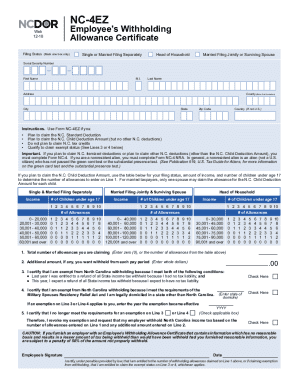
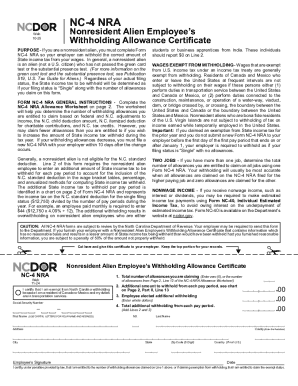
The North Carolina Employee’s Withholding Allowance Certificate is a tax document used by employees to determine state income tax withholding from their paychecks.
pdfFiller scores top ratings on review platforms




Great
I haven't completely used it yet but I am exploring now and I can use it in my everyday work experience.
Im totally satisfied with the…
Im totally satisfied with the application and the features provided.
great experience
great experience. Service is easy to use and very convenient. Customer service is extremely responsive, knowledgeable. Excellent service!
really great program
this was a very user friendly interface, no guessing what different tools do or where anything is located everything is organized and very simple but at the same im there is a lot of useful and needed options for editing the pdf, even a way to convert to other document styles and save...can share or and docs as attachment to contacts that you choose, and h\they have the option to edit and add to the doc as well. im also getting a totally free no gimmicks snags or hidden charges or fees and i mean legit its really free for real! highly recommend!!!
really simple to use
Very easy to use
Who needs NC DoR NC-4?
Explore how professionals across industries use pdfFiller.

NC DoR NC-4 is needed by:
-
Individuals employed in North Carolina needing to manage their state tax withholdings
-
New employees who must report their withholding allowances to their employer
-
Employers in North Carolina responsible for accurate payroll deductions
-
Tax consultants assisting clients with withholding allowances
-
HR professionals managing employee tax documentation
Comprehensive Guide to NC DoR NC-4
What is the North Carolina Employee’s Withholding Allowance Certificate?
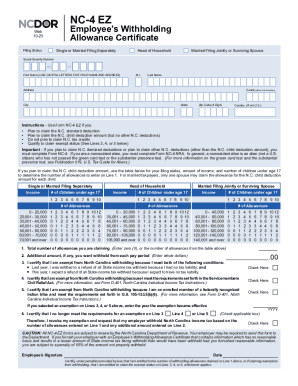
The NC-4 form is the North Carolina withholding form that employees utilize to specify their state income tax withholding. This employee withholding allowance certificate serves a crucial role in determining how much state income tax will be deducted from an employee's paycheck. Primarily, it helps North Carolina employees manage their tax obligations effectively, ensuring that they are withholding the correct amount for state income tax.
Purpose and Benefits of the North Carolina Employee’s Withholding Allowance Certificate
Understanding and using the NC-4 tax form is essential for employees in North Carolina. The form offers several benefits:
-
Ensures accurate tax withholding based on individual circumstances.
-
Helps employees potentially receive tax refunds by over-withholding.
-
Avoids issues related to under-withholding, which can lead to penalties.
Overall, utilizing this form contributes to a more favorable tax situation for individuals.
Key Features of the NC-4 Form
The NC-4 form includes key elements designed to facilitate accurate tax calculations. Some notable features are:
-
Sections for entering allowances, which influence the tax withheld.
-
Fillable fields that guide users step-by-step through the form.
-
Worksheets included for determining appropriate allowances based on personal financial conditions.
This structure helps ensure that employees accurately file their taxes.
Who Needs the NC-4 Form?
The primary audience for the NC-4 form includes employees working in North Carolina. These employees are obligated to complete this form to meet their tax responsibilities. However, certain exclusions may apply, such as employees working for state agencies or independent contractors. It’s vital for North Carolina employees to understand their standing regarding tax withholding to avoid complications.
How to Fill Out the North Carolina Employee’s Withholding Allowance Certificate Online
Filling out the NC-4 form online can be straightforward by following these steps:
-
Access the online NC-4 form through a reliable PDF service.
-
Carefully enter your Social Security Number.
-
Complete the fields regarding your filing status and allowances.
-
Review entered information for accuracy.
-
Submit the form once all sections are complete.
Be aware of common errors, such as miscalculating allowances and providing incorrect personal information. Double-checking entries can save you from potential issues.
How to Submit the NC-4 Form
Submitting your NC-4 form can be done through several methods. Employees typically submit the form directly to their employers, which ensures that withholdings begin promptly. Timely submission is crucial; deadlines for tax withholding adjustments must be adhered to strictly. Delayed submissions can lead to undesirable consequences, including tax penalties.
Required Documents and Information for Completing the NC-4 Form
Gathering the necessary documents and information before completing the NC-4 form streamlines the process. Essential items to collect include:
-
Your Social Security Number.
-
Details regarding your filing status.
-
Information on any dependents or allowances claimed on your taxes.
Accurate reporting of allowances is significant, as it directly affects the amount of tax withheld from your earnings.
Security and Compliance Considerations for the NC-4 Form
Data security is paramount when handling tax forms like the NC-4 form. Employing a platform with strong security measures, such as 256-bit encryption, protects sensitive information. Additionally, ensuring compliance with regulations like HIPAA and GDPR is vital. When submitting your forms, always use secure methods to manage and transmit your information safely.
How pdfFiller Can Help With Your NC-4 Form Submission
pdfFiller enhances the experience of filling out and submitting your NC-4 form. The platform offers features like:
-
Easy editing and filling capabilities.
-
eSignature functionality for a seamless signing process.
-
Secure document management to keep your information safe.
By utilizing pdfFiller, you can simplify your form completion while maintaining the security of your personal information.
Getting Started with Your NC-4 Form on pdfFiller
To begin filling out the NC-4 form on pdfFiller, follow these directions:
-
Create an account or log into your existing pdfFiller profile.
-
Access the NC-4 template available in the template library.
-
Start filling out the form with necessary information.
-
Utilize resources provided by pdfFiller for guidance.
Using a cloud-based service like pdfFiller for form management enhances flexibility and ease of use while ensuring access to your documents anytime, anywhere.
How to fill out the NC DoR NC-4
-
1.Access the NC-4 form by navigating to pdfFiller's main page and searching for 'North Carolina Employee’s Withholding Allowance Certificate'.
-
2.Click on the form to open it in pdfFiller's editing interface, allowing for easy navigation.
-
3.Gather necessary information beforehand, including your Social Security Number, filing status, and details on allowances you may claim.
-
4.Start filling out the fields by entering your Social Security Number and selecting your filing status from the dropdown menu.
-
5.Refer to the NC-4 worksheet included on the form to determine the correct number of allowances based on your financial situation.
-
6.Complete all relevant fields, ensuring that the information is accurate and matches your financial records.
-
7.After filling in the form, review all entries for completeness and accuracy to avoid common mistakes like incorrect Social Security Numbers.
-
8.Finalize your submission by following the prompts to save your completed NC-4 form.
-
9.You can download the filled form, email it directly from pdfFiller, or print it for your records, then submit it to your employer.

Who is eligible to fill out the NC-4 form?
Anyone employed in North Carolina is eligible to complete the NC-4 form, especially new employees or those who need to adjust their withholding allowances.
What is the deadline for submitting the NC-4 form?
The NC-4 form should be submitted to your employer when you start new employment or when you change your withholding allowances. Make sure to provide it before your first paycheck.
How do I submit the completed NC-4 form?
You can submit the completed NC-4 form to your employer directly, either in person, via email, or as a printed document.
What supporting documents do I need when completing the NC-4?
You will need your Social Security Number, knowledge of your filing status, and information regarding any allowances you wish to claim.
Are there common mistakes to avoid when filling out the NC-4 form?
Yes, common mistakes include misreporting your Social Security Number, incorrect filing status, and failing to check calculations on allowances.
How long does it take to process the NC-4 form?
Processing of the NC-4 form is typically immediate when submitted to your employer, as it affects your upcoming paychecks.
What should I do if I need to change my allowances after submitting the NC-4?
If you need to change your allowances, simply complete a new NC-4 form and submit it to your employer as soon as possible.
NC DoR NC-4 Form Versions
Related Content
Related Forms




Get the latest insights from our blog


If you believe that this page should be taken down, please follow our DMCA take down process
here
.
This form may include fields for payment information. Data entered in these fields is not covered by PCI DSS compliance.