
Last updated on
Oct 19, 2026

PA Penn National Insurance Form 70-3350 2013-2026 free printable template
pdfFiller is not affiliated with any government organization

Fill out
Complete the form online in a simple drag-and-drop editor.

eSign
Add your legally binding signature or send the form for signing.

Share
Share the form via a link, letting anyone fill it out from any device.

Export
Download, print, email, or move the form to your cloud storage.
Why pdfFiller is the best tool for your documents and forms


End-to-end document management
From editing and signing to collaboration and tracking, pdfFiller has everything you need to get your documents done quickly and efficiently.
Accessible from anywhere
pdfFiller is fully cloud-based. This means you can edit, sign, and share documents from anywhere using your computer, smartphone, or tablet.
Secure and compliant
pdfFiller lets you securely manage documents following global laws like ESIGN, CCPA, and GDPR. It's also HIPAA and SOC 2 compliant.
What is PA Penn National Insurance Form 70-3350
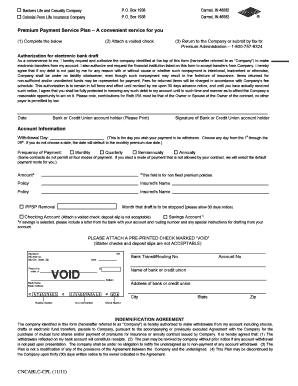
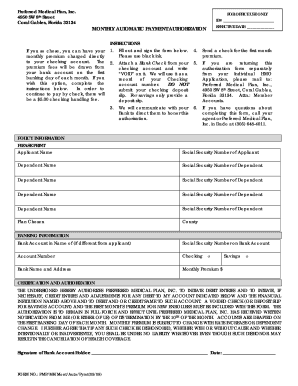
The Recurring Payments Authorization Form is a financial document used by policyholders of Penn National Insurance to authorize automatic debit payments for insurance premiums from their bank accounts.
pdfFiller scores top ratings on review platforms




Who needs PA Penn National Insurance Form 70-3350?
Explore how professionals across industries use pdfFiller.

PA Penn National Insurance Form 70-3350 is needed by:
-
Insurance policyholders of Penn National Insurance
-
Business owners using Penn National Insurance services
-
Individuals setting up automatic payments for insurance premiums
-
Financial advisors assisting clients with payment setups
-
Accountants managing client insurance payment authorizations
Comprehensive Guide to PA Penn National Insurance Form 70-3350
What is the Recurring Payments Authorization Form (Form 70-3350)?
The Recurring Payments Authorization Form, also known as Form 70-3350, is essential for policyholders of Penn National Insurance. This form facilitates automatic debit payments for insurance premiums directly from the policyholder's bank account. By authorizing automatic payments, policyholders can ensure timely premium payments, which helps maintain continuous coverage. Keywords relevant to this form include recurring payments authorization form, insurance payment form, and Pennsylvania insurance form.
Purpose and Benefits of the Recurring Payments Authorization Form
This form streamlines the payment process for insurance premiums, reducing the risk of late fees. By automating payments, policyholders can avoid missed deadlines and enjoy peace of mind regarding their insurance coverage. The key benefits of the Recurring Payments Authorization Form include:
-
Automatic payment authorization for hassle-free premium payments
-
Elimination of late fees, enhancing financial management
-
Convenience for both personal and commercial insurance lines
Key Components of the Recurring Payments Authorization Form
The form contains several essential fields that policyholders must complete, including:
-
Policyholder name
-
Address
-
Bank account details
Additionally, submitting a voided check with the form is crucial as it verifies the bank account information needed for ACH payment authorization. This ensures accurate transactions for premium payments and strengthens security.
Who Needs to Complete the Recurring Payments Authorization Form?
All policyholders of Penn National Insurance, including individuals and businesses, must complete this form to set up automatic payments. Eligibility criteria encompass both personal and commercial lines policies, ensuring that all policyholders can benefit from the convenience of automated payment processing. Understanding your status as a policyholder is essential for effective completion of the form.
How to Fill Out the Recurring Payments Authorization Form Online (Step-by-Step)
Filling out the Recurring Payments Authorization Form online is straightforward when following these steps:
-
Access the form through a reliable platform.
-
Enter your policyholder information accurately, including your name and address.
-
Provide your bank account details, ensuring that all digits are correct.
-
Attach a voided check as required.
-
Review the form for any errors before submission.
-
Sign the form to authorize the payment.
Make sure to check each field for 100% accuracy to facilitate rapid processing.
Common Errors When Filling Out the Recurring Payments Authorization Form
Many users encounter pitfalls while completing the form. Some frequent mistakes include:
-
Incorrect bank account numbers
-
Failing to include a voided check
-
Leaving required fields blank
To avoid these errors, review each section carefully and confirm that all information provided is complete and accurate. This diligence will help ensure smooth processing of the authorization.
How to Submit the Recurring Payments Authorization Form
There are several methods available for submitting the Recurring Payments Authorization Form:
-
Online submission through a secure portal
-
Mailing the completed form to the appropriate Penn National Insurance address
Post-submission, you may receive confirmation or tracking information to verify that your form has been processed efficiently.
Security and Compliance When Using the Recurring Payments Authorization Form
The handling of Form 70-3350 comes with stringent security measures. Safeguarding personal and financial information is paramount when submitting sensitive documents online. Maintaining data protection compliance, such as HIPAA and GDPR, ensures that your information is secure throughout the processing stage, thereby enhancing user trust.
Examples of a Completed Recurring Payments Authorization Form
Reviewing completed forms can provide valuable insights into proper submissions. Visual references demonstrate:
-
The correct filling of policyholder details
-
How a voided check should be attached
These examples clarify what to aim for when completing your form to ensure compliance with requirements.
Make Filling Out the Recurring Payments Authorization Form Easy with pdfFiller
Utilizing pdfFiller simplifies the process of filling out and submitting the Recurring Payments Authorization Form. With pdfFiller, users benefit from:
-
Editing and eSignature capabilities for accuracy
-
User-friendly features that streamline the filling process
These advantages enhance the experience of policyholders by providing a secure method to authorize automatic payment processing.
How to fill out the PA Penn National Insurance Form 70-3350
-
1.Access the Recurring Payments Authorization Form on pdfFiller by searching for 'Recurring Payments Authorization Form' in the search bar or navigating to the forms section.
-
2.Once opened, familiarize yourself with the fillable fields. You will see sections such as 'Policyholder Name:', 'Address:', and 'Bank Account Number:'.
-
3.Gather the necessary information before starting. This includes your policy details, bank account information, and a voided check.
-
4.Begin filling in each field systematically. Click on the 'Policyholder Name' field and enter your full name as the policyholder.
-
5.Continue with the 'Address' field, filling out your current address accurately as it appears on your insurance documents.
-
6.Fill in the 'Bank Account Number' and 'Routing Number' fields with your banking details, ensuring they match what is on your voided check.
-
7.Once all fields are completed, carefully review your entries for accuracy. Check that the information matches your insurance policy and bank documents.
-
8.Sign the form in the designated area labeled 'Signature of person authorizing this withdrawal'. Use pdfFiller's signature tool if needed.
-
9.After reviewing, save your filled form by clicking 'Save' or 'Download' to have a copy for your records.
-
10.Submit the form as instructed, either by uploading it to the designated portal or emailing it to your insurer along with the voided check.

Who needs to complete the Recurring Payments Authorization Form?
The Recurring Payments Authorization Form needs to be completed by policyholders of Penn National Insurance who wish to set up automatic debit payments for their insurance premiums from their bank accounts.
What documents do I need to submit with this form?
You must submit a voided check alongside the Recurring Payments Authorization Form to provide your bank details. Ensure your bank account number and routing number are correct.
Are there any deadlines for submitting this form?
There is generally no strict deadline for submitting the Recurring Payments Authorization Form; however, it's best to submit it well before your next premium payment due date to avoid any lapses in coverage.
How do I submit the Recurring Payments Authorization Form once completed?
You can submit the form electronically via the insurance portal or email it to your insurer at the address specified in their instructions. Make sure to include any required supporting documents.
What are the common mistakes to avoid while filling out this form?
Common mistakes include incorrect bank account numbers, missing signature, and not including a voided check. Double-check all entries before finalizing your submission.
How long does it take for the form to be processed?
Processing times can vary, but typically it may take a few business days for the form to be processed by Penn National Insurance after submission. Check with their customer service for specifics.
Can I revoke my authorization after submitting the form?
Yes, you can revoke your authorization for recurring payments at any time. Contact Penn National Insurance to request the necessary forms or procedures for revocation.
PA Penn National Insurance Form 70-3350 Form Versions
Related Content
Related Forms




Get the latest insights from our blog


If you believe that this page should be taken down, please follow our DMCA take down process
here
.
This form may include fields for payment information. Data entered in these fields is not covered by PCI DSS compliance.