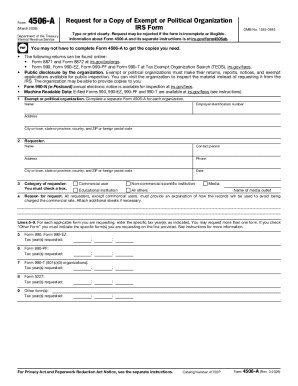
Form preview

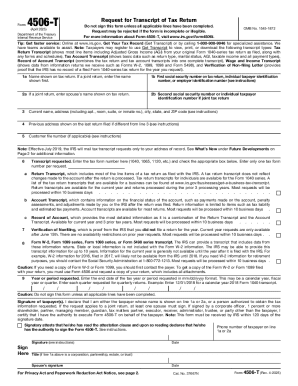
IRS 4506 2024 free printable template


Get Form
pdfFiller is not affiliated with IRS
Screenshot
Screenshot
Screenshot

Get, Create, Make, and Sign IRS 4506

Edit your IRS 4506 online
Type text, complete fillable fields, insert images, highlight or blackout data for discretion, add comments, and more.
Screenshot
Add your legally-binding signature
Draw or type your signature, upload a signature image, or capture it with your digital camera.
Screenshot
Share your form instantly
Email, fax, or share your IRS 4506 via URL. You can also download, print, or export forms to your preferred cloud storage service.
Screenshot

Instructions and Help about IRS 4506

How to edit IRS 4506

To edit IRS Form 4506, you can use pdfFiller's tools for efficient form editing. Begin by uploading the form to the platform, where you can make necessary changes to any fields. Ensure that the edits comply with IRS requirements to maintain the validity of your submission.

How to fill out IRS 4506

Filling out IRS Form 4506 requires accurate information about your identity and tax records. Start by entering your name, Social Security number, and any applicable tax identification numbers. Continue by providing details for the tax year in question and the type of records you are requesting. Use pdfFiller to simplify the completion process, ensuring fields are filled correctly to prevent errors.

Latest updates to IRS 4506

The most recent updates to IRS Form 4506 include changes in the verification process for electronically filed tax returns and adjustments to submission methods that accommodate changes in postal services. Always ensure you're using the latest version available on the IRS website.

About IRS 4 previous version

What is IRS 4506?

IRS Form 4506, also known as the Request for Copy of Tax Form, allows taxpayers to request a copy of their tax return from the IRS. This form is useful for individuals and businesses needing historical tax documents for loans, financial aid, or estate purposes.

Who needs the form?

IRS Form 4506 is typically needed by individuals applying for loans, grants, or any financial assistance that requires proof of income. Additionally, tax professionals may use this form to assist clients who need copies of their returns. Also, anyone undergoing an audit may find it necessary to provide copies of their tax filings.

Components of the form

IRS Form 4506 includes several key components that need to be completed correctly. These components consist of personal identification information, the type of tax return requested, the tax years in question, and your signature. Accurate completion of these components ensures that the IRS can process your request efficiently.

What information do you need when you file the form?

When filing IRS Form 4506, you need to provide accurate personal identification, including your name, Social Security number, and address. You may also need to specify the type of return you are requesting, the tax years needed, and your signature to certify the request. This information is critical for the IRS to locate your records efficiently.

Where do I send the form?

After completing IRS Form 4506, you should send it to the appropriate IRS processing center based on your location. The submission address is listed in the instructions provided with the form. Ensure that you mail the form to the correct location to avoid processing delays.

What is the purpose of this form?

The purpose of IRS Form 4506 is to retrieve copies of your previously filed tax returns. Taxpayers may need these documents for various reasons, including verification of income or loss, completing an application for a mortgage, or in cases of audits. Accessing past returns can provide clarity and support for decisions regarding finances or compliance.

When am I exempt from filling out this form?

You are exempt from using IRS Form 4506 if you do not need a copy of your tax return for verification, such as when using a tax transcript that provides sufficient information for lenders. Additionally, if your request can be fulfilled using IRS Form 4506-T, which is a request for a tax return transcript, you may not need this form.

What are the penalties for not issuing the form?

Failure to issue IRS Form 4506 when required may lead to complications like delayed loan approvals or financial assistance. Additionally, inaccuracies in the submission could result in penalties from the IRS or prolonged audits. It's essential to understand the implications of not submitting this form when necessary.

Is the form accompanied by other forms?

IRS Form 4506 does not usually need to be submitted with other forms; however, applicants may include IRS Form 4506-T if they prefer to receive a tax transcript rather than a full copy of their tax return. It is advisable to review requirements based on your specific situation.

FAQ about IRS 4506

If you've made a mistake on your IRS 4506 form, you can submit a corrected version. Make sure to clearly indicate that it is an amended submission, and include any necessary corrections. Retaining a copy of both the original and corrected forms is crucial for your records.

To check the status of your IRS 4506, you can contact the IRS directly or use their online tools. It’s essential to have your submission details ready, as this will help in tracking the processing of your request effectively.

Common errors include incorrect social security numbers, missing signatures, and failing to match the name exactly as it appears on tax documents. Double-checking all information before final submission can help avoid delays or rejections.

Yes, an authorized representative can file the IRS 4506 for you, provided they have the proper power of attorney documentation. Make sure that your representative understands the specifics of your tax situation to ensure accurate filing.

If your IRS 4506 is rejected when e-filing, review the rejection code provided, as it usually indicates the specific issue. Correct the error and resubmit your form promptly, ensuring all information is accurate to avoid further rejections.

See what our users say

Read user feedback and try pdfFiller to explore all its benefits for yourself
So far, I'm just using the service to fill out miscellaneous forms for my Veterans Administration file and consolidating outlines for submittal as well. So far, so good with very little issues.
Michael M
It is helpful
Ume K
NICE
Raul M
EXCELLENT
RAHUL K
good
Anonymous Customer
Exceptional Service Customer service is just exceptional. They listen and assist in their best way possible.
Marcel Occon
See what our users say
Trust Seal
Trust Seal
Trust Seal
Trust Seal
Trust Seal
Trust Seal
Trust Seal
Trust Seal
Rate free form
4.4
satisfied
52 votes

How to Fill Out Small Business Tax Forms Online with pdfFiller

Struggling with your Schedule C or not sure how to file business taxes as a sole proprietor, LLC, or self-employed professional? This step-by-step pdfFiller tutorial walks you through completing IRS Schedule C quickly and accurately — no printing, no scanning, no stress. Whether you're handling small business tax deductions, tracking self-employed taxes, or preparing your full business tax return, pdfFiller makes it simple right in your browser.

Related Forms

If you believe that this page should be taken down, please follow our DMCA take down process here .
This form may include fields for payment information. Data entered in these fields is not covered by PCI DSS compliance.