
Last updated on
Nov 16, 2026
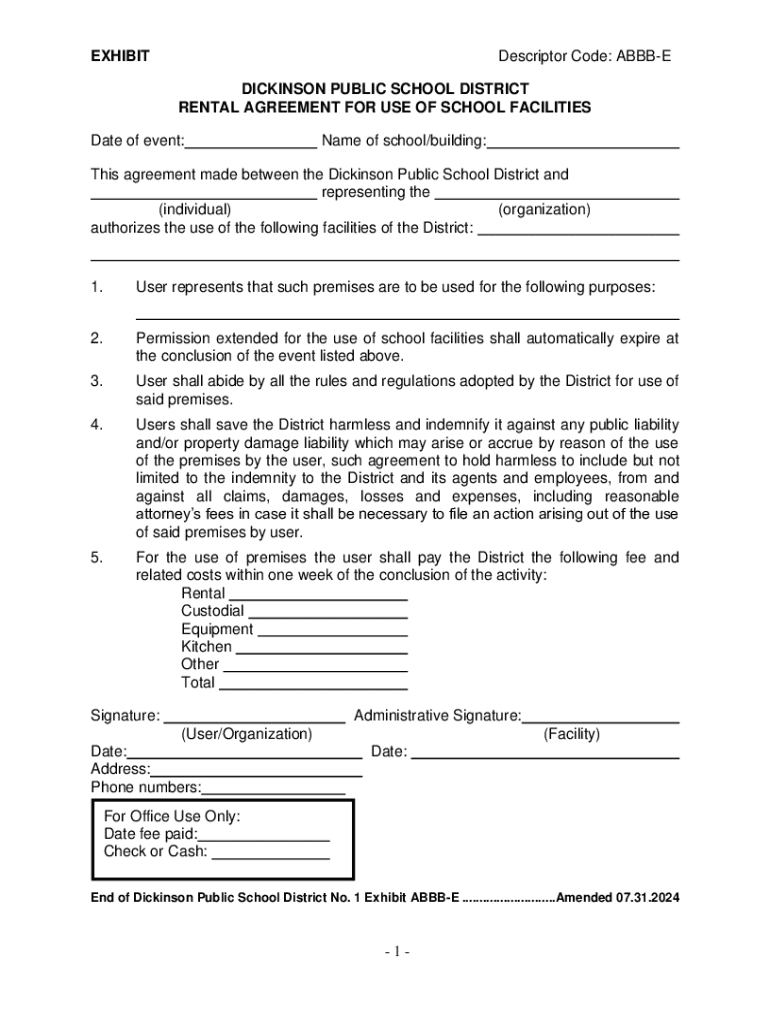
ND Dickinson Public School District Rental Agreement for Use of School Facilities 2024-2026 free...
pdfFiller is not affiliated with any government organization

Fill out
Complete the form online in a simple drag-and-drop editor.

eSign
Add your legally binding signature or send the form for signing.

Share
Share the form via a link, letting anyone fill it out from any device.

Export
Download, print, email, or move the form to your cloud storage.
Why pdfFiller is the best tool for your documents and forms


End-to-end document management
From editing and signing to collaboration and tracking, pdfFiller has everything you need to get your documents done quickly and efficiently.
Accessible from anywhere
pdfFiller is fully cloud-based. This means you can edit, sign, and share documents from anywhere using your computer, smartphone, or tablet.
Secure and compliant
pdfFiller lets you securely manage documents following global laws like ESIGN, CCPA, and GDPR. It's also HIPAA and SOC 2 compliant.
What is ND Dickinson Public School District Rental Agreement for Use of School Facilities
The Dickinson Public School District Rental Agreement is a formal document used by individuals or organizations to authorize the use of school facilities for events.
pdfFiller scores top ratings on review platforms




Who needs ND Dickinson Public School District Rental Agreement for Use of School Facilities?
Explore how professionals across industries use pdfFiller.

ND Dickinson Public School District Rental Agreement for Use of School Facilities is needed by:
-
Local event organizers needing venue space
-
Parents arranging school events for children
-
Non-profit organizations holding community activities
-
Businesses planning workshops or meetings
-
School staff coordinating extracurricular activities
-
Sports teams reserving facilities for practice
Comprehensive Guide to ND Dickinson Public School District Rental Agreement for Use of School Facilities
What is the Dickinson Public School District Rental Agreement?
The Dickinson Public School District Rental Agreement serves as the official document authorizing the use of school facilities for events organized by individuals or organizations. Created by the district administration, this agreement holds significant value as it establishes the terms and conditions necessary for the proper utilization of educational spaces. This school facility rental form ensures that events align with the district's policies and community standards.
Purpose and Benefits of the Dickinson Public School District Rental Agreement
This rental agreement provides several key benefits for both individuals and organizations hosting events. Firstly, it streamlines the process of booking school facilities, making it easier to secure space for various activities. Additionally, the agreement ensures compliance with school district rules, effectively protecting both the event organizers and the school district from potential liabilities. Establishing a clear and legally binding framework, the school event rental agreement helps in maintaining order and accountability during the use of school property.
Key Features of the Dickinson Public School District Rental Agreement
The Dickinson Public School District Rental Agreement contains essential elements that users must complete. Key features include fields for the event name, date, location, and specific requirements that the applicant must meet. Furthermore, both the user or organization and an administrative representative are required to provide signatures, validating the agreement. This facility use agreement template outlines the expectations and responsibilities of all parties involved, ensuring smooth operations.
Who Should Complete the Dickinson Public School District Rental Agreement?
This agreement is designed for a diverse audience, including individuals, community groups, and organizations wishing to utilize school facilities for various purposes. Eligible events typically include educational programs, community gatherings, and recreational activities. To qualify, applicants should ensure they meet the necessary criteria outlined by the school district, promoting responsible use of its resources.
How to Complete the Dickinson Public School District Rental Agreement Online (Step-by-Step)
Completing the Dickinson Public School District Rental Agreement online involves several straightforward steps:
-
Gather necessary information, including the event date, facility details, and nature of the event.
-
Access the online form through the designated platform, ensuring all required fields are visible.
-
Fill out the key sections accurately to avoid common errors, like incorrect dates or missing information.
-
Review the completed form for clarity and accuracy before proceeding to submission.
Signing and Validating the Dickinson Public School District Rental Agreement
Signing the rental agreement can be done in two ways: through digital signatures or traditional wet signatures. It's crucial to ensure that all necessary parties sign the document to validate its terms legally. Missing signatures can lead to complications in processing the agreement and might jeopardize the intended event if not addressed before the event date.
Submission Methods and Delivery for the Dickinson Public School District Rental Agreement
Users can submit the completed Dickinson Public School District Rental Agreement through various methods, including online submissions and in-person delivery at the school district office. Once submitted, applicants should seek confirmation of their submission and track the processing status to ensure the agreement is reviewed in a timely manner. These verification steps help maintain accountability throughout the rental process.
Common Errors and How to Avoid Them When Filing the Dickinson Public School District Rental Agreement
Applicants frequently make several common mistakes when filling out the rental agreement. To ensure an error-free submission, consider the following tips:
-
Double-check all dates and details for accuracy before submitting.
-
Confirm that all required signatures are obtained from relevant parties.
A validation checklist can also be beneficial to systematically review the form before submission, enhancing the likelihood of a seamless rental process.
How to Download and Save the Dickinson Public School District Rental Agreement PDF
To download and save the Dickinson Public School District Rental Agreement PDF, follow these steps: access the document from the official source, select the option to download, and choose the desired format for saving. Various platforms, such as pdfFiller, can facilitate this process, allowing users to manage their files efficiently.
Using pdfFiller to Complete Your Dickinson Public School District Rental Agreement
Utilizing pdfFiller presents numerous benefits for managing the rental agreement. This cloud-based platform allows users to edit, sign, and organize their documents easily. With robust security features—such as 256-bit encryption—pdfFiller ensures that sensitive information remains protected throughout the document handling process. Its user-friendly interface streamlines the process of managing the school facility rental form, making it an appealing choice for applicants.
How to fill out the ND Dickinson Public School District Rental Agreement for Use of School Facilities
-
1.To access the Dickinson Public School District Rental Agreement, visit the pdfFiller website and search for the form by its official name.
-
2.Once located, click on the form to open it in the pdfFiller editor. Make sure you have a pdfFiller account to proceed with the editing.
-
3.Before filling out the form, gather necessary details such as the name of the school building, date of the event, and the specific facilities you wish to rent.
-
4.Using pdfFiller’s interface, click on the designated fields to type in your information. For checkbox selections, simply click in the box to mark your choices.
-
5.Ensure you fill out all required sections accurately, including event details and the purpose of the facility usage. Pay attention to any special instructions provided.
-
6.After completing the form, review all entries for accuracy and completeness. Ensure that required signatures are included; both the user's and an administrative representative's signatures are necessary.
-
7.Once the form is finalized, save your changes to your pdfFiller account. You can download a copy for your records or directly submit it via email or online submission options available on pdfFiller.

Who is eligible to use the Dickinson Public School District Rental Agreement?
The form is designed for individuals, organizations, and businesses that wish to rent school facilities for various events. Make sure to comply with any specific eligibility guidelines from the school district.
What documents do I need to complete the rental agreement?
You may need to provide identification, event details, and any specific information related to your event's nature. It's also advisable to have proof of liability insurance if it’s required by the district.
When should I submit the rental agreement?
It’s best to submit your form as early as possible. Check with the school district for any specific deadlines and ensure you allow enough time for processing prior to your event date.
How do I submit the completed rental agreement?
After completing the agreement on pdfFiller, you can submit it directly through the platform or download it and send it via email or regular mail to the school district's administrative office.
What are common mistakes to avoid when filling out the form?
Ensure all required fields are completed, double-check the accuracy of event details, and verify that both signatures are present. Failing to follow these steps can delay the approval process.
What fees are associated with the use of school facilities?
Fees may vary depending on the facility type and usage duration. Check with the Dickinson Public School District for detailed fee structures related to rental agreements.
How long does it take to process the rental agreement?
Processing times can vary based on the school district's workload and the completeness of your application. Typically, it can take anywhere from a few days to a couple of weeks.
ND Dickinson Public School District Rental Agreement for Use of School Facilities Form Versions
Related Forms



Get the latest insights from our blog



If you believe that this page should be taken down, please follow our DMCA take down process
here
.
This form may include fields for payment information. Data entered in these fields is not covered by PCI DSS compliance.