
Last updated on
Oct 31, 2026
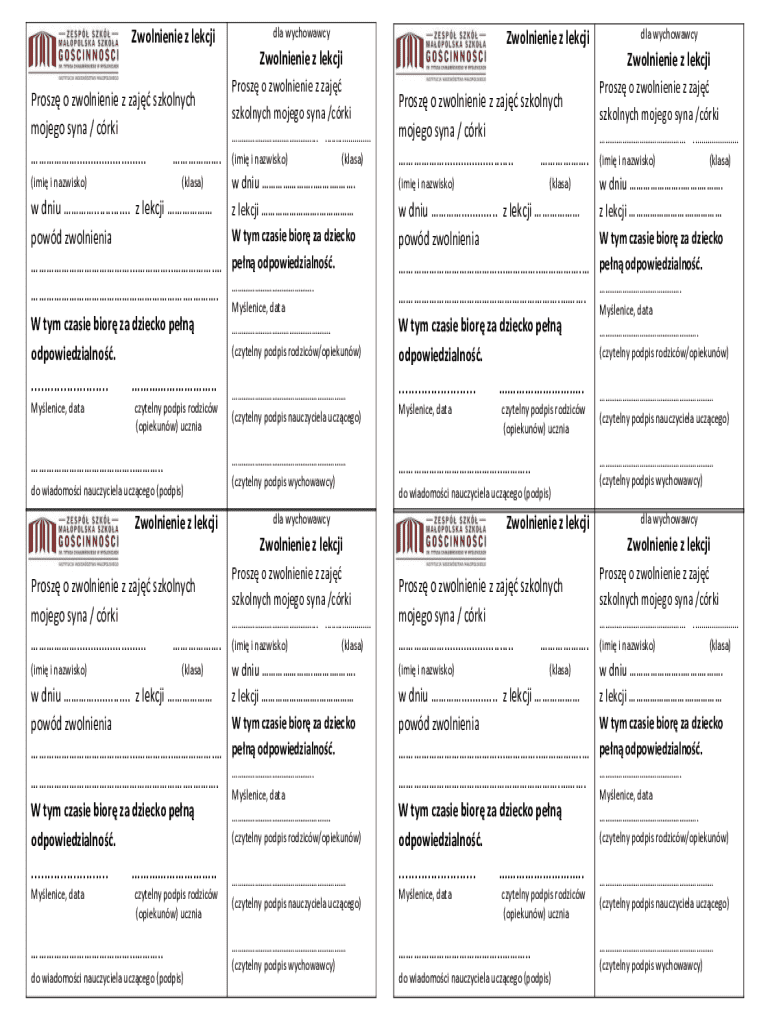
Get the free School Excuse Note for Guardian
We are not affiliated with any brand or entity on this form

Fill out
Complete the form online in a simple drag-and-drop editor.

eSign
Add your legally binding signature or send the form for signing.

Share
Share the form via a link, letting anyone fill it out from any device.

Export
Download, print, email, or move the form to your cloud storage.
Why pdfFiller is the best tool for your documents and forms


End-to-end document management
From editing and signing to collaboration and tracking, pdfFiller has everything you need to get your documents done quickly and efficiently.
Accessible from anywhere
pdfFiller is fully cloud-based. This means you can edit, sign, and share documents from anywhere using your computer, smartphone, or tablet.
Secure and compliant
pdfFiller lets you securely manage documents following global laws like ESIGN, CCPA, and GDPR. It's also HIPAA and SOC 2 compliant.
What is Excuse Note
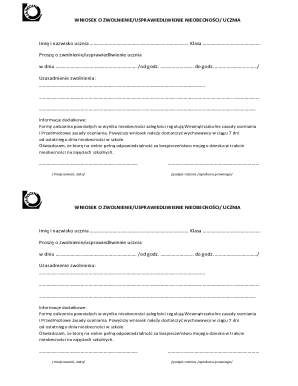
The School Excuse Note for Guardian is a form used by parents or guardians in Poland to request an official excuse for their child's absence from school classes.
pdfFiller scores top ratings on review platforms




Who needs Excuse Note?
Explore how professionals across industries use pdfFiller.

Excuse Note is needed by:
-
Parents and guardians seeking to excuse their child's absence
-
Teachers needing to verify absence requests
-
School administrators managing student attendance
-
Educational institutions requiring documentation for absences
-
Legal guardians responsible for the child's education
Comprehensive Guide to Excuse Note
What is the School Excuse Note for Guardian?
The School Excuse Note for Guardian is a formal document used by parents or guardians in Poland to request an excuse for their child's absence from school. This form serves as a vital means to document and communicate absences, ensuring that schools keep accurate records of student attendance. Utilizing this form not only fulfills a responsibility but also helps maintain a formal communication channel between guardians and educational institutions.
Purpose and Benefits of the School Excuse Note for Guardian
The primary purpose of the School Excuse Note for Guardian is to authorize a student's absence in a legal and formal way. This documentation demonstrates accountability from parents or guardians regarding their child's attendance. The benefits of using this form extend to students, parents, and schools alike, as it fosters clear communication and helps avoid misunderstandings about attendance records.
-
Legally validates the student's absence.
-
Strengthens the communication lines between parents and schools.
-
Provides clarity on absenteeism for future reference.
Who Needs the School Excuse Note for Guardian?
Parents and guardians of school-age children are the primary users of the School Excuse Note for Guardian. Schools and educational institutions also play a pivotal role as they are responsible for processing these absentee forms. This form is essential for anyone involved in managing student attendance and ensuring compliance with school policies.
How to Fill Out the School Excuse Note for Guardian Online (Step-by-Step)
Filling out the School Excuse Note for Guardian online is a straightforward process. Below are essential fields that need to be completed:
-
Child’s name
-
Class
-
Date of absence
-
Subject
To complete the form step-by-step, follow these instructions:
-
Access the online platform to the form.
-
Enter your child's information in the designated fields.
-
Provide the date of the absence and subjects affected.
-
Include the reason for the absence and ensure all information is accurate.
-
Sign the form electronically if required.
-
Submit the form through the online portal.
Common Errors and How to Avoid Them
When completing the School Excuse Note for Guardian, users often encounter several common errors. These may include missing signatures, entering incorrect dates, or failing to provide the required information. To ensure accuracy in the submission, consider the following tips:
-
Double-check all information before submission.
-
Ensure that all required signatures are included.
-
Verify the dates for correctness.
After Submission: What Happens Next?
After submitting the School Excuse Note for Guardian, you will typically receive confirmation of submission. Processing time can vary depending on the school’s policies. To keep track of your submission, you may have options available through the online platform to check the status of your excuse note.
Example of a Completed School Excuse Note for Guardian
A visual reference can be invaluable while completing the form. Below is an example of a completed School Excuse Note for Guardian:
-
Sample filled-out form depicting all necessary fields.
-
Annotations explaining the sections such as child’s name, class, reason for absence, and signatures.
Security and Compliance of Using the School Excuse Note for Guardian
When handling the School Excuse Note for Guardian, it is crucial to consider security. Using platforms like pdfFiller ensures that sensitive information is safeguarded with features such as 256-bit encryption and adherence to GDPR compliance. Protecting personal information is paramount, especially when dealing with school-related documentation.
Why Use pdfFiller for the School Excuse Note for Guardian?
Utilizing pdfFiller for the School Excuse Note for Guardian offers numerous benefits. This cloud-based platform provides features such as editing, electronic signing, and easy document sharing. The ability to manage forms efficiently enhances the user experience and simplifies the process of handling school-related documents.
Getting Started with Your School Excuse Note for Guardian
Ready to fill out the School Excuse Note for Guardian? You can quickly access the form through pdfFiller to get started. Using this platform will simplify your documentation process and ensure that all necessary details are captured accurately.
How to fill out the Excuse Note
-
1.To access the form, visit pdfFiller's website and use the search bar to locate 'School Excuse Note for Guardian'.
-
2.Once you find the form, click on it to open the fillable PDF in user-friendly pdfFiller interface.
-
3.Before completing the form, gather crucial information such as your child's full name, class, dates of absence, subjects affected, and the reason for absence.
-
4.Fill in the requested fields, entering your child's details and the specific dates for their absence, along with the relevant subject matter.
-
5.When reaching the section for signatures, ensure both you and the teacher can provide electronic signatures on the designated lines.
-
6.Double-check all inputted data for accuracy, making sure that the reason for absence and signature details match your intentions.
-
7.Once you're satisfied with the completed form, locate the 'Save' option to keep a copy for your records.
-
8.You can also choose to download the form as a PDF or submit it directly through pdfFiller by following the on-screen prompts that guide you through the submission process.

Who is eligible to fill out the School Excuse Note for Guardian?
The form is intended for parents or legal guardians of a child enrolled in school in Poland. Teachers may also need to fill it out for verification purposes.
Is there a deadline for submitting the excuse note?
While specific deadlines may vary by school, it's advisable to submit the excuse note as soon as possible after the child's absence to ensure proper documentation.
How should I submit the completed excuse note?
You can submit the completed form digitally through pdfFiller or print it and hand it in to your child's school. Check with the school for preferred submission methods.
Are supporting documents required with the excuse note?
Typically, you do not need to submit additional documents, but providing any relevant proof of absence may strengthen your request, especially for extended absences.
What should I avoid to ensure my excuse note is accepted?
Double-check for spelling mistakes in names and ensure all required fields are filled out completely. Missing signatures or unclear reasons can lead to rejection.
How long does processing take for the excuse note?
Processing time can vary, but schools usually respond within a few days. If you have specific concerns, contacting the school directly is recommended.
Do I need to notarize the excuse note?
No, the School Excuse Note for Guardian does not require notarization, but both signatures from the guardian and teacher are necessary.
Related Forms


Get the latest insights from our blog


If you believe that this page should be taken down, please follow our DMCA take down process
here
.
This form may include fields for payment information. Data entered in these fields is not covered by PCI DSS compliance.