
Last updated on
Oct 19, 2026

Get the free Cooling Log for Food Products
We are not affiliated with any brand or entity on this form

Fill out
Complete the form online in a simple drag-and-drop editor.

eSign
Add your legally binding signature or send the form for signing.

Share
Share the form via a link, letting anyone fill it out from any device.

Export
Download, print, email, or move the form to your cloud storage.
Why pdfFiller is the best tool for your documents and forms


End-to-end document management
From editing and signing to collaboration and tracking, pdfFiller has everything you need to get your documents done quickly and efficiently.
Accessible from anywhere
pdfFiller is fully cloud-based. This means you can edit, sign, and share documents from anywhere using your computer, smartphone, or tablet.
Secure and compliant
pdfFiller lets you securely manage documents following global laws like ESIGN, CCPA, and GDPR. It's also HIPAA and SOC 2 compliant.
What is Cooling Log
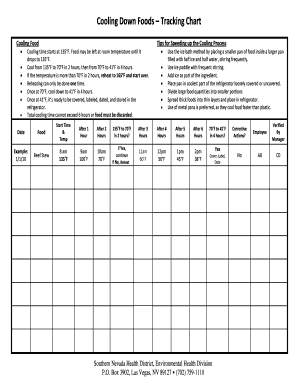
The Cooling Log for Food Products is a healthcare form used by food safety professionals to monitor and record the cooling process of potentially hazardous food, ensuring compliance with safety standards.
pdfFiller scores top ratings on review platforms




Who needs Cooling Log?
Explore how professionals across industries use pdfFiller.

Cooling Log is needed by:
-
Food safety inspectors
-
Restaurant managers
-
Catering services
-
Food product manufacturers
-
Health department personnel
-
HACCP compliance officers
Comprehensive Guide to Cooling Log
What is the Cooling Log for Food Products?
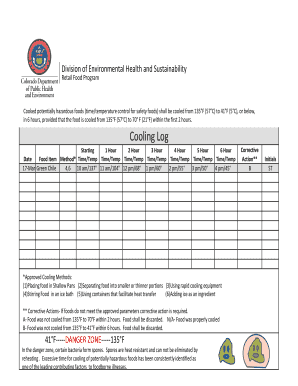
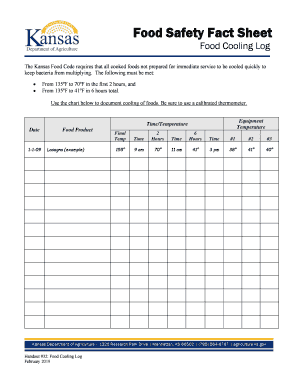
The Cooling Log for Food Products is a critical document designed to monitor the cooling processes of hazardous food items. Its main purpose is to ensure that food is cooled from 135°F to 41°F within a six-hour window, a crucial requirement for food safety. By effectively tracking temperature changes, the Cooling Log helps prevent foodborne illnesses by maintaining safe food temperatures. This log is particularly relevant for food service providers committed to adhering to food safety regulations.
Purpose and Benefits of Using a Cooling Log for Food Products
Employing a Cooling Log for Food Products is essential for food safety compliance. This log supports adherence to health regulations and standards, thereby fostering a safe food environment. Regular temperature monitoring promotes accountability by requiring signatures from responsible parties, ensuring that every step is documented and verifiable. Accurate record-keeping also mitigates risk factors associated with hazardous food items.
Key Features of the Cooling Log for Food Products
This form features several fillable fields, making it user-friendly while ensuring thorough documentation. Key fields include:
-
Facility Name
-
Food Product
-
Cooling Method
-
Time/Temp columns for precise tracking
Additionally, the form mandates a review and signature for validation, reinforcing accountability. Digital options facilitate easy filling out and management of the form, especially with capabilities provided by pdfFiller.
Who Needs the Cooling Log for Food Products?
The Cooling Log is vital for various food service establishments, including:
-
Restaurants
-
Caterers
-
Food safety professionals
Each of these stakeholders plays a crucial role in maintaining food safety compliance and is responsible for accurately completing the log to avoid any health violations.
How to Fill Out the Cooling Log for Food Products Online
Filling out the Cooling Log using pdfFiller is straightforward. Follow these steps:
-
Access the cooling log template on pdfFiller.
-
Enter information in the required fields, focusing on accurate time and temperature readings.
-
Review the entries for consistency and correctness.
-
Submit your log following the outlined submission guidelines.
Accurate records are crucial for compliance, so always double-check your entries before submission.
Common Errors and How to Avoid Them When Using the Cooling Log
Users often encounter errors when filling out the Cooling Log, such as:
-
Missing temperature readings
-
Incorrect time entries
To prevent these mistakes, always double-check entries for accuracy prior to submission. Adhering strictly to temperature requirements helps in avoiding food safety violations, ensuring compliance with health regulations.
How to Submit the Cooling Log for Food Products
Submitting the Cooling Log can be done through various methods, including:
-
Online submission via pdfFiller
-
Printing and mailing
-
Email submission
Each method has its advantages and disadvantages, so consider factors like fees and deadlines associated with each submission method. Understanding the tracking process for your submissions is also crucial once sent.
Security and Compliance When Managing the Cooling Log
When handling the Cooling Log, security is paramount. pdfFiller implements various security measures such as:
-
256-bit encryption
-
Compliance with HIPAA and GDPR requirements
It is essential to secure sensitive food safety records effectively while maintaining compliance with applicable standards. Clear guidelines on how to protect digital logs are necessary to safeguard user information and ensure compliance.
How pdfFiller Simplifies the Cooling Log Process
pdfFiller enhances the user experience in managing Cooling Logs through functionalities like:
-
Editing and annotating documents
-
eSigning and submitting online without downloads
User testimonials highlight the ease of use and efficiency provided by pdfFiller's tools, encouraging food service providers to leverage these capabilities for their document management needs.
Explore More About the Cooling Log for Food Products
Users can maximize their food safety management by downloading and securely filling out the Cooling Log using pdfFiller’s tools. Additionally, exploring related documents available through pdfFiller can further enhance compliance and operational efficiency. Numerous resources exist for further learning about food safety standards and compliance practices.
How to fill out the Cooling Log
-
1.Access pdfFiller and locate the Cooling Log for Food Products by searching in the form library or uploading the file directly.
-
2.Open the form to begin editing. Familiarize yourself with the layout, which contains crucial fillable fields like Facility Name, Food Product, Cooling Method, and Time/Temp columns.
-
3.Before filling out the form, gather necessary information such as the facility's name, details about the food products being cooled, and the cooling methods you will use.
-
4.Start by entering the Facility Name at the designated field, ensuring it's accurate for proper record-keeping.
-
5.Next, list the specific Food Product being monitored. Ensure that you include all relevant items to track their cooling process.
-
6.For Cooling Method, select the appropriate method used for each product. Use accurate terminology to reflect your procedures.
-
7.As you conduct the cooling process, record temperature readings at specified intervals in the Time/Temp columns. Make sure these entries are precise and clearly marked.
-
8.Once all necessary information is filled out, review each section carefully to ensure accuracy and completeness.
-
9.After confirming that all fields are complete, find the 'Reviewed by' area of the form and have the responsible party sign in the designated space.
-
10.Finally, save your work in pdfFiller, where you can download the completed form as a PDF or submit it directly to the relevant department.

Who is required to fill out the Cooling Log for Food Products?
This form is essential for any establishment involved in food service and preparation, including restaurants, catering services, and food manufacturers, to ensure food safety compliance.
What information do I need to gather before completing the form?
You should collect details about the facility, specific food products, cooling methods, and the temperature readings to accurately fill in the Cooling Log for Food Products.
What happens if I miss filling out a time/temp entry?
Failing to document time/temperature readings can lead to compliance issues with food safety standards, so it's crucial to record every interval to ensure safety.
How do I submit the Cooling Log after filling it out?
Once you have completed the Cooling Log for Food Products in pdfFiller, you can save it, download it as a PDF, or submit it directly to your health department or internal compliance team.
Is a signature required on this form?
Yes, the form includes a 'Reviewed by' field that must be signed by a responsible party, confirming that the cooling process and log entries are accurate.
Are there specific deadlines for completing and submitting this log?
It is advisable to complete the Cooling Log for Food Products immediately after food items are cooled to ensure that all temperature records are accurate and timely.
Can I fill out this form electronically?
Yes, you can easily fill out the Cooling Log for Food Products electronically using pdfFiller, which supports smooth editing and signing processes.
Related Forms



Get the latest insights from our blog


If you believe that this page should be taken down, please follow our DMCA take down process
here
.
This form may include fields for payment information. Data entered in these fields is not covered by PCI DSS compliance.