
Last updated on
Oct 19, 2026

Get the free Nonprofit Client Intake Form
We are not affiliated with any brand or entity on this form

Fill out
Complete the form online in a simple drag-and-drop editor.

eSign
Add your legally binding signature or send the form for signing.

Share
Share the form via a link, letting anyone fill it out from any device.

Export
Download, print, email, or move the form to your cloud storage.
Why pdfFiller is the best tool for your documents and forms


End-to-end document management
From editing and signing to collaboration and tracking, pdfFiller has everything you need to get your documents done quickly and efficiently.
Accessible from anywhere
pdfFiller is fully cloud-based. This means you can edit, sign, and share documents from anywhere using your computer, smartphone, or tablet.
Secure and compliant
pdfFiller lets you securely manage documents following global laws like ESIGN, CCPA, and GDPR. It's also HIPAA and SOC 2 compliant.
What is Nonprofit Intake Form
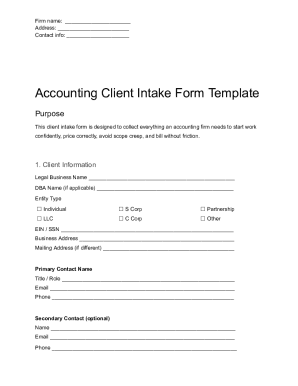
The Nonprofit Client Intake Form is a business document used by nonprofit organizations to collect essential legal, financial, and operational information for compliance and service requests.
pdfFiller scores top ratings on review platforms




Who needs Nonprofit Intake Form?
Explore how professionals across industries use pdfFiller.

Nonprofit Intake Form is needed by:
-
Nonprofit organizations seeking registration.
-
Grant writers needing financial and operational details.
-
Fundraising consultants working with nonprofits.
-
Legal advisors assisting nonprofits with compliance.
-
Accountants preparing tax-exempt filings for nonprofits.
Comprehensive Guide to Nonprofit Intake Form
What is the Nonprofit Client Intake Form?
The nonprofit client intake form serves as a crucial tool for collecting essential information required by nonprofit organizations. This form provides a standardized method for detailing an organization's legal and operational status. It is particularly important for nonprofits during compliance assessments and when seeking funding or partnership opportunities. Nonprofit organizations need to employ this form to ensure all stakeholder information is captured accurately and comprehensively.
Purpose and Benefits of the Nonprofit Client Intake Form
The nonprofit client intake form offers significant advantages to organizations by streamlining data collection. By using this form, nonprofits can effectively gather key organizational data, which is vital for compliance and verification processes. Additionally, employing a standardized format helps eliminate discrepancies and ensures a high level of accuracy, which is essential for successful operations in the nonprofit sector.
Key Features of the Nonprofit Client Intake Form
This form comprises several critical sections, each designed to facilitate comprehensive data collection. Key components include:
-
Organization identification details
-
Financial and banking information
-
Compliance and reporting requirements
-
Details about fundraising activities
-
Checklist for required documents
Moreover, the inclusion of fillable fields enhances usability, especially when utilizing platforms like pdfFiller that support easy editing and completion of documents.
Who Needs the Nonprofit Client Intake Form?
This form is primarily beneficial for various types of nonprofit organizations. It is particularly important for newly established nonprofits seeking to establish their legal identity and compliance. Additionally, organizations undergoing status revisions or updates must also complete this form to keep their information current and relevant.
How to Fill Out the Nonprofit Client Intake Form Online (Step-by-Step)
Filling out the nonprofit client intake form electronically is straightforward, especially using the pdfFiller platform. Follow these steps:
-
Access the nonprofit client intake form on pdfFiller.
-
Use the fillable fields to enter the necessary information.
-
Leverage digital tools for editing and eSigning as needed.
-
Review the completed form for accuracy before submission.
This step-by-step approach ensures a smooth completion process with minimal errors.
Common Errors When Filling Out the Nonprofit Client Intake Form
To avoid processing delays, it is essential to recognize common mistakes that can occur when completing the nonprofit client intake form. Frequent pitfalls include:
-
Leaving sections incomplete
-
Providing outdated or incorrect organizational details
-
Failing to attach necessary documentation
Referencing a checklist before submission can help ensure all required fields are filled and that submissions are accurate.
How to Submit the Nonprofit Client Intake Form
Submission methods for the nonprofit client intake form include various options to accommodate different organizational needs. You can choose to:
-
Email the filled-out form to the appropriate department
-
Send it through standard mail to the designated address
-
Utilize e-filing options if available
Monitoring your submission and confirming its receipt can provide peace of mind and ensure proper processing of your form.
Security and Compliance when Using the Nonprofit Client Intake Form
When using the nonprofit client intake form, security and data protection are paramount. The pdfFiller platform employs robust security measures, including 256-bit encryption, to safeguard sensitive information. Additionally, compliance with regulations like HIPAA and GDPR reinforces the importance of securely handling data within nonprofit organizations.
Examples and Templates for the Nonprofit Client Intake Form
To assist users, downloadable templates and completed examples of the nonprofit client intake form are highly beneficial. These resources serve as guides for proper completion, helping to clarify expectations and reduce errors during the filling process.
Start Using the Nonprofit Client Intake Form with pdfFiller
Utilizing pdfFiller for your nonprofit client intake form offers a user-friendly experience, with advanced features designed to streamline the form-filling and management process. The platform not only facilitates ease of use but also ensures that sensitive documents are handled securely, aligning with best practices for compliance.
How to fill out the Nonprofit Intake Form
-
1.To start, access pdfFiller and search for 'Nonprofit Client Intake Form' in the template section.
-
2.Once you locate the form, click on it to open it in the pdfFiller editor.
-
3.Before filling out the form, gather all necessary documents that contain your organization's identification details, contact information, and financial status.
-
4.Begin by filling in the organization identification fields, including the official name and tax identification number.
-
5.Proceed to enter contact information for key personnel involved in the organization.
-
6.In the mission and program details section, describe the organization's objectives and programs clearly.
-
7.Next, indicate the type of tax-exempt status and any supporting documents you have.
-
8.Fill out the financial and banking information, ensuring accuracy to reflect your organization’s status.
-
9.Don’t forget to include members of the board of directors and officers, along with their contact details.
-
10.In compliance and reporting, note the necessary reports and filings relevant to your nonprofit.
-
11.Complete sections on fundraising activities, specifying the types of fundraising your organization engages in.
-
12.Add details about employees and contractors, highlighting their roles and contributions.
-
13.If applicable, provide insurance information and any related documents.
-
14.For requested services, indicate what assistance you need from the organization receiving this form.
-
15.Finally, review each section for completeness before finalizing your entries.
-
16.After ensuring all information is accurate, save the form within pdfFiller for your records.
-
17.You may download the completed form to print or submit, or utilize pdfFiller's built-in submission features if available.

Who is eligible to use the Nonprofit Client Intake Form?
Any registered nonprofit organization can use the Nonprofit Client Intake Form to gather required information for compliance, registration, or help requests.
Are there deadlines for submitting this form?
While there are no universal deadlines for this form, prompt submission is encouraged to ensure timely processing of your nonprofit's services and compliance needs.
How can I submit the completed Nonprofit Client Intake Form?
You can submit the completed form through pdfFiller’s submission features or download it to submit directly to the relevant nonprofit body via email or mail.
What supporting documents are required with the form?
Generally, supporting documents include tax exemption letters, financial statements, and a list of the board of directors, which you should gather beforehand.
What are common mistakes to avoid when filling this form?
Avoid incomplete sections, incorrect tax identification numbers, and ensure all financial data is consistent with your organization's records.
How long does it take to process the form?
Processing times can vary based on the organization receiving the form; typically, expect 2-6 weeks for verification and response.
What should I do if my organization has multiple programs?
Provide a brief overview of each program in the mission and program details section, highlighting their specific purposes and impacts for clarity.
Related Forms





Get the latest insights from our blog


If you believe that this page should be taken down, please follow our DMCA take down process
here
.
This form may include fields for payment information. Data entered in these fields is not covered by PCI DSS compliance.