
Last updated on
Oct 19, 2026

Get the free Washington State DCYF Provider Registration Form
We are not affiliated with any brand or entity on this form

Fill out
Complete the form online in a simple drag-and-drop editor.

eSign
Add your legally binding signature or send the form for signing.

Share
Share the form via a link, letting anyone fill it out from any device.

Export
Download, print, email, or move the form to your cloud storage.
Why pdfFiller is the best tool for your documents and forms


End-to-end document management
From editing and signing to collaboration and tracking, pdfFiller has everything you need to get your documents done quickly and efficiently.
Accessible from anywhere
pdfFiller is fully cloud-based. This means you can edit, sign, and share documents from anywhere using your computer, smartphone, or tablet.
Secure and compliant
pdfFiller lets you securely manage documents following global laws like ESIGN, CCPA, and GDPR. It's also HIPAA and SOC 2 compliant.
What is DCYF Registration Form
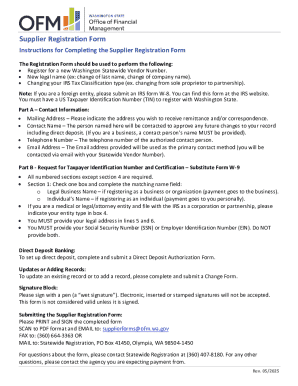
The Washington State DCYF Provider Registration Form is a government document used by providers to apply for a Washington Statewide Vendor Number and make updates to their registration details.
pdfFiller scores top ratings on review platforms




Who needs DCYF Registration Form?
Explore how professionals across industries use pdfFiller.

DCYF Registration Form is needed by:
-
Childcare providers in Washington State
-
Businesses seeking state vendor registration
-
Anyone needing to change IRS tax classification
-
Organizations updating legal names
-
Individuals applying for direct deposit authorization
Comprehensive Guide to DCYF Registration Form
What is the Washington State DCYF Provider Registration Form?
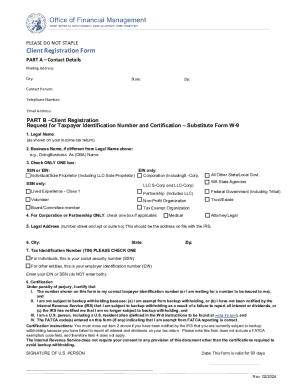
The Washington State DCYF Provider Registration Form is a crucial document for individuals and organizations seeking to establish their vendor status within state systems. It is used for registering to obtain a statewide vendor number, as well as for updating existing information related to registration. Key components of the form include essential details such as contact information, taxpayer identification, and any necessary signatures.
This form facilitates a structured method of collecting important data, ensuring compliance with state regulations. It serves as a gateway for service providers, businesses, and contractors to operate legally within Washington State.
Purpose and Benefits of the Washington State DCYF Provider Registration Form
The primary purpose of the Washington State DCYF Provider Registration Form is to ensure that all service providers are registered properly in order to comply with state requirements. Accurate registration contributes to obtaining vendor numbers, which are essential for legal and financial dealings with the state.
-
Supports compliance with Washington State regulations.
-
Helps businesses streamline their vendor registration process.
-
Utilizing pdfFiller, users can expect a hassle-free experience for filling and submitting the form.
Who Needs the Washington State DCYF Provider Registration Form?
This form is necessary for a variety of stakeholders in Washington State. Service providers, businesses, and contractors are primary users, all of whom must be legally registered to operate within the market.
It is essential for these individuals and organizations to undergo the registration process to ensure compliance and maintain eligibility for state contracts and programs.
How to Fill Out the Washington State DCYF Provider Registration Form Online
Filling out the Washington State DCYF Provider Registration Form online is a straightforward process. Here’s how to complete the form using pdfFiller:
-
Access the form on the pdfFiller platform.
-
Fill in critical fields such as your Mailing Address and Tax Identification Number.
-
Review the form for accuracy before submitting.
Ensuring completeness is vital to avoid delays in the registration process. Users should double-check all entries to provide accurate data.
Review and Validation Checklist for the Washington State DCYF Provider Registration Form
Before submitting the Washington State DCYF Provider Registration Form, it is important to verify its accuracy. Users should check for common errors that can lead to submission issues.
-
Verify that all required fields are completed.
-
Avoid mistakes in contact information and taxpayer details.
-
Understand the differences between wet signatures and digital signatures, ensuring compliance with submission requirements.
Submission Methods and Where to Submit the Washington State DCYF Provider Registration Form
Once the form is filled out, it can be submitted through various channels. Users have the option to send the form via email or traditional mail. It is crucial to select the appropriate submission method based on convenience and compliance.
-
Email to designated state agency addresses.
-
Mail to specified offices as listed in the registration guidelines.
-
Include any required documents that must accompany the form.
What Happens After You Submit the Washington State DCYF Provider Registration Form?
After submission, applicants can expect a follow-up regarding their registration status. The state typically provides confirmation, and users can track their application outcomes.
Common scenarios include being notified of document acceptance or receiving requests for additional information to address discrepancies. Understanding processing times is also key to effective planning.
Security and Compliance for the Washington State DCYF Provider Registration Form
Security plays a critical role in the submission of sensitive information through the Washington State DCYF Provider Registration Form. Platforms like pdfFiller implement robust data protection measures, ensuring user information remains safe and compliant with regulations such as HIPAA and GDPR.
Utilizing secure document handling methods during the completion and submission process helps safeguard personal and financial data.
How pdfFiller Can Help with the Washington State DCYF Provider Registration Form
pdfFiller offers an array of features that simplify the process of completing the Washington State DCYF Provider Registration Form. Users can edit, eSign, and manage their forms efficiently in a cloud-based environment, ensuring ease of access and convenience.
This platform facilitates smooth document management, making it easier for businesses and providers to handle their registration swiftly and securely.
Get Started with the Washington State DCYF Provider Registration Form Today!
To begin the registration process, leverage the pdfFiller platform for an efficient experience in filling out and submitting the Washington State DCYF Provider Registration Form. The user-friendly interface and customer support make completing the form a straightforward task.
Timely registration is essential to avoid potential penalties, encouraging users to begin as soon as possible.
How to fill out the DCYF Registration Form
-
1.Access the Washington State DCYF Provider Registration Form on pdfFiller by searching the form name in the platform's search bar or directly navigating to the link provided by DCYF.
-
2.Open the form by clicking on it, which will launch the editing interface where you can begin completing the necessary fields.
-
3.Before starting, gather your contact information, taxpayer identification details, and any legal documents required for registration.
-
4.Fill in each blank field carefully, including your 'Mailing Address', 'Contact Person', 'Telephone Number', and 'Email Address'.
-
5.Input your 'Tax Identification Number' accurately to ensure proper processing of your registration.
-
6.Ensure to review all provided information for accuracy and completeness before moving on to the signature section.
-
7.Locate the signature block and sign the form. Remember, a 'wet signature' is required.
-
8.Finalize the form by checking all entries one last time, ensuring no fields are left blank.
-
9.Save your work regularly to avoid losing any information during the process.
-
10.Once completed, use pdfFiller’s built-in features to download, email, or print the form for submission.
-
11.Submit the form via email or mail it to the specified addresses provided in the form instructions.

Who is eligible to use the Washington State DCYF Provider Registration Form?
The form is intended for childcare providers and businesses operating in Washington State seeking to obtain or update their vendor registration with the DCYF.
What should I do if I miss the 90-day submission period for the form?
If you miss the 90-day validity period, you will need to complete the form again to initiate your registration process.
How can I submit the Washington State DCYF Provider Registration Form?
You can submit the form by either emailing it or mailing it to the designated addresses outlined in the form's instructions after completing it.
Are there any supporting documents required for this form?
You may need to provide proof of your business identity or tax identification. Check the specific requirements outlined on the form for details.
What are common mistakes to avoid when filling out this form?
Common mistakes include leaving required fields blank, not signing the form, or providing incorrect tax identification numbers. Double-check all entries before submission.
How long does it take for the registration to be processed?
Processing times can vary, but it typically takes several weeks. You should wait for confirmation from DCYF after submission.
Is notarization required for this form?
No, notarization is not required for the Washington State DCYF Provider Registration Form, but a signed 'wet signature' is necessary.
Related Forms



Get the latest insights from our blog


If you believe that this page should be taken down, please follow our DMCA take down process
here
.
This form may include fields for payment information. Data entered in these fields is not covered by PCI DSS compliance.